{"id":"741a42e2-5fe8-4e4e-8d94-18a10ba92433","slug":"ahmed0ezzat-mcp-gateway","kind":"mcp","name":"mcp-gateway","summary":"","owner":"ahmed0ezzat","repoUrl":"https://github.com/ahmed0ezzat/mcp-gateway","license":"Apache-2.0","licenseTier":"permissive","trust":"community","stars":1,"match":null,"fewStars":true,"format":"mcp","createdAt":"2025-11-25T11:43:45.000Z","addedAt":"2026-10-21T16:22:02.425Z","logoUrl":"https://avatars.githubusercontent.com/u/63745775?u=7eb2c72ca2813e8794a85ad45c30f501a7571957&v=4","linkOnly":false,"collection":null,"skillPath":null,"categories":["utilities"],"tags":[],"runtime":"python","local":true,"cloudCapable":false,"cloudCapability":"unknown","cloudReadyOnPlatform":false,"needsApiKey":false,"reviewed":false,"syncedAt":"2026-10-23T06:56:11.913Z","sample":false,"url":"https://conduits.dev/tools/ahmed0ezzat-mcp-gateway","language":"Python","transports":["stdio"],"install":{"pypi":"mcp-contextforge-gateway"},"requirements":{"env":[],"upstreamMayCharge":false},"tools":null,"readme":"# MCP Gateway\n\n> Model Context Protocol gateway & proxy - unify REST, MCP, and A2A with federation, virtual servers, retries, security, and an optional admin UI.\n\n\n\n\n[](https://github.com/IBM/mcp-context-forge/actions/workflows/python-package.yml) \n[](https://github.com/IBM/mcp-context-forge/actions/workflows/codeql.yml) \n[](https://github.com/IBM/mcp-context-forge/actions/workflows/bandit.yml) \n[](https://github.com/IBM/mcp-context-forge/actions/workflows/dependency-review.yml) \n[](https://github.com/IBM/mcp-context-forge/actions/workflows/pytest.yml) \n[](https://github.com/IBM/mcp-context-forge/actions/workflows/lint.yml)\n\n\n[](https://github.com/IBM/mcp-context-forge/actions/workflows/docker-image.yml) \n[](https://github.com/IBM/mcp-context-forge/actions/workflows/ibm-cloud-code-engine.yml)\n\n\n[](https://docs.python.org/3/library/asyncio.html)\n[](LICENSE) \n[](https://pypi.org/project/mcp-contextforge-gateway/) \n[](https://github.com/ibm/mcp-context-forge/pkgs/container/mcp-context-forge) \n\n\nContextForge MCP Gateway is a feature-rich gateway, proxy and MCP Registry that federates MCP and REST services - unifying discovery, auth, rate-limiting, observability, virtual servers, multi-transport protocols, and an optional Admin UI into one clean endpoint for your AI clients. It runs as a fully compliant MCP server, deployable via PyPI or Docker, and scales to multi-cluster environments on Kubernetes with Redis-backed federation and caching.\n\n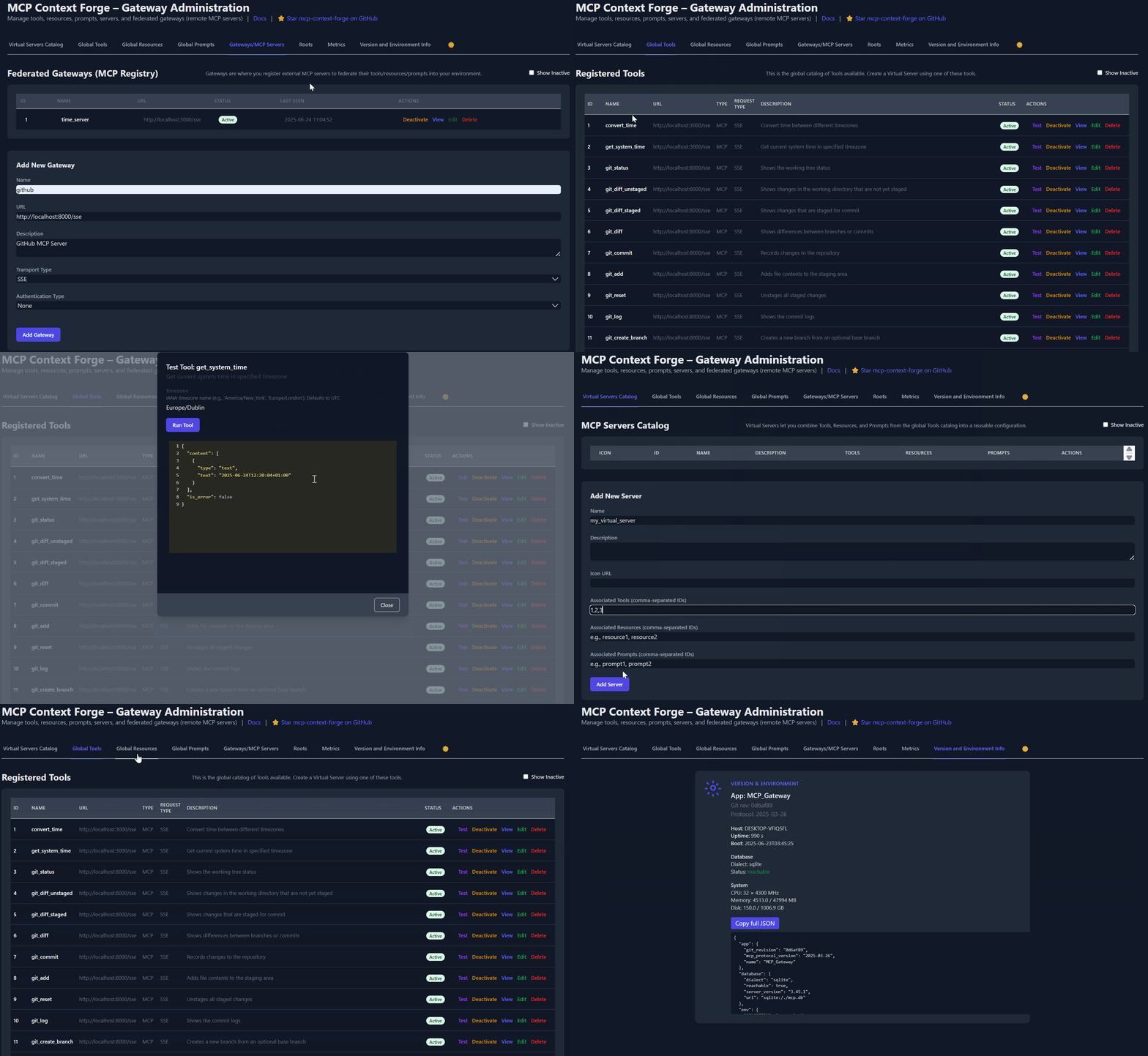\n---\n\n\n## Table of Contents\n\n* 1. [Table of Contents](#table-of-contents)\n* 2. [🚀 Overview & Goals](#-overview--goals)\n* 3. [Quick Start - PyPI](#quick-start---pypi)\n * 3.1. [1 - Install & run (copy-paste friendly)](#1---install--run-copy-paste-friendly)\n* 4. [Quick Start - Containers](#quick-start---containers)\n * 4.1. [🐳 Docker](#-docker)\n * 4.1.1. [1 - Minimum viable run](#1---minimum-viable-run)\n * 4.1.2. [2 - Persist the SQLite database](#2---persist-the-sqlite-database)\n * 4.1.3. [3 - Local tool discovery (host network)](#3---local-tool-discovery-host-network)\n * 4.2. [🦭 Podman (rootless-friendly)](#-podman-rootless-friendly)\n * 4.2.1. [1 - Basic run](#1---basic-run)\n * 4.2.2. [2 - Persist SQLite](#2---persist-sqlite)\n * 4.2.3. [3 - Host networking (rootless)](#3---host-networking-rootless)\n* 5. [Testing `mcpgateway.wrapper` by hand](#testing-mcpgatewaywrapper-by-hand)\n * 5.1. [🧩 Running from an MCP Client (`mcpgateway.wrapper`)](#-running-from-an-mcp-client-mcpgatewaywrapper)\n * 5.1.1. [1 - Install `uv` (`uvx` is an alias it provides)](#1---install-uv-uvx-is-an-alias-it-provides)\n * 5.1.2. [2 - Create an on-the-spot venv & run the wrapper](#2---create-an-on-the-spot-venv--run-the-wrapper)\n * 5.1.3. [Claude Desktop JSON (runs through **uvx**)](#claude-desktop-json-runs-through-uvx)\n * 5.2. [🚀 Using with Claude Desktop (or any GUI MCP client)](#-using-with-claude-desktop-or-any-gui-mcp-client)\n* 6. [🚀 Quick Start: VS Code Dev Container](#-quick-start-vs-code-dev-container)\n * 6.1. [1 - Clone & Open](#1---clone--open)\n * 6.2. [2 - First-Time Build (Automatic)](#2---first-time-build-automatic)\n* 7. [Quick Start (manual install)](#quick-start-manual-install)\n * 7.1. [Prerequisites](#prerequisites)\n * 7.2. [One-liner (dev)](#one-liner-dev)\n * 7.3. [Containerized (self-signed TLS)](#containerized-self-signed-tls)\n * 7.4. [Smoke-test the API](#smoke-test-the-api)\n* 8. [Installation](#installation)\n * 8.1. [Via Make](#via-make)\n * 8.2. [UV (alternative)](#uv-alternative)\n * 8.3. [pip (alternative)](#pip-alternative)\n * 8.4. [Optional (PostgreSQL adapter)](#optional-postgresql-adapter)\n * 8.4.1. [Quick Postgres container](#quick-postgres-container)\n* 9. [🔄 Upgrading to v0.7.0](#-upgrading-to-v070)\n* 10. [Configuration (`.env` or env vars)](#configuration-env-or-env-vars)\n * 10.1. [Basic](#basic)\n * 10.2. [Authentication](#authentication)\n * 10.3. [A2A (Agent-to-Agent) Features](#a2a-agent-to-agent-features)\n * 10.4. [Email-Based Authentication & User Management](#email-based-authentication--user-management)\n * 10.5. [MCP Client Authentication](#mcp-client-authentication)\n * 10.6. [SSO (Single Sign-On) Configuration](#sso-single-sign-on-configuration)\n * 10.7. [Dynamic Client Registration & Virtual MCP Server Authentication](#dynamic-client-registration--virtual-mcp-server-authentication)\n * 10.8. [UI Features](#ui-features)\n * 10.9. [Security](#security)\n * 10.10. [Logging](#logging)\n * 10.11. [Transport](#transport)\n * 10.12. [Federation](#federation)\n * 10.13. [Resources](#resources)\n * 10.14. [Tools](#tools)\n * 10.15. [Prompts](#prompts)\n * 10.16. [Health Checks](#health-checks)\n * 10.17. [Database](#database)\n * 10.18. [Cache Backend](#cache-backend)\n * 10.19. [Plugin Configuration](#plugin-configuration)\n * 10.20. [Development](#development)\n* 11. [Running](#running)\n * 11.1. [Makefile](#makefile)\n * 11.2. [Script helper](#script-helper)\n * 11.3. [Manual (Uvicorn)](#manual-uvicorn)\n* 12. [Authentication examples](#authentication-examples)\n* 13. [☁️ AWS / Azure / OpenShift](#️-aws--azure--openshift)\n* 14. [☁️ IBM Cloud Code Engine Deployment](#️-ibm-cloud-code-engine-deployment)\n * 14.1. [🔧 Prerequisites](#-prerequisites-1)\n * 14.2. [📦 Environment Variables](#-environment-variables)\n * 14.3. [🚀 Make Targets](#-make-targets)\n * 14.4. [📝 Example Workflow](#-example-workflow)\n* 15. [API Endpoints](#api-endpoints)\n* 16. [Testing](#testing)\n* 17. [Project Structure](#project-structure)\n* 18. [API Documentation](#api-documentation)\n* 19. [Makefile targets](#makefile-targets)\n* 20. [🔍 Troubleshooting](#-troubleshooting)\n * 20.1. [Diagnose the listener](#diagnose-the-listener)\n * 20.2. [Why localhost fails on Windows](#why-localhost-fails-on-windows)\n * 20.2.1. [Fix (Podman rootless)](#fix-podman-rootless)\n * 20.2.2. [Fix (Docker Desktop > 4.19)](#fix-docker-desktop--419)\n* 21. [Contributing](#contributing)\n* 22. [Changelog](#changelog)\n* 23. [License](#license)\n* 24. [Core Authors and Maintainers](#core-authors-and-maintainers)\n* 25. [Star History and Project Activity](#star-history-and-project-activity)\n\n\n\n\n\n\n## 🚀 Overview & Goals\n\n**ContextForge** is a gateway, registry, and proxy that sits in front of any [Model Context Protocol](https://modelcontextprotocol.io) (MCP) server, A2A server or REST API-exposing a unified endpoint for all your AI clients. See the [project roadmap](https://ibm.github.io/mcp-context-forge/architecture/roadmap/) for more details.\n\nIt currently supports:\n\n* Federation across multiple MCP and REST services\n* **A2A (Agent-to-Agent) integration** for external AI agents (OpenAI, Anthropic, custom)\n* **gRPC-to-MCP translation** via automatic reflection-based service discovery\n* Virtualization of legacy APIs as MCP-compliant tools and servers\n* Transport over HTTP, JSON-RPC, WebSocket, SSE (with configurable keepalive), stdio and streamable-HTTP\n* An Admin UI for real-time management, configuration, and log monitoring\n* Built-in auth, retries, and rate-limiting with user-scoped OAuth tokens and unconditional X-Upstream-Authorization header support\n* **OpenTelemetry observability** with Phoenix, Jaeger, Zipkin, and other OTLP backends\n* Scalable deployments via Docker or PyPI, Redis-backed caching, and multi-cluster federation\n\n\n\nFor a list of upcoming features, check out the [ContextForge Roadmap](https://ibm.github.io/mcp-context-forge/architecture/roadmap/)\n\n> Note on Multi‑Tenancy (v0.7.0): A comprehensive multi‑tenant architecture with email authentication, teams, RBAC, and resource visibility is available since v0.7.0. If upgrading from an older version, see the [Migration Guide](https://github.com/IBM/mcp-context-forge/blob/main/MIGRATION-0.7.0.md) and [Changelog](https://github.com/IBM/mcp-context-forge/blob/main/CHANGELOG.md) for details.\n\n**⚠️ Important**: See [SECURITY.md](./SECURITY.md) for more details.\n\n---\n\n\n🔌 Gateway Layer with Protocol Flexibility
\n\n* Sits in front of any MCP server or REST API\n* Lets you choose your MCP protocol version (e.g., `2025-03-26`)\n* Exposes a single, unified interface for diverse backends\n\n \n\n\n🌐 Federation of Peer Gateways (MCP Registry)
\n\n* Auto-discovers or configures peer gateways (via mDNS or manual)\n* Performs health checks and merges remote registries transparently\n* Supports Redis-backed syncing and fail-over\n\n \n\n\n🧩 Virtualization of REST/gRPC Services
\n\n* Wraps non-MCP services as virtual MCP servers\n* Registers tools, prompts, and resources with minimal configuration\n* **gRPC-to-MCP translation** via server reflection protocol\n* Automatic service discovery and method introspection\n\n \n\n\n🔁 REST-to-MCP Tool Adapter
\n\n* Adapts REST APIs into tools with:\n\n * Automatic JSON Schema extraction\n * Support for headers, tokens, and custom auth\n * Retry, timeout, and rate-limit policies\n\n \n\n\n🧠 Unified Registries
\n\n* **Prompts**: Jinja2 templates, multimodal support, rollback/versioning\n* **Resources**: URI-based access, MIME detection, caching, SSE updates\n* **Tools**: Native or adapted, with input validation and concurrency controls\n\n \n\n\n📈 Admin UI, Observability & Dev Experience
\n\n* Admin UI built with HTMX + Alpine.js\n* Real-time log viewer with filtering, search, and export capabilities\n* Auth: Basic, JWT, or custom schemes\n* Structured logs, health endpoints, metrics\n* 400+ tests, Makefile targets, live reload, pre-commit hooks\n\n \n\n\n🔍 OpenTelemetry Observability
\n\n* **Vendor-agnostic tracing** with OpenTelemetry (OTLP) protocol support\n* **Multiple backend support**: Phoenix (LLM-focused), Jaeger, Zipkin, Tempo, DataDog, New Relic\n* **Distributed tracing** across federated gateways and services\n* **Automatic instrumentation** of tools, prompts, resources, and gateway operations\n* **LLM-specific metrics**: Token usage, costs, model performance\n* **Zero-overhead when disabled** with graceful degradation\n* **Easy configuration** via environment variables\n\nQuick start with Phoenix (LLM observability):\n```bash\n# Start Phoenix\ndocker run -p 6006:6006 -p 4317:4317 arizephoenix/phoenix:latest\n\n# Configure gateway\nexport OTEL_ENABLE_OBSERVABILITY=true\nexport OTEL_TRACES_EXPORTER=otlp\nexport OTEL_EXPORTER_OTLP_ENDPOINT=http://localhost:4317\n\n# Run gateway - traces automatically sent to Phoenix\nmcpgateway\n```\n\nSee [Observability Documentation](https://ibm.github.io/mcp-context-forge/manage/observability/) for detailed setup with other backends.\n\n \n\n---\n\n## Quick Start - PyPI\n\nContextForge is published on [PyPI](https://pypi.org/project/mcp-contextforge-gateway/) as `mcp-contextforge-gateway`.\n\n---\n\n**TLDR;**:\n(single command using [uv](https://docs.astral.sh/uv/))\n\n```bash\n# Quick start with environment variables\nBASIC_AUTH_PASSWORD=pass \\\nMCPGATEWAY_UI_ENABLED=true \\\nMCPGATEWAY_ADMIN_API_ENABLED=true \\\nPLATFORM_ADMIN_EMAIL=admin@example.com \\\nPLATFORM_ADMIN_PASSWORD=changeme \\\nPLATFORM_ADMIN_FULL_NAME=\"Platform Administrator\" \\\nuvx --from mcp-contextforge-gateway mcpgateway --host 0.0.0.0 --port 4444\n\n# Or better: use the provided .env.example\ncp .env.example .env\n# Edit .env to customize your settings\nuvx --from mcp-contextforge-gateway mcpgateway --host 0.0.0.0 --port 4444\n```\n\n\n📋 Prerequisites
\n\n* **Python ≥ 3.10** (3.11 recommended)\n* **curl + jq** - only for the last smoke-test step\n\n \n\n### 1 - Install & run (copy-paste friendly)\n\n```bash\n# 1️⃣ Isolated env + install from pypi\nmkdir mcpgateway && cd mcpgateway\npython3 -m venv .venv && source .venv/bin/activate\npip install --upgrade pip\npip install mcp-contextforge-gateway\n\n# 2️⃣ Copy and customize the configuration\n# Download the example environment file\ncurl -O https://raw.githubusercontent.com/IBM/mcp-context-forge/main/.env.example\ncp .env.example .env\n# Edit .env to customize your settings (especially passwords!)\n\n# Or set environment variables directly:\nexport MCPGATEWAY_UI_ENABLED=true\nexport MCPGATEWAY_ADMIN_API_ENABLED=true\nexport PLATFORM_ADMIN_EMAIL=admin@example.com\nexport PLATFORM_ADMIN_PASSWORD=changeme\nexport PLATFORM_ADMIN_FULL_NAME=\"Platform Administrator\"\n\nBASIC_AUTH_PASSWORD=pass JWT_SECRET_KEY=my-test-key \\\n mcpgateway --host 0.0.0.0 --port 4444 & # admin/pass\n\n# 3️⃣ Generate a bearer token & smoke-test the API\nexport MCPGATEWAY_BEARER_TOKEN=$(python3 -m mcpgateway.utils.create_jwt_token \\\n --username admin@example.com --exp 10080 --secret my-test-key)\n\ncurl -s -H \"Authorization: Bearer $MCPGATEWAY_BEARER_TOKEN\" \\\n http://127.0.0.1:4444/version | jq\n```\n\n\nWindows (PowerShell) quick-start
\n\n```powershell\n# 1️⃣ Isolated env + install from PyPI\nmkdir mcpgateway ; cd mcpgateway\npython3 -m venv .venv ; .\\.venv\\Scripts\\Activate.ps1\npip install --upgrade pip\npip install mcp-contextforge-gateway\n\n# 2️⃣ Copy and customize the configuration\n# Download the example environment file\nInvoke-WebRequest -Uri \"https://raw.githubusercontent.com/IBM/mcp-context-forge/main/.env.example\" -OutFile \".env.example\"\nCopy-Item .env.example .env\n# Edit .env to customize your settings\n\n# Or set environment variables (session-only)\n$Env:MCPGATEWAY_UI_ENABLED = \"true\"\n$Env:MCPGATEWAY_ADMIN_API_ENABLED = \"true\"\n$Env:BASIC_AUTH_PASSWORD = \"changeme\" # admin/changeme\n$Env:JWT_SECRET_KEY = \"my-test-key\"\n$Env:PLATFORM_ADMIN_EMAIL = \"admin@example.com\"\n$Env:PLATFORM_ADMIN_PASSWORD = \"changeme\"\n$Env:PLATFORM_ADMIN_FULL_NAME = \"Platform Administrator\"\n\n# 3️⃣ Launch the gateway\nmcpgateway.exe --host 0.0.0.0 --port 4444\n\n# Optional: background it\n# Start-Process -FilePath \"mcpgateway.exe\" -ArgumentList \"--host 0.0.0.0 --port 4444\"\n\n# 4️⃣ Bearer token and smoke-test\n$Env:MCPGATEWAY_BEARER_TOKEN = python3 -m mcpgateway.utils.create_jwt_token `\n --username admin@example.com --exp 10080 --secret my-test-key\n\ncurl -s -H \"Authorization: Bearer $Env:MCPGATEWAY_BEARER_TOKEN\" `\n http://127.0.0.1:4444/version | jq\n```\n\n \n\n\nMore configuration
\n\nCopy [.env.example](https://github.com/IBM/mcp-context-forge/blob/main/.env.example) to `.env` and tweak any of the settings (or use them as env variables).\n\n \n\n\n🚀 End-to-end demo (register a local MCP server)
\n\n```bash\n# 1️⃣ Spin up the sample GO MCP time server using mcpgateway.translate & docker\npython3 -m mcpgateway.translate \\\n --stdio \"docker run --rm -i ghcr.io/ibm/fast-time-server:latest -transport=stdio\" \\\n --expose-sse \\\n --port 8003\n\n# Or using the official mcp-server-git using uvx:\npip install uv # to install uvx, if not already installed\npython3 -m mcpgateway.translate --stdio \"uvx mcp-server-git\" --expose-sse --port 9000\n\n# Alternative: running the local binary\n# cd mcp-servers/go/fast-time-server; make build\n# python3 -m mcpgateway.translate --stdio \"./dist/fast-time-server -transport=stdio\" --expose-sse --port 8002\n\n# NEW: Expose via multiple protocols simultaneously!\npython3 -m mcpgateway.translate \\\n --stdio \"uvx mcp-server-git\" \\\n --expose-sse \\\n --expose-streamable-http \\\n --port 9000\n# Now accessible via both /sse (SSE) and /mcp (streamable HTTP) endpoints\n\n# 2️⃣ Register it with the gateway\ncurl -s -X POST -H \"Authorization: Bearer $MCPGATEWAY_BEARER_TOKEN\" \\\n -H \"Content-Type: application/json\" \\\n -d '{\"name\":\"fast_time\",\"url\":\"http://localhost:8003/sse\"}' \\\n http://localhost:4444/gateways\n\n# 3️⃣ Verify tool catalog\ncurl -s -H \"Authorization: Bearer $MCPGATEWAY_BEARER_TOKEN\" http://localhost:4444/tools | jq\n\n# 4️⃣ Create a *virtual server* bundling those tools. Use the ID of tools from the tool catalog (Step #3) and pass them in the associatedTools list.\ncurl -s -X POST -H \"Authorization: Bearer $MCPGATEWAY_BEARER_TOKEN\" \\\n -H \"Content-Type: application/json\" \\\n -d '{\"name\":\"time_server\",\"description\":\"Fast time tools\",\"associatedTools\":[]}' \\\n http://localhost:4444/servers | jq\n\n# Example curl\ncurl -s -X POST -H \"Authorization: Bearer $MCPGATEWAY_BEARER_TOKEN\"\n -H \"Content-Type: application/json\"\n -d '{\"name\":\"time_server\",\"description\":\"Fast time tools\",\"associatedTools\":[\"6018ca46d32a4ac6b4c054c13a1726a2\"]}' \\\n http://localhost:4444/servers | jq\n\n# 5️⃣ List servers (should now include the UUID of the newly created virtual server)\ncurl -s -H \"Authorization: Bearer $MCPGATEWAY_BEARER_TOKEN\" http://localhost:4444/servers | jq\n\n# 6️⃣ Client SSE endpoint. Inspect it interactively with the MCP Inspector CLI (or use any MCP client)\nnpx -y @modelcontextprotocol/inspector\n# Transport Type: SSE, URL: http://localhost:4444/servers/UUID_OF_SERVER_1/sse, Header Name: \"Authorization\", Bearer Token\n```\n\n \n\n\n🖧 Using the stdio wrapper (mcpgateway-wrapper)
\n\n```bash\nexport MCP_AUTH=\"Bearer ${MCPGATEWAY_BEARER_TOKEN}\"\nexport MCP_SERVER_URL=http://localhost:4444/servers/UUID_OF_SERVER_1/mcp\npython3 -m mcpgateway.wrapper # Ctrl-C to exit\n```\n\nYou can also run it with `uv` or inside Docker/Podman - see the *Containers* section above.\n\nIn MCP Inspector, define `MCP_AUTH` and `MCP_SERVER_URL` env variables, and select `python3` as the Command, and `-m mcpgateway.wrapper` as Arguments.\n\n```bash\necho $PWD/.venv/bin/python3 # Using the Python3 full path ensures you have a working venv\nexport MCP_SERVER_URL='http://localhost:4444/servers/UUID_OF_SERVER_1/mcp'\nexport MCP_AUTH=\"Bearer ${MCPGATEWAY_BEARER_TOKEN}\"\nnpx -y @modelcontextprotocol/inspector\n```\n\nor\n\nPass the url and auth as arguments (no need to set environment variables)\n```bash\nnpx -y @modelcontextprotocol/inspector\ncommand as `python`\nArguments as `-m mcpgateway.wrapper --url \"http://localhost:4444/servers/UUID_OF_SERVER_1/mcp\" --auth \"Bearer \"`\n```\n\n\nWhen using a MCP Client such as Claude with stdio:\n\n```json\n{\n \"mcpServers\": {\n \"mcpgateway-wrapper\": {\n \"command\": \"python\",\n \"args\": [\"-m\", \"mcpgateway.wrapper\"],\n \"env\": {\n \"MCP_AUTH\": \"Bearer your-token-here\",\n \"MCP_SERVER_URL\": \"http://localhost:4444/servers/UUID_OF_SERVER_1\",\n \"MCP_TOOL_CALL_TIMEOUT\": \"120\"\n }\n }\n }\n}\n```\n\n \n\n---\n\n## Quick Start - Containers\n\nUse the official OCI image from GHCR with **Docker** *or* **Podman**.\nPlease note: Currently, arm64 is not supported. If you are e.g. running on MacOS, install via PyPi.\n\n---\n\n### 🐳 Docker\n\n#### 1 - Minimum viable run\n\n```bash\ndocker run -d --name mcpgateway \\\n -p 4444:4444 \\\n -e MCPGATEWAY_UI_ENABLED=true \\\n -e MCPGATEWAY_ADMIN_API_ENABLED=true \\\n -e HOST=0.0.0.0 \\\n -e JWT_SECRET_KEY=my-test-key \\\n -e BASIC_AUTH_USER=admin \\\n -e BASIC_AUTH_PASSWORD=changeme \\\n -e AUTH_REQUIRED=true \\\n -e PLATFORM_ADMIN_EMAIL=admin@example.com \\\n -e PLATFORM_ADMIN_PASSWORD=changeme \\\n -e PLATFORM_ADMIN_FULL_NAME=\"Platform Administrator\" \\\n -e DATABASE_URL=sqlite:///./mcp.db \\\n -e SECURE_COOKIES=false \\\n ghcr.io/ibm/mcp-context-forge:0.8.0\n\n# Note: when not running over SSL, use SECURE_COOKIES=false to prevent the browser denying access.\n\n# Tail logs (Ctrl+C to quit)\ndocker logs -f mcpgateway\n\n# Generating an API key\ndocker run --rm -it ghcr.io/ibm/mcp-context-forge:0.8.0 \\\n python3 -m mcpgateway.utils.create_jwt_token --username admin@example.com --exp 0 --secret my-test-key\n```\n\nBrowse to **[http://localhost:4444/admin](http://localhost:4444/admin)** (user `admin` / pass `changeme`).\n\n#### 2 - Persist the SQLite database\n\n```bash\nmkdir -p $(pwd)/data\n\ntouch $(pwd)/data/mcp.db\n\nsudo chown -R :docker $(pwd)/data\n\nchmod 777 $(pwd)/data\n\ndocker run -d --name mcpgateway \\\n --restart unless-stopped \\\n -p 4444:4444 \\\n -v $(pwd)/data:/data \\\n -e MCPGATEWAY_UI_ENABLED=true \\\n -e MCPGATEWAY_ADMIN_API_ENABLED=true \\\n -e DATABASE_URL=sqlite:////data/mcp.db \\\n -e HOST=0.0.0.0 \\\n -e JWT_SECRET_KEY=my-test-key \\\n -e BASIC_AUTH_USER=admin \\\n -e BASIC_AUTH_PASSWORD=changeme \\\n -e PLATFORM_ADMIN_EMAIL=admin@example.com \\\n -e PLATFORM_ADMIN_PASSWORD=changeme \\\n -e PLATFORM_ADMIN_FULL_NAME=\"Platform Administrator\" \\\n ghcr.io/ibm/mcp-context-forge:0.8.0\n```\n\nSQLite now lives on the host at `./data/mcp.db`.\n\n#### 3 - Local tool discovery (host network)\n\n```bash\nmkdir -p $(pwd)/data\n\ntouch $(pwd)/data/mcp.db\n\nsudo chown -R :docker $(pwd)/data\n\nchmod 777 $(pwd)/data\n\ndocker run -d --name mcpgateway \\\n --network=host \\\n -e MCPGATEWAY_UI_ENABLED=true \\\n -e MCPGATEWAY_ADMIN_API_ENABLED=true \\\n -e HOST=0.0.0.0 \\\n -e PORT=4444 \\\n -e DATABASE_URL=sqlite:////data/mcp.db \\\n -e PLATFORM_ADMIN_EMAIL=admin@example.com \\\n -e PLATFORM_ADMIN_PASSWORD=changeme \\\n -e PLATFORM_ADMIN_FULL_NAME=\"Platform Administrator\" \\\n -v $(pwd)/data:/data \\\n ghcr.io/ibm/mcp-context-forge:0.8.0\n```\n\nUsing `--network=host` allows Docker to access the local network, allowing you to add MCP servers running on your host. See [Docker Host network driver documentation](https://docs.docker.com/engine/network/drivers/host/) for more details.\n\n---\n\n### 🦭 Podman (rootless-friendly)\n\n#### 1 - Basic run\n\n```bash\npodman run -d --name mcpgateway \\\n -p 4444:4444 \\\n -e HOST=0.0.0.0 \\\n -e DATABASE_URL=sqlite:///./mcp.db \\\n ghcr.io/ibm/mcp-context-forge:0.8.0\n```\n\n#### 2 - Persist SQLite\n\n```bash\nmkdir -p $(pwd)/data\n\ntouch $(pwd)/data/mcp.db\n\nsudo chown -R :docker $(pwd)/data\n\nchmod 777 $(pwd)/data\n\npodman run -d --name mcpgateway \\\n --restart=on-failure \\\n -p 4444:4444 \\\n -v $(pwd)/data:/data \\\n -e DATABASE_URL=sqlite:////data/mcp.db \\\n ghcr.io/ibm/mcp-context-forge:0.8.0\n```\n\n#### 3 - Host networking (rootless)\n\n```bash\nmkdir -p $(pwd)/data\n\ntouch $(pwd)/data/mcp.db\n\nsudo chown -R :docker $(pwd)/data\n\nchmod 777 $(pwd)/data\n\npodman run -d --name mcpgateway \\\n --network=host \\\n -v $(pwd)/data:/data \\\n -e DATABASE_URL=sqlite:////data/mcp.db \\\n ghcr.io/ibm/mcp-context-forge:0.8.0\n```\n\n---\n\n\n✏️ Docker/Podman tips
\n\n* **.env files** - Put all the `-e FOO=` lines into a file and replace them with `--env-file .env`. See the provided [.env.example](https://github.com/IBM/mcp-context-forge/blob/main/.env.example) for reference.\n* **Pinned tags** - Use an explicit version (e.g. `v0.8.0`) instead of `latest` for reproducible builds.\n* **JWT tokens** - Generate one in the running container:\n\n ```bash\n docker exec mcpgateway python3 -m mcpgateway.utils.create_jwt_token --username admin@example.com --exp 10080 --secret my-test-key\n ```\n* **Upgrades** - Stop, remove, and rerun with the same `-v $(pwd)/data:/data` mount; your DB and config stay intact.\n\n \n\n---\n\n\n🚑 Smoke-test the running container
\n\n```bash\ncurl -s -H \"Authorization: Bearer $MCPGATEWAY_BEARER_TOKEN\" \\\n http://localhost:4444/health | jq\ncurl -s -H \"Authorization: Bearer $MCPGATEWAY_BEARER_TOKEN\" \\\n http://localhost:4444/tools | jq\ncurl -s -H \"Authorization: Bearer $MCPGATEWAY_BEARER_TOKEN\" \\\n http://localhost:4444/version | jq\n```\n\n \n\n---\n\n\n🖧 Running the MCP Gateway stdio wrapper
\n\nThe `mcpgateway.wrapper` lets you connect to the gateway over **stdio** while keeping JWT authentication. You should run this from the MCP Client. The example below is just for testing.\n\n```bash\n# Set environment variables\nexport MCPGATEWAY_BEARER_TOKEN=$(python3 -m mcpgateway.utils.create_jwt_token --username admin@example.com --exp 10080 --secret my-test-key)\nexport MCP_AUTH=\"Bearer ${MCPGATEWAY_BEARER_TOKEN}\"\nexport MCP_SERVER_URL='http://localhost:4444/servers/UUID_OF_SERVER_1/mcp'\nexport MCP_TOOL_CALL_TIMEOUT=120\nexport MCP_WRAPPER_LOG_LEVEL=DEBUG # or OFF to disable logging\n\ndocker run --rm -i \\\n -e MCP_AUTH=$MCP_AUTH \\\n -e MCP_SERVER_URL=http://host.docker.internal:4444/servers/UUID_OF_SERVER_1/mcp \\\n -e MCP_TOOL_CALL_TIMEOUT=120 \\\n -e MCP_WRAPPER_LOG_LEVEL=DEBUG \\\n ghcr.io/ibm/mcp-context-forge:0.8.0 \\\n python3 -m mcpgateway.wrapper\n```\n\n \n\n---\n\n## Testing `mcpgateway.wrapper` by hand:\n\nBecause the wrapper speaks JSON-RPC over stdin/stdout, you can interact with it using nothing more than a terminal or pipes.\n\n```bash\n# Start the MCP Gateway Wrapper\nexport MCP_AUTH=\"Bearer ${MCPGATEWAY_BEARER_TOKEN}\"\nexport MCP_SERVER_URL=http://localhost:4444/servers/YOUR_SERVER_UUID\npython3 -m mcpgateway.wrapper\n```\n\n\nInitialize the protocol
\n\n```json\n# Initialize the protocol\n{\"jsonrpc\":\"2.0\",\"id\":1,\"method\":\"initialize\",\"params\":{\"protocolVersion\":\"2025-03-26\",\"capabilities\":{},\"clientInfo\":{\"name\":\"demo\",\"version\":\"0.0.1\"}}}\n\n# Then after the reply:\n{\"jsonrpc\":\"2.0\",\"method\":\"notifications/initialized\",\"params\":{}}\n\n# Get prompts\n{\"jsonrpc\":\"2.0\",\"id\":4,\"method\":\"prompts/list\"}\n{\"jsonrpc\":\"2.0\",\"id\":5,\"method\":\"prompts/get\",\"params\":{\"name\":\"greeting\",\"arguments\":{\"user\":\"Bob\"}}}\n\n# Get resources\n{\"jsonrpc\":\"2.0\",\"id\":6,\"method\":\"resources/list\"}\n{\"jsonrpc\":\"2.0\",\"id\":7,\"method\":\"resources/read\",\"params\":{\"uri\":\"https://example.com/some.txt\"}}\n\n# Get / call tools\n{\"jsonrpc\":\"2.0\",\"id\":2,\"method\":\"tools/list\"}\n{\"jsonrpc\":\"2.0\",\"id\":3,\"method\":\"tools/call\",\"params\":{\"name\":\"get_system_time\",\"arguments\":{\"timezone\":\"Europe/Dublin\"}}}\n```\n\n \n\n\nExpected responses from mcpgateway.wrapper
\n\n```json\n{\"jsonrpc\":\"2.0\",\"id\":1,\"result\":{\"protocolVersion\":\"2025-03-26\",\"capabilities\":{\"experimental\":{},\"prompts\":{\"listChanged\":false},\"resources\":{\"subscribe\":false,\"listChanged\":false},\"tools\":{\"listChanged\":false}},\"serverInfo\":{\"name\":\"mcpgateway-wrapper\",\"version\":\"0.8.0\"}}}\n\n# When there's no tools\n{\"jsonrpc\":\"2.0\",\"id\":2,\"result\":{\"tools\":[]}}\n\n# After you add some tools and create a virtual server\n{\"jsonrpc\":\"2.0\",\"id\":2,\"result\":{\"tools\":[{\"annotations\":{\"readOnlyHint\":false,\"destructiveHint\":true,\"idempotentHint\":false,\"openWorldHint\":true},\"description\":\"Convert time between different timezones\",\"inputSchema\":{\"properties\":{\"source_timezone\":{\"description\":\"Source IANA timezone name\",\"type\":\"string\"},\"target_timezone\":{\"description\":\"Target IANA timezone name\",\"type\":\"string\"},\"time\":{\"description\":\"Time to convert in RFC3339 format or common formats like '2006-01-02 15:04:05'\",\"type\":\"string\"}},\"required\":[\"time\",\"source_timezone\",\"target_timezone\"],\"type\":\"object\"},\"name\":\"convert_time\"},{\"annotations\":{\"readOnlyHint\":false,\"destructiveHint\":true,\"idempotentHint\":false,\"openWorldHint\":true},\"description\":\"Get current system time in specified timezone\",\"inputSchema\":{\"properties\":{\"timezone\":{\"description\":\"IANA timezone name (e.g., 'America/New_York', 'Europe/London'). Defaults to UTC\",\"type\":\"string\"}},\"type\":\"object\"},\"name\":\"get_system_time\"}]}}\n\n# Running the time tool:\n{\"jsonrpc\":\"2.0\",\"id\":3,\"result\":{\"content\":[{\"type\":\"text\",\"text\":\"2025-07-09T00:09:45+01:00\"}]}}\n```\n\n \n\n### 🧩 Running from an MCP Client (`mcpgateway.wrapper`)\n\nThe `mcpgateway.wrapper` exposes everything your Gateway knows about over **stdio**, so any MCP client that *can't* (or *shouldn't*) open an authenticated SSE stream still gets full tool-calling power.\n\n> **Remember** to substitute your real Gateway URL (and server ID) for `http://localhost:4444/servers/UUID_OF_SERVER_1/mcp`.\n> When inside Docker/Podman, that often becomes `http://host.docker.internal:4444/servers/UUID_OF_SERVER_1/mcp` (macOS/Windows) or the gateway container's hostname (Linux).\n\n---\n\n\n🐳 Docker / Podman
\n\n```bash\nexport MCP_AUTH=\"Bearer $MCPGATEWAY_BEARER_TOKEN\"\n\ndocker run -i --rm \\\n --network=host \\\n -e MCP_SERVER_URL=http://localhost:4444/servers/UUID_OF_SERVER_1/mcp \\\n -e MCP_AUTH=${MCP_AUTH} \\\n -e MCP_TOOL_CALL_TIMEOUT=120 \\\n ghcr.io/ibm/mcp-context-forge:0.8.0 \\\n python3 -m mcpgateway.wrapper\n```\n\n \n\n---\n\n\n📦 pipx (one-liner install & run)
\n\n```bash\n# Install gateway package in its own isolated venv\npipx install --include-deps mcp-contextforge-gateway\n\n# Run the stdio wrapper\nMCP_AUTH=\"Bearer ${MCPGATEWAY_BEARER_TOKEN}\" \\\nMCP_SERVER_URL=http://localhost:4444/servers/UUID_OF_SERVER_1/mcp \\\npython3 -m mcpgateway.wrapper\n# Alternatively with uv\nuv run --directory . -m mcpgateway.wrapper\n```\n\n**Claude Desktop JSON** (uses the host Python that pipx injected):\n\n```json\n{\n \"mcpServers\": {\n \"mcpgateway-wrapper\": {\n \"command\": \"python3\",\n \"args\": [\"-m\", \"mcpgateway.wrapper\"],\n \"env\": {\n \"MCP_AUTH\": \"Bearer \",\n \"MCP_SERVER_URL\": \"http://localhost:4444/servers/UUID_OF_SERVER_1/mcp\",\n \"MCP_TOOL_CALL_TIMEOUT\": \"120\"\n }\n }\n }\n}\n```\n\n \n\n---\n\n\n⚡ uv / uvx (light-speed venvs)
\n\n#### 1 - Install uv (uvx is an alias it provides)\n\n```bash\n# (a) official one-liner\ncurl -Ls https://astral.sh/uv/install.sh | sh\n\n# (b) or via pipx\npipx install uv\n```\n\n#### 2 - Create an on-the-spot venv & run the wrapper\n\n```bash\n# Create venv in ~/.venv/mcpgateway (or current dir if you prefer)\nuv venv ~/.venv/mcpgateway\nsource ~/.venv/mcpgateway/bin/activate\n\n# Install the gateway package using uv\nuv pip install mcp-contextforge-gateway\n\n# Launch wrapper\nMCP_AUTH=\"Bearer ${MCPGATEWAY_BEARER_TOKEN}\" \\\nMCP_SERVER_URL=http://localhost:4444/servers/UUID_OF_SERVER_1/mcp \\\nuv run --directory . -m mcpgateway.wrapper # Use this just for testing, as the Client will run the uv command\n```\n\n#### Claude Desktop JSON (runs through **uvx**)\n\n```json\n{\n \"mcpServers\": {\n \"mcpgateway-wrapper\": {\n \"command\": \"uvx\",\n \"args\": [\n \"run\",\n \"--\",\n \"python\",\n \"-m\",\n \"mcpgateway.wrapper\"\n ],\n \"env\": {\n \"MCP_AUTH\": \"Bearer \",\n \"MCP_SERVER_URL\": \"http://localhost:4444/servers/UUID_OF_SERVER_1/mcp\"\n }\n }\n}\n```\n\n \n\n---\n\n### 🚀 Using with Claude Desktop (or any GUI MCP client)\n\n1. **Edit Config** → `File ▸ Settings ▸ Developer ▸ Edit Config`\n2. Paste one of the JSON blocks above (Docker / pipx / uvx).\n3. Restart the app so the new stdio server is spawned.\n4. Open logs in the same menu to verify `mcpgateway-wrapper` started and listed your tools.\n\nNeed help? See:\n\n* **MCP Debugging Guide** - [https://modelcontextprotocol.io/docs/tools/debugging](https://modelcontextprotocol.io/docs/tools/debugging)\n\n---\n\n## 🚀 Quick Start: VS Code Dev Container\n\nSpin up a fully-loaded dev environment (Python 3.11, Docker/Podman CLI, all project dependencies) in just two clicks.\n\n---\n\n\n📋 Prerequisites
\n\n* **VS Code** with the [Dev Containers extension](https://code.visualstudio.com/docs/devcontainers/containers)\n* **Docker** or **Podman** installed and running locally\n\n \n\n\n🧰 Setup Instructions
\n\n### 1 - Clone & Open\n\n```bash\ngit clone https://github.com/ibm/mcp-context-forge.git\ncd mcp-context-forge\ncode .\n```\n\nVS Code will detect the `.devcontainer` and prompt:\n**\"Reopen in Container\"**\n*or* manually run: Ctrl/Cmd ⇧ P → **Dev Containers: Reopen in Container**\n\n---\n\n### 2 - First-Time Build (Automatic)\n\nThe container build will:\n\n* Install system packages & Python 3.11\n* Run `make install-dev` to pull all dependencies\n* Execute tests to verify the toolchain\n\nYou'll land in `/workspace` ready to develop.\n\n \n\n\n🛠️ Daily Developer Workflow
\n\nCommon tasks inside the container:\n\n```bash\n# Start dev server (hot reload)\nmake dev # http://localhost:4444\n\n# Run tests & linters\nmake test\nmake lint\n```\n\nOptional:\n\n* `make bash` - drop into an interactive shell\n* `make clean` - clear build artefacts & caches\n* Port forwarding is automatic (customize via `.devcontainer/devcontainer.json`)\n\n \n\n\n☁️ GitHub Codespaces: 1-Click Cloud IDE
\n\nNo local Docker? Use Codespaces:\n\n1. Go to the repo → **Code ▸ Codespaces ▸ Create codespace on main**\n2. Wait for the container image to build in the cloud\n3. Develop using the same workflow above\n\n \n\n---\n\n## Quick Start (manual install)\n\n### Prerequisites\n\n* **Python ≥ 3.10**\n* **GNU Make** (optional, but all common workflows are available as Make targets)\n* Optional: **Docker / Podman** for containerized runs\n\n### One-liner (dev)\n\n```bash\nmake venv install serve\n```\n\nWhat it does:\n\n1. Creates / activates a `.venv` in your home folder `~/.venv/mcpgateway`\n2. Installs the gateway and necessary dependencies\n3. Launches **Gunicorn** (Uvicorn workers) on [http://localhost:4444](http://localhost:4444)\n\nFor development, you can use:\n\n```bash\nmake install-dev # Install development dependencies, ex: linters and test harness\nmake lint # optional: run style checks (ruff, mypy, etc.)\n```\n\n### Containerized (self-signed TLS)\n\n## Container Runtime Support\n\nThis project supports both Docker and Podman. The Makefile automatically detects\nwhich runtime is available and handles image naming differences.\n\n### Auto-detection\n```bash\nmake container-build # Uses podman if available, otherwise docker\n\n> You can use docker or podman, ex:\n\n```bash\nmake podman # build production image\nmake podman-run-ssl # run at https://localhost:4444\n# or listen on port 4444 on your host directly, adds --network=host to podman\nmake podman-run-ssl-host\n```\n\n### Smoke-test the API\n\n```bash\ncurl -k -sX GET \\\n -H \"Authorization: Bearer $MCPGATEWAY_BEARER_TOKEN\" \\\n https://localhost:4444/tools | jq\n```\n\nYou should receive `[]` until you register a tool.\n\n---\n\n## Installation\n\n### Via Make\n\n```bash\nmake venv install # create .venv + install deps\nmake serve # gunicorn on :4444\n```\n\n### UV (alternative)\n\n```bash\nuv venv && source .venv/bin/activate\nuv pip install -e '.[dev]' # IMPORTANT: in zsh, quote to disable glob expansion!\n```\n\n### pip (alternative)\n\n```bash\npython3 -m venv .venv && source .venv/bin/activate\npip install -e \".[dev]\"\n```\n\n### Optional (PostgreSQL adapter)\n\nYou can configure the gateway with SQLite, PostgreSQL (or any other compatible database) in .env.\n\nWhen using PostgreSQL, you need to install `psycopg2` driver.\n\n```bash\nuv pip install psycopg2-binary # dev convenience\n# or\nuv pip install psycopg2 # production build\n```\n\n#### Quick Postgres container\n\n```bash\ndocker run --name mcp-postgres \\\n -e POSTGRES_USER=postgres \\\n -e POSTGRES_PASSWORD=mysecretpassword \\\n -e POSTGRES_DB=mcp \\\n -p 5432:5432 -d postgres\n```\n\nA `make compose-up` target is provided along with a [docker-compose.yml](docker-compose.yml) file to make this process simpler.\n\n---\n\n## 🔄 Upgrading to v0.7.0\n\n> **⚠️ CRITICAL**: Version 0.7.0 introduces comprehensive multi-tenancy and requires database migration.\n\n### Backup Your Data First\nBefore upgrading to v0.7.0, **always** backup your database, environment configuration, and export your settings:\n\n```bash\n# Backup database (SQLite example)\ncp mcp.db mcp.db.backup.$(date +%Y%m%d_%H%M%S)\n\n# Backup existing .env file\ncp .env .env.bak\n\n# Export configuration via Admin UI or API\ncurl -u admin:changeme \"http://localhost:4444/admin/export/configuration\" \\\n -o config_backup_$(date +%Y%m%d_%H%M%S).json\n```\n\n### Migration Process\n1. **Update `.env`** - Copy new settings: `cp .env.example .env` then configure `PLATFORM_ADMIN_EMAIL` and other required multi-tenancy settings\n2. **Run migration** - Database schema updates automatically: `python3 -m mcpgateway.bootstrap_db`\n3. **Verify migration** - Use verification script: `python3 scripts/verify_multitenancy_0_7_0_migration.py`\n\n### If Migration Fails\nIf the database migration fails or you encounter issues:\n1. **Restore database backup**: `cp mcp.db.backup.YYYYMMDD_HHMMSS mcp.db`\n2. **Restore .env backup**: `cp .env.bak .env`\n3. **Delete corrupted database**: `rm mcp.db` (if migration partially completed)\n4. **Restore configuration**: Import your exported configuration via Admin UI\n\n### Complete Migration Guide\nFor detailed upgrade instructions, troubleshooting, and rollback procedures, see:\n- **📖 [MIGRATION-0.7.0.md](MIGRATION-0.7.0.md)** - Complete step-by-step upgrade guide\n- **🏗️ [Multi-tenancy Architecture](https://ibm.github.io/mcp-context-forge/architecture/multitenancy/)** - Understanding the new system\n\n---\n\n## Configuration (`.env` or env vars)\n\n> ⚠️ If any required `.env` variable is missing or invalid, the gateway will fail fast at startup with a validation error via Pydantic.\n\nYou can get started by copying the provided [.env.example](https://github.com/IBM/mcp-context-forge/blob/main/.env.example) to `.env` and making the necessary edits to fit your environment.\n\n\n🔧 Environment Configuration Variables
\n\n### Basic\n\n| Setting | Description | Default | Options |\n|--------------------|------------------------------------------|------------------------|------------------------|\n| `APP_NAME` | Gateway / OpenAPI title | `MCP Gateway` | string |\n| `HOST` | Bind address for the app | `127.0.0.1` | IPv4/IPv6 |\n| `PORT` | Port the server listens on | `4444` | 1-65535 |\n| `DATABASE_URL` | SQLAlchemy connection URL | `sqlite:///./mcp.db` | any SQLAlchemy dialect |\n| `APP_ROOT_PATH` | Subpath prefix for app (e.g. `/gateway`) | (empty) | string |\n| `TEMPLATES_DIR` | Path to Jinja2 templates | `mcpgateway/templates` | path |\n| `STATIC_DIR` | Path to static files | `mcpgateway/static` | path |\n| `PROTOCOL_VERSION` | MCP protocol version supported | `2025-03-26` | string |\n| `FORGE_CONTENT_TYPE` | Content-Type for outgoing requests to Forge | `application/json` | `application/json`, `application/x-www-form-urlencoded` |\n\n> 💡 Use `APP_ROOT_PATH=/foo` if reverse-proxying under a subpath like `https://host.com/foo/`.\n> 🔄 Use `FORGE_CONTENT_TYPE=application/x-www-form-urlencoded` to send URL-encoded form data instead of JSON.\n\n### Authentication\n\n| Setting | Description | Default | Options |\n|-----------------------------|------------------------------------------------------------------------------|---------------------|-------------|\n| `BASIC_AUTH_USER` | Username for Admin UI login and HTTP Basic authentication | `admin` | string |\n| `BASIC_AUTH_PASSWORD` | Password for Admin UI login and HTTP Basic authentication | `changeme` | string |\n| `PLATFORM_ADMIN_EMAIL` | Email for bootstrap platform admin user (auto-created with admin privileges) | `admin@example.com` | string |\n| `AUTH_REQUIRED` | Require authentication for all API routes | `true` | bool |\n| `JWT_ALGORITHM` | Algorithm used to sign the JWTs (`HS256` is default, HMAC-based) | `HS256` | PyJWT algs |\n| `JWT_SECRET_KEY` | Secret key used to **sign JWT tokens** for API access | `my-test-key` | string |\n| `JWT_PUBLIC_KEY_PATH` | If an asymmetric algorithm is used, a public key is required | (empty) | path to pem |\n| `JWT_PRIVATE_KEY_PATH` | If an asymmetric algorithm is used, a private key is required | (empty) | path to pem |\n| `JWT_AUDIENCE` | JWT audience claim for token validation | `mcpgateway-api` | string |\n| `JWT_AUDIENCE_VERIFICATION` | Disables jwt audience verification (useful for DCR) | `true` | boolean |\n| `JWT_ISSUER` | JWT issuer claim for token validation | `mcpgateway` | string |\n| `TOKEN_EXPIRY` | Expiry of generated JWTs in minutes | `10080` | int > 0 |\n| `REQUIRE_TOKEN_EXPIRATION` | Require all JWT tokens to have expiration claims | `false` | bool |\n| `AUTH_ENCRYPTION_SECRET` | Passphrase used to derive AES key for encrypting tool auth headers | `my-test-salt` | string |\n| `OAUTH_REQUEST_TIMEOUT` | OAuth request timeout in seconds | `30` | int > 0 |\n| `OAUTH_MAX_RETRIES` | Maximum retries for OAuth token requests | `3` | int > 0 |\n| `OAUTH_DEFAULT_TIMEOUT` | Default OAuth token timeout in seconds | `3600` | int > 0 |\n\n> 🔐 `BASIC_AUTH_USER`/`PASSWORD` are used for:\n>\n> * Logging into the web-based Admin UI\n> * Accessing APIs via Basic Auth (`curl -H \"Authorization: Bearer $MCPGATEWAY_BEARER_TOKEN\"`)\n>\n> 🔑 `JWT_SECRET_KEY` is used to:\n>\n> * Sign JSON Web Tokens (`Authorization: Bearer `)\n> * Generate tokens via:\n>\n> ```bash\n> export MCPGATEWAY_BEARER_TOKEN=$(python3 -m mcpgateway.utils.create_jwt_token --username admin@example.com --exp 0 --secret my-test-key)\n> echo $MCPGATEWAY_BEARER_TOKEN\n> ```\n> * Tokens allow non-interactive API clients to authenticate securely.\n>\n> 🧪 Set `AUTH_REQUIRED=false` during development if you want to disable all authentication (e.g. for local testing or open APIs) or clients that don't support SSE authentication.\n> In production, you should use the SSE to stdio `mcpgateway-wrapper` for such tools that don't support authenticated SSE, while still ensuring the gateway uses authentication.\n>\n> 🔐 `AUTH_ENCRYPTION_SECRET` is used to encrypt and decrypt tool authentication credentials (`auth_value`).\n> You must set the same value across environments to decode previously stored encrypted auth values.\n> Recommended: use a long, random string.\n\n### UI Features\n\n| Setting | Description | Default | Options |\n| ------------------------------ | -------------------------------------- | ------- | ------- |\n| `MCPGATEWAY_UI_ENABLED` | Enable the interactive Admin dashboard | `false` | bool |\n| `MCPGATEWAY_ADMIN_API_ENABLED` | Enable API endpoints for admin ops | `false` | bool |\n| `MCPGATEWAY_BULK_IMPORT_ENABLED` | Enable bulk import endpoint for tools | `true` | bool |\n| `MCPGATEWAY_BULK_IMPORT_MAX_TOOLS` | Maximum number of tools per bulk import request | `200` | int |\n| `MCPGATEWAY_BULK_IMPORT_RATE_LIMIT` | Rate limit for bulk import endpoint (requests per minute) | `10` | int |\n| `MCPGATEWAY_UI_TOOL_TEST_TIMEOUT` | Tool test timeout in milliseconds for the admin UI | `60000` | int |\n| `MCPCONTEXT_UI_ENABLED` | Enable ContextForge UI features | `true` | bool |\n\n> 🖥️ Set both UI and Admin API to `false` to disable management UI and APIs in production.\n> 📥 The bulk import endpoint allows importing up to 200 tools in a single request via `/admin/tools/import`.\n> ⏱️ Increase `MCPGATEWAY_UI_TOOL_TEST_TIMEOUT` if your tools make multiple API calls or operate in high-latency environments.\n\n### A2A (Agent-to-Agent) Features\n\n| Setting | Description | Default | Options |\n| ------------------------------ | -------------------------------------- | ------- | ------- |\n| `MCPGATEWAY_A2A_ENABLED` | Enable A2A agent features | `true` | bool |\n| `MCPGATEWAY_A2A_MAX_AGENTS` | Maximum number of A2A agents allowed | `100` | int |\n| `MCPGATEWAY_A2A_DEFAULT_TIMEOUT` | Default timeout for A2A HTTP requests (seconds) | `30` | int |\n| `MCPGATEWAY_A2A_MAX_RETRIES` | Maximum retry attempts for A2A calls | `3` | int |\n| `MCPGATEWAY_A2A_METRICS_ENABLED` | Enable A2A agent metrics collection | `true` | bool |\n\n> 🤖 **A2A Integration**: Register external AI agents (OpenAI, Anthropic, custom) and expose them as MCP tools\n> 📊 **Metrics**: Track agent performance, success rates, and response times\n> 🔒 **Security**: Encrypted credential storage and configurable authentication\n> 🎛️ **Admin UI**: Dedicated tab for agent management with test functionality\n\n**A2A Configuration Effects:**\n- `MCPGATEWAY_A2A_ENABLED=false`: Completely disables A2A features (API endpoints return 404, admin tab hidden)\n- `MCPGATEWAY_A2A_METRICS_ENABLED=false`: Disables metrics collection while keeping functionality\n\n### LLM Chat MCP Client\n\nThe LLM Chat MCP Client allows you to interact with MCP servers using conversational AI from multiple LLM providers. This feature enables natural language interaction with tools, resources, and prompts exposed by MCP servers.\n\n| Setting | Description | Default | Options |\n| ------------------------------ | -------------------------------------- | ------- | ------- |\n| `LLMCHAT_ENABLED` | Enable LLM Chat functionality | `false` | bool |\n| `LLM_PROVIDER` | LLM provider selection | `azure_openai` | `azure_openai`, `openai`, `anthropic`, `aws_bedrock`, `ollama` |\n\n**Azure OpenAI Configuration:**\n\n| Setting | Description | Default | Options |\n| ------------------------------ | -------------------------------------- | ------- | ------- |\n| `AZURE_OPENAI_ENDPOINT` | Azure OpenAI endpoint URL | (none) | string |\n| `AZURE_OPENAI_API_KEY` | Azure OpenAI API key | (none) | string |\n| `AZURE_OPENAI_DEPLOYMENT` | Azure OpenAI deployment name | (none) | string |\n| `AZURE_OPENAI_API_VERSION` | Azure OpenAI API version | `2024-02-15-preview` | string |\n| `AZURE_OPENAI_TEMPERATURE` | Sampling temperature | `0.7` | float (0.0-2.0) |\n| `AZURE_OPENAI_MAX_TOKENS` | Maximum tokens to generate | (none) | int |\n\n**OpenAI Configuration:**\n\n| Setting | Description | Default | Options |\n| ------------------------------ | -------------------------------------- | ------- | ------- |\n| `OPENAI_API_KEY` | OpenAI API key | (none) | string |\n| `OPENAI_MODEL` | OpenAI model name | `gpt-4o-mini` | string |\n| `OPENAI_BASE_URL` | Base URL for OpenAI-compatible endpoints | (none) | string |\n| `OPENAI_TEMPERATURE` | Sampling temperature | `0.7` | float (0.0-2.0) |\n| `OPENAI_MAX_RETRIES` | Maximum number of retries | `2` | int |\n\n**Anthropic Claude Configuration:**\n\n| Setting | Description | Default | Options |\n| ------------------------------ | -------------------------------------- | ------- | ------- |\n| `ANTHROPIC_API_KEY` | Anthropic API key | (none) | string |\n| `ANTHROPIC_MODEL` | Claude model name | `claude-3-5-sonnet-20241022` | string |\n| `ANTHROPIC_TEMPERATURE` | Sampling temperature | `0.7` | float (0.0-1.0) |\n| `ANTHROPIC_MAX_TOKENS` | Maximum tokens to generate | `4096` | int |\n| `ANTHROPIC_MAX_RETRIES` | Maximum number of retries | `2` | int |\n\n**AWS Bedrock Configuration:**\n\n| Setting | Description | Default | Options |\n| ------------------------------ | -------------------------------------- | ------- | ------- |\n| `AWS_BEDROCK_MODEL_ID` | Bedrock model ID | (none) | string |\n| `AWS_BEDROCK_REGION` | AWS region name | `us-east-1` | string |\n| `AWS_BEDROCK_TEMPERATURE` | Sampling temperature | `0.7` | float (0.0-1.0) |\n| `AWS_BEDROCK_MAX_TOKENS` | Maximum tokens to generate | `4096` | int |\n| `AWS_ACCESS_KEY_ID` | AWS access key ID (optional) | (none) | string |\n| `AWS_SECRET_ACCESS_KEY` | AWS secret access key (optional) | (none) | string |\n| `AWS_SESSION_TOKEN` | AWS session token (optional) | (none) | string |\n\n\n**IBM WatsonX AI**\n| Setting | Description | Default | Options |\n| ----------------------- | --------------------------------| ------------------------------ | ----------------|\n| `WATSONX_URL` | watsonx url | (none) | string |\n| `WATSONX_APIKEY` | API key | (none) | string |\n| `WATSONX_PROJECT_ID` | Project Id for WatsonX | (none) | string |\n| `WATSONX_MODEL_ID` | Watsonx model id | `ibm/granite-13b-chat-v2` | string |\n| `WATSONX_TEMPERATURE` | temperature (optional) | `0.7` | float (0.0-1.0) |\n\n\n**Ollama Configuration:**\n\n| Setting | Description | Default | Options |\n| ------------------------------ | -------------------------------------- | ------- | ------- |\n| `OLLAMA_BASE_URL` | Ollama base URL | `http://localhost:11434` | string |\n| `OLLAMA_MODEL` | Ollama model name | `llama3.2` | string |\n| `OLLAMA_TEMPERATURE` | Sampling temperature | `0.7` | float (0.0-2.0) |\n\n> 🤖 **LLM Chat Integration**: Chat with MCP servers using natural language powered by Azure OpenAI, OpenAI, Anthropic Claude, AWS Bedrock, or Ollama\n> 🔧 **Flexible Providers**: Switch between different LLM providers without changing your MCP integration\n> 🔒 **Security**: API keys and credentials are securely stored and never exposed in responses\n> 🎛️ **Admin UI**: Dedicated LLM Chat tab in the admin interface for interactive conversations\n\n**LLM Chat Configuration Effects:**\n- `LLMCHAT_ENABLED=false` (default): Completely disables LLM Chat features (API endpoints return 404, admin tab hidden)\n- `LLMCHAT_ENABLED=true`: Enables LLM Chat functionality with the selected provider\n\n**Provider Requirements:**\n- **Azure OpenAI**: Requires `AZURE_OPENAI_ENDPOINT`, `AZURE_OPENAI_API_KEY`, and `AZURE_OPENAI_DEPLOYMENT`\n- **OpenAI**: Requires `OPENAI_API_KEY`\n- **Anthropic**: Requires `ANTHROPIC_API_KEY` and `pip install langchain-anthropic`\n- **AWS Bedrock**: Requires `AWS_BEDROCK_MODEL_ID` and `pip install langchain-aws boto3`. Uses AWS credential chain if explicit credentials not provided.\n**IBM WatsonX AI**: Requires `WATSONX_URL`, `WATSONX_APIKEY`, `WATSONX_PROJECT_ID`, `WATSONX_MODEL_ID` and `pip install langchain-ibm `.\n- **Ollama**: Requires local Ollama instance running (default: `http://localhost:11434`)\n\n**Redis Configurations:** For maintaining Chat Sessions in multi-worker environment\n\n| Setting | Description | Default | Options |\n| -------------------------------------| -------------------------------------------| ------- | ------- |\n| `LLMCHAT_SESSION_TTL` | Seconds for active_session key TTL | `300` | int |\n| `LLMCHAT_SESSION_LOCK_TTL` | Seconds for lock expiry | `30` | int |\n| `LLMCHAT_SESSION_LOCK_RETRIES` | How many times to poll while waiting | `10` | int |\n| `LLMCHAT_SESSION_LOCK_WAIT` | Seconds between polls | `0.2` | float |\n| `LLMCHAT_CHAT_HISTORY_TTL` | Seconds for chat history expiry | `3600` | int |\n| `LLMCHAT_CHAT_HISTORY_MAX_MESSAGES` | Maximum message history to store per user | `50` | int |\n\n**Documentation:**\n- [LLM Chat Guide](https://ibm.github.io/mcp-context-forge/using/clients/llm-chat) - Complete LLM Chat setup and provider configuration\n\n### Email-Based Authentication & User Management\n\n| Setting | Description | Default | Options |\n| ------------------------------ | ------------------------------------------------ | --------------------- | ------- |\n| `EMAIL_AUTH_ENABLED` | Enable email-based authentication system | `true` | bool |\n| `PLATFORM_ADMIN_EMAIL` | Email for bootstrap platform admin user | `admin@example.com` | string |\n| `PLATFORM_ADMIN_PASSWORD` | Password for bootstrap platform admin user | `changeme` | string |\n| `PLATFORM_ADMIN_FULL_NAME` | Full name for bootstrap platform admin user | `Platform Administrator` | string |\n| `ARGON2ID_TIME_COST` | Argon2id time cost (iterations) | `3` | int > 0 |\n| `ARGON2ID_MEMORY_COST` | Argon2id memory cost in KiB | `65536` | int > 0 |\n| `ARGON2ID_PARALLELISM` | Argon2id parallelism (threads) | `1` | int > 0 |\n| `PASSWORD_MIN_LENGTH` | Minimum password length | `8` | int > 0 |\n| `PASSWORD_REQUIRE_UPPERCASE` | Require uppercase letters in passwords | `false` | bool |\n| `PASSWORD_REQUIRE_LOWERCASE` | Require lowercase letters in passwords | `false` | bool |\n| `PASSWORD_REQUIRE_NUMBERS` | Require numbers in passwords | `false` | bool |\n| `PASSWORD_REQUIRE_SPECIAL` | Require special characters in passwords | `false` | bool |\n| `MAX_FAILED_LOGIN_ATTEMPTS` | Maximum failed login attempts before lockout | `5` | int > 0 |\n| `ACCOUNT_LOCKOUT_DURATION_MINUTES` | Account lockout duration in minutes | `30` | int > 0 |\n\n### MCP Client Authentication\n\n| Setting | Description | Default | Options |\n| ------------------------------ | ------------------------------------------------ | --------------------- | ------- |\n| `MCP_CLIENT_AUTH_ENABLED` | Enable JWT authentication for MCP client operations | `true` | bool |\n| `TRUST_PROXY_AUTH` | Trust proxy authentication headers | `false` | bool |\n| `PROXY_USER_HEADER` | Header containing authenticated username from proxy | `X-Authenticated-User` | string |\n\n> 🔐 **MCP Client Auth**: When `MCP_CLIENT_AUTH_ENABLED=false`, you must set `TRUST_PROXY_AUTH=true` if using a trusted authentication proxy. This is a security-sensitive setting.\n\n### SSO (Single Sign-On) Configuration\n\n| Setting | Description | Default | Options |\n| ------------------------------ | ------------------------------------------------ | --------------------- | ------- |\n| `SSO_ENABLED` | Master switch for Single Sign-On authentication | `false` | bool |\n| `SSO_AUTO_CREATE_USERS` | Automatically create users from SSO providers | `true` | bool |\n| `SSO_TRUSTED_DOMAINS` | Trusted email domains (JSON array) | `[]` | JSON array |\n| `SSO_PRESERVE_ADMIN_AUTH` | Preserve local admin authentication when SSO enabled | `true` | bool |\n| `SSO_REQUIRE_ADMIN_APPROVAL` | Require admin approval for new SSO registrations | `false` | bool |\n| `SSO_ISSUERS` | Optional JSON array of issuer URLs for SSO providers | (none) | JSON array |\n\n**GitHub OAuth:**\n| Setting | Description | Default | Options |\n| ------------------------------ | ------------------------------------------------ | --------------------- | ------- |\n| `SSO_GITHUB_ENABLED` | Enable GitHub OAuth authentication | `false` | bool |\n| `SSO_GITHUB_CLIENT_ID` | GitHub OAuth client ID | (none) | string |\n| `SSO_GITHUB_CLIENT_SECRET` | GitHub OAuth client secret | (none) | string |\n| `SSO_GITHUB_ADMIN_ORGS` | GitHub orgs granting admin privileges (JSON) | `[]` | JSON array |\n\n**Google OAuth:**\n| Setting | Description | Default | Options |\n| ------------------------------ | ------------------------------------------------ | --------------------- | ------- |\n| `SSO_GOOGLE_ENABLED` | Enable Google OAuth authentication | `false` | bool |\n| `SSO_GOOGLE_CLIENT_ID` | Google OAuth client ID | (none) | string |\n| `SSO_GOOGLE_CLIENT_SECRET` | Google OAuth client secret | (none) | string |\n| `SSO_GOOGLE_ADMIN_DOMAINS` | Google admin domains (JSON) | `[]` | JSON array |\n\n**IBM Security Verify OIDC:**\n| Setting | Description | Default | Options |\n| ------------------------------ | ------------------------------------------------ | --------------------- | ------- |\n| `SSO_IBM_VERIFY_ENABLED` | Enable IBM Security Verify OIDC authentication | `false` | bool |\n| `SSO_IBM_VERIFY_CLIENT_ID` | IBM Security Verify client ID | (none) | string |\n| `SSO_IBM_VERIFY_CLIENT_SECRET` | IBM Security Verify client secret | (none) | string |\n| `SSO_IBM_VERIFY_ISSUER` | IBM Security Verify OIDC issuer URL | (none) | string |\n\n**Keycloak OIDC:**\n| Setting | Description | Default | Options |\n| ------------------------------------ | ------------------------------------------------ | -------------------------- | ------- |\n| `SSO_KEYCLOAK_ENABLED` | Enable Keycloak OIDC authentication | `false` | bool |\n| `SSO_KEYCLOAK_BASE_URL` | Keycloak base URL | (none) | string |\n| `SSO_KEYCLOAK_REALM` | Keycloak realm name | `master` | string |\n| `SSO_KEYCLOAK_CLIENT_ID` | Keycloak client ID | (none) | string |\n| `SSO_KEYCLOAK_CLIENT_SECRET` | Keycloak client secret | (none) | string |\n| `SSO_KEYCLOAK_MAP_REALM_ROLES` | Map Keycloak realm roles to gateway teams | `true` | bool |\n| `SSO_KEYCLOAK_MAP_CLIENT_ROLES` | Map Keycloak client roles to gateway RBAC | `false` | bool |\n| `SSO_KEYCLOAK_USERNAME_CLAIM` | JWT claim for username | `preferred_username` | string |\n| `SSO_KEYCLOAK_EMAIL_CLAIM` | JWT claim for email | `email` | string |\n| `SSO_KEYCLOAK_GROUPS_CLAIM` | JWT claim for groups/roles | `groups` | string |\n\n**Microsoft Entra ID OIDC:**\n| Setting | Description | Default | Options |\n| ------------------------------ | ------------------------------------------------ | --------------------- | ------- |\n| `SSO_ENTRA_ENABLED` | Enable Microsoft Entra ID OIDC authentication | `false` | bool |\n| `SSO_ENTRA_CLIENT_ID` | Microsoft Entra ID client ID | (none) | string |\n| `SSO_ENTRA_CLIENT_SECRET` | Microsoft Entra ID client secret | (none) | string |\n| `SSO_ENTRA_TENANT_ID` | Microsoft Entra ID tenant ID | (none) | string |\n\n**Generic OIDC Provider (Auth0, Authentik, etc.):**\n| Setting | Description | Default | Options |\n| ------------------------------------ | ------------------------------------------------ | -------------------------- | ------- |\n| `SSO_GENERIC_ENABLED` | Enable generic OIDC provider authentication | `false` | bool |\n| `SSO_GENERIC_PROVIDER_ID` | Provider ID (e.g., keycloak, auth0, authentik) | (none) | string |\n| `SSO_GENERIC_DISPLAY_NAME` | Display name shown on login page | (none) | string |\n| `SSO_GENERIC_CLIENT_ID` | Generic OIDC client ID | (none) | string |\n| `SSO_GENERIC_CLIENT_SECRET` | Generic OIDC client secret | (none) | string |\n| `SSO_GENERIC_AUTHORIZATION_URL` | Authorization endpoint URL | (none) | string |\n| `SSO_GENERIC_TOKEN_URL` | Token endpoint URL | (none) | string |\n| `SSO_GENERIC_USERINFO_URL` | Userinfo endpoint URL | (none) | string |\n| `SSO_GENERIC_ISSUER` | OIDC issuer URL | (none) | string |\n| `SSO_GENERIC_SCOPE` | OAuth scopes (space-separated) | `openid profile email` | string |\n\n**Okta OIDC:**\n| Setting | Description | Default | Options |\n| ------------------------------ | ------------------------------------------------ | --------------------- | ------- |\n| `SSO_OKTA_ENABLED` | Enable Okta OIDC authentication | `false` | bool |\n| `SSO_OKTA_CLIENT_ID` | Okta client ID | (none) | string |\n| `SSO_OKTA_CLIENT_SECRET` | Okta client secret | (none) | string |\n| `SSO_OKTA_ISSUER` | Okta issuer URL | (none) | string |\n\n**SSO Admin Assignment:**\n| Setting | Description | Default | Options |\n| ------------------------------ | ------------------------------------------------ | --------------------- | ------- |\n| `SSO_AUTO_ADMIN_DOMAINS` | Email domains that automatically get admin privileges | `[]` | JSON array |\n\n### OAuth 2.0 Dynamic Client Registration (DCR) & PKCE\n\nContextForge implements **OAuth 2.0 Dynamic Client Registration (RFC 7591)** and **PKCE (RFC 7636)** for seamless integration with OAuth-protected MCP servers and upstream API gateways like HyperMCP.\n\n**Key Features:**\n- ✅ Automatic client registration with Authorization Servers (no manual credential configuration)\n- ✅ Authorization Server metadata discovery (RFC 8414)\n- ✅ PKCE (Proof Key for Code Exchange) enabled for all Authorization Code flows\n- ✅ Support for public clients (PKCE-only, no client secret)\n- ✅ Encrypted credential storage with Fernet encryption\n- ✅ Configurable issuer allowlist for security\n\n| Setting | Description | Default | Options |\n|--------------------------------------------|----------------------------------------------------------------|--------------------------------|---------------|\n| `DCR_ENABLED` | Enable Dynamic Client Registration (RFC 7591) | `true` | bool |\n| `DCR_AUTO_REGISTER_ON_MISSING_CREDENTIALS` | Auto-register when gateway has issuer but no client_id | `true` | bool |\n| `DCR_DEFAULT_SCOPES` | Default OAuth scopes to request during DCR | `[\"mcp:read\"]` | JSON array |\n| `DCR_ALLOWED_ISSUERS` | Allowlist of trusted issuer URLs (empty = allow any) | `[]` | JSON array |\n| `DCR_TOKEN_ENDPOINT_AUTH_METHOD` | Token endpoint auth method | `client_secret_basic` | `client_secret_basic`, `client_secret_post`, `none` |\n| `DCR_METADATA_CACHE_TTL` | AS metadata cache TTL in seconds | `3600` | int |\n| `DCR_CLIENT_NAME_TEMPLATE` | Template for client_name in DCR requests | `MCP Gateway ({gateway_name})` | string |\n| `OAUTH_DISCOVERY_ENABLED` | Enable AS metadata discovery (RFC 8414) | `true` | bool |\n| `OAUTH_PREFERRED_CODE_CHALLENGE_METHOD` | PKCE code challenge method | `S256` | `S256`, `plain` |\n| `JWT_AUDIENCE_VERIFICATION` | JWT audience verification (disable for DCR) | `true` | bool |\n\n**Documentation:**\n- [DCR Configuration Guide](https://ibm.github.io/mcp-context-forge/manage/dcr/) - Complete DCR setup and troubleshooting\n- [OAuth 2.0 Integration](https://ibm.github.io/mcp-context-forge/manage/oauth/) - OAuth configuration and PKCE details\n- [HyperMCP Tutorial](https://ibm.github.io/mcp-context-forge/tutorials/dcr-hyprmcp/) - End-to-end DCR setup with HyperMCP gateway\n\n### Personal Teams Configuration\n\n| Setting | Description | Default | Options |\n| ---------------------------------------- | ------------------------------------------------ | ---------- | ------- |\n| `AUTO_CREATE_PERSONAL_TEAMS` | Enable automatic personal team creation for new users | `true` | bool |\n| `PERSONAL_TEAM_PREFIX` | Personal team naming prefix | `personal` | string |\n| `MAX_TEAMS_PER_USER` | Maximum number of teams a user can belong to | `50` | int > 0 |\n| `MAX_MEMBERS_PER_TEAM` | Maximum number of members per team | `100` | int > 0 |\n| `INVITATION_EXPIRY_DAYS` | Number of days before team invitations expire | `7` | int > 0 |\n| `REQUIRE_EMAIL_VERIFICATION_FOR_INVITES` | Require email verification for team invitations | `true` | bool |\n\n### MCP Server Catalog\n\n> 🆕 **New in v0.7.0**: The MCP Server Catalog allows you to define a catalog of pre-configured MCP servers in a YAML file for easy discovery and management via the Admin UI.\n\n| Setting | Description | Default | Options |\n| ------------------------------------ | ------------------------------------------------ | ------------------ | ------- |\n| `MCPGATEWAY_CATALOG_ENABLED` | Enable MCP server catalog feature | `true` | bool |\n| `MCPGATEWAY_CATALOG_FILE` | Path to catalog configuration file | `mcp-catalog.yml` | string |\n| `MCPGATEWAY_CATALOG_AUTO_HEALTH_CHECK` | Automatically health check catalog servers | `true` | bool |\n| `MCPGATEWAY_CATALOG_CACHE_TTL` | Catalog cache TTL in seconds | `3600` | int > 0 |\n| `MCPGATEWAY_CATALOG_PAGE_SIZE` | Number of catalog servers per page | `12` | int > 0 |\n\n**Key Features:**\n- 🔄 Refresh Button - Manually refresh catalog without page reload\n- 🔍 Debounced Search - Optimized search with 300ms debounce\n- 📝 Custom Server Names - Specify custom names when registering\n- 🔌 Transport Detection - Auto-detect SSE, WebSocket, or HTTP transports\n- 🔐 OAuth Support - Register OAuth servers and configure later\n- ⚡ Better Error Messages - User-friendly errors for common issues\n\n**Documentation:**\n- [MCP Server Catalog Guide](https://ibm.github.io/mcp-context-forge/manage/catalog/) - Complete catalog setup and configuration\n\n### Security\n\n| Setting | Description | Default | Options |\n| ------------------------- | ------------------------------ | ---------------------------------------------- | ---------- |\n| `SKIP_SSL_VERIFY` | Skip upstream TLS verification | `false` | bool |\n| `ENVIRONMENT` | Deployment environment (affects security defaults) | `development` | `development`/`production` |\n| `APP_DOMAIN` | Domain for production CORS origins | `localhost` | string |\n| `ALLOWED_ORIGINS` | CORS allow-list | Auto-configured by environment | JSON array |\n| `CORS_ENABLED` | Enable CORS | `true` | bool |\n| `CORS_ALLOW_CREDENTIALS` | Allow credentials in CORS | `true` | bool |\n| `SECURE_COOKIES` | Force secure cookie flags | `true` | bool |\n| `COOKIE_SAMESITE` | Cookie SameSite attribute | `lax` | `strict`/`lax`/`none` |\n| `SECURITY_HEADERS_ENABLED` | Enable security headers middleware | `true` | bool |\n| `X_FRAME_OPTIONS` | X-Frame-Options header value | `DENY` | `DENY`/`SAMEORIGIN` |\n| `X_CONTENT_TYPE_OPTIONS_ENABLED` | Enable X-Content-Type-Options: nosniff header | `true` | bool |\n| `X_XSS_PROTECTION_ENABLED` | Enable X-XSS-Protection header | `true` | bool |\n| `X_DOWNLOAD_OPTIONS_ENABLED` | Enable X-Download-Options: noopen header | `true` | bool |\n| `HSTS_ENABLED` | Enable HSTS header | `true` | bool |\n| `HSTS_MAX_AGE` | HSTS max age in seconds | `31536000` | int |\n| `HSTS_INCLUDE_SUBDOMAINS` | Include subdomains in HSTS header | `true` | bool |\n| `REMOVE_SERVER_HEADERS` | Remove server identification | `true` | bool |\n| `DOCS_ALLOW_BASIC_AUTH` | Allow Basic Auth for docs (in addition to JWT) | `false` | bool |\n| `MIN_SECRET_LENGTH` | Minimum length for secret keys (JWT, encryption) | `32` | int |\n| `MIN_PASSWORD_LENGTH` | Minimum length for passwords | `12` | int |\n| `REQUIRE_STRONG_SECRETS` | Enforce strong secrets (fail startup on weak secrets) | `false` | bool |\n\n> **CORS Configuration**: When `ENVIRONMENT=development`, CORS origins are automatically configured for common development ports (3000, 8080, gateway port). In production, origins are constructed from `APP_DOMAIN` (e.g., `https://yourdomain.com`, `https://app.yourdomain.com`). You can override this by explicitly setting `ALLOWED_ORIGINS`.\n>\n> **Security Headers**: The gateway automatically adds configurable security headers to all responses including CSP, X-Frame-Options, X-Content-Type-Options, X-Download-Options, and HSTS (on HTTPS). All headers can be individually enabled/disabled. Sensitive server headers are removed.\n>\n> **Security Validation**: Set `REQUIRE_STRONG_SECRETS=true` to enforce minimum lengths for JWT secrets and passwords at startup. This helps prevent weak credentials in production. Default is `false` for backward compatibility.\n>\n> **iframe Embedding**: By default, `X-Frame-Options: DENY` prevents iframe embedding for security. To allow embedding, set `X_FRAME_OPTIONS=SAMEORIGIN` (same domain) or disable with `X_FRAME_OPTIONS=\"\"`. Also update CSP `frame-ancestors` directive if needed.\n>\n> **Cookie Security**: Authentication cookies are automatically configured with HttpOnly, Secure (in production), and SameSite attributes for CSRF protection.\n>\n> Note: do not quote the ALLOWED_ORIGINS values, this needs to be valid JSON, such as:\n> ALLOWED_ORIGINS=[\"http://localhost\", \"http://localhost:4444\"]\n>\n> Documentation endpoints (`/docs`, `/redoc`, `/openapi.json`) are always protected by authentication.\n> By default, they require Bearer token authentication. Setting `DOCS_ALLOW_BASIC_AUTH=true` enables HTTP Basic Authentication as an additional method using the same credentials as `BASIC_AUTH_USER` and `BASIC_AUTH_PASSWORD`.\n\n### Response Compression\n\nMCP Gateway includes automatic response compression middleware that reduces bandwidth usage by 30-70% for text-based responses (JSON, HTML, CSS, JS). Compression is negotiated automatically based on client `Accept-Encoding` headers with algorithm priority: **Brotli** (best compression) > **Zstd** (fastest) > **GZip** (universal fallback).\n\n| Setting | Description | Default | Options |\n| ----------------------------- | ------------------------------------------------- | ------- | -------------------- |\n| `COMPRESSION_ENABLED` | Enable response compression | `true` | bool |\n| `COMPRESSION_MINIMUM_SIZE` | Minimum response size in bytes to compress | `500` | int (0=compress all) |\n| `COMPRESSION_GZIP_LEVEL` | GZip compression level (1=fast, 9=best) | `6` | int (1-9) |\n| `COMPRESSION_BROTLI_QUALITY` | Brotli quality (0-3=fast, 4-9=balanced, 10-11=max) | `4` | int (0-11) |\n| `COMPRESSION_ZSTD_LEVEL` | Zstd level (1-3=fast, 4-9=balanced, 10+=slow) | `3` | int (1-22) |\n\n**Compression Behavior:**\n- Automatically negotiates algorithm based on client `Accept-Encoding` header\n- Only compresses responses larger than `COMPRESSION_MINIMUM_SIZE` bytes (small responses not worth compression overhead)\n- Adds `Vary: Accept-Encoding` header for proper cache behavior\n- No client changes required (browsers/clients handle decompression automatically)\n- Typical compression ratios: JSON responses 40-60%, HTML responses 50-70%\n\n**Performance Impact:**\n- CPU overhead: <5% (balanced settings)\n- Bandwidth reduction: 30-70% for text responses\n- Latency impact: <10ms for typical responses\n\n**Testing Compression:**\n```bash\n# Start server\nmake dev\n\n# Test Brotli (best compression)\ncurl -H \"Accept-Encoding: br\" http://localhost:8000/openapi.json -v | grep -i \"content-encoding\"\n\n# Test GZip (universal fallback)\ncurl -H \"Accept-Encoding: gzip\" http://localhost:8000/openapi.json -v | grep -i \"content-encoding\"\n\n# Test Zstd (fastest)\ncurl -H \"Accept-Encoding: zstd\" http://localhost:8000/openapi.json -v | grep -i \"content-encoding\"\n```\n\n**Tuning for Production:**\n```bash\n# High-traffic (optimize for speed)\nCOMPRESSION_GZIP_LEVEL=4\nCOMPRESSION_BROTLI_QUALITY=3\nCOMPRESSION_ZSTD_LEVEL=1\n\n# Bandwidth-constrained (optimize for size)\nCOMPRESSION_GZIP_LEVEL=9\nCOMPRESSION_BROTLI_QUALITY=11\nCOMPRESSION_ZSTD_LEVEL=9\n```\n\n> **Note**: See [Scaling Guide](https://ibm.github.io/mcp-context-forge/manage/scale/) for compression performance optimization at scale.\n\n### Logging\n\nMCP Gateway provides flexible logging with **stdout/stderr output by default** and **optional file-based logging**. When file logging is enabled, it provides JSON formatting for structured logs and text formatting for console output.\n\n| Setting | Description | Default | Options |\n| ----------------------- | ---------------------------------- | ----------------- | -------------------------- |\n| `LOG_LEVEL` | Minimum log level | `INFO` | `DEBUG`...`CRITICAL` |\n| `LOG_FORMAT` | Console log format | `json` | `json`, `text` |\n| `LOG_TO_FILE` | **Enable file logging** | **`false`** | **`true`, `false`** |\n| `LOG_FILE` | Log filename (when enabled) | `null` | `mcpgateway.log` |\n| `LOG_FOLDER` | Directory for log files | `null` | `logs`, `/var/log/gateway` |\n| `LOG_FILEMODE` | File write mode | `a+` | `a+` (append), `w` (overwrite)|\n| `LOG_ROTATION_ENABLED` | **Enable log file rotation** | **`false`** | **`true`, `false`** |\n| `LOG_MAX_SIZE_MB` | Max file size before rotation (MB) | `1` | Any positive integer |\n| `LOG_BACKUP_COUNT` | Number of backup files to keep | `5` | Any non-negative integer |\n| `LOG_BUFFER_SIZE_MB` | Size of in-memory log buffer (MB) | `1.0` | float > 0 |\n\n**Logging Behavior:**\n- **Default**: Logs only to **stdout/stderr** with human-readable text format\n- **File Logging**: When `LOG_TO_FILE=true`, logs to **both** file (JSON format) and console (text format)\n- **Log Rotation**: When `LOG_ROTATION_ENABLED=true`, files rotate at `LOG_MAX_SIZE_MB` with `LOG_BACKUP_COUNT` backup files (e.g., `.log.1`, `.log.2`)\n- **Directory Creation**: Log folder is automatically created if it doesn't exist\n- **Centralized Service**: All modules use the unified `LoggingService` for consistent formatting\n\n**Example Configurations:**\n\n```bash\n# Default: stdout/stderr only (recommended for containers)\nLOG_LEVEL=INFO\n# No additional config needed - logs to stdout/stderr\n\n# Optional: Enable file logging (no rotation)\nLOG_TO_FILE=true\nLOG_FOLDER=/var/log/mcpgateway\nLOG_FILE=gateway.log\nLOG_FILEMODE=a+\n\n# Optional: Enable file logging with rotation\nLOG_TO_FILE=true\nLOG_ROTATION_ENABLED=true\nLOG_MAX_SIZE_MB=10\nLOG_BACKUP_COUNT=3\nLOG_FOLDER=/var/log/mcpgateway\nLOG_FILE=gateway.log\n```\n\n**Default Behavior:**\n- Logs are written **only to stdout/stderr** in human-readable text format\n- File logging is **disabled by default** (no files created)\n- Set `LOG_TO_FILE=true` to enable optional file logging with JSON format\n\n### Observability (OpenTelemetry)\n\nMCP Gateway includes **vendor-agnostic OpenTelemetry support** for distributed tracing. Works with Phoenix, Jaeger, Zipkin, Tempo, DataDog, New Relic, and any OTLP-compatible backend.\n\n| Setting | Description | Default | Options |\n| ------------------------------- | ---------------------------------------------- | --------------------- | ------------------------------------------ |\n| `OTEL_ENABLE_OBSERVABILITY` | Master switch for observability | `true` | `true`, `false` |\n| `OTEL_SERVICE_NAME` | Service identifier in traces | `mcp-gateway` | string |\n| `OTEL_SERVICE_VERSION` | Service version in traces | `0.8.0` | string |\n| `OTEL_DEPLOYMENT_ENVIRONMENT` | Environment tag (dev/staging/prod) | `development` | string |\n| `OTEL_TRACES_EXPORTER` | Trace exporter backend | `otlp` | `otlp`, `jaeger`, `zipkin`, `console`, `none` |\n| `OTEL_RESOURCE_ATTRIBUTES` | Custom resource attributes | (empty) | `key=value,key2=value2` |\n\n**OTLP Configuration** (for Phoenix, Tempo, DataDog, etc.):\n\n| Setting | Description | Default | Options |\n| ------------------------------- | ---------------------------------------------- | --------------------- | ------------------------------------------ |\n| `OTEL_EXPORTER_OTLP_ENDPOINT` | OTLP collector endpoint | (none) | `http://localhost:4317` |\n| `OTEL_EXPORTER_OTLP_PROTOCOL` | OTLP protocol | `grpc` | `grpc`, `http/protobuf` |\n| `OTEL_EXPORTER_OTLP_HEADERS` | Authentication headers | (empty) | `api-key=secret,x-auth=token` |\n| `OTEL_EXPORTER_OTLP_INSECURE` | Skip TLS verification | `true` | `true`, `false` |\n\n**Alternative Backends** (optional):\n\n| Setting | Description | Default | Options |\n| ------------------------------- | ---------------------------------------------- | --------------------- | ------------------------------------------ |\n| `OTEL_EXPORTER_JAEGER_ENDPOINT` | Jaeger collector endpoint | `http://localhost:14268/api/traces` | URL |\n| `OTEL_EXPORTER_ZIPKIN_ENDPOINT` | Zipkin collector endpoint | `http://localhost:9411/api/v2/spans` | URL |\n\n**Performance Tuning**:\n\n| Setting | Description | Default | Options |\n| ------------------------------- | ---------------------------------------------- | --------------------- | ------------------------------------------ |\n| `OTEL_TRACES_SAMPLER` | Sampling strategy | `parentbased_traceidratio` | `always_on`, `always_off`, `traceidratio` |\n| `OTEL_TRACES_SAMPLER_ARG` | Sample rate (0.0-1.0) | `0.1` | float (0.1 = 10% sampling) |\n| `OTEL_BSP_MAX_QUEUE_SIZE` | Max queued spans | `2048` | int > 0 |\n| `OTEL_BSP_MAX_EXPORT_BATCH_SIZE`| Max batch size for export | `512` | int > 0 |\n| `OTEL_BSP_SCHEDULE_DELAY` | Export interval (ms) | `5000` | int > 0 |\n\n**Quick Start with Phoenix**:\n```bash\n# Start Phoenix for LLM observability\ndocker run -p 6006:6006 -p 4317:4317 arizephoenix/phoenix:latest\n\n# Configure gateway\nexport OTEL_ENABLE_OBSERVABILITY=true\nexport OTEL_TRACES_EXPORTER=otlp\nexport OTEL_EXPORTER_OTLP_ENDPOINT=http://localhost:4317\n\n# Run gateway - traces automatically sent to Phoenix\nmcpgateway\n```\n\n> 🔍 **What Gets Traced**: Tool invocations, prompt rendering, resource fetching, gateway federation, health checks, plugin execution (if enabled)\n>\n> 🚀 **Zero Overhead**: When `OTEL_ENABLE_OBSERVABILITY=false`, all tracing is disabled with no performance impact\n>\n> 📊 **View Traces**: Phoenix UI at `http://localhost:6006`, Jaeger at `http://localhost:16686`, or your configured backend\n\n### Transport\n\n| Setting | Description | Default | Options |\n| ------------------------- | ---------------------------------- | ------- | ------------------------------- |\n| `TRANSPORT_TYPE` | Enabled transports | `all` | `http`,`ws`,`sse`,`stdio`,`all` |\n| `WEBSOCKET_PING_INTERVAL` | WebSocket ping (secs) | `30` | int > 0 |\n| `SSE_RETRY_TIMEOUT` | SSE retry timeout (ms) | `5000` | int > 0 |\n| `SSE_KEEPALIVE_ENABLED` | Enable SSE keepalive events | `true` | bool |\n| `SSE_KEEPALIVE_INTERVAL` | SSE keepalive interval (secs) | `30` | int > 0 |\n| `USE_STATEFUL_SESSIONS` | streamable http config | `false` | bool |\n| `JSON_RESPONSE_ENABLED` | json/sse streams (streamable http) | `true` | bool |\n\n> **💡 SSE Keepalive Events**: The gateway sends periodic keepalive events to prevent connection timeouts with proxies and load balancers. Disable with `SSE_KEEPALIVE_ENABLED=false` if your client doesn't handle unknown event types. Common intervals: 30s (default), 60s (AWS ALB), 240s (Azure).\n\n### Federation\n\n| Setting | Description | Default | Options |\n| -------------------------- | ---------------------- | ------- | ---------- |\n| `FEDERATION_ENABLED` | Enable federation | `true` | bool |\n| `FEDERATION_DISCOVERY` | Auto-discover peers | `false` | bool |\n| `FEDERATION_PEERS` | Comma-sep peer URLs | `[]` | JSON array |\n| `FEDERATION_TIMEOUT` | Gateway timeout (secs) | `30` | int > 0 |\n| `FEDERATION_SYNC_INTERVAL` | Sync interval (secs) | `300` | int > 0 |\n\n### Resources\n\n| Setting | Description | Default | Options |\n| --------------------- | --------------------- | ---------- | ---------- |\n| `RESOURCE_CACHE_SIZE` | LRU cache size | `1000` | int > 0 |\n| `RESOURCE_CACHE_TTL` | Cache TTL (seconds) | `3600` | int > 0 |\n| `MAX_RESOURCE_SIZE` | Max resource bytes | `10485760` | int > 0 |\n| `ALLOWED_MIME_TYPES` | Acceptable MIME types | see code | JSON array |\n\n### Tools\n\n| Setting | Description | Default | Options |\n| ----------------------- | ------------------------------ | ------- | ------- |\n| `TOOL_TIMEOUT` | Tool invocation timeout (secs) | `60` | int > 0 |\n| `MAX_TOOL_RETRIES` | Max retry attempts | `3` | int ≥ 0 |\n| `TOOL_RATE_LIMIT` | Tool calls per minute | `100` | int > 0 |\n| `TOOL_CONCURRENT_LIMIT` | Concurrent tool invocations | `10` | int > 0 |\n| `GATEWAY_TOOL_NAME_SEPARATOR` | Tool name separator for gateway routing | `-` | `-`, `--`, `_`, `.` |\n\n### Prompts\n\n| Setting | Description | Default | Options |\n| ----------------------- | -------------------------------- | -------- | ------- |\n| `PROMPT_CACHE_SIZE` | Cached prompt templates | `100` | int > 0 |\n| `MAX_PROMPT_SIZE` | Max prompt template size (bytes) | `102400` | int > 0 |\n| `PROMPT_RENDER_TIMEOUT` | Jinja render timeout (secs) | `10` | int > 0 |\n\n### Health Checks\n\n| Setting | Description | Default | Options |\n| ----------------------- | ----------------------------------------- | ------- | ------- |\n| `HEALTH_CHECK_INTERVAL` | Health poll interval (secs) | `60` | int > 0 |\n| `HEALTH_CHECK_TIMEOUT` | Health request timeout (secs) | `10` | int > 0 |\n| `UNHEALTHY_THRESHOLD` | Fail-count before peer deactivation, | `3` | int > 0 |\n| | Set to -1 if deactivation is not needed. | | |\n| `GATEWAY_VALIDATION_TIMEOUT` | Gateway URL validation timeout (secs) | `5` | int > 0 |\n| `FILELOCK_NAME` | File lock for leader election | `gateway_service_leader.lock` | string |\n| `DEFAULT_ROOTS` | Default root paths for resources | `[]` | JSON array |\n\n### Database\n\n| Setting | Description | Default | Options |\n| ----------------------- | ------------------------------- | ------- | ------- |\n| `DB_POOL_SIZE` . | SQLAlchemy connection pool size | `200` | int > 0 |\n| `DB_MAX_OVERFLOW`. | Extra connections beyond pool | `10` | int ≥ 0 |\n| `DB_POOL_TIMEOUT`. | Wait for connection (secs) | `30` | int > 0 |\n| `DB_POOL_RECYCLE`. | Recycle connections (secs) | `3600` | int > 0 |\n| `DB_MAX_RETRIES` . | Max Retry Attempts | `3` | int > 0 |\n| `DB_RETRY_INTERVAL_MS` | Retry Interval (ms) | `2000` | int > 0 |\n\n### Cache Backend\n\n| Setting | Description | Default | Options |\n| ------------------------- | -------------------------- | -------- | ------------------------ |\n| `CACHE_TYPE` | Backend type | `database` | `none`, `memory`, `database`, `redis` |\n| `REDIS_URL` | Redis connection URL | (none) | string or empty |\n| `CACHE_PREFIX` | Key prefix | `mcpgw:` | string |\n| `SESSION_TTL` | Session validity (secs) | `3600` | int > 0 |\n| `MESSAGE_TTL` | Message retention (secs) | `600` | int > 0 |\n| `REDIS_MAX_RETRIES` | Max Retry Attempts | `3` | int > 0 |\n| `REDIS_RETRY_INTERVAL_MS` | Retry Interval (ms) | `2000` | int > 0 |\n\n> 🧠 `none` disables caching entirely. Use `memory` for dev, `database` for local persistence, or `redis` for distributed caching across multiple instances.\n\n### Database Management\n\nMCP Gateway uses Alembic for database migrations. Common commands:\n\n- `make db-current` - Show current database version\n- `make db-upgrade` - Apply pending migrations\n- `make db-migrate` - Create new migration\n- `make db-history` - Show migration history\n- `make db-status` - Detailed migration status\n\n#### Troubleshooting\n\n**Common Issues:**\n\n- **\"No 'script_location' key found\"**: Ensure you're running from the project root directory.\n\n- **\"Unknown SSE event: keepalive\" warnings**: Some MCP clients don't recognize keepalive events. These warnings are harmless and don't affect functionality. To disable: `SSE_KEEPALIVE_ENABLED=false`\n\n- **Connection timeouts with proxies/load balancers**: If experiencing timeouts, adjust keepalive interval to match your infrastructure: `SSE_KEEPALIVE_INTERVAL=60` (AWS ALB) or `240` (Azure).\n\n### Development\n\n| Setting | Description | Default | Options |\n| ---------- | ---------------------- | ------- | ------- |\n| `DEV_MODE` | Enable dev mode | `false` | bool |\n| `RELOAD` | Auto-reload on changes | `false` | bool |\n| `DEBUG` | Debug logging | `false` | bool |\n\n### Well-Known URI Configuration\n\n| Setting | Description | Default | Options |\n| ------------------------------ | ------------------------------------------------ | --------------------- | ------- |\n| `WELL_KNOWN_ENABLED` | Enable well-known URI endpoints (/.well-known/*) | `true` | bool |\n| `WELL_KNOWN_ROBOTS_TXT` | robots.txt content | (blocks crawlers) | string |\n| `WELL_KNOWN_SECURITY_TXT` | security.txt content (RFC 9116) | (empty) | string |\n| `WELL_KNOWN_CUSTOM_FILES` | Additional custom well-known files (JSON) | `{}` | JSON object |\n| `WELL_KNOWN_CACHE_MAX_AGE` | Cache control for well-known files (seconds) | `3600` | int > 0 |\n\n> 🔍 **robots.txt**: By default, blocks all crawlers for security. Customize for your needs.\n>\n> 🔐 **security.txt**: Define security contact information per RFC 9116. Leave empty to disable.\n>\n> 📄 **Custom Files**: Add arbitrary well-known files like `ai.txt`, `dnt-policy.txt`, etc.\n\n### Header Passthrough Configuration\n\n| Setting | Description | Default | Options |\n| ------------------------------ | ------------------------------------------------ | --------------------- | ------- |\n| `ENABLE_HEADER_PASSTHROUGH` | Enable HTTP header passthrough feature (⚠️ Security implications) | `false` | bool |\n| `ENABLE_OVERWRITE_BASE_HEADERS` | Enable overwriting of base headers (⚠️ Advanced usage) | `false` | bool |\n| `DEFAULT_PASSTHROUGH_HEADERS` | Default headers to pass through (JSON array) | `[\"X-Tenant-Id\", \"X-Trace-Id\"]` | JSON array |\n\n> ⚠️ **Security Warning**: Header passthrough is disabled by default for security. Only enable if you understand the implications and have reviewed which headers should be passed through to backing MCP servers. Authorization headers are not included in defaults.\n\n### Plugin Configuration\n\n| Setting | Description | Default | Options |\n| ------------------------------ | ------------------------------------------------ | --------------------- | ------- |\n| `PLUGINS_ENABLED` | Enable the plugin framework | `false` | bool |\n| `PLUGIN_CONFIG_FILE` | Path to main plugin configuration file | `plugins/config.yaml` | string |\n| `PLUGINS_MTLS_CA_BUNDLE` | (Optional) default CA bundle for external plugin mTLS | _(empty)_ | string |\n| `PLUGINS_MTLS_CLIENT_CERT` | (Optional) gateway client certificate for plugin mTLS | _(empty)_ | string |\n| `PLUGINS_MTLS_CLIENT_KEY` | (Optional) gateway client key for plugin mTLS | _(empty)_ | string |\n| `PLUGINS_MTLS_CLIENT_KEY_PASSWORD` | (Optional) password for plugin client key | _(empty)_ | string |\n| `PLUGINS_MTLS_VERIFY` | (Optional) verify remote plugin certificates (`true`/`false`) | `true` | bool |\n| `PLUGINS_MTLS_CHECK_HOSTNAME` | (Optional) enforce hostname verification for plugins | `true` | bool |\n| `PLUGINS_CLI_COMPLETION` | Enable auto-completion for plugins CLI | `false` | bool |\n| `PLUGINS_CLI_MARKUP_MODE` | Set markup mode for plugins CLI | (none) | `rich`, `markdown`, `disabled` |\n\n### HTTP Retry Configuration\n\n| Setting | Description | Default | Options |\n| ------------------------------ | ------------------------------------------------ | --------------------- | ------- |\n| `RETRY_MAX_ATTEMPTS` | Maximum retry attempts for HTTP requests | `3` | int > 0 |\n| `RETRY_BASE_DELAY` | Base delay between retries (seconds) | `1.0` | float > 0 |\n| `RETRY_MAX_DELAY` | Maximum delay between retries (seconds) | `60` | int > 0 |\n| `RETRY_JITTER_MAX` | Maximum jitter fraction of base delay | `0.5` | float 0-1 |\n\n \n\n---\n\n## Running\n\n### Makefile\n\n```bash\n make serve # Run production Gunicorn server on\n make serve-ssl # Run Gunicorn behind HTTPS on :4444 (uses ./certs)\n```\n\n### Script helper\n\nTo run the development (uvicorn) server:\n\n```bash\nmake dev\n# or\n./run.sh --reload --log debug --workers 2\n```\n\n> `run.sh` is a wrapper around `uvicorn` that loads `.env`, supports reload, and passes arguments to the server.\n\nKey flags:\n\n| Flag | Purpose | Example |\n| ---------------- | ---------------- | ------------------ |\n| `-e, --env FILE` | load env-file | `--env prod.env` |\n| `-H, --host` | bind address | `--host 127.0.0.1` |\n| `-p, --port` | listen port | `--port 8080` |\n| `-w, --workers` | gunicorn workers | `--workers 4` |\n| `-r, --reload` | auto-reload | `--reload` |\n\n### Manual (Uvicorn)\n\n```bash\nuvicorn mcpgateway.main:app --host 0.0.0.0 --port 4444 --workers 4\n```\n\n---\n\n## Authentication examples\n\n```bash\n# Generate a JWT token using JWT_SECRET_KEY and export it as MCPGATEWAY_BEARER_TOKEN\n# Note that the module needs to be installed. If running locally use:\nexport MCPGATEWAY_BEARER_TOKEN=$(JWT_SECRET_KEY=my-test-key python3 -m mcpgateway.utils.create_jwt_token)\n\n# Use the JWT token in an API call\ncurl -H \"Authorization: Bearer $MCPGATEWAY_BEARER_TOKEN\" http://localhost:4444/tools\n```\n\n---\n\n## ☁️ AWS / Azure / OpenShift\n\nDeployment details can be found in the GitHub Pages.\n\n## ☁️ IBM Cloud Code Engine Deployment\n\nThis project supports deployment to [IBM Cloud Code Engine](https://cloud.ibm.com/codeengine) using the **ibmcloud** CLI and the IBM Container Registry.\n\n\n☁️ IBM Cloud Code Engine Deployment
\n\n### 🔧 Prerequisites\n\n- Podman **or** Docker installed locally\n- IBM Cloud CLI (use `make ibmcloud-cli-install` to install)\n- An [IBM Cloud API key](https://cloud.ibm.com/iam/apikeys) with access to Code Engine & Container Registry\n- Code Engine and Container Registry services **enabled** in your IBM Cloud account\n\n---\n\n### 📦 Environment Variables\n\nCreate a **`.env`** file (or export the variables in your shell).\nThe first block is **required**; the second provides **tunable defaults** you can override:\n\n```bash\n# ── Required ─────────────────────────────────────────────\nIBMCLOUD_REGION=us-south\nIBMCLOUD_RESOURCE_GROUP=default\nIBMCLOUD_PROJECT=my-codeengine-project\nIBMCLOUD_CODE_ENGINE_APP=mcpgateway\nIBMCLOUD_IMAGE_NAME=us.icr.io/myspace/mcpgateway:latest\nIBMCLOUD_IMG_PROD=mcpgateway/mcpgateway\nIBMCLOUD_API_KEY=your_api_key_here # Optional - omit to use interactive `ibmcloud login --sso`\n\n# ── Optional overrides (sensible defaults provided) ──────\nIBMCLOUD_CPU=1 # vCPUs for the app\nIBMCLOUD_MEMORY=4G # Memory allocation\nIBMCLOUD_REGISTRY_SECRET=my-regcred # Name of the Container Registry secret\n```\n\n> ✅ **Quick check:** `make ibmcloud-check-env`\n\n---\n\n### 🚀 Make Targets\n\n| Target | Purpose |\n| --------------------------- | ------------------------------------------------------------------------- |\n| `make ibmcloud-cli-install` | Install IBM Cloud CLI and required plugins |\n| `make ibmcloud-login` | Log in to IBM Cloud (API key or SSO) |\n| `make ibmcloud-ce-login` | Select the Code Engine project & region |\n| `make ibmcloud-tag` | Tag the local container image |\n| `make ibmcloud-push` | Push the image to IBM Container Registry |\n| `make ibmcloud-deploy` | **Create or update** the Code Engine application (uses CPU/memory/secret) |\n| `make ibmcloud-ce-status` | Show current deployment status |\n| `make ibmcloud-ce-logs` | Stream logs from the running app |\n| `make ibmcloud-ce-rm` | Delete the Code Engine application |\n\n---\n\n### 📝 Example Workflow\n\n```bash\nmake ibmcloud-check-env\nmake ibmcloud-cli-install\nmake ibmcloud-login\nmake ibmcloud-ce-login\nmake ibmcloud-tag\nmake ibmcloud-push\nmake ibmcloud-deploy\nmake ibmcloud-ce-status\nmake ibmcloud-ce-logs\n```\n\n \n\n---\n\n## API Endpoints\n\nYou can test the API endpoints through curl, or Swagger UI, and check detailed documentation on ReDoc:\n\n* **Swagger UI** → [http://localhost:4444/docs](http://localhost:4444/docs)\n* **ReDoc** → [http://localhost:4444/redoc](http://localhost:4444/redoc)\n\nGenerate an API Bearer token, and test the various API endpoints.\n\n\n🔐 Authentication & Health Checks
\n\n```bash\n# Generate a bearer token using the configured secret key (use the same as your .env)\nexport MCPGATEWAY_BEARER_TOKEN=$(python3 -m mcpgateway.utils.create_jwt_token --username admin@example.com --secret my-test-key)\necho ${MCPGATEWAY_BEARER_TOKEN}\n\n# Quickly confirm that authentication works and the gateway is healthy\ncurl -s -k -H \"Authorization: Bearer $MCPGATEWAY_BEARER_TOKEN\" https://localhost:4444/health\n# {\"status\":\"healthy\"}\n\n# Quickly confirm the gateway version & DB connectivity\ncurl -s -k -H \"Authorization: Bearer $MCPGATEWAY_BEARER_TOKEN\" https://localhost:4444/version | jq\n```\n\n \n\n---\n\n\n🧱 Protocol APIs (MCP) /protocol
\n\n```bash\n# Initialize MCP session\ncurl -X POST -H \"Authorization: Bearer $MCPGATEWAY_BEARER_TOKEN\" \\\n -H \"Content-Type: application/json\" \\\n -d '{\n \"protocol_version\":\"2025-03-26\",\n \"capabilities\":{},\n \"client_info\":{\"name\":\"MyClient\",\"version\":\"1.0.0\"}\n }' \\\n http://localhost:4444/protocol/initialize\n\n# Ping (JSON-RPC style)\ncurl -X POST -H \"Authorization: Bearer $MCPGATEWAY_BEARER_TOKEN\" \\\n -H \"Content-Type: application/json\" \\\n -d '{\"jsonrpc\":\"2.0\",\"id\":1,\"method\":\"ping\"}' \\\n http://localhost:4444/protocol/ping\n\n# Completion for prompt/resource arguments (not implemented)\ncurl -X POST -H \"Authorization: Bearer $MCPGATEWAY_BEARER_TOKEN\" \\\n -H \"Content-Type: application/json\" \\\n -d '{\n \"ref\":{\"type\":\"ref/prompt\",\"name\":\"example_prompt\"},\n \"argument\":{\"name\":\"topic\",\"value\":\"py\"}\n }' \\\n http://localhost:4444/protocol/completion/complete\n\n# Sampling (streaming) (not implemented)\ncurl -N -X POST -H \"Authorization: Bearer $MCPGATEWAY_BEARER_TOKEN\" \\\n -H \"Content-Type: application/json\" \\\n -d '{\n \"messages\":[{\"role\":\"user\",\"content\":{\"type\":\"text\",\"text\":\"Hello\"}}],\n \"maxTokens\":16\n }' \\\n http://localhost:4444/protocol/sampling/createMessage\n```\n\n \n\n---\n\n\n🧠 JSON-RPC Utility /rpc
\n\n```bash\n# Generic JSON-RPC calls (tools, gateways, roots, etc.)\ncurl -X POST -H \"Authorization: Bearer $MCPGATEWAY_BEARER_TOKEN\" \\\n -H \"Content-Type: application/json\" \\\n -d '{\"jsonrpc\":\"2.0\",\"id\":1,\"method\":\"list_tools\"}' \\\n http://localhost:4444/rpc\n```\n\nHandles any method name: `list_tools`, `list_gateways`, `prompts/get`, or invokes a tool if method matches a registered tool name .\n\n \n\n---\n\n\n🔧 Tool Management /tools
\n\n\n```bash\n# Register a new tool\ncurl -X POST -H \"Authorization: Bearer $MCPGATEWAY_BEARER_TOKEN\" \\\n -H \"Content-Type: application/json\" \\\n -d '{\n \"name\":\"clock_tool\",\n \"url\":\"http://localhost:9000/rpc\",\n \"description\":\"Returns current time\",\n \"input_schema\":{\n \"type\":\"object\",\n \"properties\":{\"timezone\":{\"type\":\"string\"}},\n \"required\":[]\n }\n }' \\\n http://localhost:4444/tools\n\n# List tools\ncurl -H \"Authorization: Bearer $MCPGATEWAY_BEARER_TOKEN\" http://localhost:4444/tools\n\n# Get tool by ID\ncurl -H \"Authorization: Bearer $MCPGATEWAY_BEARER_TOKEN\" http://localhost:4444/tools/1\n\n# Update tool\ncurl -X PUT -H \"Authorization: Bearer $MCPGATEWAY_BEARER_TOKEN\" \\\n -H \"Content-Type: application/json\" \\\n -d '{ \"description\":\"Updated desc\" }' \\\n http://localhost:4444/tools/1\n\n# Toggle active status\ncurl -X POST -H \"Authorization: Bearer $MCPGATEWAY_BEARER_TOKEN\" \\\n http://localhost:4444/tools/1/toggle?activate=false\ncurl -X POST -H \"Authorization: Bearer $MCPGATEWAY_BEARER_TOKEN\" \\\n http://localhost:4444/tools/1/toggle?activate=true\n\n# Delete tool\ncurl -X DELETE -H \"Authorization: Bearer $MCPGATEWAY_BEARER_TOKEN\" http://localhost:4444/tools/1\n```\n\n \n\n---\n\n\n🤖 A2A Agent Management /a2a
\n\n```bash\n# Register a new A2A agent\ncurl -X POST -H \"Authorization: Bearer $MCPGATEWAY_BEARER_TOKEN\" \\\n -H \"Content-Type: application/json\" \\\n -d '{\n \"name\":\"hello_world_agent\",\n \"endpoint_url\":\"http://localhost:9999/\",\n \"agent_type\":\"jsonrpc\",\n \"description\":\"External AI agent for hello world functionality\",\n \"auth_type\":\"api_key\",\n \"auth_value\":\"your-api-key\",\n \"tags\":[\"ai\", \"hello-world\"]\n }' \\\n http://localhost:4444/a2a\n\n# List A2A agents\ncurl -H \"Authorization: Bearer $MCPGATEWAY_BEARER_TOKEN\" http://localhost:4444/a2a\n\n# Get agent by ID\ncurl -H \"Authorization: Bearer $MCPGATEWAY_BEARER_TOKEN\" http://localhost:4444/a2a/agent-id\n\n# Update agent\ncurl -X PUT -H \"Authorization: Bearer $MCPGATEWAY_BEARER_TOKEN\" \\\n -H \"Content-Type: application/json\" \\\n -d '{ \"description\":\"Updated description\" }' \\\n http://localhost:4444/a2a/agent-id\n\n# Test agent (direct invocation)\ncurl -X POST -H \"Authorization: Bearer $MCPGATEWAY_BEARER_TOKEN\" \\\n -H \"Content-Type: application/json\" \\\n -d '{\n \"parameters\": {\n \"method\": \"message/send\",\n \"params\": {\n \"message\": {\n \"messageId\": \"test-123\",\n \"role\": \"user\",\n \"parts\": [{\"type\": \"text\", \"text\": \"Hello!\"}]\n }\n }\n },\n \"interaction_type\": \"test\"\n }' \\\n http://localhost:4444/a2a/agent-name/invoke\n\n# Toggle agent status\ncurl -X POST -H \"Authorization: Bearer $MCPGATEWAY_BEARER_TOKEN\" \\\n http://localhost:4444/a2a/agent-id/toggle?activate=false\n\n# Delete agent\ncurl -X DELETE -H \"Authorization: Bearer $MCPGATEWAY_BEARER_TOKEN\" \\\n http://localhost:4444/a2a/agent-id\n\n# Associate agent with virtual server (agents become available as MCP tools)\ncurl -X POST -H \"Authorization: Bearer $MCPGATEWAY_BEARER_TOKEN\" \\\n -H \"Content-Type: application/json\" \\\n -d '{\n \"name\":\"AI Assistant Server\",\n \"description\":\"Virtual server with AI agents\",\n \"associated_a2a_agents\":[\"agent-id\"]\n }' \\\n http://localhost:4444/servers\n```\n\n> 🤖 **A2A Integration**: A2A agents are external AI agents that can be registered and exposed as MCP tools\n> 🔄 **Protocol Detection**: Gateway automatically detects JSONRPC vs custom A2A protocols\n> 📊 **Testing**: Built-in test functionality via Admin UI or `/a2a/{agent_id}/test` endpoint\n> 🎛️ **Virtual Servers**: Associate agents with servers to expose them as standard MCP tools\n\n \n\n---\n\n\n🌐 Gateway Management /gateways
\n\n```bash\n# Register an MCP server as a new gateway provider\ncurl -X POST -H \"Authorization: Bearer $MCPGATEWAY_BEARER_TOKEN\" \\\n -H \"Content-Type: application/json\" \\\n -d '{\"name\":\"peer_gateway\",\"url\":\"http://peer:4444\"}' \\\n http://localhost:4444/gateways\n\n# List gateways\ncurl -H \"Authorization: Bearer $MCPGATEWAY_BEARER_TOKEN\" http://localhost:4444/gateways\n\n# Get gateway by ID\ncurl -H \"Authorization: Bearer $MCPGATEWAY_BEARER_TOKEN\" http://localhost:4444/gateways/1\n\n# Update gateway\ncurl -X PUT -H \"Authorization: Bearer $MCPGATEWAY_BEARER_TOKEN\" \\\n -H \"Content-Type: application/json\" \\\n -d '{\"description\":\"New description\"}' \\\n http://localhost:4444/gateways/1\n\n# Toggle active status\ncurl -X POST -H \"Authorization: Bearer $MCPGATEWAY_BEARER_TOKEN\" \\\n http://localhost:4444/gateways/1/toggle?activate=false\n\n# Delete gateway\ncurl -X DELETE -H \"Authorization: Bearer $MCPGATEWAY_BEARER_TOKEN\" http://localhost:4444/gateways/1\n```\n\n \n\n---\n\n\n📁 Resource Management /resources
\n\n\n```bash\n# Register resource\ncurl -X POST -H \"Authorization: Bearer $MCPGATEWAY_BEARER_TOKEN\" \\\n -H \"Content-Type: application/json\" \\\n -d '{\n \"uri\":\"config://app/settings\",\n \"name\":\"App Settings\",\n \"content\":\"key=value\"\n }' \\\n http://localhost:4444/resources\n\n# List resources\ncurl -H \"Authorization: Bearer $MCPGATEWAY_BEARER_TOKEN\" http://localhost:4444/resources\n\n# Read a resource\ncurl -H \"Authorization: Bearer $MCPGATEWAY_BEARER_TOKEN\" http://localhost:4444/resources/config://app/settings\n\n# Update resource\ncurl -X PUT -H \"Authorization: Bearer $MCPGATEWAY_BEARER_TOKEN\" \\\n -H \"Content-Type: application/json\" \\\n -d '{\"content\":\"new=value\"}' \\\n http://localhost:4444/resources/config://app/settings\n\n# Delete resource\ncurl -X DELETE -H \"Authorization: Bearer $MCPGATEWAY_BEARER_TOKEN\" http://localhost:4444/resources/config://app/settings\n\n# Subscribe to updates (SSE)\ncurl -N -H \"Authorization: Bearer $MCPGATEWAY_BEARER_TOKEN\" http://localhost:4444/resources/subscribe/config://app/settings\n```\n\n \n\n---\n\n\n📝 Prompt Management /prompts
\n\n```bash\n# Create prompt template\ncurl -X POST -H \"Authorization: Bearer $MCPGATEWAY_BEARER_TOKEN\" \\\n -H \"Content-Type: application/json\" \\\n -d '{\n \"name\":\"greet\",\n \"template\":\"Hello, {{ user }}!\",\n \"argument_schema\":{\n \"type\":\"object\",\n \"properties\":{\"user\":{\"type\":\"string\"}},\n \"required\":[\"user\"]\n }\n }' \\\n http://localhost:4444/prompts\n\n# List prompts\ncurl -H \"Authorization: Bearer $MCPGATEWAY_BEARER_TOKEN\" http://localhost:4444/prompts\n\n# Get prompt (with args)\ncurl -X POST -H \"Authorization: Bearer $MCPGATEWAY_BEARER_TOKEN\" \\\n -H \"Content-Type: application/json\" \\\n -d '{\"user\":\"Alice\"}' \\\n http://localhost:4444/prompts/greet\n\n# Get prompt (no args)\ncurl -H \"Authorization: Bearer $MCPGATEWAY_BEARER_TOKEN\" http://localhost:4444/prompts/greet\n\n# Update prompt\ncurl -X PUT -H \"Authorization: Bearer $MCPGATEWAY_BEARER_TOKEN\" \\\n -H \"Content-Type: application/json\" \\\n -d '{\"template\":\"Hi, {{ user }}!\"}' \\\n http://localhost:4444/prompts/greet\n\n# Toggle active\ncurl -X POST -H \"Authorization: Bearer $MCPGATEWAY_BEARER_TOKEN\" \\\n http://localhost:4444/prompts/5/toggle?activate=false\n\n# Delete prompt\ncurl -X DELETE -H \"Authorization: Bearer $MCPGATEWAY_BEARER_TOKEN\" http://localhost:4444/prompts/greet\n```\n\n \n\n---\n\n\n🌲 Root Management /roots
\n\n```bash\n# List roots\ncurl -H \"Authorization: Bearer $MCPGATEWAY_BEARER_TOKEN\" http://localhost:4444/roots\n\n# Add root\ncurl -X POST -H \"Authorization: Bearer $MCPGATEWAY_BEARER_TOKEN\" \\\n -H \"Content-Type: application/json\" \\\n -d '{\"uri\":\"/data\",\"name\":\"Data Root\"}' \\\n http://localhost:4444/roots\n\n# Remove root\ncurl -X DELETE -H \"Authorization: Bearer $MCPGATEWAY_BEARER_TOKEN\" http://localhost:4444/roots/%2Fdata\n\n# Subscribe to root changes (SSE)\ncurl -N -H \"Authorization: Bearer $MCPGATEWAY_BEARER_TOKEN\" http://localhost:4444/roots/changes\n```\n\n \n\n---\n\n\n🖥️ Server Management /servers
\n\n```bash\n# List servers\ncurl -H \"Authorization: Bearer $MCPGATEWAY_BEARER_TOKEN\" http://localhost:4444/servers\n\n# Get server\ncurl -H \"Authorization: Bearer $MCPGATEWAY_BEARER_TOKEN\" http://localhost:4444/servers/UUID_OF_SERVER_1\n\n# Create server\ncurl -X POST -H \"Authorization: Bearer $MCPGATEWAY_BEARER_TOKEN\" \\\n -H \"Content-Type: application/json\" \\\n -d '{\"name\":\"db\",\"description\":\"Database\",\"associatedTools\": [\"1\",\"2\",\"3\"]}' \\\n http://localhost:4444/servers\n\n# Update server\ncurl -X PUT -H \"Authorization: Bearer $MCPGATEWAY_BEARER_TOKEN\" \\\n -H \"Content-Type: application/json\" \\\n -d '{\"description\":\"Updated\"}' \\\n http://localhost:4444/servers/UUID_OF_SERVER_1\n\n# Toggle active\ncurl -X POST -H \"Authorization: Bearer $MCPGATEWAY_BEARER_TOKEN\" \\\n http://localhost:4444/servers/UUID_OF_SERVER_1/toggle?activate=false\n```\n\n \n\n---\n\n\n📊 Metrics /metrics
\n\n```bash\n# Get aggregated metrics\ncurl -H \"Authorization: Bearer $MCPGATEWAY_BEARER_TOKEN\" http://localhost:4444/metrics\n\n# Reset metrics (all or per-entity)\ncurl -X POST -H \"Authorization: Bearer $MCPGATEWAY_BEARER_TOKEN\" http://localhost:4444/metrics/reset\ncurl -X POST -H \"Authorization: Bearer $MCPGATEWAY_BEARER_TOKEN\" http://localhost:4444/metrics/reset?entity=tool&id=1\n```\n\n \n\n---\n\n\n📡 Events & Health
\n\n```bash\n# SSE: all events\ncurl -N -H \"Authorization: Bearer $MCPGATEWAY_BEARER_TOKEN\" http://localhost:4444/events\n\n# WebSocket\nwscat -c ws://localhost:4444/ws \\\n -H \"Authorization: Basic $(echo -n admin:changeme|base64)\"\n\n# Health check\ncurl http://localhost:4444/health\n```\n\nFull Swagger UI at `/docs`.\n\n \n\n---\n\n\n🛠️ Sample Tool
\n\n```bash\nuvicorn sample_tool.clock_tool:app --host 0.0.0.0 --port 9000\n```\n\n```bash\ncurl -X POST -H \"Content-Type: application/json\" \\\n -d '{\"jsonrpc\":\"2.0\",\"id\":1,\"method\":\"get_time\",\"params\":{\"timezone\":\"UTC\"}}' \\\n http://localhost:9000/rpc\n```\n\n \n\n---\n\n## Testing\n\n```bash\nmake test # Run unit tests\nmake lint # Run lint tools\n```\n\n## Doctest Coverage\n\nContextForge implements comprehensive doctest coverage to ensure all code examples in documentation are tested and verified:\n\n```bash\nmake doctest # Run all doctests\nmake doctest-verbose # Run with detailed output\nmake doctest-coverage # Generate coverage report\nmake doctest-check # Check coverage percentage\n```\n\n**Coverage Status:**\n- ✅ **Transport Modules**: 100% (base, stdio, SSE, WebSocket, streamable HTTP)\n- ✅ **Utility Functions**: 100% (slug generation, JWT tokens, validation)\n- ✅ **Configuration**: 100% (settings, environment variables)\n- 🔄 **Service Classes**: ~60% (in progress)\n- 🔄 **Complex Classes**: ~40% (in progress)\n\n**Benefits:**\n- All documented examples are automatically tested\n- Documentation stays accurate and up-to-date\n- Developers can run examples directly from docstrings\n- Regression prevention through automated verification\n\nFor detailed information, see the [Doctest Coverage Guide](https://ibm.github.io/mcp-context-forge/development/doctest-coverage/).\n\n---\n\n## Project Structure\n\n\n📁 Directory and file structure for mcpgateway
\n\n```bash\n# ────────── CI / Quality & Meta-files ──────────\n├── .bumpversion.cfg # Automated semantic-version bumps\n├── .coveragerc # Coverage.py settings\n├── .darglint # Doc-string linter rules\n├── .dockerignore # Context exclusions for image builds\n├── .editorconfig # Consistent IDE / editor behaviour\n├── .env # Local runtime variables (git-ignored)\n├── .env.ce # IBM Code Engine runtime env (ignored)\n├── .env.ce.example # Sample env for IBM Code Engine\n├── .env.example # Generic sample env file\n├── .env.gcr # Google Cloud Run runtime env (ignored)\n├── .eslintrc.json # ESLint rules for JS / TS assets\n├── .flake8 # Flake-8 configuration\n├── .gitattributes # Git attributes (e.g. EOL normalisation)\n├── .github # GitHub settings, CI/CD workflows & templates\n│ ├── CODEOWNERS # Default reviewers\n│ └── workflows/ # Bandit, Docker, CodeQL, Python Package, Container Deployment, etc.\n├── .gitignore # Git exclusion rules\n├── .hadolint.yaml # Hadolint rules for Dockerfiles\n├── .htmlhintrc # HTMLHint rules\n├── .markdownlint.json # Markdown-lint rules\n├── .pre-commit-config.yaml # Pre-commit hooks (ruff, black, mypy, ...)\n├── .pycodestyle # PEP-8 checker settings\n├── .pylintrc # Pylint configuration\n├── .pyspelling.yml # Spell-checker dictionary & filters\n├── .ruff.toml # Ruff linter / formatter settings\n├── .spellcheck-en.txt # Extra dictionary entries\n├── .stylelintrc.json # Stylelint rules for CSS\n├── .travis.yml # Legacy Travis CI config (reference)\n├── .whitesource # WhiteSource security-scanning config\n├── .yamllint # yamllint ruleset\n\n# ────────── Documentation & Guidance ──────────\n├── CHANGELOG.md # Version-by-version change log\n├── CODE_OF_CONDUCT.md # Community behaviour guidelines\n├── CONTRIBUTING.md # How to file issues & send PRs\n├── DEVELOPING.md # Contributor workflows & style guide\n├── LICENSE # Apache License 2.0\n├── README.md # Project overview & quick-start\n├── SECURITY.md # Security policy & CVE disclosure process\n├── TESTING.md # Testing strategy, fixtures & guidelines\n\n# ────────── Containerisation & Runtime ──────────\n├── Containerfile # OCI image build (Docker / Podman)\n├── Containerfile.lite # FROM scratch UBI-Micro production build\n├── docker-compose.yml # Local multi-service stack\n├── podman-compose-sonarqube.yaml # One-liner SonarQube stack\n├── run-gunicorn.sh # Opinionated Gunicorn startup script\n├── run.sh # Uvicorn shortcut with arg parsing\n\n# ────────── Build / Packaging / Tooling ──────────\n├── MANIFEST.in # sdist inclusion rules\n├── Makefile # Dev & deployment targets\n├── package-lock.json # Deterministic npm lock-file\n├── package.json # Front-end / docs tooling deps\n├── pyproject.toml # Poetry / PDM config & lint rules\n├── sonar-code.properties # SonarQube analysis settings\n├── uv.lock # UV resolver lock-file\n\n# ────────── Kubernetes & Helm Assets ──────────\n├── charts # Helm chart(s) for K8s / OpenShift\n│ ├── mcp-stack # Umbrella chart\n│ │ ├── Chart.yaml # Chart metadata\n│ │ ├── templates/... # Manifest templates\n│ │ └── values.yaml # Default values\n│ └── README.md # Install / upgrade guide\n├── k8s # Raw (non-Helm) K8s manifests\n│ └── *.yaml # Deployment, Service, PVC resources\n\n# ────────── Documentation Source ──────────\n├── docs # MkDocs site source\n│ ├── base.yml # MkDocs \"base\" configuration snippet (do not modify)\n│ ├── mkdocs.yml # Site configuration (requires base.yml)\n│ ├── requirements.txt # Python dependencies for the MkDocs site\n│ ├── Makefile # Make targets for building/serving the docs\n│ └── theme # Custom MkDocs theme assets\n│ └── logo.png # Logo for the documentation theme\n│ └── docs # Markdown documentation\n│ ├── architecture/ # ADRs for the project\n│ ├── articles/ # Long-form writeups\n│ ├── blog/ # Blog posts\n│ ├── deployment/ # Deployment guides (AWS, Azure, etc.)\n│ ├── development/ # Development workflows & CI docs\n│ ├── images/ # Diagrams & screenshots\n│ ├── index.md # Top-level docs landing page\n│ ├── manage/ # Management topics (backup, logging, tuning, upgrade)\n│ ├── overview/ # Feature overviews & UI documentation\n│ ├── security/ # Security guidance & policies\n│ ├── testing/ # Testing strategy & fixtures\n│ └── using/ # User-facing usage guides (agents, clients, etc.)\n│ ├── media/ # Social media, press coverage, videos & testimonials\n│ │ ├── press/ # Press articles and blog posts\n│ │ ├── social/ # Tweets, LinkedIn posts, YouTube embeds\n│ │ ├── testimonials/ # Customer quotes & community feedback\n│ │ └── kit/ # Media kit & logos for bloggers & press\n├── dictionary.dic # Custom dictionary for spell-checker (make spellcheck)\n\n# ────────── Application & Libraries ──────────\n├── agent_runtimes # Configurable agentic frameworks converted to MCP Servers\n├── mcpgateway # ← main application package\n│ ├── __init__.py # Package metadata & version constant\n│ ├── admin.py # FastAPI routers for Admin UI\n│ ├── cache\n│ │ ├── __init__.py\n│ │ ├── resource_cache.py # LRU+TTL cache implementation\n│ │ └── session_registry.py # Session ↔ cache mapping\n│ ├── config.py # Pydantic settings loader\n│ ├── db.py # SQLAlchemy models & engine setup\n│ ├── federation\n│ │ ├── __init__.py\n│ │ ├── discovery.py # Peer-gateway discovery\n│ │ ├── forward.py # RPC forwarding\n│ ├── handlers\n│ │ ├── __init__.py\n│ │ └── sampling.py # Streaming sampling handler\n│ ├── main.py # FastAPI app factory & startup events\n│ ├── mcp.db # SQLite fixture for tests\n│ ├── py.typed # PEP 561 marker (ships type hints)\n│ ├── schemas.py # Shared Pydantic DTOs\n│ ├── services\n│ │ ├── __init__.py\n│ │ ├── completion_service.py # Prompt / argument completion\n│ │ ├── gateway_service.py # Peer-gateway registry\n│ │ ├── logging_service.py # Central logging helpers\n│ │ ├── prompt_service.py # Prompt CRUD & rendering\n│ │ ├── resource_service.py # Resource registration & retrieval\n│ │ ├── root_service.py # File-system root registry\n│ │ ├── server_service.py # Server registry & monitoring\n│ │ └── tool_service.py # Tool registry & invocation\n│ ├── static\n│ │ ├── admin.css # Styles for Admin UI\n│ │ └── admin.js # Behaviour for Admin UI\n│ ├── templates\n│ │ └── admin.html # HTMX/Alpine Admin UI template\n│ ├── transports\n│ │ ├── __init__.py\n│ │ ├── base.py # Abstract transport interface\n│ │ ├── sse_transport.py # Server-Sent Events transport\n│ │ ├── stdio_transport.py # stdio transport for embedding\n│ │ └── websocket_transport.py # WS transport with ping/pong\n│ ├── models.py # Core enums / type aliases\n│ ├── utils\n│ │ ├── create_jwt_token.py # CLI & library for JWT generation\n│ │ ├── services_auth.py # Service-to-service auth dependency\n│ │ └── verify_credentials.py # Basic / JWT auth helpers\n│ ├── validation\n│ │ ├── __init__.py\n│ │ └── jsonrpc.py # JSON-RPC 2.0 validation\n│ └── version.py # Library version helper\n├── mcpgateway-wrapper # Stdio client wrapper (PyPI)\n│ ├── pyproject.toml\n│ ├── README.md\n│ └── src/mcpgateway_wrapper/\n│ ├── __init__.py\n│ └── server.py # Wrapper entry-point\n├── mcp-servers # Sample downstream MCP servers\n├── mcp.db # Default SQLite DB (auto-created)\n├── mcpgrid # Experimental grid client / PoC\n├── os_deps.sh # Installs system-level deps for CI\n\n# ────────── Tests & QA Assets ──────────\n├── test_readme.py # Guard: README stays in sync\n├── tests\n│ ├── conftest.py # Shared fixtures\n│ ├── e2e/... # End-to-end scenarios\n│ ├── hey/... # Load-test logs & helper script\n│ ├── integration/... # API-level integration tests\n│ └── unit/... # Pure unit tests for business logic\n```\n\n \n\n---\n\n## API Documentation\n\n* **Swagger UI** → [http://localhost:4444/docs](http://localhost:4444/docs)\n* **ReDoc** → [http://localhost:4444/redoc](http://localhost:4444/redoc)\n* **Admin Panel** → [http://localhost:4444/admin](http://localhost:4444/admin)\n\n---\n\n## Makefile targets\n\nThis project offer the following Makefile targets. Type `make` in the project root to show all targets.\n\n\n🔧 Available Makefile targets
\n\n```bash\n🐍 MCP CONTEXTFORGE (An enterprise-ready Model Context Protocol Gateway)\n🔧 SYSTEM-LEVEL DEPENDENCIES (DEV BUILD ONLY)\nos-deps - Install Graphviz, Pandoc, Trivy, SCC used for dev docs generation and security scan\n🌱 VIRTUAL ENVIRONMENT & INSTALLATION\nvenv - Create a fresh virtual environment with uv & friends\nactivate - Activate the virtual environment in the current shell\ninstall - Install project into the venv\ninstall-dev - Install project (incl. dev deps) into the venv\ninstall-db - Install project (incl. postgres and redis) into venv\nupdate - Update all installed deps inside the venv\ncheck-env - Verify all required env vars in .env are present\n▶️ SERVE & TESTING\nserve - Run production Gunicorn server on :4444\ncerts - Generate self-signed TLS cert & key in ./certs (won't overwrite)\nserve-ssl - Run Gunicorn behind HTTPS on :4444 (uses ./certs)\ndev - Run fast-reload dev server (uvicorn)\nrun - Execute helper script ./run.sh\ntest - Run unit tests with pytest\ntest-curl - Smoke-test API endpoints with curl script\npytest-examples - Run README / examples through pytest-examples\nclean - Remove caches, build artefacts, virtualenv, docs, certs, coverage, SBOM, etc.\n📊 COVERAGE & METRICS\ncoverage - Run tests with coverage, emit md/HTML/XML + badge\npip-licenses - Produce dependency license inventory (markdown)\nscc - Quick LoC/complexity snapshot with scc\nscc-report - Generate HTML LoC & per-file metrics with scc\n📚 DOCUMENTATION & SBOM\ndocs - Build docs (graphviz + handsdown + images + SBOM)\nimages - Generate architecture & dependency diagrams\n🔍 LINTING & STATIC ANALYSIS\nlint - Run the full linting suite (see targets below)\nblack - Reformat code with black\nautoflake - Remove unused imports / variables with autoflake\nisort - Organise & sort imports with isort\nflake8 - PEP-8 style & logical errors\npylint - Pylint static analysis\nmarkdownlint - Lint Markdown files with markdownlint (requires markdownlint-cli)\nmypy - Static type-checking with mypy\nbandit - Security scan with bandit\npydocstyle - Docstring style checker\npycodestyle - Simple PEP-8 checker\npre-commit - Run all configured pre-commit hooks\nruff - Ruff linter + formatter\nty - Ty type checker from astral\npyright - Static type-checking with Pyright\nradon - Code complexity & maintainability metrics\npyroma - Validate packaging metadata\nimportchecker - Detect orphaned imports\nspellcheck - Spell-check the codebase\nfawltydeps - Detect undeclared / unused deps\nwily - Maintainability report\npyre - Static analysis with Facebook Pyre\ndepend - List dependencies in ≈requirements format\nsnakeviz - Profile & visualise with snakeviz\npstats - Generate PNG call-graph from cProfile stats\nspellcheck-sort - Sort local spellcheck dictionary\ntox - Run tox across multi-Python versions\nsbom - Produce a CycloneDX SBOM and vulnerability scan\npytype - Flow-sensitive type checker\ncheck-manifest - Verify sdist/wheel completeness\nyamllint - Lint YAML files (uses .yamllint)\njsonlint - Validate every *.json file with jq (--exit-status)\ntomllint - Validate *.toml files with tomlcheck\n🕸️ WEBPAGE LINTERS & STATIC ANALYSIS (HTML/CSS/JS lint + security scans + formatting)\ninstall-web-linters - Install HTMLHint, Stylelint, ESLint, Retire.js & Prettier via npm\nlint-web - Run HTMLHint, Stylelint, ESLint, Retire.js and npm audit\nformat-web - Format HTML, CSS & JS files with Prettier\nosv-install - Install/upgrade osv-scanner (Go)\nosv-scan-source - Scan source & lockfiles for CVEs\nosv-scan-image - Scan the built container image for CVEs\nosv-scan - Run all osv-scanner checks (source, image, licence)\n📡 SONARQUBE ANALYSIS\nsonar-deps-podman - Install podman-compose + supporting tools\nsonar-deps-docker - Install docker-compose + supporting tools\nsonar-up-podman - Launch SonarQube with podman-compose\nsonar-up-docker - Launch SonarQube with docker-compose\nsonar-submit-docker - Run containerized Sonar Scanner CLI with Docker\nsonar-submit-podman - Run containerized Sonar Scanner CLI with Podman\npysonar-scanner - Run scan with Python wrapper (pysonar-scanner)\nsonar-info - How to create a token & which env vars to export\n🛡️ SECURITY & PACKAGE SCANNING\ntrivy - Scan container image for CVEs (HIGH/CRIT). Needs podman socket enabled\ngrype-scan - Scan container for security audit and vulnerability scanning\ndockle - Lint the built container image via tarball (no daemon/socket needed)\nhadolint - Lint Containerfile/Dockerfile(s) with hadolint\npip-audit - Audit Python dependencies for published CVEs\n📦 DEPENDENCY MANAGEMENT\ndeps-update - Run update-deps.py to update all dependencies in pyproject.toml and docs/requirements.txt\ncontainerfile-update - Update base image in Containerfile to latest tag\n📦 PACKAGING & PUBLISHING\ndist - Clean-build wheel *and* sdist into ./dist\nwheel - Build wheel only\nsdist - Build source distribution only\nverify - Build + twine + check-manifest + pyroma (no upload)\npublish - Verify, then upload to PyPI (needs TWINE_* creds)\n🦭 PODMAN CONTAINER BUILD & RUN\npodman-dev - Build development container image\npodman - Build container image\npodman-prod - Build production container image (using ubi-micro → scratch). Not supported on macOS.\npodman-run - Run the container on HTTP (port 4444)\npodman-run-shell - Run the container on HTTP (port 4444) and start a shell\npodman-run-ssl - Run the container on HTTPS (port 4444, self-signed)\npodman-run-ssl-host - Run the container on HTTPS with --network=host (port 4444, self-signed)\npodman-stop - Stop & remove the container\npodman-test - Quick curl smoke-test against the container\npodman-logs - Follow container logs (⌃C to quit)\npodman-stats - Show container resource stats (if supported)\npodman-top - Show live top-level process info in container\npodman-shell - Open an interactive shell inside the Podman container\n🐋 DOCKER BUILD & RUN\ndocker-dev - Build development Docker image\ndocker - Build production Docker image\ndocker-prod - Build production container image (using ubi-micro → scratch). Not supported on macOS.\ndocker-run - Run the container on HTTP (port 4444)\ndocker-run-ssl - Run the container on HTTPS (port 4444, self-signed)\ndocker-stop - Stop & remove the container\ndocker-test - Quick curl smoke-test against the container\ndocker-logs - Follow container logs (⌃C to quit)\ndocker-stats - Show container resource usage stats (non-streaming)\ndocker-top - Show top-level process info in Docker container\ndocker-shell - Open an interactive shell inside the Docker container\n🛠️ COMPOSE STACK - Build / start / stop the multi-service stack\ncompose-up - Bring the whole stack up (detached)\ncompose-restart - Recreate changed containers, pulling / building as needed\ncompose-build - Build (or rebuild) images defined in the compose file\ncompose-pull - Pull the latest images only\ncompose-logs - Tail logs from all services (Ctrl-C to exit)\ncompose-ps - Show container status table\ncompose-shell - Open an interactive shell in the \"gateway\" container\ncompose-stop - Gracefully stop the stack (keep containers)\ncompose-down - Stop & remove containers (keep named volumes)\ncompose-rm - Remove *stopped* containers\ncompose-clean - ✨ Down **and** delete named volumes (data-loss ⚠)\n☁️ IBM CLOUD CODE ENGINE\nibmcloud-check-env - Verify all required IBM Cloud env vars are set\nibmcloud-cli-install - Auto-install IBM Cloud CLI + required plugins (OS auto-detected)\nibmcloud-login - Login to IBM Cloud CLI using IBMCLOUD_API_KEY (--sso)\nibmcloud-ce-login - Set Code Engine target project and region\nibmcloud-list-containers - List deployed Code Engine apps\nibmcloud-tag - Tag container image for IBM Container Registry\nibmcloud-push - Push image to IBM Container Registry\nibmcloud-deploy - Deploy (or update) container image in Code Engine\nibmcloud-ce-logs - Stream logs for the deployed application\nibmcloud-ce-status - Get deployment status\nibmcloud-ce-rm - Delete the Code Engine application\n🧪 MINIKUBE LOCAL CLUSTER\nminikube-install - Install Minikube (macOS, Linux, or Windows via choco)\nhelm-install - Install Helm CLI (macOS, Linux, or Windows)\nminikube-start - Start local Minikube cluster with Ingress + DNS + metrics-server\nminikube-stop - Stop the Minikube cluster\nminikube-delete - Delete the Minikube cluster\nminikube-image-load - Build and load ghcr.io/ibm/mcp-context-forge:latest into Minikube\nminikube-k8s-apply - Apply Kubernetes manifests from deployment/k8s/\nminikube-status - Show status of Minikube and ingress pods\n🛠️ HELM CHART TASKS\nhelm-lint - Lint the Helm chart (static analysis)\nhelm-package - Package the chart into dist/ as mcp-stack-.tgz\nhelm-deploy - Upgrade/Install chart into Minikube (profile mcpgw)\nhelm-delete - Uninstall the chart release from Minikube\n🏠 LOCAL PYPI SERVER\nlocal-pypi-install - Install pypiserver for local testing\nlocal-pypi-start - Start local PyPI server on :8084 (no auth)\nlocal-pypi-start-auth - Start local PyPI server with basic auth (admin/admin)\nlocal-pypi-stop - Stop local PyPI server\nlocal-pypi-upload - Upload existing package to local PyPI (no auth)\nlocal-pypi-upload-auth - Upload existing package to local PyPI (with auth)\nlocal-pypi-test - Install package from local PyPI\nlocal-pypi-clean - Full cycle: build → upload → install locally\n🏠 LOCAL DEVPI SERVER\ndevpi-install - Install devpi server and client\ndevpi-init - Initialize devpi server (first time only)\ndevpi-start - Start devpi server\ndevpi-stop - Stop devpi server\ndevpi-setup-user - Create user and dev index\ndevpi-upload - Upload existing package to devpi\ndevpi-test - Install package from devpi\ndevpi-clean - Full cycle: build → upload → install locally\ndevpi-status - Show devpi server status\ndevpi-web - Open devpi web interface\n```\n \n\n## 🔍 Troubleshooting\n\n\nmacOS: SQLite \"disk I/O error\" when running make serve
\n\nIf the gateway fails on macOS with `sqlite3.OperationalError: disk I/O error` (works on Linux/Docker), it's usually a filesystem/locking quirk rather than a schema bug.\n\nQuick placement guidance (macOS):\n- Avoid cloning/running the repo under `~/Documents` or `~/Desktop` if iCloud \"Desktop & Documents\" sync is enabled.\n- A simple, safe choice is a project folder directly under your home directory:\n - `mkdir -p \"$HOME/mcp-context-forge\" && cd \"$HOME/mcp-context-forge\"`\n - If you keep the DB inside the repo, use a subfolder like `data/` and an absolute path in `.env`:\n - `mkdir -p \"$HOME/mcp-context-forge/data\"`\n - `DATABASE_URL=sqlite:////Users/$USER/mcp-context-forge/data/mcp.db`\n\n- Use a safe, local APFS path for SQLite (avoid iCloud/Dropbox/OneDrive/Google Drive, network shares, or external exFAT/NAS):\n - Option A (system location): point the DB to Application Support (note spaces):\n - `mkdir -p \"$HOME/Library/Application Support/mcpgateway\"`\n - `export DATABASE_URL=\"sqlite:////Users/$USER/Library/Application Support/mcpgateway/mcp.db\"`\n - Option B (project-local): keep the DB under `~/mcp-context-forge/data`:\n - `mkdir -p \"$HOME/mcp-context-forge/data\"`\n - `export DATABASE_URL=\"sqlite:////Users/$USER/mcp-context-forge/data/mcp.db\"`\n- Clean stale SQLite artifacts after any crash:\n - `pkill -f mcpgateway || true && rm -f mcp.db-wal mcp.db-shm mcp.db-journal`\n- Reduce startup concurrency to rule out multi-process contention:\n - `GUNICORN_WORKERS=1 make serve` (or use `make dev` which runs single-process)\n- Run the diagnostic helper to verify the environment:\n - `python3 scripts/test_sqlite.py --verbose`\n- While debugging, consider lowering pool pressure and retry:\n - `DB_POOL_SIZE=10 DB_MAX_OVERFLOW=0 DB_POOL_TIMEOUT=60 DB_MAX_RETRIES=10 DB_RETRY_INTERVAL_MS=5000`\n- Optional: temporarily disable the file-lock leader path by using the in-process mode:\n - `export CACHE_TYPE=none`\n\nIf the error persists, update SQLite and ensure Python links against it:\n- `brew install sqlite3 && brew link --force sqlite3`\n- `brew install python3 && /opt/homebrew/bin/python3 -c 'import sqlite3; print(sqlite3.sqlite_version)'`\n\nSee the full migration guide's \"SQLite Troubleshooting Guide\" for deeper steps (WAL cleanup, integrity check, recovery): `MIGRATION-0.7.0.md`.\n\n \n\n\nPort publishing on WSL2 (rootless Podman & Docker Desktop)
\n\n### Diagnose the listener\n\n```bash\n# Inside your WSL distro\nss -tlnp | grep 4444 # Use ss\nnetstat -anp | grep 4444 # or netstat\n```\n\n*Seeing `:::4444 LISTEN rootlessport` is normal* - the IPv6 wildcard\nsocket (`::`) also accepts IPv4 traffic **when**\n`net.ipv6.bindv6only = 0` (default on Linux).\n\n### Why localhost fails on Windows\n\nWSL 2's NAT layer rewrites only the *IPv6* side of the dual-stack listener. From Windows, `http://127.0.0.1:4444` (or Docker Desktop's \"localhost\") therefore times-out.\n\n#### Fix (Podman rootless)\n\n```bash\n# Inside the WSL distro\necho \"wsl\" | sudo tee /etc/containers/podman-machine\nsystemctl --user restart podman.socket\n```\n\n`ss` should now show `0.0.0.0:4444` instead of `:::4444`, and the\nservice becomes reachable from Windows *and* the LAN.\n\n#### Fix (Docker Desktop > 4.19)\n\nDocker Desktop adds a \"WSL integration\" switch per-distro.\nTurn it **on** for your distro, restart Docker Desktop, then restart the\ncontainer:\n\n```bash\ndocker restart mcpgateway\n```\n\n \n\n\nGateway starts but immediately exits (\"Failed to read DATABASE_URL\")
\n\nCopy `.env.example` to `.env` first:\n\n```bash\ncp .env.example .env\n```\n\nThen edit `DATABASE_URL`, `JWT_SECRET_KEY`, `BASIC_AUTH_PASSWORD`, etc.\nMissing or empty required vars cause a fast-fail at startup.\n\n \n\n## Contributing\n\n1. Fork the repo, create a feature branch.\n2. Run `make lint` and fix any issues.\n3. Keep `make test` green and 100% coverage.\n4. Open a PR - describe your changes clearly.\n\nSee [CONTRIBUTING.md](CONTRIBUTING.md) for more details.\n---\n\n## Changelog\n\nA complete changelog can be found here: [CHANGELOG.md](./CHANGELOG.md)\n\n## License\n\nLicensed under the **Apache License 2.0** - see [LICENSE](./LICENSE)\n\n\n## Core Authors and Maintainers\n\n- [Mihai Criveti](https://www.linkedin.com/in/crivetimihai) - Distinguished Engineer, Agentic AI\n\nSpecial thanks to our contributors for helping us improve ContextForge:\n\n\n  \n\n\n## Star History and Project Activity\n\n[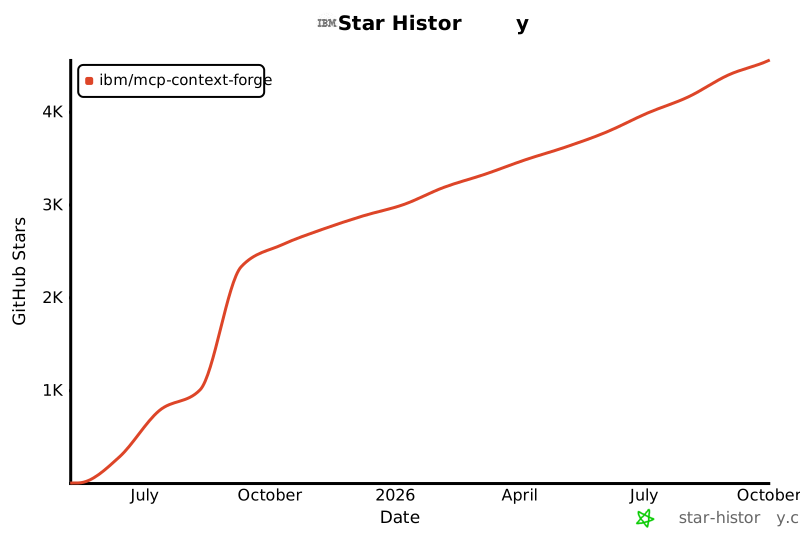](https://www.star-history.com/#ibm/mcp-context-forge&Date)\n\n\n[](https://pepy.tech/project/mcp-contextforge-gateway) \n[](https://github.com/ibm/mcp-context-forge/stargazers) \n[](https://github.com/ibm/mcp-context-forge/network/members) \n[](https://github.com/ibm/mcp-context-forge/graphs/contributors) \n[](https://github.com/ibm/mcp-context-forge/commits) \n[](https://github.com/ibm/mcp-context-forge/issues) \n"}
\n\n\n## Star History and Project Activity\n\n[](https://www.star-history.com/#ibm/mcp-context-forge&Date)\n\n\n[](https://pepy.tech/project/mcp-contextforge-gateway) \n[](https://github.com/ibm/mcp-context-forge/stargazers) \n[](https://github.com/ibm/mcp-context-forge/network/members) \n[](https://github.com/ibm/mcp-context-forge/graphs/contributors) \n[](https://github.com/ibm/mcp-context-forge/commits) \n[](https://github.com/ibm/mcp-context-forge/issues) \n"}