{"id":"9b9e19ba-b1ac-4ee1-ad43-239321e32847","slug":"lexware-office-mcp","kind":"mcp","name":"lexware-office-mcp","summary":"Unofficial MCP server for the Lexware Office accounting API — runs over stdio or HTTP.","owner":"benethos-hub","repoUrl":"https://github.com/benethos-hub/lexware-office-mcp","license":"MIT","licenseTier":"permissive","trust":"community","stars":2,"match":null,"fewStars":true,"format":"mcp","createdAt":"2026-08-22T12:51:20.000Z","addedAt":"2026-10-14T05:27:47.175Z","logoUrl":"https://avatars.githubusercontent.com/u/296464892?v=4","linkOnly":false,"collection":null,"skillPath":null,"categories":["cloud-infra","memory-knowledge"],"tags":["accounting","bookkeeping","invoicing","lexoffice","lexware","lexware-office","python"],"runtime":"python","local":true,"cloudCapable":false,"cloudCapability":"unknown","cloudReadyOnPlatform":false,"needsApiKey":false,"reviewed":false,"syncedAt":"2026-10-17T14:56:49.025Z","sample":false,"url":"https://conduits.dev/tools/lexware-office-mcp","language":"Python","transports":["stdio"],"install":{"pypi":"benethos-lexware-office-mcp"},"requirements":{"env":[],"upstreamMayCharge":false},"tools":null,"readme":"#  Unofficial Lexware Office MCP Server\n\n[](https://github.com/benethos-hub/lexware-office-mcp/actions/workflows/ci.yml)\n[](https://pypi.org/project/benethos-lexware-office-mcp/)\n[](https://github.com/benethos-hub/lexware-office-mcp/pkgs/container/benethos-lexware-office-mcp)\n[](https://pypi.org/project/benethos-lexware-office-mcp/)\n[](https://github.com/benethos-hub/lexware-office-mcp/actions/workflows/ci.yml)\n[](https://github.com/benethos-hub/lexware-office-mcp/blob/main/LICENSE)\n\n\n\n> **Disclaimer**\n>\n> - This project is **not affiliated with, endorsed by, or sponsored by\n> Lexware or Haufe-Lexware GmbH & Co. KG**. \"Lexware\" and \"Lexware Office\"\n> are trademarks of their respective owners.\n> - It uses the **documented public API** with an API key you generate and can\n> revoke yourself. Use of that API is governed by Lexware's own terms, which\n> you accept independently of this project. The API can change at any time,\n> and requests may be rate limited or blocked.\n> - It reaches **real accounting records**. Write access is off by default. If\n> you enable it, anything created through the API is a real and legally\n> relevant record — a finalized document cannot be withdrawn through the API.\n> - Data may be incomplete or out of date. **Nothing here is tax, accounting\n> or legal advice.** Do not rely on it for filings, audits, or your\n> bookkeeping obligations.\n> - Provided \"as is\", without warranty. Intended for personal and professional\n> use at your own risk. See [LICENSE](https://github.com/benethos-hub/lexware-office-mcp/blob/main/LICENSE).\n> - For **commercial use**, review Lexware's API terms and your own retention\n> and documentation duties.\n\n**Contents**\n\n- [Why this exists](#why-this-exists)\n- [Safety first](#safety-first)\n- [How it works](#how-it-works)\n- [Tools](#tools)\n- [Requirements](#requirements)\n- [Getting an API key](#getting-an-api-key)\n- [Installation](#installation)\n - [As a Claude Desktop extension](#as-a-claude-desktop-extension)\n - [With uvx, for any MCP client](#with-uvx-for-any-mcp-client)\n- [Configuring it in a browser](#configuring-it-in-a-browser)\n- [Switching individual tools off](#switching-individual-tools-off)\n- [Configuration](#configuration)\n - [Where a value comes from, and which one wins](#where-a-value-comes-from-and-which-one-wins)\n - [Naming the files](#naming-the-files)\n - [The settings](#the-settings)\n- [Transport](#transport)\n- [In a container](#in-a-container)\n - [With Compose](#with-compose)\n - [As single containers](#as-single-containers)\n - [Turn the interface off when you are done](#turn-the-interface-off-when-you-are-done)\n- [Logs](#logs)\n- [Example prompts](#example-prompts)\n- [Rate limits](#rate-limits)\n- [Development](#development)\n- [License](#license)\n- [Trademarks and affiliation](#trademarks-and-affiliation)\n\nAn [MCP](https://modelcontextprotocol.io) server that connects an MCP client\nsuch as Claude Desktop to a [Lexware Office](https://www.lexware.de/) account\nthrough the official\n[public REST API](https://developers.lexware.io/docs/). Ask about invoices,\ncontacts, articles and vouchers in plain language, and let the client fetch\nthem for you.\n\n> **Status: 0.6.0.**\n> The server handles contacts, vouchers and documents: find them, read them,\n> create them, change them, see what is still unpaid, download a PDF and\n> upload a receipt and book it. `get_profile` answers which account is\n> connected. Every tool in the table below is built, and each was exercised\n> against a live account. It speaks stdio to a client that starts it, as a\n> Claude Desktop extension or from PyPI, and streamable HTTP behind a bearer\n> token where something else has to reach it - as a published container\n> image, with Compose files for running it and for building it from a\n> checkout. See [SPECS.md](https://github.com/benethos-hub/lexware-office-mcp/blob/main/SPECS.md)\n> for the full technical specification and the roadmap.\n\n## Why this exists\n\nLexware Office holds the day-to-day accounting of a small business. Most\nquestions about it are read questions — what is still unpaid, what did this\ncustomer order, which receipt belongs to that expense — and those are exactly\nthe questions an assistant answers well once it can see the data. This server\nmakes that possible without exporting anything, using an API key the account\nowner generates and can revoke.\n\n## Safety first\n\nThe server points at a real accounting system, so the defaults are cautious.\n\n**Run it read-only unless you have a reason not to.** This server can change\nreal accounting records - create a contact, record a voucher, issue an invoice,\nattach a receipt - and it is the assistant that decides when to call such a\ntool, not you. `--tools read-only` gives it everything it needs to answer\nquestions about the books, which is what most people want it for: search,\nread, and download. Nothing in that set writes.\n\nTurn a write tool on when you have a job for it, and know what it leaves\nbehind. This API cannot delete a bookkeeping voucher at all, so a wrong one\nis corrected in the web app rather than withdrawn here, and a finalized\ninvoice is a real document with a number that has been used. If you are not\nsure which tools you need, read-only is the honest starting point - the\npermissions page adds one later in a click, and a client that honours\n`notifications/tools/list_changed`, as Claude Desktop does, picks it up\nwithout a restart.\n\n- **Nothing is enabled until you say so.** A fresh installation has no\n policy file, and a server without one offers no tools at all. What this\n server may do is a decision somebody made, never a default that happened.\n- **One flag per tool**, in a JSON file you write with `--tools`, tick\n through `setup`, or edit by hand. Not a level, not a group:\n `create_contact` on and `upload_file` off is an ordinary thing to want, and\n there is no combination the file cannot express.\n- **What a tool costs you is visible while you decide.** Every enabled tool\n is sent to the assistant on every request, and the permissions page puts\n that number on each row.\n- The file is checked twice, once when the tool list is built and again when a\n call arrives, so a stale tool list on the client cannot slip past it.\n- The API key is never logged, never returned in a tool result, and redacted\n from error messages. **It belongs in the `.env` and nowhere else** — not in\n your client's configuration file, which another program owns and rewrites,\n and which is the one people screenshot when they ask for help. Nor does any\n path from your machine reach the assistant.\n\n## How it works\n\n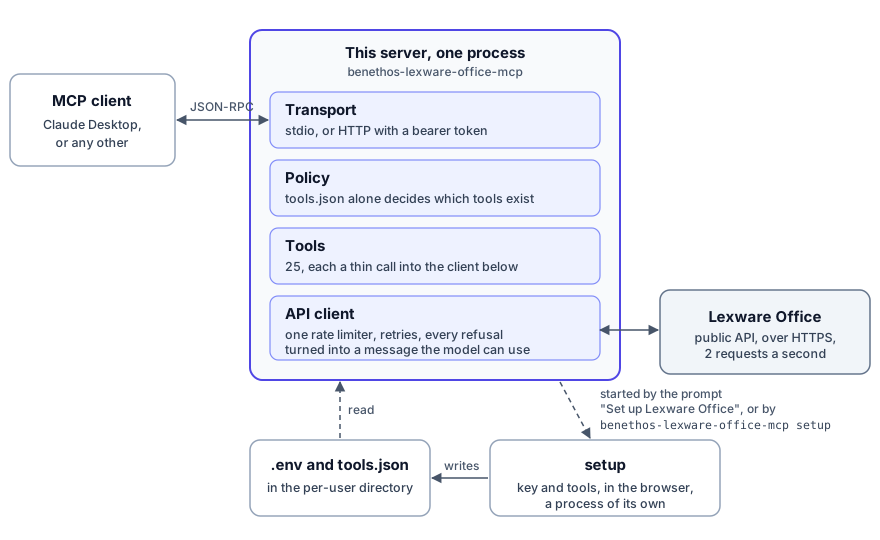\n\nThe client starts the server, or reaches it over HTTP, and speaks MCP with\nit. What a model can do is settled before anything reaches Lexware: a tool\nthe policy file does not name does not exist for the client, and every call\nthat is left goes through one API client with one rate limiter. The key and\nthe permissions live in two files that `setup` writes, a process of its own\nthat the client's prompt **Set up Lexware Office** starts, and so does\n`benethos-lexware-office-mcp setup` in a terminal.\n\n## Tools\n\nEvery tool below is built and was exercised against a live account. None of\nthem is enabled until the policy file names it.\n\nRead tools:\n\n| Tool | What it does |\n|---|---|\n| `get_profile` | Company profile and connection check |\n| `search_contacts` | Find customers and vendors by name, email, number or role |\n| `get_contact` | One contact with addresses, roles and version |\n| `search_articles` | List articles, filtered by number, barcode or kind. The API offers no search by title |\n| `get_article` | One article with its price block and version |\n| `search_vouchers` | The central query — filter the voucher list by type, status, contact, document number, date range and what is still open |\n| `get_sales_document` | Read an invoice, quotation, credit note, order confirmation, delivery note, dunning or down payment invoice in full |\n| `get_voucher` | Read a bookkeeping voucher, by id or by its document number |\n| `get_payments` | Payment status and open amount of a voucher |\n| `get_recurring_templates` | Templates that issue invoices on a schedule, one or a page of them |\n| `get_master_data` | Countries, payment conditions, posting categories and print layouts, with a search to narrow them |\n| `download_document` | Save the rendered PDF or XML of a sales document |\n| `download_file` | Save a stored file, such as an uploaded receipt |\n| `read_download` | Put a downloaded file into the answer, for clients that cannot follow a resource link |\n| `get_deeplink` | Build a permalink to a sales document, contact or voucher in the web app, without an API call |\n\nWrite tools. These change real accounting records, so enable them one at a\ntime and against an account you are willing to have changed:\n\n| Tool | What it does |\n|---|---|\n| `create_contact` | Create a customer or vendor |\n| `update_contact` | Change one, without touching what you did not name |\n| `create_article` | Add an article to the catalogue |\n| `update_article` | Change one, without touching what you did not name |\n| `create_voucher` | Record a bookkeeping voucher |\n| `update_voucher` | Change one that is already recorded, or book a receipt that `upload_file` left unchecked |\n| `create_sales_document` | Create an invoice, quotation, credit note, order confirmation, delivery note or dunning — a draft unless you ask for it to be issued, which the assistant may only do on your explicit instruction |\n| `upload_file` | Upload a receipt from a path or a URL, which also creates its voucher |\n| `attach_file_to_voucher` | Hang a file on a voucher that already exists |\n\n`update_contact` and `update_voucher` cost two API calls rather than one.\nThe API replaces a record instead of patching it, so the current one is read\nfirst and the change is laid on top. Without that, changing only an email\naddress would empty out the addresses, the note and everything else. Both\nalso need the `version` you last read: if the record changed in between, the\nupdate is refused and nothing is written.\n\nOne tool deletes, and it is the only one:\n\n| Tool | What it does |\n|---|---|\n| `delete_article` | Remove an article. The API cannot bring it back. Takes `confirm: true`, and sends nothing without it |\n\nIt is the only member of the `--tools irreversible` step so far, so that step\nis the only way to switch it on. An article is also the only thing this API\nlets you delete, which is the other half of the point:\n\n`--tools write` is not the same as undoable. Nothing that preset enables\ndeletes a record, but five of its tools create one this API cannot remove\nafterwards: `create_contact`, whose contact only the web app deletes, and\n`create_voucher`, `create_sales_document`, `upload_file` and\n`attach_file_to_voucher`, which leave a bookkeeping record.\n\n**A bookkeeping voucher cannot be deleted through the API.** There is no\nendpoint for it, so a wrong `create_voucher` has to be corrected in the\nLexware Office web app, and it is booked the moment it is created - the\nAPI accepts no status on the way in. The same applies to `upload_file`:\nuploading a receipt also creates the voucher that goes with it, so it\nleaves a record behind even though its name only mentions the file. That\nvoucher starts unchecked, and `update_voucher` fills it in and, when you\nask for it, books it.\n\nDownloads are written into the download directory on the machine the server\nruns on, and reported two ways: a **path**, which is what you want when the\nclient and the server share that machine, and a **resource URI**, which the\nclient can read to get the bytes wherever the server is. The file itself\nnever travels inside the tool result, because base64 costs roughly 1.37\ntimes the file size in context and no model can read a PDF anyway. An\nexisting file is never replaced: a download identical to one already there\nreuses it, and one that differs is saved beside it with a counter in its\nname.\n\nThe download directory is a cache of the last 100 documents. Older downloads\nare deleted when the server starts and after each download, since every\ndocument is still in Lexware Office and one call away. `LXO_MCP_KEPT_DOWNLOADS`\nchanges the number, and `0` keeps everything. A directory you name yourself\nwith `LXO_MCP_DOWNLOAD_DIR` is left alone unless you set it there too, and\neven then only files named the way a download is named are deleted: a\nspace, an umlaut or an extension such as `.docx` keeps a file out of it. The\nresource list is read from the directory each time a client asks, names the\nsame newest downloads, and survives a restart. A new download is announced\nthe way a changed tool list is: the server sends\n`notifications/resources/list_changed`, so a client that listed the\ndownloads once can ask again rather than keep the list from the start of\nits session. Whether it does is the client's business.\n\n**The resource list is not part of the prompt.** The tool list goes to the\nmodel with every request. The resource list is sent only when a client asks\nfor it, and what the client does with it is up to the client. Claude Desktop\noffers it in its attachment menu, under **Add from** the server, and a file\nreaches the conversation when somebody picks it. A client that hands the\nwhole list to the model pays for it instead: an entry carries the\n`lexware://` URI, the file name, the type and the size - never a path of\nthis machine - and comes to about 230 characters, so the default 100 make\nroughly 23,000, around 6,000 to 7,000 tokens. For such a client, set\n`LXO_MCP_KEPT_DOWNLOADS` lower, which shortens the list and the cache\ntogether.\n\nClaude Desktop does not follow a resource link at all, so `read_download`\nis the route that always works. It takes the same URI and puts the content\ninto the answer. What arrives depends on the file:\n\n| File | Arrives as |\n|---|---|\n| XML | text, so an XRechnung can actually be read |\n| PDF | pictures of its pages, the first 10 by default |\n| Image | the image |\n| Anything else | an embedded binary for the client to handle |\n\nA PDF is rendered rather than passed through because Claude Desktop turns\nan embedded binary into an image block when it calls the API, and\n`application/pdf` is not a permitted image type there, so the whole\nrequest is refused. Rendering costs no API call either, since the file is\nalready on the server.\n\nA link into the web app is a separate tool. `get_deeplink` turns an id into\na URL for a browser, costs no API call, and is the route that still works when\nthe client can display neither the file nor a resource link: somebody opens it\nthemselves. A download does not carry one — it answers where the bytes are,\nwhich is a different question, and the two were joined once long enough for a\nbroken link to ride along with a working download.\n\n`upload_file` and `attach_file_to_voucher` take a `source`: a path on the\nmachine the server runs on, or a URL to fetch the file from. Either way they\naccept PDF, JPEG, PNG and XML, at most 5 MiB per file, which is what the API\ntakes. An XML file is treated as an XRechnung and is rejected if it is not\none.\n\n**The model chooses the path.** Without `LXO_MCP_UPLOAD_DIR`, `upload_file`\nand `attach_file_to_voucher` read any file this process can read that has\none of those extensions, and send it to Lexware. That includes any `.xml`:\na configuration file or an export is refused as not an XRechnung only after\nit has reached the API. Set it to one directory - an inbox for receipts -\nand nothing outside it is read, links included.\n\n**A URL only from addresses you allow.** Another server can hand the model a\nshort-lived link to a file - a mailbox server for an attachment, say - and\nthe file then goes from that server to Lexware without passing through the\nmodel. `LXO_MCP_UPLOAD_URLS` lists the addresses such a link may point to,\ncomma separated: a scheme and a host, optionally a port and the start of a\npath, such as `https://files.example.com/inbox/`. **Without it no URL is\nfetched.** The list is required because the model chooses the URL, and a\nmodel reads email: one instruction hidden in a message could otherwise have\nthe server fetch from anywhere it can reach, a document server on your own\nnetwork included, and file what came back in your books. A link outside\nevery prefix is refused before anything is sent, a redirect is not followed,\nthe fetch gets 30 seconds, and the file is cut off at 5 MiB. It is asked for\nuncompressed, an empty file is refused, and behind a proxy a service on this\nmachine is fetched directly, since the proxy cannot reach it. A file served\nonly as bytes, `application/octet-stream` or without a type, as a mail\nattachment often is, is taken by its first bytes, and only as one of the\nfour types. The Lexware key is never sent along, and the log names a link's\nhost, never its path or query, which is where a signed link keeps its key.\n\n**Each entry is a URL prefix, not a pattern.** A link is fetched when it\nstarts with one: the same scheme, exactly the same host, the same port -\nnone given means 443 for `https` and 80 for `http` - and a path at or below\nthe prefix's. What follows is free, the rest of the path and the query a\nsigned link carries. With `https://files.example.com/inbox/`:\n\n- `https://files.example.com/inbox/9f3c?sig=abc` is fetched\n- `https://files.example.com/outbox/9f3c` is not, another path\n- `https://files.example.com.elsewhere.net/inbox/9f3c` is not, another host\n- `https://files.example.com:8443/inbox/9f3c` is not, another port\n\n`https://files.example.com/` allows every path on that host. There is no\nwildcard: a host is always written out in full, and a `*` is read as a host\nname that nothing is called, so `https://*` allows nothing at all.\n\n`https://` is the rule. `http://` is meant for a service on the same\nmachine, and is accepted for `127.0.0.1`, `::1` and `localhost` alone: the\nserver refuses to start with any other host, since the file would cross the\nnetwork unencrypted. In a container, the same machine is the container.\n\n## Requirements\n\n- [uv](https://docs.astral.sh/uv/getting-started/installation/), which brings\n its own Python and the `uvx` command every example below uses. The Claude\n Desktop extension needs neither uv nor Python:\n [Claude Desktop](https://claude.ai/download) brings both\n- Python 3.11 or newer, if you would rather bring your own. Installing pulls\n in the MCP SDK, httpx, platformdirs, pypdfium2 to render PDF pages, and\n Jinja2 for the pages of `setup`\n- A Lexware Office account with the public API add-on enabled\n- An API key from \n\n## Getting an API key\n\n1. Sign in to Lexware Office as the account owner.\n2. Open the public API add-on at\n .\n3. Create a key and copy it once — it is shown a single time.\n4. Keep it out of any file that goes into version control. `setup` writes it\n into the `.env` the server reads, in the per-user configuration directory\n or, in a checkout, in `config/.env`, which is gitignored. Either is found\n no matter which directory the server is started from, so a client such as\n Claude Desktop needs no key of its own in its configuration file. An\n environment variable works as well.\n\nA key can be revoked on the same page at any time, which is the fastest way to\ncut access if anything looks wrong.\n\n## Installation\n\nTwo ways in. In Claude Desktop the shortest is the\n[extension](#as-a-claude-desktop-extension), which needs nothing installed\nbeside Claude Desktop. For any other client, or to manage the server\nyourself, run it [with uvx](#with-uvx-for-any-mcp-client). Both read the\nsame configuration, so moving from one to the other keeps the key and the\npermissions. To run it in a container instead, see\n[In a container](#in-a-container).\n\nThe server is also listed in the\n[official MCP Registry](https://registry.modelcontextprotocol.io/v0/servers?search=benethos-lexware-office-mcp)\nas `io.github.benethos-hub/benethos-lexware-office-mcp`, with all three: the\nPyPI package, the container image and the extension.\n\n### As a Claude Desktop extension\n\nAll it needs is [Claude Desktop](https://claude.ai/download), signed in.\n\n**1. Get an API key.** Sign in to Lexware Office as the account owner, open\n, create a key and copy it straight\naway, as it is shown once only. The same page revokes it at any time. See\n[Getting an API key](#getting-an-api-key).\n\n**2. Download the extension.** This link always gives the newest release:\n[benethos-lexware-office-mcp.mcpb](https://github.com/benethos-hub/lexware-office-mcp/releases/latest/download/benethos-lexware-office-mcp.mcpb).\n\n**3. Drag it into Claude Desktop** under *Settings → Extensions*. Claude\nDesktop brings Python and uv itself, nothing else has to be installed.\n\n**4. Open the setup.** In a chat, click the plus in the message box, then\n*Connectors* → *Add from Unofficial Lexware Office MCP Server* →\n**Set up Lexware Office**. Your browser opens the interface described under\n[Configuring it in a browser](#configuring-it-in-a-browser). Only you can\npick this, the model cannot.\n\n**5. Enter the key and choose the tools.** The key goes under\n*Zugangsdaten*, the tools are ticked under *Rechte*, and *Beenden* closes the\npage. Both apply at once, without restarting Claude Desktop.\n\n**6. Try it.** Ask *\"Which Lexware Office account are you connected to?\"*\nThe answer names the company the key belongs to.\n\nWorth knowing:\n\n- **Failed until step 5.** Nothing is enabled after installing, so Claude\n Desktop shows the server as failed, offering no tools, until the setup\n page has saved some.\n- **The install dialog** asks for nothing. It warns that an extension can\n reach everything on your computer, which is true of every local MCP\n server, this one included. The server's dependencies are installed on its\n first start, the versions in this project's lockfile.\n- **The setup page ends itself** after 30 minutes without use.\n- **Every release attaches its own bundle too**, the version in the file\n name, for installing a particular one.\n- **One or the other.** The extension and an entry for the same server in\n `claude_desktop_config.json` would offer every tool twice. Remove the entry\n when you switch to the extension.\n- **The configuration is shared.** The extension reads the same per-user\n `.env` and `tools.json` as an installation with uvx, so\n `uvx benethos-lexware-office-mcp setup` changes them too.\n- **Updating** is installing the newer file over the old one. If Claude\n Desktop cannot replace it, end the setup page first with *Beenden*: while it\n runs, it holds the extension's files.\n- **A changed key** applies once Claude Desktop is quit from the tray and\n started again. The first key does not need that, and until that restart\n neither does a change to it.\n- **Tried on Windows**, with Claude Desktop from the Microsoft Store and\n nothing else installed. macOS is expected to work the same way and has not\n been tried.\n\n### With uvx, for any MCP client\n\nThe simplest way for any other client: no clone, no manual virtual\nenvironment, no `git`. `uvx` fetches the server and runs it on demand from\n[PyPI](https://pypi.org/project/benethos-lexware-office-mcp/) (published as\n`benethos-lexware-office-mcp`).\n\n**1. Install uv**, if you have not already — the\n[uv installation page](https://docs.astral.sh/uv/getting-started/installation/)\ncovers every platform. It brings `uvx`, and that is the only thing needed\nhere.\n\n**2. Configure the server.** Nothing has to be installed for this: `uvx`\nfetches the package and runs it.\n\n```bash\nuvx benethos-lexware-office-mcp setup\n```\n\nThat opens the interface described under\n[Configuring it in a browser](#configuring-it-in-a-browser): key, settings and\none checkbox per tool. Everything it does can also be done by hand — start a\nsettings file with `uvx benethos-lexware-office-mcp --settings-sample >\nconfig/.env`, put the key in it, and use `--tools` as described below.\n\nCheck that it works:\n\n```bash\nuvx benethos-lexware-office-mcp --help\n```\n\n**3. Point Claude Desktop at it** in `claude_desktop_config.json`:\n\n```json\n{\n \"mcpServers\": {\n \"benethos-lexware-office-mcp\": {\n \"command\": \"uvx\",\n \"args\": [\"benethos-lexware-office-mcp\"]\n }\n }\n}\n```\n\nNo path from your machine appears in there, which is the point: `uvx` looks\nthe package up by name. Two things worth knowing about that entry:\n\n- **Pin a version** for stability: `\"args\": [\"benethos-lexware-office-mcp==0.6.0\"]`.\n Without a pin, `uvx` takes the newest release it can resolve, and a client\n restart is enough to change what it runs.\n- **`uvx` has to be on the `PATH` the client uses**, which is not always the\n one your terminal has — some GUI clients pass a reduced environment. If the\n server does not start, put the absolute path to `uvx` in `command`, and\n restart the client fully rather than reloading it.\n\n**Would rather have a command of your own?**\n`uv tool install benethos-lexware-office-mcp` gives you\n`benethos-lexware-office-mcp` without the `uvx` in front, which is worth it if\nyou change permissions from the command line often. It buys nothing else: the\nsame version can be pinned either way, and a warm start differs by tens of\nmilliseconds. One thing to know — uv installs it into its own tool directory,\nwhich is **not on the `PATH` of a fresh install**. It says so when it\nfinishes. Run `uv tool update-shell` and open a new terminal.\n\n**From the sources instead**, to develop or to run something unreleased:\n\n```bash\ngit clone https://github.com/benethos-hub/lexware-office-mcp\ncd lexware-office-mcp\nuv sync\nuv run benethos-lexware-office-mcp setup\n```\n\nA client then needs the interpreter of that checkout's virtual environment,\n`command` pointing at `.venv/Scripts/python.exe` on Windows or\n`.venv/bin/python` elsewhere, with `args` of `[\"-m\",\n\"benethos_lexware_office_mcp\"]`.\n\n**No key in there, on purpose.** The server finds it in the `.env`. A client's\nconfiguration file is the wrong place for a credential: it is not yours —\nanother program owns it, decides where it lives and when it rewrites it. It is\nthe file people screenshot when they ask for help with an MCP setup, it is\nreadable in the client's own settings view, and it travels to the next machine\nwith the rest of that client's configuration. The `.env` is at least a file\nthis project documents, that nothing syncs on your behalf, and that the\nconfiguration interface writes without ever showing the key back to you.\n\nThat `.env` is already the part worth being careful with. It holds a\ncredential for a live accounting system, so keep it out of version control,\nout of shared folders and out of backups other people can read. When you stop\nusing the server, delete it **and revoke the key** under Extensions, Public\nAPI — revoking is the only step that actually ends access.\n\n**4. Restart Claude Desktop fully** — quit it from the tray rather than\nclosing the window. That is for the configuration file you just edited, which\na client reads once at startup, and it is what a changed setting in the `.env`\nneeds too — the server reads those at startup as well. It is **not** needed\nfor permissions: change those later and the running client is told, see\n[Switching individual tools off](#switching-individual-tools-off). Nor for\nthe first API key: a server started without one uses a key saved later from\nits next call on, and reads it again on every call until it is restarted,\nso a change to that key applies at once too. Changing a key the server was\nstarted with does need the restart.\n\n## Configuring it in a browser\n\n```bash\nuvx benethos-lexware-office-mcp setup\n```\n\nOr from your client: over stdio the server offers a prompt called **Set up\nLexware Office**, and picking it opens the same pages. In Claude Desktop it\nis under the plus in the message box, in *Connectors* under the server's\nname. There the model cannot start it, only you can, and it does nothing\nbut open the pages. That guard is the client's, not the server's: a client\nthat hands its prompts to the model, as some agent frameworks and editors\ndo, lets the model open the pages too. With such a client set\n`LXO_MCP_SETUP_PROMPT=0`, and the prompt is not offered.\n\nFour pages on `http://127.0.0.1:8771/`, closed with *Beenden* in the sidebar\nor Ctrl+C. The port is one above the HTTP transport's `8770`, so both can\nrun at once, and `--port` picks another. They write the same files the\ncommand line does, so you can use either or both. The screens are in German,\nbecause Lexware Office is sold for German companies only, and each is named\nbelow by what it does with its label in brackets.\n\n**Overview** (`Übersicht`) — where the installation stands, in three rows: the\nkey stored or missing, how many tools are on and what they cost, and what the\nlast connection test found. The first row in red is the next step, and the\nbutton at the top right goes there. Below it the `\"args\"` entry that makes a\nclient use the same files, and which files those are and whether each exists\nyet.\n\n**Credentials** (`Zugangsdaten`) — the API key, checked against the API before\nit is saved unless you say otherwise, and beside it the connection test: one\ncall on the button, never on page load, and the account it found. The key is\nnever shown back to you, never logged and never exported. If an environment\nvariable is setting it, the page says so, because that would override\nwhatever you save. A server that started without a key uses the one saved\nhere from its next call, and reads whatever is saved here again on every\ncall until it is restarted. A key that replaces one the server was started\nwith applies once the client starts it again. The token of the HTTP\ntransport is folded underneath, open when the server is set to that\ntransport.\n\n**Permissions** (`Rechte`) — one checkbox per tool, grouped, with the presets\nas buttons and the save button at the top right beside the count. On a fresh\ninstallation with no policy file yet, the reading tools come pre-ticked as a\nstarting point — a proposal in a form, not a permission:\nthere is still no file and therefore still no tool until you press save, and\nthe page says so. Each row carries what that tool costs the assistant in\ncontext, and the total follows your ticks: every enabled tool is sent to the\nmodel on **every** request, so switching one on is a budget decision as well as\na permission one. Writing tools are marked, and the ones whose result the API\ncannot take back are marked separately: `nur App` for a contact, which Lexware\nOffice deletes without ceremony, and `nur App · Buchhaltung` for a record that\nenters the books. Neither means it is stuck — nothing is festgeschrieben when\nit is created, and a legend on the page names the four things that do bind a\nrecord later.\n\nProfiles live here too. Save the current selection under a name, load it\nlater. Loading only fills the boxes: nothing reaches `tools.json` until you\npress save. A name that is already taken is refused rather than quietly\nreplacing what is there — case and spacing do not make a second profile — and\nreplacing one is its own button beside the list. They are stored in\n`tool_profiles.json` beside the policy file.\n\nThe **policy file itself** can be downloaded and read back in from the same\npage — the file as it is, so it works on another installation with or\nwithout this interface, and a `tools.json` written by `--tools` reads here.\nReading one only ticks the boxes, and saving is still a separate press. A tool\nthe file does not mention stays **off** and the page says how many those\nare, which is what `--tools sync` does on the command line.\n\n**Settings** (`Einstellungen`) — the thirteen settings that are not secret, in\nfour cards: the connection, the output, the files, and whether the client is\noffered the prompt that opens these pages. An empty field means the built-in\ndefault, which the placeholder shows. A setting a real environment variable\nholds is shown rather than offered, since saving over it would change nothing.\n\nThree things worth knowing. Every start makes a **start code**, and the\naddress it prints carries it: `http://127.0.0.1:8771/?code=…`. Without a\nvalid code every page shows one field, *Code eingeben*, so another program\nor another user on the same machine cannot open the pages through the\nloopback port. The code lives as long as the process, and after five wrong\nones each further try waits. The browser `setup` opens signs in with a\nsecond code that works once, since a browser's address can stay readable\nin its command line for other users of the machine. It **binds\n`127.0.0.1`**, because the code\ntravels in the clear and keeps nobody out who can read the traffic.\n`--host` exists for a container, where the host-side publish keeps the port\nlocal, see [In a container](#in-a-container). Anywhere else a bind beyond\nloopback leaves the pages open to whoever reaches the port and reads the\ncode, and the start says so. And it is a **separate command**: the MCP\nserver never serves HTTP, and a client such as Claude Desktop starts that\none, not this.\n\n`--port N` moves it, `--no-browser` only prints the address,\n`--exit-when-idle N` ends it after N minutes without a request, which the\nprompt sets to 30, and `--env-file` and `--tools-file` say which files it\nedits. Unlike everywhere else those files do not have to exist yet.\n`--public-port N` is for a container published under another port than the\none it binds: the address it prints and opens names that one.\n\n**If your client starts the server with `--tools-file`, give `setup` the same\nargument** — otherwise it edits a different file and reports success. Both\nprocesses fix their files when they start and never change them afterwards,\nand neither can see how the other was started. The overview prints the\n`\"args\"` line that makes your client match the files the interface is\nholding, which is the easier direction.\n\n## Switching individual tools off\n\nOne JSON file decides what this server offers, and nothing else does. Either\ntick the boxes under `setup` above, or start the file with\n\n```\nuvx benethos-lexware-office-mcp --tools read-only\n```\n\nwhich writes every tool into `tools.json`, reading ones on and the rest off,\nand prints what it did. Three presets, each containing the last:\n\n| | enables |\n|---|---|\n| `--tools read-only` | queries only |\n| `--tools write` | and creating and updating |\n| `--tools irreversible` | and deleting an article |\n| `--tools sync` | changes no flag, only adds the tools the file has not heard of |\n\n`--tools show` only reports. **`--tools-file PATH` says where to write**, and\nworks with all of them — `--tools write --tools-file ./tools.json` creates the\nfile there.\n\n**A preset overwrites the whole file**, so hand edits are lost. Use one to\nstart a file, not to update one. After an upgrade brings new tools, run\n`--tools sync`: it writes them in as off, leaves every flag you set alone, and\nnever switches anything on. That last part is why it is the only one of these\nsafe to run from a script.\n\nThe third step is its own because it is its own decision: what is deleted is\ngone, so it should be chosen by naming it rather than by picking the largest\noption. Exactly one tool carries such an effect, `delete_article`, and that is\nnot a temporary state of affairs — an article is the only thing this API can\ndelete. Nothing can be finalized or voided after the fact either, and the one\nthing that can be booked afterwards, an unchecked voucher, needs the\nassistant to pass `finalize` and `confirm` to `update_voucher` - which it may\nonly do when you asked for it.\n\nWithout `--tools-file`, the file is searched exactly like the `.env`, lowest\nprecedence first:\n\n1. the per-user configuration directory\n2. `config/` of a checkout, when you are running from the sources\n3. `config/` and then the root of the working directory\n\nThe last one found wins, and a file nobody has created yet resolves to the\nfirst. After that, edit it:\n\n```json\n{\n \"create_contact\": false,\n \"search_contacts\": true,\n \"upload_file\": false\n}\n```\n\nA tool set to `false` is not listed and cannot be called. **A tool the file\ndoes not mention is also off** — silence is a refusal, so a tool that arrives\nwith an upgrade waits for you rather than appearing on its own. No file at all\nmeans no tools at all, which is why `--tools` is part of setting the server up.\n\nThe file is read as the tool list is built and again on every call, so an\nedit takes effect at once in both directions — no restart. The server also\n**tells the client** when the set of enabled tools changes, so it fetches the\nlist again by itself: Claude Desktop picks a change up while it is running.\nNothing depends on it either way, since a tool that has been switched off\ncannot be called whatever list the client is still showing. If yours does not\nnotice, restart it — Claude Desktop by quitting it from the tray.\n\nEach tool also declares what it is — reading or writing, which group it\nbelongs to, and whether what it writes can be removed again. That\nclassification is what `--tools read-only` selects on and what the browser\ninterface groups and marks by. It never decides a call: only the file does.\n\n## Configuration\n\n### Where a value comes from, and which one wins\n\n**One `.env` applies, never several.** These are the places it is looked for,\n**lowest first**, and the highest one that exists is the file — the others are\nnot read:\n\n1. `.env` in the per-user configuration directory\n2. `config/.env` of the checkout the server runs from, if it runs from one\n3. `config/.env` and then `.env` in the working directory\n\n`--env-file` names it instead, and then no search happens at all. That is the\nsame rule `--tools-file` follows for the policy file, so both flags mean the\nsame thing: this file, and nothing else.\n\nTwo things sit outside that file, one below and one above:\n\n- the **built-in default**, for a setting no file mentions\n- **a real environment variable**, which beats whatever the file says,\n unless it is empty: an empty one counts as not set\n\nThe last one is the one that surprises people. A setting exported in your\nshell, put in a client's `env` block, or pinned in a Compose file **cannot be\nchanged by editing a `.env`** — not by hand, and not through `setup`. The\nvalue is written, the file is correct, and nothing happens.\n\nThe configuration interface says so rather than letting you find out: each\nsetting carries a badge naming its source, and one that an environment\nvariable is holding is marked as such. When something you saved seems to be\nignored, that badge is the answer.\n\n**In a container this is not an edge case.** The Compose files pin the\ntransport, the bind address, the port and the allowed hosts as real\nenvironment variables, because those belong to the container rather than to\nthe installation inside it. Everything else — the API key, the HTTP token,\nthe limits — is left to the config volume, which is what makes the\nconfiguration interface able to change it.\n\nThe same order applies to the policy file, and `LXO_MCP_TOOL_POLICY` and\n`--tools-file` name one directly. The interface pins whichever file it found\nwhen it started, so the page cannot swap its own subject out from under you.\n\n### Naming the files\n\n`--env-file PATH` names a settings file instead of searching, and pairs with\n`--tools-file` so that one entry in a client's configuration carries its own\naccount and its own permissions:\n\n```json\n\"args\": [\"--env-file\", \"/path/to/test.env\",\n \"--tools-file\", \"/path/to/test-tools.json\"]\n```\n\nA path that does not exist is refused rather than quietly falling back to the\nsearch — except under `setup`, which exists partly to create one.\n\n`setup` writes this file for you.\n\n### The settings\n\n| Variable | Meaning | Default |\n|---|---|---|\n| `LXO_MCP_API_KEY` | Your Lexware Office API key. Required. Visible ASCII only, so a space or an invisible character copied along with it is refused | — |\n| `LXO_MCP_TOOL_POLICY` | Per-tool on/off file, see below | `tools.json`, searched for the way the `.env` is |\n| `LXO_MCP_BASE_URL` | API base URL, `https://` only, since the key travels there | `https://api.lexware.io` |\n| `LXO_MCP_APP_BASE_URL` | Web app base for deeplinks, `https://` only | `https://app.lexware.de` |\n| `LXO_MCP_DOWNLOAD_DIR` | Where downloaded documents land | user cache directory |\n| `LXO_MCP_KEPT_DOWNLOADS` | How many downloads the directory keeps, newest first. Older ones are deleted, and fetched again when needed. Only in the default directory unless set, `0` keeps all, while the resource list still names the newest 100 | unset: `100` in the default directory, all in one you name |\n| `LXO_MCP_UPLOAD_DIR` | The only directory the upload tools may read from | anywhere |\n| `LXO_MCP_UPLOAD_URLS` | URL prefixes the upload tools may fetch a file from, comma separated, no wildcards. `http://` only for `127.0.0.1`, `::1` and `localhost`, which are fetched without the proxy `HTTP_PROXY` names | none |\n| `LXO_MCP_TIMEOUT` | HTTP timeout in seconds | `30` |\n| `LXO_MCP_RATE` | Requests per second, global across all endpoints | `1.5` |\n| `LXO_MCP_BURST` | Token bucket capacity. The account's own bucket holds 4 | `2` |\n| `LXO_MCP_PAGE_SIZE` | Rows per page a search requests and returns | `25` |\n| `LXO_MCP_PDF_PAGES` | Pages of a PDF `read_download` renders by default, at most 100 | `10` |\n| `LXO_MCP_LOG_LEVEL` | Level of this server's own lines on stderr. The libraries underneath stay at `WARNING` | `INFO` |\n| `LXO_MCP_SETUP_PROMPT` | Offer the prompt **Set up Lexware Office** over stdio. `0` withholds it, for a client that hands its prompts to the model | on |\n| `LXO_MCP_TRANSPORT` | `stdio`, `streamable-http` or `sse` | `stdio` |\n| `LXO_MCP_BEARER_TOKEN` | Shared secret every HTTP request must carry. Required for an HTTP transport. Visible ASCII only | — |\n| `LXO_MCP_HTTP_HOST` | Address to bind for an HTTP transport | `127.0.0.1` |\n| `LXO_MCP_HTTP_PORT` | Port to bind | `8770` |\n| `LXO_MCP_HTTP_PATH` | URL path the transport serves on | `/mcp` |\n| `LXO_MCP_ALLOWED_HOSTS` | `Host` values to accept besides loopback, comma separated | — |\n| `LXO_MCP_GENERATE_BEARER_TOKEN` | Make a token at startup if none is set and write it to the settings file | off |\n| `LXO_MCP_EXIT_ON_CONFIG_CHANGE` | End the process when the settings file changes, for something that restarts it | off |\n\nEvery setting above is in use. `LXO_MCP_PAGE_SIZE` is capped at 250, which is\nthe lowest page size any endpoint accepts, and a larger value is refused at\nstartup rather than turning into an API error later. `search_articles` asks\nfor at least 25 whatever it says, because that endpoint refuses less.\n\n## Transport\n\n**stdio** is the default and what Claude Desktop and comparable local clients\nuse: the client starts the server as its own child process, and nothing else\ncan talk to it.\n\n**streamable-HTTP** and **SSE** serve the same tools on a port, for a\ncontainer or a machine of their own:\n\n```bash\nuvx benethos-lexware-office-mcp --transport streamable-http --port 8770\n```\n\nTwo things stand in front of that port, and neither is optional. A **bearer\ntoken** every request must carry as `Authorization: Bearer ` — without\n`LXO_MCP_BEARER_TOKEN` the server refuses to start an HTTP transport at all,\nbecause anyone who can reach the port could otherwise spend your Lexware\ncredentials. And the SDK's **DNS-rebinding guard**, which checks `Host` and\n`Origin` against an allowlist of the loopback names, extended by\n`--allowed-hosts` where a container or a proxy puts another name in front.\n\nNeither makes the port safe to publish on a network. They make it survivable\non a machine shared with other processes. `--host` binds somewhere other than\nloopback, which a container has to do — see [In a container](#in-a-container)\nfor why that is not the relaxation it looks like.\n\n## In a container\n\nThe image is published for `linux/amd64` and `linux/arm64`, so nothing from\nthis repository is needed to run one:\n\n```bash\ndocker pull ghcr.io/benethos-hub/benethos-lexware-office-mcp:latest\n```\n\nPin a version for anything you depend on - `:0.6.0` for an exact release,\n`:0.6` to follow its patch releases. `:latest` moves with every release, and\n`:edge` is built on demand from whatever `main` holds and is not a release at\nall.\n\n**The image carries the package's name, every release from 0.2.0 on.**\nIt was published as `ghcr.io/benethos-hub/lexware-office-mcp` until 0.4.2,\nand the earlier releases were copied over with the same digest, so a tag\npulls the same bytes under either name. The old name got the 0.4 patch\nreleases and none from 0.5.0 on. Pulling that name, change it to the one\nabove: the volumes stay as they are.\n\n### With Compose\n\n[`containers/production/`](https://github.com/benethos-hub/lexware-office-mcp/tree/main/containers/production)\nruns the published image, and that folder is all it needs. Into an empty\nfolder:\n\n```bash\nmkdir lexware-office-mcp && cd lexware-office-mcp\nfor file in compose.yaml .env.example Caddyfile README.md; do\n curl -fsSL -o \"$file\" \"https://raw.githubusercontent.com/benethos-hub/lexware-office-mcp/main/containers/production/$file\"\ndone\ncp .env.example .env # names the image's version\ndocker compose up -d # the server, on 127.0.0.1:8770\ndocker compose --profile setup up -d # add the configuration interface\ndocker compose rm -f -s setup # take the interface away again\n```\n\n**Not `docker compose --profile setup down`.** That is the whole project: it\ntakes the server down with it. `rm -f -s setup` stops and removes the one\nservice and leaves the server running. `docker compose stop setup` also works\nand keeps the stopped container around for next time.\n\nTo update, set `LXO_VERSION` in `.env` to the new version, then\n`docker compose pull && docker compose up -d`. The `.env` beside\n`compose.yaml` holds only that, the ports on the host and HTTPS. The\nserver's own settings live in its config volume.\n\n**HTTPS for the local network** is Caddy in front of the server, behind the\nprofile `https`: `COMPOSE_PROFILES=https` and a name in `LXO_DOMAIN`, and\nclients on other machines reach `https:///mcp` on port 443. The\ncertificate comes from Caddy's own CA, whose root each client trusts once,\nand Caddy passes on the MCP path alone, never the configuration interface.\nThe folder's\n[README](https://github.com/benethos-hub/lexware-office-mcp/tree/main/containers/production#https-for-the-local-network)\nhas the steps. A public address is not what it is for: one bearer token is\nall this server knows of who is asking.\n\n**The Compose file used to sit in the repository root** and build from the\ncheckout. `containers/production/` keeps its project name, so its volumes\ncarry over with the key, the token and the tools: `docker compose up -d`\nthere replaces the container and keeps them. Building from a checkout is\n[`containers/development/`](https://github.com/benethos-hub/lexware-office-mcp/tree/main/containers#for-development),\nwhich runs beside an installation in operation under a project of its own,\non ports 8780 and 8781, and never touches its volumes.\n\nDocker keeps at most five log files of 10 MB for each service, the oldest\ndropped first. The server writes a line for every request it refuses, and at\n`DEBUG` for every one it receives, so without a cap a reachable port would\ngrow the log for as long as the container exists.\n\n### As single containers\n\n```bash\ndocker run -d --name lexware-office-mcp \\\n --restart unless-stopped \\\n --log-opt max-size=10m --log-opt max-file=5 \\\n --read-only --tmpfs /tmp --cap-drop ALL --security-opt no-new-privileges \\\n -p 127.0.0.1:8770:8770 \\\n -v lxo-config:/config -v lxo-downloads:/downloads \\\n ghcr.io/benethos-hub/benethos-lexware-office-mcp:latest\n```\n\nThe token it generated for itself is in the config volume, which is where you\nread it from:\n\n```bash\ndocker exec lexware-office-mcp grep LXO_MCP_BEARER_TOKEN /config/.env\n```\n\nThat one line rather than the whole file: once a key has been entered, the\nAPI key sits in there too, and it has no business scrolling through a\nterminal you might screenshot.\n\nThe configuration interface is the same image with its other command, pointed\nat the same volume:\n\n```bash\ndocker run --rm -d --name lexware-office-mcp-setup \\\n --read-only --tmpfs /tmp --cap-drop ALL --security-opt no-new-privileges \\\n -p 127.0.0.1:8771:8771 \\\n -v lxo-config:/config -v lxo-downloads:/downloads \\\n ghcr.io/benethos-hub/benethos-lexware-office-mcp:latest \\\n setup --no-browser --host 0.0.0.0 --port 8771 \\\n --env-file /config/.env --tools-file /config/tools.json\n```\n\nPublished under another port, `-p 127.0.0.1:9000:8771`, add\n`--public-port 9000`, so the address in its log names the port to open.\n\nIts log has the address with the start code, which is the line to open:\n\n```bash\ndocker logs lexware-office-mcp-setup 2>&1 | grep \"interface at\"\n```\n\nIt was started with `--rm`, so stopping it is also the end of it:\n\n```bash\ndocker stop lexware-office-mcp-setup\n```\n\n**`--restart unless-stopped` is not decoration here.** The container ends its\nprocess when the settings file changes, which is what carries a saved setting\ninto a running server. With no restart policy it ends and stays ended.\n\n**The rest of the second line is hardening, and the Compose files do the\nsame.** The server writes nothing but its two volumes and `/tmp`, so the\nimage itself can stay read-only, and a process of an ordinary user on a port\nabove 1024 needs no Linux capability at all.\n\n### Turn the interface off when you are done\n\nOpen the address from its log, `docker compose logs setup` with Compose,\nenter the key, tick the tools — and then stop it, with *Beenden* in the\nsidebar or one of the commands below. The address names the port it is\npublished on, which both Compose files pass in from `LXO_SETUP_PORT` as\n`--public-port`. **Nothing stops it for you.** It accepts an API key behind\na code that travels in the clear, and it will happily keep serving that page\nfor as long as the machine is up.\n*Beenden* ends the process and leaves a stopped container behind, which\n`docker compose rm -f -s setup` removes, and a `docker run --rm` one\nremoves itself.\n\n```bash\ndocker compose rm -f -s setup # Compose\ndocker stop lexware-office-mcp-setup # a single container\ndocker ps --filter name=setup # nothing listed means it is off\n```\n\nThe server is meant to run. The interface is meant to run for the minutes you\nare configuring in it, which is why a plain `docker compose up` leaves it out\nand why it has no restart policy: once stopped, it stays stopped until you\nask for it again.\n\n**Nothing has to be prepared first.** On its first start the server makes a\nbearer token, writes it into the config volume and says so — the interface\nshows it, and that is the value a client needs. It is not baked into the\nimage, where every copy would share it.\n\n**The container binds `0.0.0.0`, and that is not a relaxation.** A process on\nthe container's own loopback cannot be reached through a published port at\nall. The isolation is the network namespace, and who may reach the port is\ndecided by the publish, which maps `127.0.0.1` only.\n\n**A setting saved in the browser reaches the running server.** Settings are\nread once at startup, so the container is told to end when its settings file\nchanges and Compose starts it again a second later. A client's open stream\nholds that end back for five seconds at most, then the connection is closed\nand the client reconnects to the new process. What Compose pins as real\nenvironment variables — the transport, the bind address, the port, the allowed\nhosts — belongs to the container and cannot be changed from the volume, see\n[Configuration](#configuration).\n\n## Logs\n\nEverything goes to stderr. At `INFO` that is one line per tool call: what it\nread or wrote, named by its Lexware id, its number of rows or its size, how\nmany API calls it made and how long it took. A refused or failed call is a\n`WARNING` naming the error's class, and for a refusal by the API its status\nand error codes. `DEBUG` adds a line per API attempt and one per HTTP\nrequest. `LXO_MCP_LOG_LEVEL` sets the level.\n\n```\n2026-09-30T13:58:50.597+02:00 INFO tools: search_contacts read 12 rows in 1 API call, 230 ms\n```\n\nThe time is local, to the millisecond, with its offset. At a terminal the\nlevel and the source are coloured, unless `NO_COLOR` is set.\n\nA line never carries what the assistant sent or what the API answered: no\nsearch term, name, amount or file name, and no query string. The libraries\nunderneath stay at `WARNING` for the same reason, since their `INFO` lines\ncarry request URLs and error text. The configuration interface writes a line\nfor everything it saves, and never the key, the token or a setting's value.\n\n## Example prompts\n\nOnce the server is connected, prompts like these are the intended use:\n\n- \"Which invoices are still open, and which of them are overdue?\"\n- \"Show me everything we billed customer Muster GmbH this quarter.\"\n- \"What does invoice RE-2024-0142 contain, and has it been paid?\"\n- \"Find the article with number A-1007 and tell me its current price.\"\n- \"Download the PDF of the last credit note we issued.\"\n- \"Give me a link to open voucher X in Lexware Office.\"\n\n## Rate limits\n\nThe Lexware API allows two requests per second, enforced with a\n[token bucket](https://en.wikipedia.org/wiki/Token_bucket). That budget is\n**global** — it covers all endpoints of the API at the same time, so reading a\ncontact and reading an invoice draw from the same allowance.\n\nThe server mirrors this with a single token bucket shared by every request in\nthe process, refilling slightly below the documented rate by default. Lexware\nnotes that enforcing the limit exactly, without a buffer, tends to produce 429s\nanyway once network jitter shifts the arrival times, so the default leaves\nheadroom. Requests are serialized through that bucket rather than fired in\nparallel, which means a broad question touching many documents gets slower\ninstead of blocked.\n\nTwo things worth knowing:\n\n- The budget belongs to your **account**, not to this process. A second\n instance of the server, another integration, or a script you run yourself all\n spend from the same two per second.\n- Lexware warns that a client which keeps hammering after a 429 can stay\n blocked permanently. The server therefore backs off exponentially and gives\n up after a few attempts rather than retrying harder.\n\nThe account's bucket was measured on 2026-08-21 and holds **four**: five\nrequests fired at once got four through and one refused. The default of `2`\nleaves half of that for everything else drawing on the same account — the web\napp, another integration, a second instance of this server. Raise it to `4`\nonly if you know this server is the only consumer.\n\nBoth limiter values are configurable via `LXO_MCP_RATE` and `LXO_MCP_BURST` if\nyour account behaves differently.\n\n## Development\n\n```bash\nuv sync --extra dev\nuv run pytest -q\nuv run ruff check .\nuv run ruff format --check .\nuv run mypy\n```\n\nThe test suite is fully offline. It mocks the HTTP layer and needs no API\nkey, so it runs anywhere. Two kinds of test leave the process without leaving\nthe machine: three start the server as a real subprocess and speak MCP to it\nover stdio, which is also what proves that nothing writes to stdout on the\nstartup path, and the configuration interface is driven through a real\nloopback HTTP server with a real cookie jar, because its CSRF guards are only\nworth testing the way a browser meets them.\n\nNo API key ships with this repository and none belongs in CI, so a checkout\ncan never talk to Lexware on its own. Checking the server against the real API\nis therefore always a deliberate local run with a key you supply, separate from\nthe suite above and never part of it:\n\n```\nuv run python live/smoke.py\nuv run python live/smoke.py --env-file path/to/.env\n```\n\nIt reads your account and writes nothing to it. The server it builds gets the\n`read-only` preset, so the writing tools are not there to be called at all. It\nprints what it checked, what the account had nothing for, and what failed, and\nit masks record ids so the report can be pasted somewhere. `pytest` never runs\nit. See [SPECS.md](https://github.com/benethos-hub/lexware-office-mcp/blob/main/SPECS.md) section 14.1 for why a live check is not a gate.\n\nContributions and issues are welcome.\n[SPECS.md](https://github.com/benethos-hub/lexware-office-mcp/blob/main/SPECS.md)\nis where design decisions are recorded, with the reasoning and the\nmeasurements behind them.\n\n## License\n\nMIT. See [LICENSE](https://github.com/benethos-hub/lexware-office-mcp/blob/main/LICENSE).\n\n## Trademarks and affiliation\n\nThis project is **not affiliated with, endorsed by, or sponsored by Lexware,\nHaufe-Lexware GmbH & Co. KG, or any of their subsidiaries.** \"Lexware\" and\n\"Lexware Office\" are trademarks of their respective owners and are used here\nonly to name the API this software integrates with, in a descriptive sense.\n\nThe software talks exclusively to the documented public API using credentials\nthat the account owner supplies and can revoke. Use of that API is governed by\nLexware's own terms, which you accept independently of this project.\n"}
Unofficial Lexware Office MCP Server\n\n[](https://github.com/benethos-hub/lexware-office-mcp/actions/workflows/ci.yml)\n[](https://pypi.org/project/benethos-lexware-office-mcp/)\n[](https://github.com/benethos-hub/lexware-office-mcp/pkgs/container/benethos-lexware-office-mcp)\n[](https://pypi.org/project/benethos-lexware-office-mcp/)\n[](https://github.com/benethos-hub/lexware-office-mcp/actions/workflows/ci.yml)\n[](https://github.com/benethos-hub/lexware-office-mcp/blob/main/LICENSE)\n\n\n\n> **Disclaimer**\n>\n> - This project is **not affiliated with, endorsed by, or sponsored by\n> Lexware or Haufe-Lexware GmbH & Co. KG**. \"Lexware\" and \"Lexware Office\"\n> are trademarks of their respective owners.\n> - It uses the **documented public API** with an API key you generate and can\n> revoke yourself. Use of that API is governed by Lexware's own terms, which\n> you accept independently of this project. The API can change at any time,\n> and requests may be rate limited or blocked.\n> - It reaches **real accounting records**. Write access is off by default. If\n> you enable it, anything created through the API is a real and legally\n> relevant record — a finalized document cannot be withdrawn through the API.\n> - Data may be incomplete or out of date. **Nothing here is tax, accounting\n> or legal advice.** Do not rely on it for filings, audits, or your\n> bookkeeping obligations.\n> - Provided \"as is\", without warranty. Intended for personal and professional\n> use at your own risk. See [LICENSE](https://github.com/benethos-hub/lexware-office-mcp/blob/main/LICENSE).\n> - For **commercial use**, review Lexware's API terms and your own retention\n> and documentation duties.\n\n**Contents**\n\n- [Why this exists](#why-this-exists)\n- [Safety first](#safety-first)\n- [How it works](#how-it-works)\n- [Tools](#tools)\n- [Requirements](#requirements)\n- [Getting an API key](#getting-an-api-key)\n- [Installation](#installation)\n - [As a Claude Desktop extension](#as-a-claude-desktop-extension)\n - [With uvx, for any MCP client](#with-uvx-for-any-mcp-client)\n- [Configuring it in a browser](#configuring-it-in-a-browser)\n- [Switching individual tools off](#switching-individual-tools-off)\n- [Configuration](#configuration)\n - [Where a value comes from, and which one wins](#where-a-value-comes-from-and-which-one-wins)\n - [Naming the files](#naming-the-files)\n - [The settings](#the-settings)\n- [Transport](#transport)\n- [In a container](#in-a-container)\n - [With Compose](#with-compose)\n - [As single containers](#as-single-containers)\n - [Turn the interface off when you are done](#turn-the-interface-off-when-you-are-done)\n- [Logs](#logs)\n- [Example prompts](#example-prompts)\n- [Rate limits](#rate-limits)\n- [Development](#development)\n- [License](#license)\n- [Trademarks and affiliation](#trademarks-and-affiliation)\n\nAn [MCP](https://modelcontextprotocol.io) server that connects an MCP client\nsuch as Claude Desktop to a [Lexware Office](https://www.lexware.de/) account\nthrough the official\n[public REST API](https://developers.lexware.io/docs/). Ask about invoices,\ncontacts, articles and vouchers in plain language, and let the client fetch\nthem for you.\n\n> **Status: 0.6.0.**\n> The server handles contacts, vouchers and documents: find them, read them,\n> create them, change them, see what is still unpaid, download a PDF and\n> upload a receipt and book it. `get_profile` answers which account is\n> connected. Every tool in the table below is built, and each was exercised\n> against a live account. It speaks stdio to a client that starts it, as a\n> Claude Desktop extension or from PyPI, and streamable HTTP behind a bearer\n> token where something else has to reach it - as a published container\n> image, with Compose files for running it and for building it from a\n> checkout. See [SPECS.md](https://github.com/benethos-hub/lexware-office-mcp/blob/main/SPECS.md)\n> for the full technical specification and the roadmap.\n\n## Why this exists\n\nLexware Office holds the day-to-day accounting of a small business. Most\nquestions about it are read questions — what is still unpaid, what did this\ncustomer order, which receipt belongs to that expense — and those are exactly\nthe questions an assistant answers well once it can see the data. This server\nmakes that possible without exporting anything, using an API key the account\nowner generates and can revoke.\n\n## Safety first\n\nThe server points at a real accounting system, so the defaults are cautious.\n\n**Run it read-only unless you have a reason not to.** This server can change\nreal accounting records - create a contact, record a voucher, issue an invoice,\nattach a receipt - and it is the assistant that decides when to call such a\ntool, not you. `--tools read-only` gives it everything it needs to answer\nquestions about the books, which is what most people want it for: search,\nread, and download. Nothing in that set writes.\n\nTurn a write tool on when you have a job for it, and know what it leaves\nbehind. This API cannot delete a bookkeeping voucher at all, so a wrong one\nis corrected in the web app rather than withdrawn here, and a finalized\ninvoice is a real document with a number that has been used. If you are not\nsure which tools you need, read-only is the honest starting point - the\npermissions page adds one later in a click, and a client that honours\n`notifications/tools/list_changed`, as Claude Desktop does, picks it up\nwithout a restart.\n\n- **Nothing is enabled until you say so.** A fresh installation has no\n policy file, and a server without one offers no tools at all. What this\n server may do is a decision somebody made, never a default that happened.\n- **One flag per tool**, in a JSON file you write with `--tools`, tick\n through `setup`, or edit by hand. Not a level, not a group:\n `create_contact` on and `upload_file` off is an ordinary thing to want, and\n there is no combination the file cannot express.\n- **What a tool costs you is visible while you decide.** Every enabled tool\n is sent to the assistant on every request, and the permissions page puts\n that number on each row.\n- The file is checked twice, once when the tool list is built and again when a\n call arrives, so a stale tool list on the client cannot slip past it.\n- The API key is never logged, never returned in a tool result, and redacted\n from error messages. **It belongs in the `.env` and nowhere else** — not in\n your client's configuration file, which another program owns and rewrites,\n and which is the one people screenshot when they ask for help. Nor does any\n path from your machine reach the assistant.\n\n## How it works\n\n\n\nThe client starts the server, or reaches it over HTTP, and speaks MCP with\nit. What a model can do is settled before anything reaches Lexware: a tool\nthe policy file does not name does not exist for the client, and every call\nthat is left goes through one API client with one rate limiter. The key and\nthe permissions live in two files that `setup` writes, a process of its own\nthat the client's prompt **Set up Lexware Office** starts, and so does\n`benethos-lexware-office-mcp setup` in a terminal.\n\n## Tools\n\nEvery tool below is built and was exercised against a live account. None of\nthem is enabled until the policy file names it.\n\nRead tools:\n\n| Tool | What it does |\n|---|---|\n| `get_profile` | Company profile and connection check |\n| `search_contacts` | Find customers and vendors by name, email, number or role |\n| `get_contact` | One contact with addresses, roles and version |\n| `search_articles` | List articles, filtered by number, barcode or kind. The API offers no search by title |\n| `get_article` | One article with its price block and version |\n| `search_vouchers` | The central query — filter the voucher list by type, status, contact, document number, date range and what is still open |\n| `get_sales_document` | Read an invoice, quotation, credit note, order confirmation, delivery note, dunning or down payment invoice in full |\n| `get_voucher` | Read a bookkeeping voucher, by id or by its document number |\n| `get_payments` | Payment status and open amount of a voucher |\n| `get_recurring_templates` | Templates that issue invoices on a schedule, one or a page of them |\n| `get_master_data` | Countries, payment conditions, posting categories and print layouts, with a search to narrow them |\n| `download_document` | Save the rendered PDF or XML of a sales document |\n| `download_file` | Save a stored file, such as an uploaded receipt |\n| `read_download` | Put a downloaded file into the answer, for clients that cannot follow a resource link |\n| `get_deeplink` | Build a permalink to a sales document, contact or voucher in the web app, without an API call |\n\nWrite tools. These change real accounting records, so enable them one at a\ntime and against an account you are willing to have changed:\n\n| Tool | What it does |\n|---|---|\n| `create_contact` | Create a customer or vendor |\n| `update_contact` | Change one, without touching what you did not name |\n| `create_article` | Add an article to the catalogue |\n| `update_article` | Change one, without touching what you did not name |\n| `create_voucher` | Record a bookkeeping voucher |\n| `update_voucher` | Change one that is already recorded, or book a receipt that `upload_file` left unchecked |\n| `create_sales_document` | Create an invoice, quotation, credit note, order confirmation, delivery note or dunning — a draft unless you ask for it to be issued, which the assistant may only do on your explicit instruction |\n| `upload_file` | Upload a receipt from a path or a URL, which also creates its voucher |\n| `attach_file_to_voucher` | Hang a file on a voucher that already exists |\n\n`update_contact` and `update_voucher` cost two API calls rather than one.\nThe API replaces a record instead of patching it, so the current one is read\nfirst and the change is laid on top. Without that, changing only an email\naddress would empty out the addresses, the note and everything else. Both\nalso need the `version` you last read: if the record changed in between, the\nupdate is refused and nothing is written.\n\nOne tool deletes, and it is the only one:\n\n| Tool | What it does |\n|---|---|\n| `delete_article` | Remove an article. The API cannot bring it back. Takes `confirm: true`, and sends nothing without it |\n\nIt is the only member of the `--tools irreversible` step so far, so that step\nis the only way to switch it on. An article is also the only thing this API\nlets you delete, which is the other half of the point:\n\n`--tools write` is not the same as undoable. Nothing that preset enables\ndeletes a record, but five of its tools create one this API cannot remove\nafterwards: `create_contact`, whose contact only the web app deletes, and\n`create_voucher`, `create_sales_document`, `upload_file` and\n`attach_file_to_voucher`, which leave a bookkeeping record.\n\n**A bookkeeping voucher cannot be deleted through the API.** There is no\nendpoint for it, so a wrong `create_voucher` has to be corrected in the\nLexware Office web app, and it is booked the moment it is created - the\nAPI accepts no status on the way in. The same applies to `upload_file`:\nuploading a receipt also creates the voucher that goes with it, so it\nleaves a record behind even though its name only mentions the file. That\nvoucher starts unchecked, and `update_voucher` fills it in and, when you\nask for it, books it.\n\nDownloads are written into the download directory on the machine the server\nruns on, and reported two ways: a **path**, which is what you want when the\nclient and the server share that machine, and a **resource URI**, which the\nclient can read to get the bytes wherever the server is. The file itself\nnever travels inside the tool result, because base64 costs roughly 1.37\ntimes the file size in context and no model can read a PDF anyway. An\nexisting file is never replaced: a download identical to one already there\nreuses it, and one that differs is saved beside it with a counter in its\nname.\n\nThe download directory is a cache of the last 100 documents. Older downloads\nare deleted when the server starts and after each download, since every\ndocument is still in Lexware Office and one call away. `LXO_MCP_KEPT_DOWNLOADS`\nchanges the number, and `0` keeps everything. A directory you name yourself\nwith `LXO_MCP_DOWNLOAD_DIR` is left alone unless you set it there too, and\neven then only files named the way a download is named are deleted: a\nspace, an umlaut or an extension such as `.docx` keeps a file out of it. The\nresource list is read from the directory each time a client asks, names the\nsame newest downloads, and survives a restart. A new download is announced\nthe way a changed tool list is: the server sends\n`notifications/resources/list_changed`, so a client that listed the\ndownloads once can ask again rather than keep the list from the start of\nits session. Whether it does is the client's business.\n\n**The resource list is not part of the prompt.** The tool list goes to the\nmodel with every request. The resource list is sent only when a client asks\nfor it, and what the client does with it is up to the client. Claude Desktop\noffers it in its attachment menu, under **Add from** the server, and a file\nreaches the conversation when somebody picks it. A client that hands the\nwhole list to the model pays for it instead: an entry carries the\n`lexware://` URI, the file name, the type and the size - never a path of\nthis machine - and comes to about 230 characters, so the default 100 make\nroughly 23,000, around 6,000 to 7,000 tokens. For such a client, set\n`LXO_MCP_KEPT_DOWNLOADS` lower, which shortens the list and the cache\ntogether.\n\nClaude Desktop does not follow a resource link at all, so `read_download`\nis the route that always works. It takes the same URI and puts the content\ninto the answer. What arrives depends on the file:\n\n| File | Arrives as |\n|---|---|\n| XML | text, so an XRechnung can actually be read |\n| PDF | pictures of its pages, the first 10 by default |\n| Image | the image |\n| Anything else | an embedded binary for the client to handle |\n\nA PDF is rendered rather than passed through because Claude Desktop turns\nan embedded binary into an image block when it calls the API, and\n`application/pdf` is not a permitted image type there, so the whole\nrequest is refused. Rendering costs no API call either, since the file is\nalready on the server.\n\nA link into the web app is a separate tool. `get_deeplink` turns an id into\na URL for a browser, costs no API call, and is the route that still works when\nthe client can display neither the file nor a resource link: somebody opens it\nthemselves. A download does not carry one — it answers where the bytes are,\nwhich is a different question, and the two were joined once long enough for a\nbroken link to ride along with a working download.\n\n`upload_file` and `attach_file_to_voucher` take a `source`: a path on the\nmachine the server runs on, or a URL to fetch the file from. Either way they\naccept PDF, JPEG, PNG and XML, at most 5 MiB per file, which is what the API\ntakes. An XML file is treated as an XRechnung and is rejected if it is not\none.\n\n**The model chooses the path.** Without `LXO_MCP_UPLOAD_DIR`, `upload_file`\nand `attach_file_to_voucher` read any file this process can read that has\none of those extensions, and send it to Lexware. That includes any `.xml`:\na configuration file or an export is refused as not an XRechnung only after\nit has reached the API. Set it to one directory - an inbox for receipts -\nand nothing outside it is read, links included.\n\n**A URL only from addresses you allow.** Another server can hand the model a\nshort-lived link to a file - a mailbox server for an attachment, say - and\nthe file then goes from that server to Lexware without passing through the\nmodel. `LXO_MCP_UPLOAD_URLS` lists the addresses such a link may point to,\ncomma separated: a scheme and a host, optionally a port and the start of a\npath, such as `https://files.example.com/inbox/`. **Without it no URL is\nfetched.** The list is required because the model chooses the URL, and a\nmodel reads email: one instruction hidden in a message could otherwise have\nthe server fetch from anywhere it can reach, a document server on your own\nnetwork included, and file what came back in your books. A link outside\nevery prefix is refused before anything is sent, a redirect is not followed,\nthe fetch gets 30 seconds, and the file is cut off at 5 MiB. It is asked for\nuncompressed, an empty file is refused, and behind a proxy a service on this\nmachine is fetched directly, since the proxy cannot reach it. A file served\nonly as bytes, `application/octet-stream` or without a type, as a mail\nattachment often is, is taken by its first bytes, and only as one of the\nfour types. The Lexware key is never sent along, and the log names a link's\nhost, never its path or query, which is where a signed link keeps its key.\n\n**Each entry is a URL prefix, not a pattern.** A link is fetched when it\nstarts with one: the same scheme, exactly the same host, the same port -\nnone given means 443 for `https` and 80 for `http` - and a path at or below\nthe prefix's. What follows is free, the rest of the path and the query a\nsigned link carries. With `https://files.example.com/inbox/`:\n\n- `https://files.example.com/inbox/9f3c?sig=abc` is fetched\n- `https://files.example.com/outbox/9f3c` is not, another path\n- `https://files.example.com.elsewhere.net/inbox/9f3c` is not, another host\n- `https://files.example.com:8443/inbox/9f3c` is not, another port\n\n`https://files.example.com/` allows every path on that host. There is no\nwildcard: a host is always written out in full, and a `*` is read as a host\nname that nothing is called, so `https://*` allows nothing at all.\n\n`https://` is the rule. `http://` is meant for a service on the same\nmachine, and is accepted for `127.0.0.1`, `::1` and `localhost` alone: the\nserver refuses to start with any other host, since the file would cross the\nnetwork unencrypted. In a container, the same machine is the container.\n\n## Requirements\n\n- [uv](https://docs.astral.sh/uv/getting-started/installation/), which brings\n its own Python and the `uvx` command every example below uses. The Claude\n Desktop extension needs neither uv nor Python:\n [Claude Desktop](https://claude.ai/download) brings both\n- Python 3.11 or newer, if you would rather bring your own. Installing pulls\n in the MCP SDK, httpx, platformdirs, pypdfium2 to render PDF pages, and\n Jinja2 for the pages of `setup`\n- A Lexware Office account with the public API add-on enabled\n- An API key from \n\n## Getting an API key\n\n1. Sign in to Lexware Office as the account owner.\n2. Open the public API add-on at\n .\n3. Create a key and copy it once — it is shown a single time.\n4. Keep it out of any file that goes into version control. `setup` writes it\n into the `.env` the server reads, in the per-user configuration directory\n or, in a checkout, in `config/.env`, which is gitignored. Either is found\n no matter which directory the server is started from, so a client such as\n Claude Desktop needs no key of its own in its configuration file. An\n environment variable works as well.\n\nA key can be revoked on the same page at any time, which is the fastest way to\ncut access if anything looks wrong.\n\n## Installation\n\nTwo ways in. In Claude Desktop the shortest is the\n[extension](#as-a-claude-desktop-extension), which needs nothing installed\nbeside Claude Desktop. For any other client, or to manage the server\nyourself, run it [with uvx](#with-uvx-for-any-mcp-client). Both read the\nsame configuration, so moving from one to the other keeps the key and the\npermissions. To run it in a container instead, see\n[In a container](#in-a-container).\n\nThe server is also listed in the\n[official MCP Registry](https://registry.modelcontextprotocol.io/v0/servers?search=benethos-lexware-office-mcp)\nas `io.github.benethos-hub/benethos-lexware-office-mcp`, with all three: the\nPyPI package, the container image and the extension.\n\n### As a Claude Desktop extension\n\nAll it needs is [Claude Desktop](https://claude.ai/download), signed in.\n\n**1. Get an API key.** Sign in to Lexware Office as the account owner, open\n, create a key and copy it straight\naway, as it is shown once only. The same page revokes it at any time. See\n[Getting an API key](#getting-an-api-key).\n\n**2. Download the extension.** This link always gives the newest release:\n[benethos-lexware-office-mcp.mcpb](https://github.com/benethos-hub/lexware-office-mcp/releases/latest/download/benethos-lexware-office-mcp.mcpb).\n\n**3. Drag it into Claude Desktop** under *Settings → Extensions*. Claude\nDesktop brings Python and uv itself, nothing else has to be installed.\n\n**4. Open the setup.** In a chat, click the plus in the message box, then\n*Connectors* → *Add from Unofficial Lexware Office MCP Server* →\n**Set up Lexware Office**. Your browser opens the interface described under\n[Configuring it in a browser](#configuring-it-in-a-browser). Only you can\npick this, the model cannot.\n\n**5. Enter the key and choose the tools.** The key goes under\n*Zugangsdaten*, the tools are ticked under *Rechte*, and *Beenden* closes the\npage. Both apply at once, without restarting Claude Desktop.\n\n**6. Try it.** Ask *\"Which Lexware Office account are you connected to?\"*\nThe answer names the company the key belongs to.\n\nWorth knowing:\n\n- **Failed until step 5.** Nothing is enabled after installing, so Claude\n Desktop shows the server as failed, offering no tools, until the setup\n page has saved some.\n- **The install dialog** asks for nothing. It warns that an extension can\n reach everything on your computer, which is true of every local MCP\n server, this one included. The server's dependencies are installed on its\n first start, the versions in this project's lockfile.\n- **The setup page ends itself** after 30 minutes without use.\n- **Every release attaches its own bundle too**, the version in the file\n name, for installing a particular one.\n- **One or the other.** The extension and an entry for the same server in\n `claude_desktop_config.json` would offer every tool twice. Remove the entry\n when you switch to the extension.\n- **The configuration is shared.** The extension reads the same per-user\n `.env` and `tools.json` as an installation with uvx, so\n `uvx benethos-lexware-office-mcp setup` changes them too.\n- **Updating** is installing the newer file over the old one. If Claude\n Desktop cannot replace it, end the setup page first with *Beenden*: while it\n runs, it holds the extension's files.\n- **A changed key** applies once Claude Desktop is quit from the tray and\n started again. The first key does not need that, and until that restart\n neither does a change to it.\n- **Tried on Windows**, with Claude Desktop from the Microsoft Store and\n nothing else installed. macOS is expected to work the same way and has not\n been tried.\n\n### With uvx, for any MCP client\n\nThe simplest way for any other client: no clone, no manual virtual\nenvironment, no `git`. `uvx` fetches the server and runs it on demand from\n[PyPI](https://pypi.org/project/benethos-lexware-office-mcp/) (published as\n`benethos-lexware-office-mcp`).\n\n**1. Install uv**, if you have not already — the\n[uv installation page](https://docs.astral.sh/uv/getting-started/installation/)\ncovers every platform. It brings `uvx`, and that is the only thing needed\nhere.\n\n**2. Configure the server.** Nothing has to be installed for this: `uvx`\nfetches the package and runs it.\n\n```bash\nuvx benethos-lexware-office-mcp setup\n```\n\nThat opens the interface described under\n[Configuring it in a browser](#configuring-it-in-a-browser): key, settings and\none checkbox per tool. Everything it does can also be done by hand — start a\nsettings file with `uvx benethos-lexware-office-mcp --settings-sample >\nconfig/.env`, put the key in it, and use `--tools` as described below.\n\nCheck that it works:\n\n```bash\nuvx benethos-lexware-office-mcp --help\n```\n\n**3. Point Claude Desktop at it** in `claude_desktop_config.json`:\n\n```json\n{\n \"mcpServers\": {\n \"benethos-lexware-office-mcp\": {\n \"command\": \"uvx\",\n \"args\": [\"benethos-lexware-office-mcp\"]\n }\n }\n}\n```\n\nNo path from your machine appears in there, which is the point: `uvx` looks\nthe package up by name. Two things worth knowing about that entry:\n\n- **Pin a version** for stability: `\"args\": [\"benethos-lexware-office-mcp==0.6.0\"]`.\n Without a pin, `uvx` takes the newest release it can resolve, and a client\n restart is enough to change what it runs.\n- **`uvx` has to be on the `PATH` the client uses**, which is not always the\n one your terminal has — some GUI clients pass a reduced environment. If the\n server does not start, put the absolute path to `uvx` in `command`, and\n restart the client fully rather than reloading it.\n\n**Would rather have a command of your own?**\n`uv tool install benethos-lexware-office-mcp` gives you\n`benethos-lexware-office-mcp` without the `uvx` in front, which is worth it if\nyou change permissions from the command line often. It buys nothing else: the\nsame version can be pinned either way, and a warm start differs by tens of\nmilliseconds. One thing to know — uv installs it into its own tool directory,\nwhich is **not on the `PATH` of a fresh install**. It says so when it\nfinishes. Run `uv tool update-shell` and open a new terminal.\n\n**From the sources instead**, to develop or to run something unreleased:\n\n```bash\ngit clone https://github.com/benethos-hub/lexware-office-mcp\ncd lexware-office-mcp\nuv sync\nuv run benethos-lexware-office-mcp setup\n```\n\nA client then needs the interpreter of that checkout's virtual environment,\n`command` pointing at `.venv/Scripts/python.exe` on Windows or\n`.venv/bin/python` elsewhere, with `args` of `[\"-m\",\n\"benethos_lexware_office_mcp\"]`.\n\n**No key in there, on purpose.** The server finds it in the `.env`. A client's\nconfiguration file is the wrong place for a credential: it is not yours —\nanother program owns it, decides where it lives and when it rewrites it. It is\nthe file people screenshot when they ask for help with an MCP setup, it is\nreadable in the client's own settings view, and it travels to the next machine\nwith the rest of that client's configuration. The `.env` is at least a file\nthis project documents, that nothing syncs on your behalf, and that the\nconfiguration interface writes without ever showing the key back to you.\n\nThat `.env` is already the part worth being careful with. It holds a\ncredential for a live accounting system, so keep it out of version control,\nout of shared folders and out of backups other people can read. When you stop\nusing the server, delete it **and revoke the key** under Extensions, Public\nAPI — revoking is the only step that actually ends access.\n\n**4. Restart Claude Desktop fully** — quit it from the tray rather than\nclosing the window. That is for the configuration file you just edited, which\na client reads once at startup, and it is what a changed setting in the `.env`\nneeds too — the server reads those at startup as well. It is **not** needed\nfor permissions: change those later and the running client is told, see\n[Switching individual tools off](#switching-individual-tools-off). Nor for\nthe first API key: a server started without one uses a key saved later from\nits next call on, and reads it again on every call until it is restarted,\nso a change to that key applies at once too. Changing a key the server was\nstarted with does need the restart.\n\n## Configuring it in a browser\n\n```bash\nuvx benethos-lexware-office-mcp setup\n```\n\nOr from your client: over stdio the server offers a prompt called **Set up\nLexware Office**, and picking it opens the same pages. In Claude Desktop it\nis under the plus in the message box, in *Connectors* under the server's\nname. There the model cannot start it, only you can, and it does nothing\nbut open the pages. That guard is the client's, not the server's: a client\nthat hands its prompts to the model, as some agent frameworks and editors\ndo, lets the model open the pages too. With such a client set\n`LXO_MCP_SETUP_PROMPT=0`, and the prompt is not offered.\n\nFour pages on `http://127.0.0.1:8771/`, closed with *Beenden* in the sidebar\nor Ctrl+C. The port is one above the HTTP transport's `8770`, so both can\nrun at once, and `--port` picks another. They write the same files the\ncommand line does, so you can use either or both. The screens are in German,\nbecause Lexware Office is sold for German companies only, and each is named\nbelow by what it does with its label in brackets.\n\n**Overview** (`Übersicht`) — where the installation stands, in three rows: the\nkey stored or missing, how many tools are on and what they cost, and what the\nlast connection test found. The first row in red is the next step, and the\nbutton at the top right goes there. Below it the `\"args\"` entry that makes a\nclient use the same files, and which files those are and whether each exists\nyet.\n\n**Credentials** (`Zugangsdaten`) — the API key, checked against the API before\nit is saved unless you say otherwise, and beside it the connection test: one\ncall on the button, never on page load, and the account it found. The key is\nnever shown back to you, never logged and never exported. If an environment\nvariable is setting it, the page says so, because that would override\nwhatever you save. A server that started without a key uses the one saved\nhere from its next call, and reads whatever is saved here again on every\ncall until it is restarted. A key that replaces one the server was started\nwith applies once the client starts it again. The token of the HTTP\ntransport is folded underneath, open when the server is set to that\ntransport.\n\n**Permissions** (`Rechte`) — one checkbox per tool, grouped, with the presets\nas buttons and the save button at the top right beside the count. On a fresh\ninstallation with no policy file yet, the reading tools come pre-ticked as a\nstarting point — a proposal in a form, not a permission:\nthere is still no file and therefore still no tool until you press save, and\nthe page says so. Each row carries what that tool costs the assistant in\ncontext, and the total follows your ticks: every enabled tool is sent to the\nmodel on **every** request, so switching one on is a budget decision as well as\na permission one. Writing tools are marked, and the ones whose result the API\ncannot take back are marked separately: `nur App` for a contact, which Lexware\nOffice deletes without ceremony, and `nur App · Buchhaltung` for a record that\nenters the books. Neither means it is stuck — nothing is festgeschrieben when\nit is created, and a legend on the page names the four things that do bind a\nrecord later.\n\nProfiles live here too. Save the current selection under a name, load it\nlater. Loading only fills the boxes: nothing reaches `tools.json` until you\npress save. A name that is already taken is refused rather than quietly\nreplacing what is there — case and spacing do not make a second profile — and\nreplacing one is its own button beside the list. They are stored in\n`tool_profiles.json` beside the policy file.\n\nThe **policy file itself** can be downloaded and read back in from the same\npage — the file as it is, so it works on another installation with or\nwithout this interface, and a `tools.json` written by `--tools` reads here.\nReading one only ticks the boxes, and saving is still a separate press. A tool\nthe file does not mention stays **off** and the page says how many those\nare, which is what `--tools sync` does on the command line.\n\n**Settings** (`Einstellungen`) — the thirteen settings that are not secret, in\nfour cards: the connection, the output, the files, and whether the client is\noffered the prompt that opens these pages. An empty field means the built-in\ndefault, which the placeholder shows. A setting a real environment variable\nholds is shown rather than offered, since saving over it would change nothing.\n\nThree things worth knowing. Every start makes a **start code**, and the\naddress it prints carries it: `http://127.0.0.1:8771/?code=…`. Without a\nvalid code every page shows one field, *Code eingeben*, so another program\nor another user on the same machine cannot open the pages through the\nloopback port. The code lives as long as the process, and after five wrong\nones each further try waits. The browser `setup` opens signs in with a\nsecond code that works once, since a browser's address can stay readable\nin its command line for other users of the machine. It **binds\n`127.0.0.1`**, because the code\ntravels in the clear and keeps nobody out who can read the traffic.\n`--host` exists for a container, where the host-side publish keeps the port\nlocal, see [In a container](#in-a-container). Anywhere else a bind beyond\nloopback leaves the pages open to whoever reaches the port and reads the\ncode, and the start says so. And it is a **separate command**: the MCP\nserver never serves HTTP, and a client such as Claude Desktop starts that\none, not this.\n\n`--port N` moves it, `--no-browser` only prints the address,\n`--exit-when-idle N` ends it after N minutes without a request, which the\nprompt sets to 30, and `--env-file` and `--tools-file` say which files it\nedits. Unlike everywhere else those files do not have to exist yet.\n`--public-port N` is for a container published under another port than the\none it binds: the address it prints and opens names that one.\n\n**If your client starts the server with `--tools-file`, give `setup` the same\nargument** — otherwise it edits a different file and reports success. Both\nprocesses fix their files when they start and never change them afterwards,\nand neither can see how the other was started. The overview prints the\n`\"args\"` line that makes your client match the files the interface is\nholding, which is the easier direction.\n\n## Switching individual tools off\n\nOne JSON file decides what this server offers, and nothing else does. Either\ntick the boxes under `setup` above, or start the file with\n\n```\nuvx benethos-lexware-office-mcp --tools read-only\n```\n\nwhich writes every tool into `tools.json`, reading ones on and the rest off,\nand prints what it did. Three presets, each containing the last:\n\n| | enables |\n|---|---|\n| `--tools read-only` | queries only |\n| `--tools write` | and creating and updating |\n| `--tools irreversible` | and deleting an article |\n| `--tools sync` | changes no flag, only adds the tools the file has not heard of |\n\n`--tools show` only reports. **`--tools-file PATH` says where to write**, and\nworks with all of them — `--tools write --tools-file ./tools.json` creates the\nfile there.\n\n**A preset overwrites the whole file**, so hand edits are lost. Use one to\nstart a file, not to update one. After an upgrade brings new tools, run\n`--tools sync`: it writes them in as off, leaves every flag you set alone, and\nnever switches anything on. That last part is why it is the only one of these\nsafe to run from a script.\n\nThe third step is its own because it is its own decision: what is deleted is\ngone, so it should be chosen by naming it rather than by picking the largest\noption. Exactly one tool carries such an effect, `delete_article`, and that is\nnot a temporary state of affairs — an article is the only thing this API can\ndelete. Nothing can be finalized or voided after the fact either, and the one\nthing that can be booked afterwards, an unchecked voucher, needs the\nassistant to pass `finalize` and `confirm` to `update_voucher` - which it may\nonly do when you asked for it.\n\nWithout `--tools-file`, the file is searched exactly like the `.env`, lowest\nprecedence first:\n\n1. the per-user configuration directory\n2. `config/` of a checkout, when you are running from the sources\n3. `config/` and then the root of the working directory\n\nThe last one found wins, and a file nobody has created yet resolves to the\nfirst. After that, edit it:\n\n```json\n{\n \"create_contact\": false,\n \"search_contacts\": true,\n \"upload_file\": false\n}\n```\n\nA tool set to `false` is not listed and cannot be called. **A tool the file\ndoes not mention is also off** — silence is a refusal, so a tool that arrives\nwith an upgrade waits for you rather than appearing on its own. No file at all\nmeans no tools at all, which is why `--tools` is part of setting the server up.\n\nThe file is read as the tool list is built and again on every call, so an\nedit takes effect at once in both directions — no restart. The server also\n**tells the client** when the set of enabled tools changes, so it fetches the\nlist again by itself: Claude Desktop picks a change up while it is running.\nNothing depends on it either way, since a tool that has been switched off\ncannot be called whatever list the client is still showing. If yours does not\nnotice, restart it — Claude Desktop by quitting it from the tray.\n\nEach tool also declares what it is — reading or writing, which group it\nbelongs to, and whether what it writes can be removed again. That\nclassification is what `--tools read-only` selects on and what the browser\ninterface groups and marks by. It never decides a call: only the file does.\n\n## Configuration\n\n### Where a value comes from, and which one wins\n\n**One `.env` applies, never several.** These are the places it is looked for,\n**lowest first**, and the highest one that exists is the file — the others are\nnot read:\n\n1. `.env` in the per-user configuration directory\n2. `config/.env` of the checkout the server runs from, if it runs from one\n3. `config/.env` and then `.env` in the working directory\n\n`--env-file` names it instead, and then no search happens at all. That is the\nsame rule `--tools-file` follows for the policy file, so both flags mean the\nsame thing: this file, and nothing else.\n\nTwo things sit outside that file, one below and one above:\n\n- the **built-in default**, for a setting no file mentions\n- **a real environment variable**, which beats whatever the file says,\n unless it is empty: an empty one counts as not set\n\nThe last one is the one that surprises people. A setting exported in your\nshell, put in a client's `env` block, or pinned in a Compose file **cannot be\nchanged by editing a `.env`** — not by hand, and not through `setup`. The\nvalue is written, the file is correct, and nothing happens.\n\nThe configuration interface says so rather than letting you find out: each\nsetting carries a badge naming its source, and one that an environment\nvariable is holding is marked as such. When something you saved seems to be\nignored, that badge is the answer.\n\n**In a container this is not an edge case.** The Compose files pin the\ntransport, the bind address, the port and the allowed hosts as real\nenvironment variables, because those belong to the container rather than to\nthe installation inside it. Everything else — the API key, the HTTP token,\nthe limits — is left to the config volume, which is what makes the\nconfiguration interface able to change it.\n\nThe same order applies to the policy file, and `LXO_MCP_TOOL_POLICY` and\n`--tools-file` name one directly. The interface pins whichever file it found\nwhen it started, so the page cannot swap its own subject out from under you.\n\n### Naming the files\n\n`--env-file PATH` names a settings file instead of searching, and pairs with\n`--tools-file` so that one entry in a client's configuration carries its own\naccount and its own permissions:\n\n```json\n\"args\": [\"--env-file\", \"/path/to/test.env\",\n \"--tools-file\", \"/path/to/test-tools.json\"]\n```\n\nA path that does not exist is refused rather than quietly falling back to the\nsearch — except under `setup`, which exists partly to create one.\n\n`setup` writes this file for you.\n\n### The settings\n\n| Variable | Meaning | Default |\n|---|---|---|\n| `LXO_MCP_API_KEY` | Your Lexware Office API key. Required. Visible ASCII only, so a space or an invisible character copied along with it is refused | — |\n| `LXO_MCP_TOOL_POLICY` | Per-tool on/off file, see below | `tools.json`, searched for the way the `.env` is |\n| `LXO_MCP_BASE_URL` | API base URL, `https://` only, since the key travels there | `https://api.lexware.io` |\n| `LXO_MCP_APP_BASE_URL` | Web app base for deeplinks, `https://` only | `https://app.lexware.de` |\n| `LXO_MCP_DOWNLOAD_DIR` | Where downloaded documents land | user cache directory |\n| `LXO_MCP_KEPT_DOWNLOADS` | How many downloads the directory keeps, newest first. Older ones are deleted, and fetched again when needed. Only in the default directory unless set, `0` keeps all, while the resource list still names the newest 100 | unset: `100` in the default directory, all in one you name |\n| `LXO_MCP_UPLOAD_DIR` | The only directory the upload tools may read from | anywhere |\n| `LXO_MCP_UPLOAD_URLS` | URL prefixes the upload tools may fetch a file from, comma separated, no wildcards. `http://` only for `127.0.0.1`, `::1` and `localhost`, which are fetched without the proxy `HTTP_PROXY` names | none |\n| `LXO_MCP_TIMEOUT` | HTTP timeout in seconds | `30` |\n| `LXO_MCP_RATE` | Requests per second, global across all endpoints | `1.5` |\n| `LXO_MCP_BURST` | Token bucket capacity. The account's own bucket holds 4 | `2` |\n| `LXO_MCP_PAGE_SIZE` | Rows per page a search requests and returns | `25` |\n| `LXO_MCP_PDF_PAGES` | Pages of a PDF `read_download` renders by default, at most 100 | `10` |\n| `LXO_MCP_LOG_LEVEL` | Level of this server's own lines on stderr. The libraries underneath stay at `WARNING` | `INFO` |\n| `LXO_MCP_SETUP_PROMPT` | Offer the prompt **Set up Lexware Office** over stdio. `0` withholds it, for a client that hands its prompts to the model | on |\n| `LXO_MCP_TRANSPORT` | `stdio`, `streamable-http` or `sse` | `stdio` |\n| `LXO_MCP_BEARER_TOKEN` | Shared secret every HTTP request must carry. Required for an HTTP transport. Visible ASCII only | — |\n| `LXO_MCP_HTTP_HOST` | Address to bind for an HTTP transport | `127.0.0.1` |\n| `LXO_MCP_HTTP_PORT` | Port to bind | `8770` |\n| `LXO_MCP_HTTP_PATH` | URL path the transport serves on | `/mcp` |\n| `LXO_MCP_ALLOWED_HOSTS` | `Host` values to accept besides loopback, comma separated | — |\n| `LXO_MCP_GENERATE_BEARER_TOKEN` | Make a token at startup if none is set and write it to the settings file | off |\n| `LXO_MCP_EXIT_ON_CONFIG_CHANGE` | End the process when the settings file changes, for something that restarts it | off |\n\nEvery setting above is in use. `LXO_MCP_PAGE_SIZE` is capped at 250, which is\nthe lowest page size any endpoint accepts, and a larger value is refused at\nstartup rather than turning into an API error later. `search_articles` asks\nfor at least 25 whatever it says, because that endpoint refuses less.\n\n## Transport\n\n**stdio** is the default and what Claude Desktop and comparable local clients\nuse: the client starts the server as its own child process, and nothing else\ncan talk to it.\n\n**streamable-HTTP** and **SSE** serve the same tools on a port, for a\ncontainer or a machine of their own:\n\n```bash\nuvx benethos-lexware-office-mcp --transport streamable-http --port 8770\n```\n\nTwo things stand in front of that port, and neither is optional. A **bearer\ntoken** every request must carry as `Authorization: Bearer ` — without\n`LXO_MCP_BEARER_TOKEN` the server refuses to start an HTTP transport at all,\nbecause anyone who can reach the port could otherwise spend your Lexware\ncredentials. And the SDK's **DNS-rebinding guard**, which checks `Host` and\n`Origin` against an allowlist of the loopback names, extended by\n`--allowed-hosts` where a container or a proxy puts another name in front.\n\nNeither makes the port safe to publish on a network. They make it survivable\non a machine shared with other processes. `--host` binds somewhere other than\nloopback, which a container has to do — see [In a container](#in-a-container)\nfor why that is not the relaxation it looks like.\n\n## In a container\n\nThe image is published for `linux/amd64` and `linux/arm64`, so nothing from\nthis repository is needed to run one:\n\n```bash\ndocker pull ghcr.io/benethos-hub/benethos-lexware-office-mcp:latest\n```\n\nPin a version for anything you depend on - `:0.6.0` for an exact release,\n`:0.6` to follow its patch releases. `:latest` moves with every release, and\n`:edge` is built on demand from whatever `main` holds and is not a release at\nall.\n\n**The image carries the package's name, every release from 0.2.0 on.**\nIt was published as `ghcr.io/benethos-hub/lexware-office-mcp` until 0.4.2,\nand the earlier releases were copied over with the same digest, so a tag\npulls the same bytes under either name. The old name got the 0.4 patch\nreleases and none from 0.5.0 on. Pulling that name, change it to the one\nabove: the volumes stay as they are.\n\n### With Compose\n\n[`containers/production/`](https://github.com/benethos-hub/lexware-office-mcp/tree/main/containers/production)\nruns the published image, and that folder is all it needs. Into an empty\nfolder:\n\n```bash\nmkdir lexware-office-mcp && cd lexware-office-mcp\nfor file in compose.yaml .env.example Caddyfile README.md; do\n curl -fsSL -o \"$file\" \"https://raw.githubusercontent.com/benethos-hub/lexware-office-mcp/main/containers/production/$file\"\ndone\ncp .env.example .env # names the image's version\ndocker compose up -d # the server, on 127.0.0.1:8770\ndocker compose --profile setup up -d # add the configuration interface\ndocker compose rm -f -s setup # take the interface away again\n```\n\n**Not `docker compose --profile setup down`.** That is the whole project: it\ntakes the server down with it. `rm -f -s setup` stops and removes the one\nservice and leaves the server running. `docker compose stop setup` also works\nand keeps the stopped container around for next time.\n\nTo update, set `LXO_VERSION` in `.env` to the new version, then\n`docker compose pull && docker compose up -d`. The `.env` beside\n`compose.yaml` holds only that, the ports on the host and HTTPS. The\nserver's own settings live in its config volume.\n\n**HTTPS for the local network** is Caddy in front of the server, behind the\nprofile `https`: `COMPOSE_PROFILES=https` and a name in `LXO_DOMAIN`, and\nclients on other machines reach `https:///mcp` on port 443. The\ncertificate comes from Caddy's own CA, whose root each client trusts once,\nand Caddy passes on the MCP path alone, never the configuration interface.\nThe folder's\n[README](https://github.com/benethos-hub/lexware-office-mcp/tree/main/containers/production#https-for-the-local-network)\nhas the steps. A public address is not what it is for: one bearer token is\nall this server knows of who is asking.\n\n**The Compose file used to sit in the repository root** and build from the\ncheckout. `containers/production/` keeps its project name, so its volumes\ncarry over with the key, the token and the tools: `docker compose up -d`\nthere replaces the container and keeps them. Building from a checkout is\n[`containers/development/`](https://github.com/benethos-hub/lexware-office-mcp/tree/main/containers#for-development),\nwhich runs beside an installation in operation under a project of its own,\non ports 8780 and 8781, and never touches its volumes.\n\nDocker keeps at most five log files of 10 MB for each service, the oldest\ndropped first. The server writes a line for every request it refuses, and at\n`DEBUG` for every one it receives, so without a cap a reachable port would\ngrow the log for as long as the container exists.\n\n### As single containers\n\n```bash\ndocker run -d --name lexware-office-mcp \\\n --restart unless-stopped \\\n --log-opt max-size=10m --log-opt max-file=5 \\\n --read-only --tmpfs /tmp --cap-drop ALL --security-opt no-new-privileges \\\n -p 127.0.0.1:8770:8770 \\\n -v lxo-config:/config -v lxo-downloads:/downloads \\\n ghcr.io/benethos-hub/benethos-lexware-office-mcp:latest\n```\n\nThe token it generated for itself is in the config volume, which is where you\nread it from:\n\n```bash\ndocker exec lexware-office-mcp grep LXO_MCP_BEARER_TOKEN /config/.env\n```\n\nThat one line rather than the whole file: once a key has been entered, the\nAPI key sits in there too, and it has no business scrolling through a\nterminal you might screenshot.\n\nThe configuration interface is the same image with its other command, pointed\nat the same volume:\n\n```bash\ndocker run --rm -d --name lexware-office-mcp-setup \\\n --read-only --tmpfs /tmp --cap-drop ALL --security-opt no-new-privileges \\\n -p 127.0.0.1:8771:8771 \\\n -v lxo-config:/config -v lxo-downloads:/downloads \\\n ghcr.io/benethos-hub/benethos-lexware-office-mcp:latest \\\n setup --no-browser --host 0.0.0.0 --port 8771 \\\n --env-file /config/.env --tools-file /config/tools.json\n```\n\nPublished under another port, `-p 127.0.0.1:9000:8771`, add\n`--public-port 9000`, so the address in its log names the port to open.\n\nIts log has the address with the start code, which is the line to open:\n\n```bash\ndocker logs lexware-office-mcp-setup 2>&1 | grep \"interface at\"\n```\n\nIt was started with `--rm`, so stopping it is also the end of it:\n\n```bash\ndocker stop lexware-office-mcp-setup\n```\n\n**`--restart unless-stopped` is not decoration here.** The container ends its\nprocess when the settings file changes, which is what carries a saved setting\ninto a running server. With no restart policy it ends and stays ended.\n\n**The rest of the second line is hardening, and the Compose files do the\nsame.** The server writes nothing but its two volumes and `/tmp`, so the\nimage itself can stay read-only, and a process of an ordinary user on a port\nabove 1024 needs no Linux capability at all.\n\n### Turn the interface off when you are done\n\nOpen the address from its log, `docker compose logs setup` with Compose,\nenter the key, tick the tools — and then stop it, with *Beenden* in the\nsidebar or one of the commands below. The address names the port it is\npublished on, which both Compose files pass in from `LXO_SETUP_PORT` as\n`--public-port`. **Nothing stops it for you.** It accepts an API key behind\na code that travels in the clear, and it will happily keep serving that page\nfor as long as the machine is up.\n*Beenden* ends the process and leaves a stopped container behind, which\n`docker compose rm -f -s setup` removes, and a `docker run --rm` one\nremoves itself.\n\n```bash\ndocker compose rm -f -s setup # Compose\ndocker stop lexware-office-mcp-setup # a single container\ndocker ps --filter name=setup # nothing listed means it is off\n```\n\nThe server is meant to run. The interface is meant to run for the minutes you\nare configuring in it, which is why a plain `docker compose up` leaves it out\nand why it has no restart policy: once stopped, it stays stopped until you\nask for it again.\n\n**Nothing has to be prepared first.** On its first start the server makes a\nbearer token, writes it into the config volume and says so — the interface\nshows it, and that is the value a client needs. It is not baked into the\nimage, where every copy would share it.\n\n**The container binds `0.0.0.0`, and that is not a relaxation.** A process on\nthe container's own loopback cannot be reached through a published port at\nall. The isolation is the network namespace, and who may reach the port is\ndecided by the publish, which maps `127.0.0.1` only.\n\n**A setting saved in the browser reaches the running server.** Settings are\nread once at startup, so the container is told to end when its settings file\nchanges and Compose starts it again a second later. A client's open stream\nholds that end back for five seconds at most, then the connection is closed\nand the client reconnects to the new process. What Compose pins as real\nenvironment variables — the transport, the bind address, the port, the allowed\nhosts — belongs to the container and cannot be changed from the volume, see\n[Configuration](#configuration).\n\n## Logs\n\nEverything goes to stderr. At `INFO` that is one line per tool call: what it\nread or wrote, named by its Lexware id, its number of rows or its size, how\nmany API calls it made and how long it took. A refused or failed call is a\n`WARNING` naming the error's class, and for a refusal by the API its status\nand error codes. `DEBUG` adds a line per API attempt and one per HTTP\nrequest. `LXO_MCP_LOG_LEVEL` sets the level.\n\n```\n2026-09-30T13:58:50.597+02:00 INFO tools: search_contacts read 12 rows in 1 API call, 230 ms\n```\n\nThe time is local, to the millisecond, with its offset. At a terminal the\nlevel and the source are coloured, unless `NO_COLOR` is set.\n\nA line never carries what the assistant sent or what the API answered: no\nsearch term, name, amount or file name, and no query string. The libraries\nunderneath stay at `WARNING` for the same reason, since their `INFO` lines\ncarry request URLs and error text. The configuration interface writes a line\nfor everything it saves, and never the key, the token or a setting's value.\n\n## Example prompts\n\nOnce the server is connected, prompts like these are the intended use:\n\n- \"Which invoices are still open, and which of them are overdue?\"\n- \"Show me everything we billed customer Muster GmbH this quarter.\"\n- \"What does invoice RE-2024-0142 contain, and has it been paid?\"\n- \"Find the article with number A-1007 and tell me its current price.\"\n- \"Download the PDF of the last credit note we issued.\"\n- \"Give me a link to open voucher X in Lexware Office.\"\n\n## Rate limits\n\nThe Lexware API allows two requests per second, enforced with a\n[token bucket](https://en.wikipedia.org/wiki/Token_bucket). That budget is\n**global** — it covers all endpoints of the API at the same time, so reading a\ncontact and reading an invoice draw from the same allowance.\n\nThe server mirrors this with a single token bucket shared by every request in\nthe process, refilling slightly below the documented rate by default. Lexware\nnotes that enforcing the limit exactly, without a buffer, tends to produce 429s\nanyway once network jitter shifts the arrival times, so the default leaves\nheadroom. Requests are serialized through that bucket rather than fired in\nparallel, which means a broad question touching many documents gets slower\ninstead of blocked.\n\nTwo things worth knowing:\n\n- The budget belongs to your **account**, not to this process. A second\n instance of the server, another integration, or a script you run yourself all\n spend from the same two per second.\n- Lexware warns that a client which keeps hammering after a 429 can stay\n blocked permanently. The server therefore backs off exponentially and gives\n up after a few attempts rather than retrying harder.\n\nThe account's bucket was measured on 2026-08-21 and holds **four**: five\nrequests fired at once got four through and one refused. The default of `2`\nleaves half of that for everything else drawing on the same account — the web\napp, another integration, a second instance of this server. Raise it to `4`\nonly if you know this server is the only consumer.\n\nBoth limiter values are configurable via `LXO_MCP_RATE` and `LXO_MCP_BURST` if\nyour account behaves differently.\n\n## Development\n\n```bash\nuv sync --extra dev\nuv run pytest -q\nuv run ruff check .\nuv run ruff format --check .\nuv run mypy\n```\n\nThe test suite is fully offline. It mocks the HTTP layer and needs no API\nkey, so it runs anywhere. Two kinds of test leave the process without leaving\nthe machine: three start the server as a real subprocess and speak MCP to it\nover stdio, which is also what proves that nothing writes to stdout on the\nstartup path, and the configuration interface is driven through a real\nloopback HTTP server with a real cookie jar, because its CSRF guards are only\nworth testing the way a browser meets them.\n\nNo API key ships with this repository and none belongs in CI, so a checkout\ncan never talk to Lexware on its own. Checking the server against the real API\nis therefore always a deliberate local run with a key you supply, separate from\nthe suite above and never part of it:\n\n```\nuv run python live/smoke.py\nuv run python live/smoke.py --env-file path/to/.env\n```\n\nIt reads your account and writes nothing to it. The server it builds gets the\n`read-only` preset, so the writing tools are not there to be called at all. It\nprints what it checked, what the account had nothing for, and what failed, and\nit masks record ids so the report can be pasted somewhere. `pytest` never runs\nit. See [SPECS.md](https://github.com/benethos-hub/lexware-office-mcp/blob/main/SPECS.md) section 14.1 for why a live check is not a gate.\n\nContributions and issues are welcome.\n[SPECS.md](https://github.com/benethos-hub/lexware-office-mcp/blob/main/SPECS.md)\nis where design decisions are recorded, with the reasoning and the\nmeasurements behind them.\n\n## License\n\nMIT. See [LICENSE](https://github.com/benethos-hub/lexware-office-mcp/blob/main/LICENSE).\n\n## Trademarks and affiliation\n\nThis project is **not affiliated with, endorsed by, or sponsored by Lexware,\nHaufe-Lexware GmbH & Co. KG, or any of their subsidiaries.** \"Lexware\" and\n\"Lexware Office\" are trademarks of their respective owners and are used here\nonly to name the API this software integrates with, in a descriptive sense.\n\nThe software talks exclusively to the documented public API using credentials\nthat the account owner supplies and can revoke. Use of that API is governed by\nLexware's own terms, which you accept independently of this project.\n"}