{"id":"25890b9d-fe22-44d2-9a2b-bee29d899b8a","slug":"zilliztech-mfs","kind":"skill","name":"mfs","summary":"A context harness for AI agents: all your scattered context — code, memory, docs, databases, SaaS — in one searchable, browsable, file-like interface.","owner":"zilliztech","repoUrl":"https://github.com/zilliztech/mfs","license":"Apache-2.0","licenseTier":"permissive","trust":"community","stars":154,"match":null,"fewStars":false,"format":"skill","createdAt":"2026-04-20T09:43:04.000Z","addedAt":"2026-10-14T05:05:12.050Z","logoUrl":"https://avatars.githubusercontent.com/u/18416694?v=4","linkOnly":false,"collection":null,"skillPath":null,"categories":["memory-knowledge","search","developer-tools"],"tags":["agent","agent-memory","claude-code","codex","embeddings","file-search","markdown","memory"],"runtime":"binary","local":true,"cloudCapable":false,"cloudCapability":"unknown","cloudReadyOnPlatform":false,"needsApiKey":false,"reviewed":false,"syncedAt":"2026-10-14T22:25:23.459Z","sample":false,"url":"https://conduits.dev/tools/zilliztech-mfs","language":"Python","transports":["stdio"],"install":{},"requirements":{"env":[],"upstreamMayCharge":false},"tools":null,"readme":"
MFS — Multi-source File-like Search
\n\n
\n A context harness for AI agents — and for building them: one unified workspace over your code, memory, skills, docs, messages, and every data source.\n
\n\n
\n \n \n \n \n \n \n \n \n \n
\n\n---\n\n
\n \n
\n\nModern AI agents run on a huge amount of **context** — and it's sprawling,\nscattered, and siloed across dozens of sources and formats. That makes it hard\nto manage and harder to locate: for any given task, which slice of all that\ncontext is the part that actually matters? It piles up in:\n\n- **Code & repos** — every repo the agent reads or writes\n- **Memory & skills** — past-session transcripts, memory `.md` files, reusable `SKILL.md` skills\n- **Docs & knowledge** — PDFs, design specs, Notion, crawled web pages\n- **Chat & mail** — Slack, Discord, Gmail, Feishu\n- **Issues & CRM** — Jira, Linear, HubSpot, Zendesk\n- **Databases & object stores** — Postgres, Mongo, BigQuery, Snowflake, S3, Drive\n\nMFS gathers it under one shell: every source becomes a **file-like tree under a\nstable URI**, driven by two skills your agent loads:\n\n- **🗂️ mfs-ingest** — the skill that bundles the commands for bringing sources\n in: `mfs add` registers and indexes any connector (re-run to re-sync), and\n `mfs connector` lists, inspects, and removes them.\n- **🔎 mfs-find** — the skill that bundles the commands for finding across\n what's ingested, in two families:\n - **Search** — `search` and `grep` find things fast across huge volumes.\n - **Browse** — `ls`, `cat`, `tree`, `head`, `tail` give progressive, precise\n navigation down to the exact bytes.\n\n
\n \n
\n\n## 🚀 Quick start\n\n### Start the server\n\n**Server** — start it in one terminal:\n\n- **Option A — uv tool** (no clone; installs from PyPI, reads local paths directly)\n\n```bash\nuv tool install mfs-server && mfs-server run\n```\n\nWait until the server logs show `Application startup complete` before switching to the client terminal.\n\n- **Option B — Docker Compose** (isolated; builds the image from source)\n\n```bash\ngit clone https://github.com/zilliztech/mfs.git && cd mfs\n\ndocker compose -f deployments/compose/docker-compose.yml up --build\n```\n\nThe first build takes a few minutes. The ~600 MB embedding model downloads on the first `mfs add` and is cached in the `mfs-data` volume.\n\n### Install the CLI\n\n**Client** — in another terminal, install the CLI and point it at the server:\n\n```bash\ncargo install mfs-cli\n```\n\n### Set environment variables\n\n```bash\n# server address\nexport MFS_API_URL=http://127.0.0.1:13619\n\n# option A: reads ~/.mfs/server.token automatically — no export needed\n# option B: read the token the container auto-generated\nexport MFS_API_TOKEN=\"$(docker compose -f deployments/compose/docker-compose.yml exec -T mfs-server cat /data/server.token)\"\n```\n\nCreate a tiny sample tree:\n\n```bash\nmkdir -p /tmp/hello-mfs\necho \"Print a greeting to the user.\" > /tmp/hello-mfs/greet.txt\n```\n\nThen index and search it:\n\n```bash\nmfs add --upload /tmp/hello-mfs\n# --upload bundles + sends the tree to the container\n# (omit it under option A: the server reads the path in place)\nmfs search \"where the greeting is printed\" /tmp/hello-mfs\n```\n\n> macOS: run `xattr -d com.apple.quarantine $(which mfs)` once if prompted about an unidentified developer.\n\n### Skill install\n\nInstall the skills once:\n\n```bash\n# every project + every supported agent (drop -g for the current project only)\nnpx skills add zilliztech/mfs --all -g\n```\n\n\nInstall to a specific agent\n\nPass one or more `-a `:\n\n```bash\nnpx skills add zilliztech/mfs -a claude-code -a codex -g\n```\n\n`` can be `claude-code`, `codex`, `cursor`, `windsurf`, `github-copilot`,\n`gemini-cli`, `opencode`, `zed`, `cline`, `continue` — 70+ agents in all.\n\n\n\n\nCheck for updates\n\n```bash\nnpx skills check\nnpx skills update\n```\n\nFor project-level installs, re-run the `npx skills add` command to update.\n\n\n\n\n📥 Then open your agent (Claude Code, Codex, …) and ask in plain language. First,\ningest something:\n\n```text\nUse the mfs-ingest skill to spin up a tiny hello-world project in /tmp/hello-mfs\nand ingest it\n```\n\n🔍 Then search and read across it:\n\n```text\nUse the mfs-find skill to find where the greeting is printed in the hello-mfs\nproject, and show me the exact lines\n```\n\n🎉 That's it — you're up and running. From here, point MFS at your real sources.\n\n> 🛠️ **The first run is a one-time setup, and the agent walks you through it:**\n> it installs the `mfs` CLI, helps you start a local server, and downloads a\n> ~600 MB local embedding model into `~/.mfs/`. Give it a minute. After that the\n> whole stack runs locally and offline — **no API key, no GPU, no cloud account.**\n>\n> Don't want the model download? If you already have an embedding-service API key\n> (OpenAI, …), point the server at it instead — see\n> [Configure the server](#-configure-the-server).\n\n## 💡 Use cases\n\n### 🧠 Your agent's memory and skills\n\nPast-session memory files (`.md`, `.jsonl`) and reusable\nskills become one searchable namespace — the prompt you tuned last week or a\ndecision logged three sessions ago, one query away.\n\n> The `mfs` line is the CLI; the trailing `#` comment is the same request to an\n> agent (`/mfs-ingest` or `/mfs-find` — Codex uses `$mfs-ingest` / `$mfs-find`\n> instead of `/`).\n\n```bash\nmfs add path/to/memory # /mfs-ingest index my session memory\nmfs add path/to/skills # /mfs-ingest index my skills\nmfs search \"the prompt I tuned for refund disputes\" --all # /mfs-find the refund-dispute prompt\n```\n\n\nOutput\n\n```text\nfile://local/.agents/memory/2026-05-31.jsonl score=0.88\n {\"role\":\"note\",\"text\":\"refund-dispute prompt: lead with the order ID, then ...\"}\n\nfile://local/.agents/skills/support-triage/SKILL.md score=0.74\n ## Refund disputes — confirm the order ID first, then check the gateway log ...\n```\n\nOpen the hit — `mfs cat file://local/.agents/memory/2026-05-31.jsonl`:\n\n```text\n{\"role\":\"note\",\"text\":\"refund-dispute prompt: lead with the order ID, then ask\nfor the gateway transaction id; never promise a timeline before the dispute\nwindow is confirmed.\"}\n```\n\n\n\n### 💻 Your codebases\n\nIndex the repos your agent reads or writes and grep them by meaning — find the\nhelper by what it *does*, not the name you've forgotten.\n\n```bash\nmfs add path/to/repo # /mfs-ingest index my repos\nmfs search \"where do we retry failed webhook deliveries?\" path/to/repo # /mfs-find our webhook retry logic\n```\n\n\nOutput\n\n```text\nfile://local/repos/payments/webhooks/deliver.go score=0.84\n 87 // cap exponential backoff at 6 attempts, then dead-letter\n 88 func (d *Dispatcher) retryDelivery(ev Event) error {\n\nfile://local/repos/payments/webhooks/deliver_test.go score=0.69\n TestRetryDelivery_DeadLettersAfterMaxAttempts ...\n```\n\nOpen the matching lines — `mfs cat file://local/repos/payments/webhooks/deliver.go --range 80:110`:\n\n```text\n// retryDelivery re-sends a webhook with capped exponential backoff.\nfunc (d *Dispatcher) retryDelivery(ev Event) error {\n for attempt := 1; attempt <= maxAttempts; attempt++ {\n if err := d.post(ev); err == nil {\n return nil\n }\n time.Sleep(backoff(attempt))\n }\n return d.deadLetter(ev) // give up after maxAttempts\n}\n```\n\n\n\n### 📄 Documents, images, any format\n\nPDFs, Word docs, Markdown, screenshots — MFS converts each to text **locally**\n(PDF / docx → Markdown, no API key), and with a vision model on it describes\nimages too. One search spans every format.\n\n```bash\nmfs add path/to/docs # /mfs-ingest index my design docs\nmfs add path/to/screenshots # /mfs-ingest index my screenshots\nmfs search \"audit-log retention and the dashboards that show it\" --all # /mfs-find audit-log retention + dashboards\n```\n\n\nOutput\n\n```text\nfile://local/design-docs/data-governance.pdf score=0.86\n ... Audit logs are retained for 400 days, then moved to cold storage; access\n beyond 90 days requires a break-glass approval ...\n\nfile://local/screenshots/grafana-2026-06-02.png score=0.71\n A Grafana dashboard; the p99 latency panel climbs to ~800 ms around 14:10,\n well above the 200 ms band on the other panels ...\n```\n\nOpen the hit — `mfs cat file://local/design-docs/data-governance.pdf`:\n\n```text\n# Data Governance — Audit Logs\n\nAudit logs are retained for **400 days**, then moved to cold storage. Access\nbeyond 90 days requires a break-glass approval recorded in the change log.\n```\n\n\n\n### ☁️ Cloud drives and buckets\n\nMount a Google Drive or S3 bucket; its files become searchable text alongside\nyour local ones — no syncing, no downloads.\n\n```bash\nmfs add gdrive://my-drive --config ./gdrive.toml # /mfs-ingest add my google drive\nmfs add s3://acme-exports --config ./s3.toml # /mfs-ingest add our s3 exports bucket\nmfs search \"the Q3 board deck\" --all # /mfs-find the Q3 board deck\n```\n\n\nOutput\n\n```text\ngdrive://my-drive/Board/2026-Q3-review.pdf score=0.87\n ... Q3 highlights: net revenue retention 118%, two enterprise logos closed ...\n\ns3://acme-exports/finance/2026-q3-summary.csv score=0.70\n quarter,net_revenue,nrr,churn 2026Q3,4.2M,1.18,1.4% ...\n```\n\nOpen the hit — `mfs cat gdrive://my-drive/Board/2026-Q3-review.pdf`:\n\n```text\n# 2026 Q3 Board Review\n\n- Net revenue retention: 118%\n- New enterprise logos: Globex, Initech\n- Gross margin: 79% (+2 pts QoQ)\n```\n\n\n\n### 🌍 Online sources\n\nCrawl a docs site or mount a GitHub repo with its issues — remote content lands\nin the same namespace as your local files.\n\n```bash\nmfs add web://docs.your-product.com # /mfs-ingest crawl our docs site\nmfs add github://your-org/your-repo --config ./github.toml # /mfs-ingest add our github repo\nmfs search \"how do we rotate signing keys?\" --all # /mfs-find signing-key rotation\n```\n\n\nOutput\n\n```text\nweb://docs.your-product.com/security/key-rotation score=0.88\n ... Signing keys rotate every 90 days. Trigger an early rotation from the\n admin console; the previous key stays valid for a 24-hour overlap ...\n\ngithub://your-org/your-repo/issues.jsonl score=0.75\n #312 \"Automate signing-key rotation\" state=open labels=[security]\n```\n\nOpen the hit — `mfs cat web://docs.your-product.com/security/key-rotation`:\n\n```text\n# Rotating signing keys\n\nSigning keys rotate automatically every 90 days. To rotate early, open\nAdmin → Security → Keys and click \"Rotate now\"; the previous key stays valid\nfor a 24-hour overlap so in-flight tokens keep verifying.\n```\n\n\n\n### 💬 Team chat and tickets\n\nMount Slack, Gmail, Jira, Linear and pull the thread, the ticket, and the email\nbehind a decision into one answer.\n\n```bash\nmfs add slack://acme --config ./slack.toml # /mfs-ingest add our slack\nmfs add jira://acme --config ./jira.toml # /mfs-ingest add our jira\nmfs search \"why did we revert the burst guard?\" --all # /mfs-find why we reverted the burst guard\n```\n\n\nOutput\n\n```text\nslack://acme/channels/platform/messages.jsonl score=0.90\n [Tue 09:40] @carol: reverting the burst guard — it dropped healthy traffic\n [Tue 09:42] @dave: agreed, reopening PLAT-491 to re-tune the window\n\njira://acme/teams/PLAT/issues.jsonl score=0.81\n PLAT-491 \"rate-limit guard misfires under burst\" state=Reopened\n```\n\nRead the ticket — `mfs cat jira://acme/teams/PLAT/issues.jsonl --locator '{\"id\":\"PLAT-491\"}'`:\n\n```text\nPLAT-491 rate-limit guard misfires under burst state=Reopened\nassignee: dave priority: high\nThe burst guard dropped healthy traffic during the Tuesday spike; reverted in\nPR #604. Re-tuning the window before re-enabling.\n```\n\n\n\n### 🎫 Customers and support\n\nPull your CRM and help desk together — the account, its open tickets, and the\ncall notes behind a customer issue in one query.\n\n```bash\nmfs add hubspot://acme --config ./hubspot.toml # /mfs-ingest add our hubspot crm\nmfs add zendesk://acme --config ./zendesk.toml # /mfs-ingest add our zendesk\nmfs search \"why is Globex unhappy with onboarding?\" --all # /mfs-find Globex onboarding issues\n```\n\n\nOutput\n\n```text\nzendesk://acme/tickets.jsonl score=0.88\n #5821 \"Onboarding blocked on SSO setup\" status=open priority=high\n requester ops@globex.com — \"third week without working SSO ...\"\n\nhubspot://acme/companies/globex/notes.jsonl score=0.74\n call note: Globex renewal at risk; onboarding friction flagged by the CSM ...\n```\n\nRead the ticket — `mfs cat zendesk://acme/tickets.jsonl --locator '{\"id\":5821}'`:\n\n```text\n#5821 Onboarding blocked on SSO setup status=open priority=high\nrequester: ops@globex.com\n\"Third week without working SSO — the SAML metadata upload keeps failing with a\n500. This is blocking our rollout.\"\n```\n\n\n\n### 🗄️ Production data\n\nPoint MFS at Postgres, Mongo, or BigQuery and search rows as text — each row is a\nfile-like object, so `mfs cat` pulls back the full record.\n\n```bash\nmfs add postgres://prod/orders --config ./pg.toml # /mfs-ingest add the prod orders table\nmfs search \"refunds stuck in pending over 7 days\" postgres://prod/orders # /mfs-find stuck pending refunds\n```\n\n\nOutput\n\n```text\npostgres://prod/orders score=0.79\n {\"id\":\"ord_8842\",\"status\":\"pending\",\"refund_requested_at\":\"2026-05-30\",\n \"amount\":129.00,\"gateway\":\"stripe\",\"note\":\"customer disputed, awaiting ...\"}\n```\n\nRead the full row — `mfs cat postgres://prod/orders --locator '{\"id\":\"ord_8842\"}'`:\n\n```text\nid ord_8842\nstatus pending\nrefund_requested_at 2026-05-30\namount 129.00\ngateway stripe\nnote customer disputed, awaiting gateway confirmation\n```\n\n\n\n### 🌐 One query across all of them at once\n\nWith a few sources registered, `--all` fans one query across all of them — files,\ndatabases, trackers, chat — in a single result shape, so any hit copies straight\ninto `mfs cat`.\n\n```bash\nmfs search \"rate-limit guard misfires under burst\" --all # /mfs-find the burst rate-limit bug\n```\n\n\nOutput\n\n```text\nslack://acme/channels/oncall/messages.jsonl score=0.91\n [Mon 22:14] @alice: ratelimiter pegged 500ms p99 tail, dump attached\n [Mon 22:18] @bob: smells like the burst guard from PR #418\n\njira://acme/teams/PLAT/issues.jsonl score=0.83\n PLAT-491 \"rate-limit guard misfires under burst\" state=In Progress\n\nfile://local/repo/src/throttle.go score=0.71\n 42 func handleRateLimit(req Request) error {\n```\n\nCopy any hit into a read — same locators everywhere:\n\n```bash\nmfs cat ./repo/src/throttle.go --range 42:78\nmfs cat jira://acme/teams/PLAT/issues.jsonl --locator '{\"id\":\"PLAT-491\"}'\n```\n\n\n\nFirst time adding a source and unsure what its TOML needs? Don't write it by hand\n— just tell your agent which source you want to index, and the **mfs-ingest**\nskill walks you through which credentials to grab (and where), then writes the\nconfig and registers it for you.\n\n## 🧰 Commands\n\n| Group | Command | What it does |\n|---|---|---|\n| **Ingest & manage** | **`mfs add [--config x.toml]`** | register a source and index it; re-run to re-sync |\n| | `mfs connector probe --config x.toml` | dry-run a connection before registering |\n| | `mfs connector list` · `inspect` · `remove` | see and manage what's registered |\n| **Search** | **`mfs search \"\" [] [--all]`** | hybrid semantic + keyword; scope to a path/URI, or `--all` |\n| | `mfs grep ` | exact keyword / full-text |\n| **Browse & read** | `mfs ls ` · `mfs tree ` | list one level, or a whole subtree |\n| | **`mfs cat [--range a:b] [--locator '{...}']`** | read the exact bytes, or one structured record |\n| | `mfs head ` · `mfs tail ` | sample the first / last entries |\n| **Operate** | `mfs status` | server, connectors, and jobs at a glance |\n| | `mfs job list` · `show ` · `cancel ` | track indexing jobs |\n| | `mfs config show` | resolved endpoint / profile / token |\n| | `mfs serve start` · `stop` | manage a local server process |\n\n**Browse and search are complementary — no fixed order:**\n\n- **Browse** (`ls` · `cat` · `tree`) — no index, fast and exact; best for walking\n a small or local tree.\n- **Search** (`search` · `grep`) — needs an upfront index, then finds things fast\n across huge volumes with fuzzy matching; best for rough filtering.\n\nThrough an agent it's the same set in natural language, split across two skills:\n\n- **`mfs-find`** — search + browse: `search` · `grep` · `ls` · `cat` · `tree` ·\n `head` · `tail`.\n- **`mfs-ingest`** — register + manage: `add` · `connector probe / list / inspect\n / remove`.\n\n## 🔌 Connectors\n\nLocal files are only the start. MFS speaks to a growing catalog of sources —\nobject stores, databases, code hosts, issue trackers, CRMs, chat, mail, docs —\nand mounts each one as a **URI tree** you `ls` / `cat` / `grep` / `search` like a\nlocal directory. Same verbs, same result shape, everywhere.\n\n| Category | Source | URI prefix | What you search |\n|---|---|---|---|\n| 📁 Files & objects | Local files | `file://` | any folder — text, Markdown, code, PDF, docx, images |\n| | Amazon S3 (& R2 / GCS / MinIO) | `s3://` | bucket objects, converted to text |\n| | Google Drive | `gdrive://` | Docs, Sheets, PDFs and files in a Drive |\n| 🗄️ Databases | PostgreSQL | `postgres://` | tables and rows as searchable records |\n| | MySQL | `mysql://` | tables and rows as searchable records |\n| | MongoDB | `mongo://` | collections and documents |\n| | BigQuery | `bigquery://` | datasets and tables |\n| | Snowflake | `snowflake://` | databases and tables |\n| 💻 Code & issues | GitHub | `github://` | repo files, issues, and PRs |\n| | Jira | `jira://` | projects, issues, comments |\n| | Linear | `linear://` | teams, issues, comments |\n| 🧑💼 CRM & support | HubSpot | `hubspot://` | contacts, companies, deals, notes |\n| | Zendesk | `zendesk://` | support tickets and comments |\n| 💬 Chat & mail | Slack | `slack://` | channels and message history |\n| | Discord | `discord://` | servers, channels, threads |\n| | Gmail | `gmail://` | mail threads and messages |\n| | Feishu / Lark | `feishu://` | docs and messages |\n| 🌐 Docs & web | Notion | `notion://` | pages and databases |\n| | Web | `web://` | crawled pages, converted to Markdown |\n\nNew connectors slot in behind the same interface, so the catalog keeps growing.\nEach needs a small TOML (credentials + what to expose) — three ways to get it\nright:\n\n- **Ask your agent** — describe the source in plain language; the `mfs-ingest`\n skill finds the credentials, says where to get them, and writes the TOML.\n- **Probe first** — `mfs connector probe --config x.toml` dry-runs a\n config, no registration and no writes.\n- **Read the reference** — each connector documents its exact fields and auth.\n\n> The connector TOML never holds a raw secret — it carries a **reference**\n> (`env:VAR` or `file:/path`), and the actual token, password, or credential\n> file lives on the **server** (its process env or a mounted file). So the CLI\n> and your agent never touch raw credentials, and a hosted MFS can have each user\n> supply their own through the service instead of a file on disk.\n\n## 🏗️ Architecture\n\nEverything above runs the simplest way — client and server on one machine. The\nsame MFS also scales to production; here's how it's put together.\n\nMFS is a **thin client over a stateful server**, talking over one HTTP `/v1` API:\n\n- **Client** — the `mfs` CLI, the SDKs, and the agent skills (`mfs-find` /\n `mfs-ingest`). Stateless, so re-creating it on a laptop, a CI runner, or an\n agent runtime is free.\n- **Server** — the setup wizard, all config / credentials / env vars, the queue\n + workers, and the data backends. Everything that matters lives here, so\n `env:` / `file:` secret references always resolve on the server, never the\n client.\n\n```text\n┌────────────────┐ ┌────────────────────────────────────────┐\n│ CLIENT │ │ SERVER · mfs-server │\n│ ────────────── │ │ ────────────────────────────────────── │\n│ mfs CLI │ │ setup wizard │\n│ SDKs │ │ queue + workers │\n│ skills │ │ config · env vars · credentials │\n│ · mfs-find │ ── HTTP /v1 ──▶ │ │\n│ · mfs-ingest │ │ backends (scale up as needed): │\n└────────────────┘ │ vector Milvus Lite → Zilliz Cloud │\n │ metadata SQLite → Postgres │\n │ caches local filesystem │\n └────────────────────────────────────────┘\n```\n\nThe only real deployment choice is **where the server runs**. Move it onto its\nown host (a VM or a single container), or scale it out across a Docker Compose\nstack or a Kubernetes cluster — the CLI and skills stay with you either way.\nThe table below is a **recommended layout** per mode; for how to actually set\neach piece, see [Configure the server](#-configure-the-server).\n\n| Piece | Local (one machine) | Single host (its own VM or container) | Distributed (Compose / Kubernetes) |\n|---|---|---|---|\n| `mfs` CLI | your machine | your machine | your machine |\n| Agent skills | your machine | your machine | your machine |\n| `mfs-server` + workers | your machine | the server host | the server cluster (api + worker pods) |\n| `mfs-server setup` wizard | your machine | the server host | the server cluster |\n| `server.toml` | your machine | the server host | the server cluster (ConfigMap / mounted file) |\n| Connector credentials + secret files | your machine | the server host | the server cluster (Docker / k8s secrets) |\n| `env:` / `file:` ref values | your machine | the server host | the server cluster (pod env / mounted files) |\n| Vector DB | Milvus Lite (local file) | self-hosted Milvus or Zilliz Cloud | Zilliz Cloud |\n| Metadata DB | SQLite (local file) | Postgres | Postgres |\n| `file://` ingest | server reads the path in place | CLI bundles + uploads the tree | CLI bundles + uploads the tree |\n\n> That last row is automatic: on a shared filesystem the server reads local paths\n> directly; otherwise the CLI bundles and uploads them — no flags needed.\n\nThrough an agent you don't think about any of this — the skills already encode\nit. The agent detects whether client and server share a machine and adjusts\n(local read vs upload) on its own, so there's nothing about deployment mode to\nspell out in a prompt. Just use MFS normally.\n\nFor a split deployment, point the CLI at the server and you're set:\n\n```bash\nexport MFS_API_URL=https://mfs.your-corp.internal\nexport MFS_API_TOKEN=...\nmfs status\n```\n\nDocker images, a Compose file, and a Helm chart for split api / worker\ndeployments live under [`deployments/`](deployments/).\n\n**🏭 Built for production.** MFS was built for production from day one — not a weekend demo. The split design\nscales to **production-scale** data: pair the vector backend with\n[Zilliz Cloud](https://cloud.zilliz.com/signup?utm_source=github&utm_medium=referral&utm_campaign=mfs-readme)'s Vector Lakebase and MFS indexes and searches\nmassive corpora, with the reliability and [design choices below](#-features).\n\n## 🔧 Configure the server\n\nAlmost all configuration lives **on the server** — the embedding provider, the\nvector backend, the metadata database, caches, auth, and every connector's\ncredentials all sit in the server's `server.toml`. The **client** barely has any\nconfig: a tiny TOML that just says *which server to talk to* (endpoint + token),\nso pointing the CLI at a local or a remote server is the whole client story.\n\nThere are two ways to configure the server, and they write the same `server.toml`:\n\n- **The wizard** — `mfs-server setup` is a convenient interactive walk through\n the common choices (embedding provider, vector DB, database, cache, auth).\n Defaults are self-contained, so you can press Enter through to a working local\n server and opt into hosted backends (OpenAI, Zilliz Cloud, Postgres, …) only\n where you need them.\n- **The TOML** — everything the wizard writes, plus the advanced knobs it\n doesn't surface (cache size / eviction, chunker thresholds, namespace, worker\n counts, per-connector tuning), lives in `~/.mfs/server.toml`. Edit it directly\n for anything beyond the basics.\n\n> Both run **on the server's machine or container**, not on the client — they\n> write the server's `server.toml`. In local mode (client and server on the same\n> machine), that's simply your local machine.\n\n
\n \n
\n\n```bash\nmfs-server setup # full interactive walkthrough\nmfs-server setup --section embedding # re-run just one section\n```\n\nWhat each section of `server.toml` configures:\n\n| Section | Configures | Default | Swap in |\n|---|---|---|---|\n| `[embedding]` | embedding provider · model · dim | local ONNX (BGE-M3 int8, no key) | `openai` · `gemini` · `voyage` · `jina` · `mistral` · `ollama` · `local` — needs that provider's key/extra |\n| `[milvus]` | vector store | Milvus Lite (file under `~/.mfs/`) | self-hosted Milvus or [Zilliz Cloud](https://cloud.zilliz.com/signup?utm_source=github&utm_medium=referral&utm_campaign=mfs-readme) — set `uri` + `token` |\n| `[database]` | metadata + transformation-cache DB | SQLite (file) | Postgres — set `dsn` |\n| `[artifact_cache]` | converted-blob cache | local fs under `~/.mfs/cache` | size / eviction knobs |\n| `[description]` | image descriptions (vision LLM) | off | `openai` · `anthropic` · `gemini` — needs key |\n| `[summary]` | directory / file summaries | off | provider + model, `dir` / `file` scope |\n| `auth_token` | API auth | auto-generated `server.token` | a fixed token, or `-` to disable |\n\nSecrets never sit in the TOML as plaintext — the TOML carries a **reference**\n(`env:VAR` or `file:/path`) and the real value lives on the **server** (its\nprocess env or a mounted credential file), resolved at runtime. The same holds\nfor every connector's credentials, so secrets stay on the server, never on the\nclient.\n\n\n⭐ Get a free Zilliz Cloud cluster (URI + token)\n\nFor a fully managed vector backend,\n[sign up](https://cloud.zilliz.com/signup?utm_source=github&utm_medium=referral&utm_campaign=mfs-readme)\nfor a free Zilliz Cloud cluster — the console gives you the **public endpoint\n(URI)** and an **API key (token)**. Put them in `[milvus]` as `uri` + `token`,\nkeeping the key out of the TOML with an `env:` ref.\n\n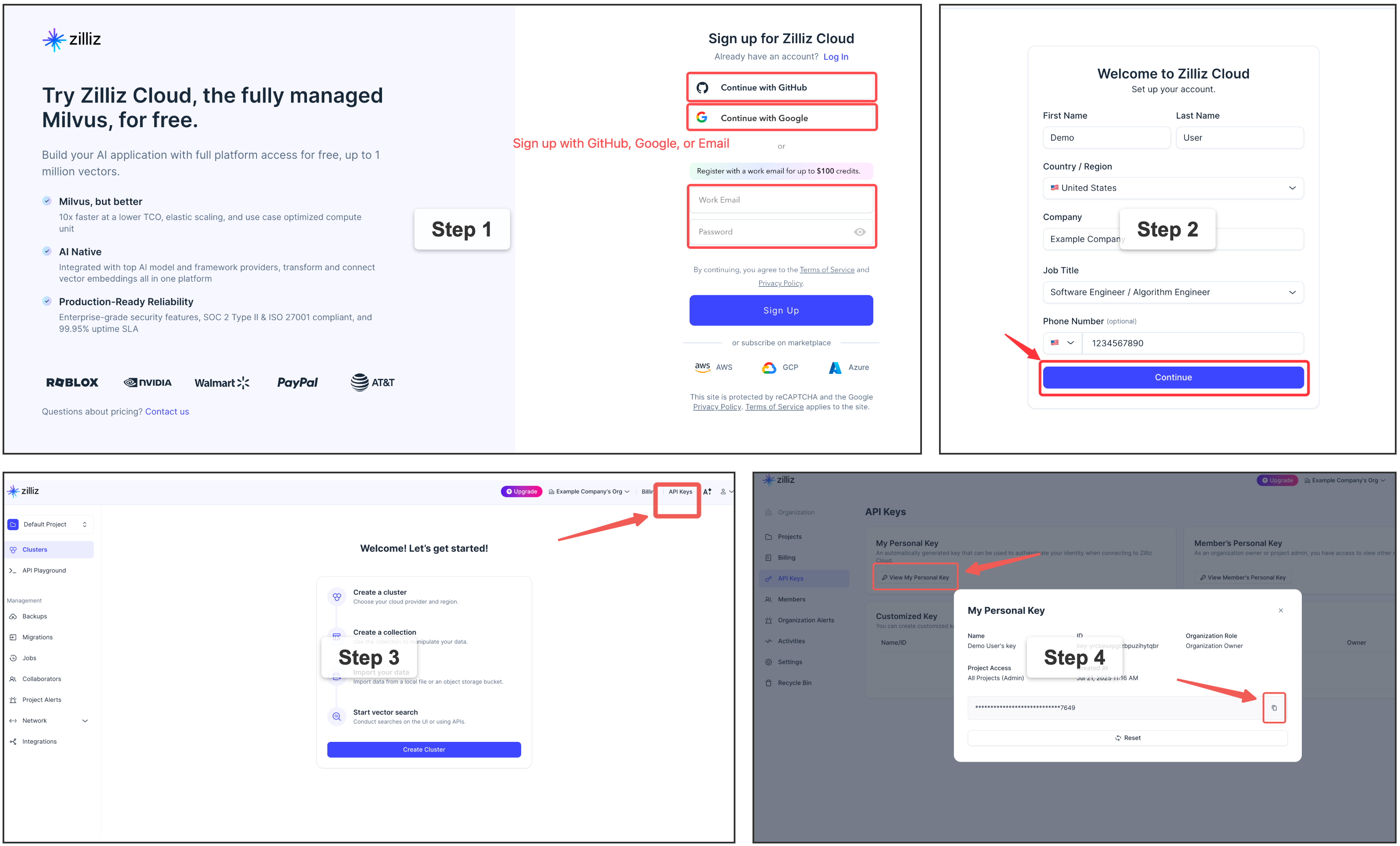\n\n\n\n\nUse OpenAI instead of the local model?\n\nSet the embedding provider to OpenAI and export your key — no model download:\n\n```toml\n[embedding]\nprovider = \"openai\" # instead of the default local \"onnx\"\n```\n\n```bash\nexport OPENAI_API_KEY=sk-...\n```\n\n\n\n## ✨ Features\n\n- **🗂️ One file-like interface, any source.** Whatever the source or format, it\n becomes a single file-like tree under a stable URI. Agents already speak shell,\n so there's no new query language and no per-source SDK — the same handful of\n verbs reach everything, and what you learn once carries across every connector.\n- **🌐 Your whole workspace, one interface.** Stop wiring a separate context\n harness for every scenario. Memory, code, docs, chat, tickets, databases — MFS\n unifies your entire working context, with its history and state, into one\n search-and-browse interface.\n- **🔍 Search and browse, two legs of one loop.** Hybrid semantic + keyword\n search locates fast across huge volumes; progressive browse then narrows to the\n exact bytes or rows. Together they lift precise recall *and* cut token spend —\n you pull in only what matters, and never trust a hit until you've reopened it.\n- **🛡️ Local and production, equally at home.** Run fully local and offline, or\n at production scale — neither is an afterthought. Every component is swappable\n and independently scalable, so the same MFS moves between the two by\n configuration alone. The index is derived and crash-safe: upstream stays the\n source of truth, so you can delete it and rebuild from the original sources,\n losing nothing.\n- **🤖 Agent-native.** Built for how agents actually work — especially context\n and memory management — so it slots into any agent setup. And when you're\n building an agent of your own, you can build it on top of MFS too.\n\n## 🤖 Build agent applications on top of MFS\n\nBeyond using MFS through an agent in your daily work, you can build **on** it —\ntreat MFS as the retrieval/context **base layer** your own agent application sits\non. The robust index pipeline and the broad connector catalog are already handled:\nyou never touch embeddings, the vector store, or per-source plumbing — you point\nat MFS and focus on the app on top.\n\n```text\n┌──────────────────┐ ┌──────────────────┐ ┌──────────────────┐\n│ agents │ │ your app code │ │ your skills/MCP/ │\n│ → skills + CLI │ │ → SDK (Py / TS) │ │ plugins → CLI │\n│ (use directly) │ │ (BUILD ON IT) │ │ (BUILD ON IT) │\n└────────┬─────────┘ └────────┬─────────┘ └────────┬─────────┘\n │ │ │\n └──────────────────────┼──────────────────────┘\n ▼\n┌────────────────────────────────────────────────────────────────┐\n│ MFS — CLI · SDK · HTTP /v1 │\n└───────────────────────────────┬────────────────────────────────┘\n │\n ▼\n┌────────────────────────────────────────────────────────────────┐\n│ index pipeline · chunking · embedding · vector DB · caches │\n│ a catalog of source connectors (MFS owns all of this) │\n└────────────────────────────────────────────────────────────────┘\n```\n\n- **SDK** — call the generated Python / TypeScript clients under\n [`sdks/`](sdks/) straight from your application code (long-running daemons,\n services, language runtimes without a shell).\n- **CLI** — call the `mfs` command to build your own **skills**, **MCP servers**,\n or **plugins** on top of the same surface.\n\n### 🧩 Examples: well-known projects, rebuilt on MFS\n\nEvery example under [`examples/`](examples/) replicates a well-known project on\ntop of MFS — the same capability, in a fraction of the code — because MFS\nalready owns the part that used to be the hard part for each of them:\ningestion, chunking, embedding, the vector store, and hybrid search across many\nsource types. What's left is thin glue, or a single skill describing a strategy.\n\n- [`claude-context`](examples/claude-context/) — a replica of\n [claude-context](https://github.com/zilliztech/claude-context) (\"make the\n codebase the context for any coding agent\"): an MCP server exposing\n `search` + `read` over MFS, about 60 lines.\n- [`deep-research-skill`](examples/deep-research-skill/) — the \"reason and\n search over private data\" job [deep-searcher](https://github.com/zilliztech/deep-searcher)\n does as a standalone framework, done here as a single skill on top of\n `mfs-find` — no vector-DB glue, no provider matrix, no custom\n retrieval-loop code.\n- [`open-tag-skill`](examples/open-tag-skill/) — a self-hosted homage to\n [Claude Tag](https://www.anthropic.com/news/introducing-claude-tag),\n Anthropic's hosted `@Claude` Slack teammate: `@mention` a bot in Slack —\n `@OpenClaude` or `@OpenCodex` — and it gathers authorized MFS context and\n runs the task on a CLI agent backend.\n\n\n\nSee [`examples/README.md`](examples/README.md) for the full list, or each\nexample's own README for its install command and walkthrough.\n\n## 🗺️ Roadmap\n\n- **Multiple processing profiles** — run different sources through different\n pipelines from one server: a code-tuned embedding model for your repos, a\n multilingual one for your docs. Because models differ in dimension and vector\n space, each profile maps to its own collection (a single one can't mix them),\n and you search within a profile or across all.\n- **Multi-user credentials and access control** — per-user secrets and\n permissions, so a shared or hosted MFS can serve many users safely.\n- **A wider connector catalog** — the set of sources keeps growing.\n\n## 🙏 Acknowledgements\n\nMFS is shaped by several related projects:\n\n- [claude-context](https://github.com/zilliztech/claude-context),\n [memsearch](https://github.com/zilliztech/memsearch), and\n [deep-searcher](https://github.com/zilliztech/deep-searcher) — earlier\n Zilliz code-search, memory-search, and deep-research efforts whose\n community feedback shaped MFS's agent-facing direction.\n- [VKFS](https://github.com/ZeroZ-lab/vkfs) — a sister exploration\n of a Unix-like interface for agent access to vector-backed\n knowledge.\n\n## ⚖️ License\n\nApache-2.0. See [LICENSE](LICENSE).\n"}


