
mcp server
autopilot
Terminal-based AI coding agent that can reason, execute tools, browse the web, and modify code in real time. Built from scratch with support for MCP servers, hooks, and persistent sessions for fully e
Set up
Runs on your computer. Pick your agent and operating system.
Before you start
- uv (`curl -LsSf https://astral.sh/uv/install.sh | sh`)
{
  "mcpServers": {
    "autopilot": {
      "command": "uvx",
      "args": [
        "autopilot-agent"
      ]
    }
  }
}
same format Cursor, GitHub Copilot CLI, Junie, JetBrains AI Assistant, Augment (Auggie CLI), Factory Droid, Kiro, Devin CLI +12
Values in angle brackets are placeholders. Restart Claude Desktop after editing its config.Claude Desktop docs
README
synced Oct 22, 2026Autopilot — AI Coding Agent
Demo Video: Watch Autopilot in Action
A terminal-based AI agent that understands entire codebases, executes complex multi-step tasks, manages long-running workflows, and operates autonomously within controlled safety limits. Built from scratch in pure Python, so no LangChain, and no abstractions you don't control.
System Architecture
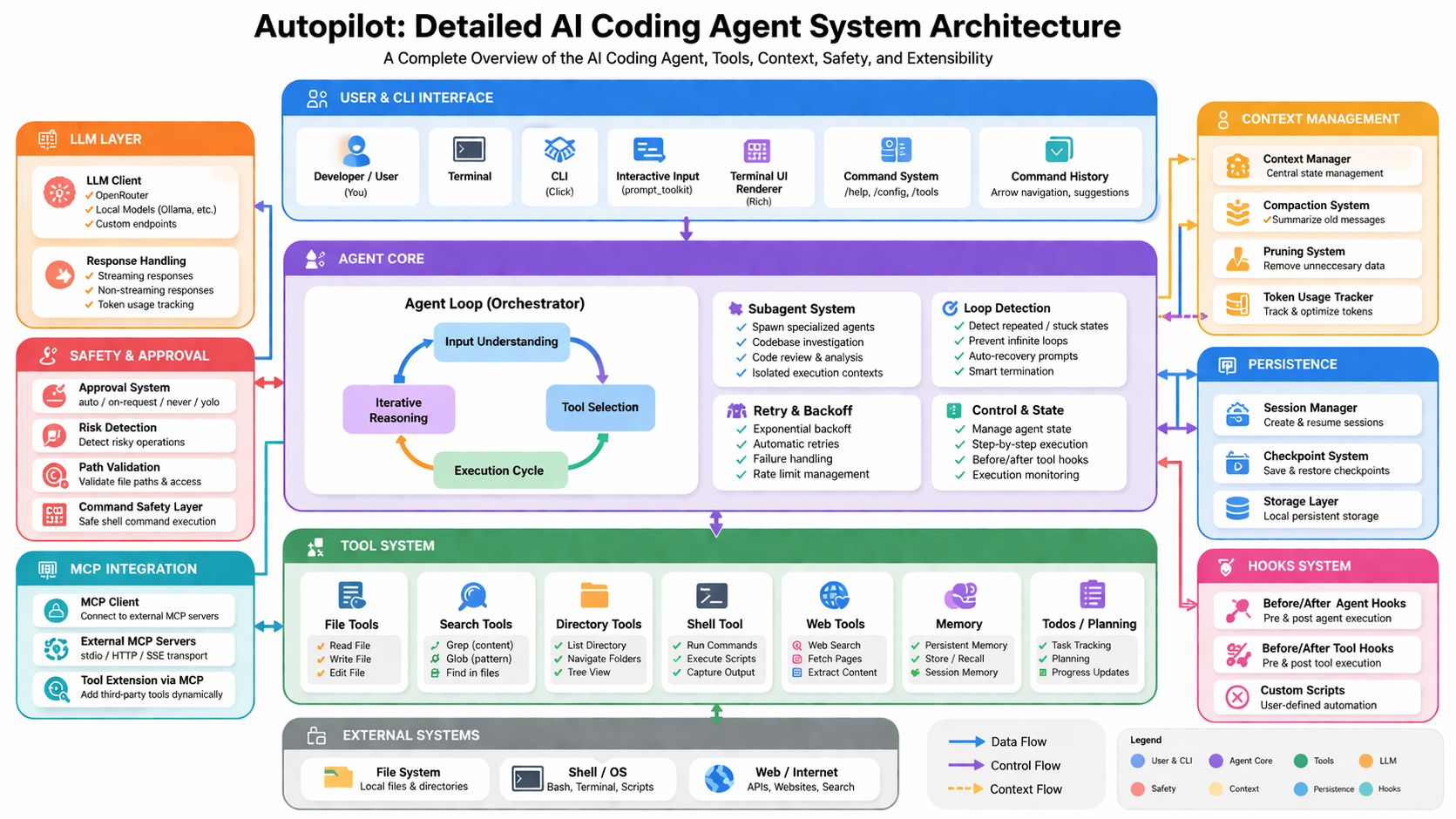
The architecture is organised into seven layers that communicate through well-defined data, control, and context flows:
- User & CLI Interface — terminal input, prompt_toolkit, command history, Rich-rendered output
- Agent Core — the orchestration loop, subagent system, retry/backoff, loop detection, and execution state
- Tool System — every environment interaction is a typed tool call; no raw side effects
- LLM Layer — OpenRouter, local models (Ollama/LMStudio), custom endpoints, streaming and non-streaming
- Safety & Approval — risk detection, path validation, shell safety, approval policies
- Context Management — compaction, pruning, token tracking, continuity across long sessions
- Persistence — session manager, checkpoint system, local storage layer
Overview
Autopilot implements a complete agent system from first principles:
- Custom agent loop with full execution control
- Typed tool calling system with pre-execution validation
- Context management — compaction and pruning for long sessions
- Session and checkpoint persistence — save, resume, restore any state
- Subagents for isolated execution of complex sub-workflows
- MCP-based extensibility — connect any external tool server
- Safety and approval controls at every execution boundary
The system runs continuously until a task is completed or safely terminated, maintaining correctness and avoiding uncontrolled behaviour throughout.
Installation
Install from PyPI:
pip install autopilot-agent
PyPI page: https://pypi.org/project/autopilot-agent/
Configuration
Create a .env file in your project root. Choose one of the following provider options.
Option 1 — OpenRouter
OPENROUTER_API_KEY=your_api_key
BASE_URL=https://openrouter.ai/api/v1
Option 2 — Local model (Ollama, LMStudio, or any OpenAI-compatible endpoint)
BASE_URL=http://localhost:11434/v1
Usage
autopilot
Starts the interactive CLI. Type a task in plain English and the agent takes it from there.
Agent Loop
The core execution loop is fully custom-built. On each iteration it:
- Interprets user intent and decomposes the task into steps
- Selects the appropriate tool from the registered tool system
- Validates arguments before execution
- Executes the action and captures structured output
- Updates context, checks for loop conditions, and decides the next step
The loop runs until the task is marked complete, a safety condition is triggered, or the user interrupts.
Tool System
All environment interaction is done strictly through tools — no direct filesystem or shell access outside the tool boundary. This makes every action auditable, approvable, and reversible.
File operations
| Tool | Description |
|---|---|
read_file | Read file contents with line range control |
write_file | Create or overwrite a file |
edit_file | Precise string replacement within a file |
Search and navigation
| Tool | Description |
|---|---|
grep | Content search with pattern matching |
glob | File discovery by pattern |
list_dir | Directory listing with tree view |
Execution
| Tool | Description |
|---|---|
shell | Run commands, scripts, and capture output |
Web
| Tool | Description |
|---|---|
web_search | Search the web |
web_fetch | Fetch and extract content from URLs |
Planning and memory
| Tool | Description |
|---|---|
todos | Task tracking with priority and status |
memory | Persistent key-value store across turns |
Context Management
Designed for large codebases and long-running sessions where the raw conversation history would exceed the model's context window.
Compaction summarises older interactions into a dense representation that preserves meaning without keeping every raw token. Pruning removes tool outputs that are no longer relevant to the current task. Token usage is tracked continuously, and compaction is triggered automatically before the context limit is reached. The agent maintains full task continuity without losing thread.
Safety and Approval System
Every action goes through a risk evaluation before execution. The approval policy controls how much autonomy the agent is given.
| Policy | Behaviour |
|---|---|
auto | Executes all tool calls without prompting |
on-request | Prompts for confirmation on flagged operations |
never | Blocks all tool execution — planning only |
yolo | No restrictions, no confirmations |
Additional safety mechanisms:
- Risk detection — flags destructive or irreversible shell commands before they run
- Path validation — prevents reads and writes outside the declared working directory
- Command safety layer — evaluates shell commands against a risk model before execution
- User confirmation — prompts on critical operations when
on-requestis active
Session and Checkpoints
The agent's full execution state — conversation history, tool call log, todos, memory, current task — can be saved and restored at any point.
- Sessions — save a complete session and resume it in a future run
- Checkpoints — snapshot the state mid-task and restore any previous snapshot
- Persistent continuity — long multi-day workflows survive restarts without losing context
Subagents
For tasks too complex for a single linear loop, Autopilot can spawn specialised subagents in isolated execution contexts. Each subagent gets its own tool set, context window, and task scope, then reports its result back to the parent agent.
MCP Integration
Autopilot supports the Model Context Protocol for dynamic tool extension without modifying the core system.
- Transport support — stdio and HTTP/SSE
- Dynamic registration — tools auto-register at runtime
- Schema forwarding — full input schemas passed to model
Loop Detection
The agent monitors its execution trace for repetitive or stuck behaviour and self-corrects before terminating safely.
Terminal UI
Built on Rich and prompt_toolkit.
- Streaming token output
- Structured tool panels
- Syntax-highlighted files
- Color-coded tool outputs
- Todos as structured tables
- Nested subagent outputs
Commands
| Command | Description |
|---|---|
/help | Show help |
/config | View configuration |
/model | Switch model |
/tools | List tools |
/mcp | Show MCP tools |
/stats | Session analytics |
/save | Save session |
/resume | Resume session |
/checkpoint | Create checkpoint |
/restore | Restore checkpoint |
/history | View history |
/exit | Exit |
Tech Stack
- Python 3.11+
- OpenRouter / Ollama / LMStudio
- Rich, prompt_toolkit
- MCP (Model Context Protocol)
- Fully custom agent architecture (no frameworks)
High-Impact Use Cases
Full codebase refactoring
"Migrate this entire project from JavaScript to TypeScript"
Feature implementation
"Add JWT authentication with refresh tokens"
Debugging
"Find why this API fails under load"
Code audit
"Audit for security issues and outdated dependencies"