
skill
before-after-ui-diff
Before/after screenshot diffing — pixel-diff two states of a page into one self-contained HTML review report.
Set up
Skills are installed by placing their folder where your agent loads skills.
The download comes from github.com/Tmuter/before-after-ui-diff itself, not from our server, so what you get is exactly what its author published.
Install instructions come from the README
README
synced Oct 22, 2026before-after-ui-diff


Before/after screenshot diffing. Capture before/after states of a page, pixel-diff them, and get one self-contained HTML report to sign off each UI change.
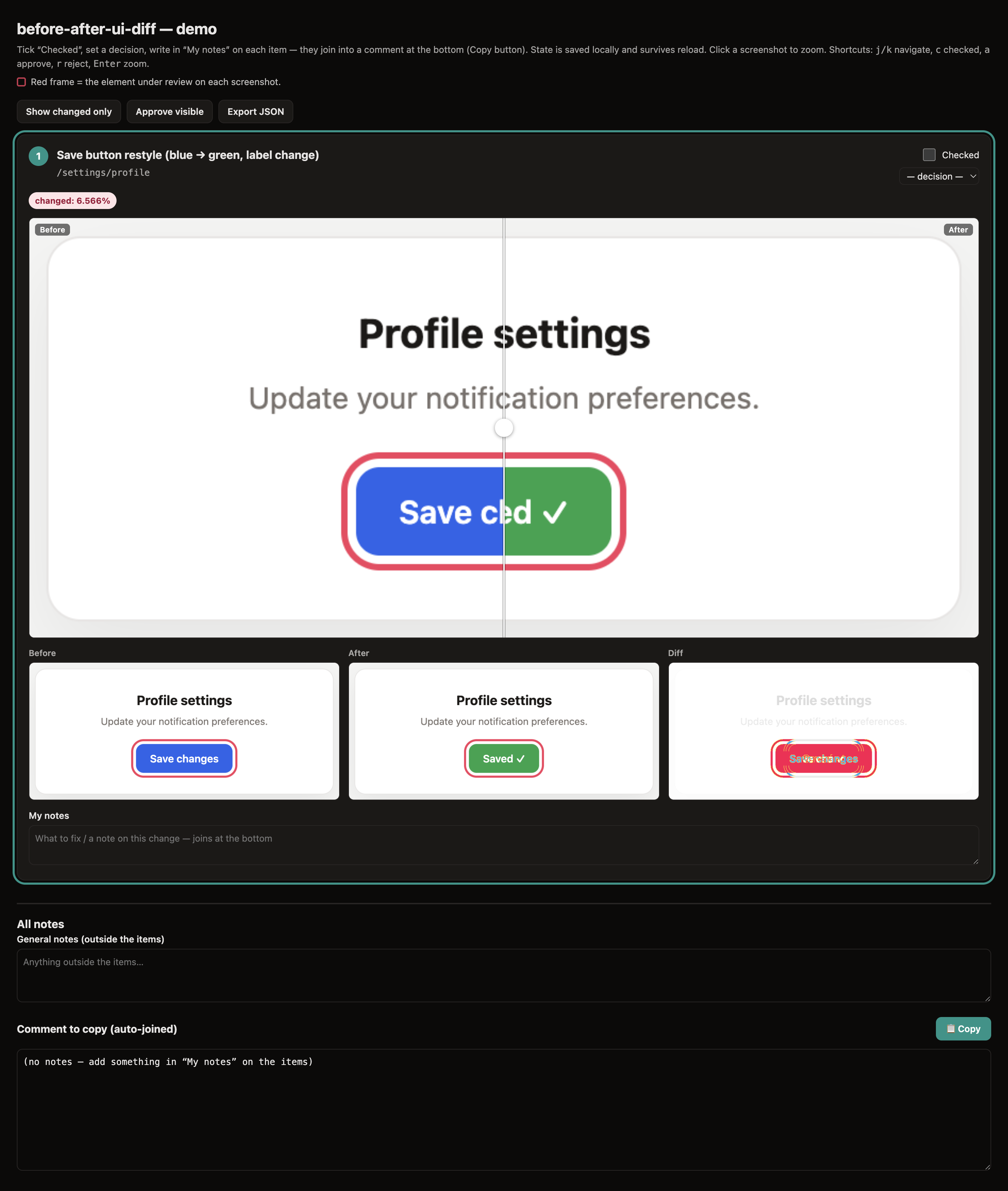
before-after-ui-diff is the picky reviewer that sits between "the change is done" and "ship it." After you (or an AI coding agent) make a batch of UI edits, point it at a list of changes and it produces one portable .html: a before/after slider, a pixel-diff column, auto-pass for rows that didn't actually move, and per-row decision + notes you tick off while reviewing.
It is not an assertion-based snapshot suite. Playwright/Percy fail CI when pixels change. It's the opposite: a human-in-the-loop review aid that shows you what changed and lets you decide.
Why
- One artifact, zero infra. The report is a single
.htmlwith images base64-inlined and all state inlocalStorage. Open it, review, share the file. No server, no DB, no account. - Background capture. A dedicated Chrome with its own profile screenshots pages over the DevTools Protocol — in the background, without stealing your foreground or mouse. You keep using your normal browser.
- Low-noise diffs. A deterministic-render prelude freezes animations, the caret, and scroll behavior, and waits for fonts + two frames before capturing — so the diff shows real changes, not font-swap jitter.
- Almost dependency-free. Only
pixelmatch+pngjs. Everything else uses Node's built-in globalWebSocket+fetch.
Requirements
- Node ≥ 22.4.0 (uses the unflagged global
WebSocketclient +fetch) - Google Chrome or Chromium
- A desktop session for the one-time interactive login — the capture half is not designed to run fully headless. (The diff + report half needs neither Chrome nor a session.)
Install
As a Claude Code skill (recommended). Clone it into a skills directory — it then auto-triggers when you ask for a "before/after report", no command needed:
git clone https://github.com/Tmuter/before-after-ui-diff ~/.claude/skills/before-after-ui-diff
cd ~/.claude/skills/before-after-ui-diff && npm install   # pixelmatch + pngjs, for the diff step
Use a project's .claude/skills/ instead of ~/.claude/skills/ to scope it to one repo.
Standalone / as a dependency. npm i before-after-ui-diff then npx before-after-ui-diff <manifest> (or the short ui-diff alias after a global install), or clone anywhere and run the scripts directly.
Quickstart — see it work in 30 seconds (no app, no Chrome, no login)
The diff + report half is fully standalone — run it from the cloned repo:
# 1. pixel-diff two screenshots → a diff PNG + JSON verdict
node diff-images.mjs examples/before.png examples/after.png /tmp/diff.png

# 2. build a report from the example manifest
node build-report.mjs examples/sample.json /tmp/report.html

open /tmp/report.html   # macOS · use xdg-open on Linux
(Installed as an npm dep instead? Prefix the script paths with node_modules/before-after-ui-diff/.)
Full before/after pipeline
# 1. Launch the dedicated capture browser (once per machine). Log in in the
#    window that opens — the session persists in the profile across runs.
bash cdp-launch.sh

# 2. Write a manifest (see below), then run the one-command pipeline:
node verify-ui.mjs my-review.json        # capture → diff → suggest → report
#   └─ writes my-review.html next to the manifest

# 3. Open my-review.html and review.
verify-ui.mjs (also exposed as the before-after-ui-diff / ui-diff bin) captures every row's before/after in parallel, pixel-diffs each pair, auto-passes the unchanged ones, tries to point at the changed element, and renders the report.
Manifest
One row per user-perceived change (not per file). You author title/where/URLs; the pipeline fills the diff fields.
{
  "title": "Settings page — review",
  "id": "settings-2026-02-14",
  "capture": { "w": 1440, "h": 900, "scale": 2, "theme": "light", "wait": 500 },
  "rows": [
    {
      "id": "a1",
      "title": "Save button restyled",
      "where": "/settings → Profile",
      "beforeUrl": "http://localhost:3001/settings",
      "afterUrl":  "http://localhost:3000/settings",
      "before": ".ui-diff/a1-before.png",
      "after":  ".ui-diff/a1-after.png",
      "sel": "[data-ui-diff='save-button']",
      "note": "needs a logged-in session"
    }
  ]
}
| Field | Meaning |
|---|---|
id | unique per report → namespaces its localStorage (decisions/notes/checks). Falls back to title. |
lang | optional <html lang> (default en). |
strings | optional map overriding any UI string — this is how you localize the report (supply your own table). |
capture | global capture defaults; any row may override via row.capture. |
beforeUrl / afterUrl | pages the capturer navigates. |
before / after | output PNG paths; inlined as base64 into the report. |
diff / diffStats / suggestedSelector | filled by the pipeline — don't hand-author. |
sel | clip the shot (and diff) to this element's box. Strongly recommended — full-page shots make noisy diffs. |
clicktext / outline / outlinetext / hide | capture helpers (open a disclosure, frame an element, hide a selector). |
frame | default on — red frame around the changed element on both shots (identical → never a false diff). Rings the row's own sel by default (clip auto-pads for context); set to a selector to ring a specific element inside a wider sel (e.g. sel: ".card", frame: "[data-ui-diff='save']"). false (row or capture.frame) disables. |
note | read-only ℹ️ context line you show the reviewer (a caveat). Not their input field. |
Tip: add a stable hook (data-ui-diff="save-button") to the changed component and clip to it (sel: "[data-ui-diff='save-button']"). Clipped diffs are far quieter than full-page (layout shifts, sticky headers, and dynamic timestamps all flip pixels).
Capture options (capture / row.capture)
w h scale wait theme (light/dark) · themeKeys (which localStorage keys get the theme; default ["theme","color-theme","ui-theme"]) · seed ({key:value} localStorage seeded before nav — e.g. dismiss a cookie banner) · hideDevOverlays (default true; hides Next.js dev portals/toasts — harmless elsewhere) · readySel · sel clicktext outline outlinetext hide · frame (default true; red frame around the changed element — true rings sel with a padded context crop, or pass a selector to ring a specific element inside a wider sel; false disables).
Security ⚠️
- The generated
.htmlembeds full-resolution screenshots of whatever your logged-in browser rendered. It can contain PII, customer data, or secrets that were on screen. Treat the report as sensitive — never paste it into a public issue or share it casually. The working dir.ui-diff/is git-ignored by default for this reason. - The capture browser uses a dedicated profile logged into your test/account, and its DevTools port is bound to loopback only (
127.0.0.1) with a single scoped allowed-origin. Don't widen it (no--remote-allow-origins=*): any page that can reach the port could otherwise drive that browser and read its session cookies.
Environment variables
| Var | Default | What |
|---|---|---|
CDP_PORT | 9333 | DevTools debugging port |
CDP_CONCURRENCY | 4 | parallel capture tabs |
DIFF_CONCURRENCY | 4 | parallel diff jobs |
PIXELMATCH_THRESHOLD | 0.1 | per-pixel colour tolerance (0–1) |
UI_DIFF_PASS_PCT | 0.02 | % changed pixels at/below which a row auto-passes |
CHROME_BIN | — | explicit Chrome/Chromium path (skips auto-detection) |
UI_DIFF_PROFILE | ~/.ui-diff-cap-profile | capture browser profile dir |
Localization
The report is English out of the box. Override any string via manifest.strings — that's the locale hook:
{ "lang": "de", "strings": { "checked": "Geprüft", "exportJson": "JSON exportieren", "copied": "Kopiert ✓" } }
Files
verify-ui.mjs orchestrator · cdp-launch.sh launches the capture browser · cdp-batch.mjs parallel capture · cdp-shot.mjs one-off shot · diff-images.mjs pixel diff · suggest-element.mjs maps a diff bbox → selector · build-report.mjs renders the HTML.
License
MIT © Tomasz Muter