
Set up
Skills are installed by placing their folder where your agent loads skills.
The download comes from github.com/skykim/cad-image-to-3d itself, not from our server, so what you get is exactly what its author published.
Install instructions come from the README
README
synced Oct 25, 2026cad-image-to-3d
A Claude Code skill that turns CAD drawing images (2D orthographic views) into 3D models (editable CadQuery code and STEP) and loads them into Unity as a ready-made scene, entirely from the command line.
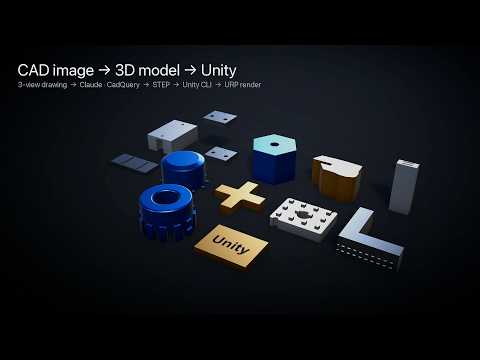
3-view drawing ──► Claude writes CadQuery ──► re-draws its own model and compares
      ──► feature audit (counts holes, slots, teeth...) ──► STEP
      ──► mesh (Y-up, metres) ──► Unity CLI: import into your project → layout scene
Why
Engineering intent still travels as 2D drawings. This skill reconstructs the 3D part as CadQuery code (editable, parametric) and STEP, checks itself the way an engineer would, and loads the parts into Unity without anyone opening the Editor.
- Self-refinement loop. It follows the inference-time self-refinement protocol from the Ortho2CAD paper: one-shot code → fix execution errors → render the model back into a 3-view drawing with the benchmark's own renderer → compare with the input → revise (twice) → pick the best candidate from the drawings alone.
- Feature audit. A visual comparison barely notices a missing row of rivet holes, so every
case ends with an audit: the agent lists every hole, slot, notch, tooth and edge treatment
the drawing shows, with counts and patterns, cross-checks hole counts with an automatic
circle/dot counter (
scripts/features.py), compares the list with the final model and adds whatever is missing in an extra stage (loop3). Findings go intoaudit.mdandlog.md. - Real-world drawings. Besides benchmark-style 3-views it handles figures from handbooks,
manuals and shops: third-angle views, a profile view plus an isometric picture, plan views
with removed sections, dimension tables, notes such as
.050 THKor12X ⌀.144 THRU, and missing dimensions. Every assumed value is logged with its evidence. - Batch. A folder of drawings is split across parallel subagents.
- Scoring. With ground-truth STEP files it reports the official Ortho2CAD IoU, a scale-preserving IoU and bounding-box error.
- Unity, from the CLI. The parts land in your own project (or a new URP project it creates) at real scale, with a scene that lays them out on a labelled grid. An optional URP preview renders stills so you can check the result without opening the Editor.
Results
On all 300 drawings of the official Ortho2CAD test set (100 each from DeepCAD, Fusion 360 Gallery and ZeroToCAD1m). This skill was run with Claude Opus 5.5; the last row is the best result reported in the Ortho2CAD paper, which used GPT 5.5 with the same self-refinement loop:
| DeepCAD | Fusion360 | ZeroToCAD | All | |
|---|---|---|---|---|
| This skill, one-shot (Claude Opus 5.5) | 0.921 | 0.892 | 0.836 | 0.883 |
| This skill, after self-refinement (Claude Opus 5.5) | 0.935 | 0.905 | 0.891 | 0.910 |
| Ortho2CAD paper's best (GPT 5.5, self-refinement) | 0.846 | 0.817 | 0.726 | – |
Mean official IoU (1.0 = identical). 100% of outputs are valid CAD; 283/300 match the overall dimensions within 1%. Same test set and scoring code as the paper, but the loop is a reproduction run by Claude agents, not the paper's API script. The official IoU normalizes scale (size errors are invisible to it; the bounding-box check covers that) and under-scores symmetric parts whose principal axes are degenerate (pyramids, nuts). These numbers were measured without the feature audit, which is not part of the paper's loop; the skill skips the audit when asked to reproduce them.
The three drawings above, their ground truth and the code the skill wrote are in
examples/. See Reproduce the figure.
Install
As a plugin (recommended)
/plugin marketplace add skykim/cad-image-to-3d
/plugin install cad-image-to-3d@cad-image-to-3d
Or manually: copy skills/cad-image-to-3d/ to ~/.claude/skills/cad-image-to-3d/.
Then, once per machine, let Claude run (or run yourself):
bash skills/cad-image-to-3d/scripts/setup_env.sh
It creates a conda-forge environment (CadQuery, pythonOCC, cairosvg) under
~/.cache/cad-image-to-3d (or $CAD_IMAGE_TO_3D_HOME), clones the Ortho2CAD renderer at a
pinned commit and runs a smoke test.
Requirements: micromamba / mamba / conda, git · for Unity: a Unity 6 editor installed via Unity Hub (its URP template is used when a new project is created) · macOS tested (Windows / Linux paths are handled but untested).
Use
Just ask Claude, for example:
Convert the 3-view drawings in
./drawingsto STEP. Ground-truth STEP files are in./gt, so score them too.
Turn these drawings into CAD and load them into my Unity project at
~/Projects/Factory. They are in mm.
These are figures cropped from an aircraft maintenance handbook. Convert them to 3D and tell me which sizes you had to assume.
Always say what unit the drawings are in (mm, cm, m, inches, feet, or unit-less); if you
don't, Claude asks, and any part whose unit had to be read off the drawing or assumed is marked
in the summary. Models are built in the drawing's own units, and every STEP file in outputs/
is exported in millimetres after unit conversion, so CAD tools and Unity get the real size.
Mention where the drawings came from and their licence too; it is recorded with each part.
Under the hood:
| Step | Script |
|---|---|
| Stage drawings (and match ground truth) | scripts/prepare_batch.py |
| Run / render one stage (used by the agents) | scripts/o2c.py run |
| Count holes / circles for the feature audit | scripts/features.py |
| Collect STEP + code, score vs ground truth | scripts/collect.py |
| Load into a Unity project (existing or new) + layout scene | scripts/to_mesh.py, scripts/unity_install.py |
| Optional URP preview renders | scripts/unity_showcase.py |
Outputs land in the batch folder: outputs/<id>.step (mm), <id>.py, <id>_render.png,
summary.md/.csv, and unity/ (the meshes). The summary lists each part's unit and where it
came from (user / drawing / assumed), checks the model's bounding box against the overall
dimensions printed on the drawing (verified within 2% / mismatch / none printed), and lists
every part with a size mismatch or an uncertain unit under needs review; the Unity scene is saved in the project under
Assets/CadImageTo3D/<batch>/, preview stills in renders/.
Reproduce the figure
Everything behind drawing-vs-render.png is in examples/:
| Path | What it is |
|---|---|
drawings/<id>.png | The input drawings, the only thing the modelling agent saw |
ground_truth/<id>.step | Ground truth for scoring (unity_plate.py is the CadQuery source of the plate) |
cases/<id>/ | The code the skill wrote: exec0.py (one shot), loop1.py, loop2.py, final.py (selected), plus the unit and overall dimensions read off the drawing (unit.json, dims.json) |
replay.py | Puts the saved code into a batch folder and renders every stage, as a live run would |
make_figure.py | Rebuilds drawing-vs-render.png from the batch folder |
| id | Drawing from | One-shot IoU | Final IoU | Selected |
|---|---|---|---|---|
z2c_94 | ZeroToCAD1m test set | 0.815 | 0.985 | loop2 |
unity_plate | made for this repository | 0.913 | 0.955 | loop2 |
z2c_65 | ZeroToCAD1m test set | 0.999 | 0.999 | exec0 |
From the repository root, after setup_env.sh:
PY=~/.cache/cad-image-to-3d/env/bin/python
S=skills/cad-image-to-3d/scripts
W=./cad-image-to-3d-work

$PY $S/prepare_batch.py examples/drawings --work $W --gt-dir examples/ground_truth
$PY examples/replay.py --work $W
$PY $S/collect.py --work $W
$PY $S/unity_showcase.py --work $W --featured unity_plate --finish z2c_94=blue unity_plate=brass z2c_65=aluminium
$PY examples/make_figure.py --work $W
replay.py re-uses the saved code, so collect.py prints exactly the scores above. To run the
loop live instead, skip replay.py and ask Claude to run the cad-image-to-3d loop on the
staged batch in ./cad-image-to-3d-work. Scores then vary from run to run. The last two
steps need Unity 6; on an M-series Mac the whole sequence takes a
few minutes. unity_plate.step is committed because CadQuery text depends on the installed
fonts; regenerate it with $PY $S/o2c.py exec examples/ground_truth/unity_plate.py <out>.step.
The "Unity" plate is a 1.5 × 1.125 × 0.1875 plate with the word cut through, made for this repository so the loop is shown on a drawing that is in no training or test set.
The agents' notes (log.md in each case folder of a live run):
- exec0: Hollow cylinder r30 (z10-40, bore D30, top outer fillet 2, bore top chamfer 2) plus 12 radial teeth (8 wide, r26-32.5, z0-20). OK.
- loop1: Similar: overall silhouette, 12 teeth at 30°, bore circles, top fillet. Differences: input bore top is rounded (no chamfer slope in side views); body bottom edges at z=10 are filleted (rounded corners in hidden lines). Plan: fillet all body edges r2 before adding teeth, teeth r27-32.5. OK.
- loop2: Loop1 matches well. Remaining difference: the +x tooth has a small horizontal groove on its outer face (notch in front view, two lines in right view). Plan: cut a 2.4-deep, 4-tall groove on that tooth. OK.
- Selection: exec0 82, loop1 88, loop2 91 → loop2. Tool runs: 3. Errors: none.
- Convention: first-angle (Ortho2CAD-style labels/layout), same as renderer. Read: plate 1.5 × 1.125 × 0.1875, "Unity" cut THROUGH (front/right hidden lines span full thickness).
- exec0: Runs OK. Matches plate + through text. Differences: input letters bolder and slightly wider (~1.06 vs 0.98), text sits ~0.03 lower in top view.
- loop1: Bold font, width scaled to ~1.06, text shifted down ~0.03. Stroke weight matches; text still ~5% too large (197 vs 187 px wide) and ~2.5 px too high.
- loop2: Font size 0.45 → 0.427, y shift -0.03 → -0.044. Size/position now match within ~1 px; plate, thickness and through-cut hidden lines match.
- Selection: exec0 85 (regular weight, narrower, too high), loop1 90 (bold, ~5% too big), loop2 95 → loop2. Tool runs: 3 (+2 compares). Errors: none.
- exec0: Block 80 × 60 × 15 with chamfered vertical corners, central through hole d20, two corner half-round notches r4 at (30, 30) and (-30, -30), 4 × 3 grid of 6 × 6 × 5 studs. Ran OK.
- loop1: Silhouettes, stud grid, notches, central hole (hidden lines) and chamfers all match. No significant differences; code kept the same.
- loop2: Re-checked; no visible mismatch; code kept the same.
- Selection: exec0 95, loop1 95, loop2 95 (identical) → exec0. Tool runs: 3. Errors: none.
Regression tests for units and the size check (need the env from setup_env.sh, ~1 min):
$PY tests/test_units.py.
Changes
- STEP files are in millimetres. Previously the model's raw numbers were written under
CadQuery's default mm header, so STEP files from inch drawings came out 25.4× too small and
from metre drawings 1000× too small (the Unity meshes were right). Each part's unit is now
resolved once (the user's
prepare_batch.py --unit, else the agent's reading inunit.json) andcollect.pyscales the delivered STEP by it; meshes follow from the STEP with the fixed--unit-scale 0.001, so the two can no longer disagree. Scoring is unchanged: it still runs on the drawing-unit model (cases/<id>/final.step), the same units as the ground truth. - Absolute-size check without ground truth. The agent records the overall dimensions
printed on the drawing before modelling (
dims.json);collect.pycompares them with the final bounding box and flags mismatches. summary.md/.csvgain unit, unit source, size in mm, size check, flags and a source/licence note (prepare_batch.py --source-note).
Repository layout
.claude-plugin/          plugin.json, marketplace.json
skills/cad-image-to-3d/  the skill (SKILL.md, scripts/, references/, assets/unity/)
examples/                drawings, ground truth and saved runs behind drawing-vs-render.png
tests/                   regression tests (units, mm STEP, size check)
drawing-vs-render.png    README figure (rebuilt by examples/make_figure.py)
Credits and licence
Apache-2.0 (see LICENSE and NOTICE). The protocol follows Ortho2CAD (Joglekar et al., 2026); the IoU alignment function is adapted from CAD-Coder (Apache-2.0). The Ortho2CAD renderer is fetched from its repository at setup time and is not redistributed here.
The z2c_94 and z2c_65 drawings and ground truth come from the Ortho2CAD test set; their
models are from ZeroToCAD1m (Apache-2.0). Details in NOTICE.