
skill
cut-as-code
Open-source agentic video editing skills — an AI-powered alternative to Opus Clip and CapCut
Set up
Skills are installed by placing their folder where your agent loads skills.
The download comes from github.com/WhiteTowerAI/cut-as-code itself, not from our server, so what you get is exactly what its author published.
Install instructions come from the README
README
synced Oct 17, 2026Cut-as-code turns video editing into an inspectable, code-driven workflow you can drive with AI coding agents like Claude Code, Codex, and OpenClaw. The agent proposes and records editing decisions as readable files; you review them in browser pages and template galleries, approve the work, and then render the final videos — all free, open source (MIT), and with nothing uploaded to a cloud service.
The bundled Editor Hub outlives browser tabs and Agent/MCP sessions. Closing or refreshing a tab does not stop a project. Use Close Project in the Hub to release one runtime or Quit Editor Service to stop all runtimes; protected drafts and active work require confirmation. An idle runtime is eligible for reclamation after 30 minutes only when it has no connected event client, active operation, mutation lease, or recoverable draft. Reopening reconstructs it from authoritative Protocol V1 files and any permitted draft in Plugin data.
Plugin data is private state for the current OS user and is the Hub discovery trust root. The launcher rejects malformed, unsigned, stale, unresponsive, or challenge-mismatched locators. It does not claim to isolate the editor from another process that already has the same user's permission to rewrite Plugin data; that process is inside the local trust boundary and can also rewrite Plugin configuration and drafts.
- ✂️ Cut — reviewed keep/drop decisions and a compact first cut.
- 🎨 Color grade — candidate looks to review, then a baked LUT.
- 🎬 B-roll — reviewed visual cutaways from local media or Pexels.
- 💬 Captions — word-timed, preset styles with optional karaoke.
- 🃏 Content cards — titles, lower thirds, stats, quotes, and calls to action.
- ✨ Motion graphics — reviewed animations from the local recipe library.
- 📱 To TikTok/YouTube shorts — extract moments and reframe them for 9:16 vertical.
How It Works
Watch this 2-minute walkthrough to see how to interact with an AI coding agent and use cut-as-code skills to complete a video-editing workflow.
Demos
1. 2h video to TikTok/YouTube shorts
Prompt: For [video-path], use /video-understand, /video-to-shorts, /video-add-captions, and /video-add-content-cards.
Agent: Proposes short-form candidates, and displays captions and content cards with motion graphics for your review, and delivers the final edit.
Original video: Jensen Huang: NVIDIA GTC Taipei 2026 Keynote
2. Cut, caption & add graphics to a raw interview
Prompt: For [video-path], use /video-understand, /video-cut, /video-add-captions, and /video-add-content-cards.
Agent: Displays a few captions and content cards candidates for your review, then delivers the final edit.
Original video: Elon Musk : How to Build the Future
3. Color grading
Prompt: For [video-path], use /video-color-grade, and /video-edit-compare.
Agent: Displays a few candidate grading options for your review, then do the final grading.
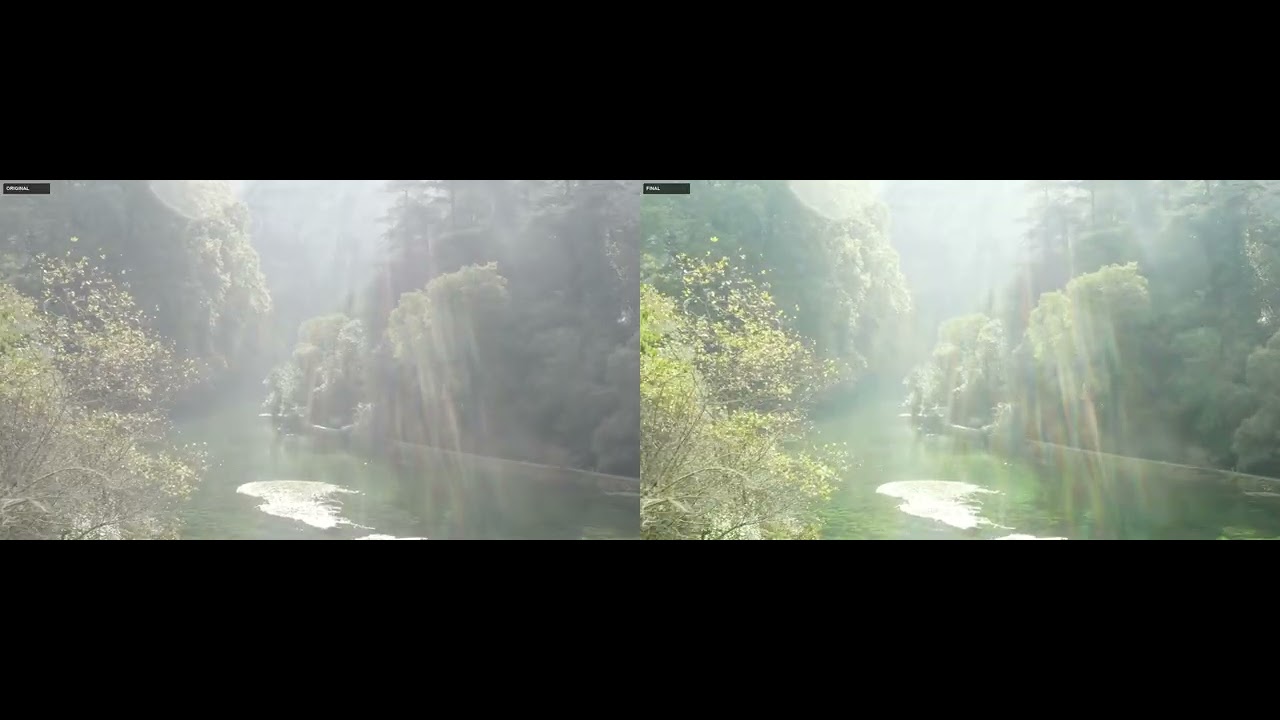
Original video: DJI MAVIC PRO 2 Ungraded Footage to practice grading
Skills
Each directory under skills/ is a self-contained agent skill. Its SKILL.md is both the agent playbook and the specification for that skill.
| Skill | Purpose |
|---|---|
/cut-as-code | Start or resume a project and route the requested work to the right skills. |
/video-understand | Probe media, generate a word-level transcript, analyze speech, and build reusable evidence for downstream skills. |
/video-cut | Create reviewed keep/drop decisions, generate the canonical timeline, render a compact first cut, and verify its boundaries. |
/video-color-grade | Assess footage, generate named looks, review the alternatives, record a selection, and bake or apply a portable LUT. |
/video-add-b-roll | Add selective transcript-timed visual cutaways from your own footage or Pexels, with reviewed candidates and recorded provenance. |
/video-add-captions | Render preset-driven, word-timed captions with optional karaoke highlighting. |
/video-add-content-cards | Add selective transcript-timed titles, lower thirds, statistics, lists, quotes, chapter cards, and calls to action. |
/video-add-motion-graphics | Adapt local animation recipes into reviewed overlays or full-frame timeline inserts. |
/video-to-shorts | Find and extract approved horizontal shorts, then optionally create reviewed 9:16 vertical deliveries. |
/video-edit-compare | Compare the original source with the actual final delivery on the original source clock. |
The bundled Editor Plugin opens projects in a local browser timeline for review and supported edits. Browse motion graphics recipes and the content card gallery when choosing a style.
Quick Start
Installation
Install the skills into your agent:
npx skills add WhiteTowerAI/cut-as-code
Or install them individually from ClawHub:
npm install -g clawhub
clawhub install @whitetowerai/<skill-name>
Prompting
With a prompt, point your agent at a video and name the skills you want. For example:
For [video-path], use /video-understand, /video-cut, /video-add-b-roll, /video-add-captions, and /video-add-content-cards.
Note
/video-understandis a prerequisite for/video-cut,/video-to-shorts,/video-add-captions, and/video-add-content-cards. Run it first so downstream skills share the same media metadata, transcript, analysis, and timeline./video-add-b-rollneeds a Pexels API key for stock footage. Put it inskills/video-add-b-roll/.envasPEXELS_API_KEY=<key>.
Project Layout
my-video-project/
|-- START-HERE.md
|-- input/                        # original user-provided media
|   `-- original-video.mp4
|-- review/                       # summaries, stills, contact sheets, previews
|   |-- 00-video-understanding/
|   |-- 01-cut/
|   |-- 02-color-grade/
|   |-- 03-b-roll/
|   |-- 03-content-cards/
|   |-- 04-edit-compare/
|   |-- 05-captions/
|   `-- 06-shorts/
|-- final/                        # main delivery and derivative shorts
|   |-- final-video.mp4
|   `-- shorts/
|       |-- short-001-horizontal.mp4
|       `-- short-001-vertical.mp4
`-- work/                         # intermediate files for the agents themselves
    |-- project.json
    |-- timeline.json
    |-- understand/
    |-- cut/
    |-- color-grade/
    |-- b-roll/
    |-- content-cards/
    |-- edit-compare/
    |-- captions/
    |-- shorts/
    |-- render/
    `-- cache/                    # disposable, regenerable files
Durable editing decisions and approval records must never live only in work/cache/.
work/project.jsonis the shared manifest: available sequences, active operations and dependencies, operation status, integer revision numbers,based_onrevision checks, review outputs, render contributions, and the final render path and status. Revision checks prevent an operation from silently rendering against stale upstream decisions.work/timeline.jsonis the canonical source-to-program mapping. Time values are in seconds and ranges are half-open[start_s, end_s). The V1 model stays small and inspectable — chronological clips from one source with linear positive speed, no OpenTimelineIO required.
Roadmap
Planned work — these items are not yet available.
- Make skills easier to install and update.
- Improve UI & UX design.
- Continue expanding the collection of composable video-editing skills.