
skill
great-generator
Generate realistic Synthetic enterprise data for Spark, Pandas, testing, demos, benchmarking, learning, and research.
Set up
Skills are installed by placing their folder where your agent loads skills.
The download comes from github.com/GreatDataLabs/great-generator itself, not from our server, so what you get is exactly what its author published.
Install instructions come from the README
README
synced Oct 25, 2026Great Generator







Generate Realistic Synthetic Data from Your Schema
Have a schema but no safe test data?
Use Great Generator to create realistic, synthetic, non-production data directly from your schema for development, QA, SIT, UAT, sandboxes, ETL validation, analytics, demos, and data engineering workflows.
from great_generator import generate_from_schema

schema = {
    "customer_id": "string",
    "customer_name": "string",
    "age": "int",
    "email": "string",
    "address": "string",
    "city": "string",
    "state": "string",
    "created_at": "datetime",
    "account_status": "string",
}

df = generate_from_schema(schema=schema, rows=1000)

print(df.head())
Great Generator is built for teams that already know their schema but cannot use production data in lower environments.
Great Generator creates synthetic data. It does not anonymize, mask, de-identify, or transform production records. Always follow your organization's privacy, security, governance, and compliance policies.
Architecture at a Glance
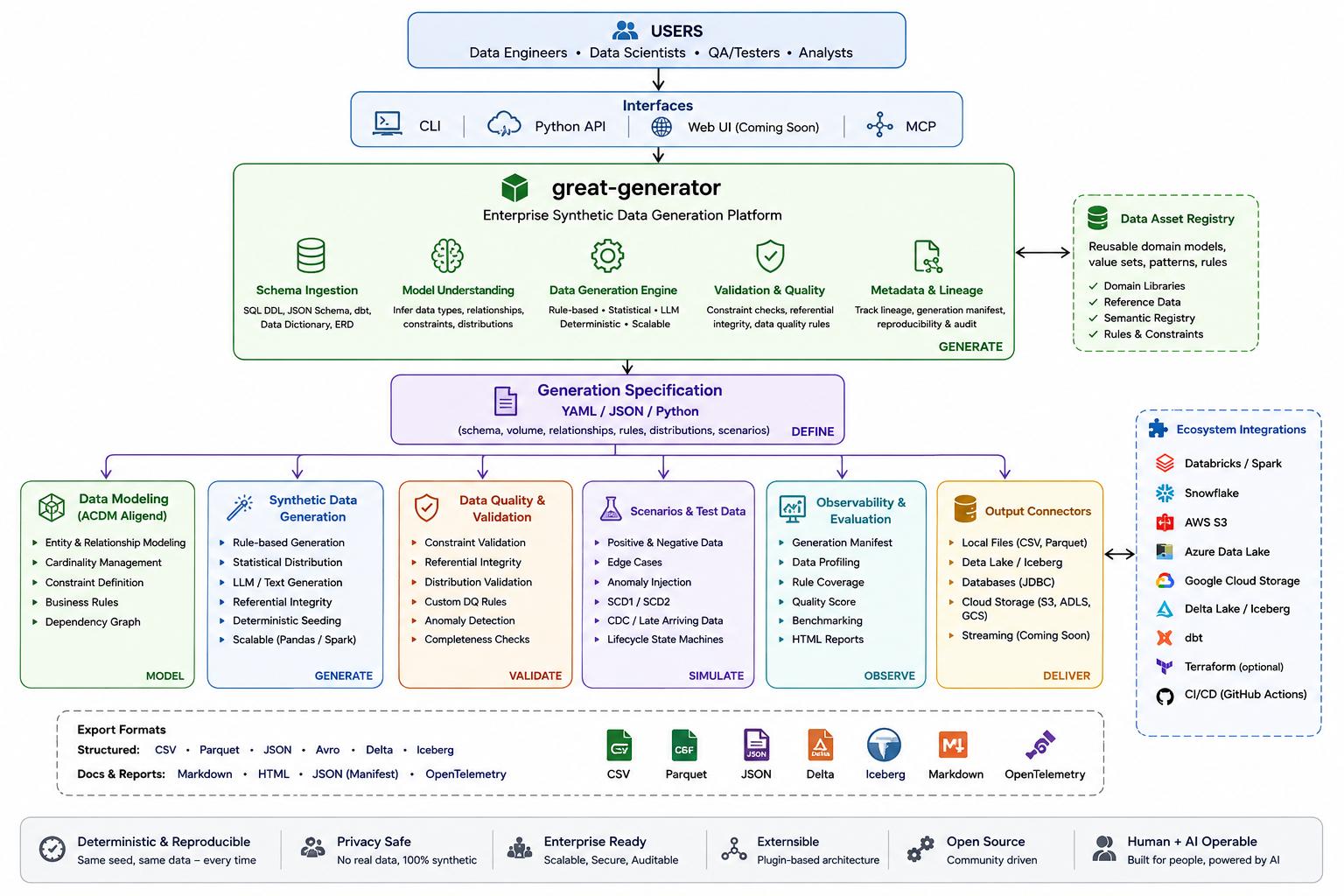
Great Generator is designed as a schema-first synthetic data platform: ingest schemas and metadata, understand fields and relationships, generate deterministic synthetic data, validate quality, and deliver DataFrames or files into the tools your team already uses.
Problem Statement
Real projects need production-like data outside production. Copying production records into development, QA, SIT, UAT, sandbox, demo, or performance-testing environments is often restricted because of privacy, security, PII, PHI, PCI, internal policy, or data governance concerns.
Teams still need realistic data to:
- test ingestion and transformation pipelines
- validate schemas, joins, and business rules
- exercise APIs and application services
- build dashboards and analytics models
- test data quality controls and failure paths
- run demonstrations, prototypes, and performance checks
- onboard developers without sharing sensitive records
Great Generator turns table-like schema definitions into usable Pandas or Spark DataFrames. You keep control of where those DataFrames are written.
Why Schema-Based Synthetic Data Matters
Most engineering teams do not begin with a blank domain. They already have a contract: column names, data types, a DataFrame, a Spark schema, or a table definition. generate_from_schema uses that contract and semantic field inference to generate values that are more useful than type-correct placeholders.
For example, these fields are recognized as name-like fields rather than generic strings:
customer_namecust_nameemployee_nameemp_namemember_namepatient_name
The same semantic layer recognizes IDs, email addresses, phone numbers, addresses, ages, dates, monetary values, quantities, statuses, and common lifecycle relationships.
Who This Library Is For
- Data engineers testing ETL, ELT, Spark, Delta, and lakehouse pipelines
- QA engineers creating repeatable positive, negative, and edge-case datasets
- Application developers testing APIs, databases, and integration contracts
- Analytics engineers validating models, joins, dashboards, and SQL transformations
- Platform teams provisioning safe lower-environment datasets
- Performance engineers creating environment-appropriate volume tests
- Researchers and ML engineers building reproducible prototypes without production records
- Students, speakers, and educators using ready-made domain packs for learning and demos
What You Can Do
- generate a realistic DataFrame from a schema
- use plain Python mappings, Pandas schemas, compact DDL, SQL DDL, JSON Schema, dbt metadata, data dictionaries, or PySpark schemas
- apply per-column ranges, categories, prefixes, patterns, weights, date windows, and null rates
- inspect the semantic generation plan before generating data
- validate generated values and cross-field consistency
- generate query-aware data with required values, partition dates, selectivity, and join coverage
- inspect permitted Databricks Unity Catalog metadata and generate single or related synthetic tables without reading source records
- return Pandas or Spark DataFrames for downstream writes
- generate custom relational parent-child tables with valid keys
- generate dimensional/star-schema examples from SQL DDL contracts
- save generation manifests for reproducibility and provenance
- run an optional MCP server for assistant-driven local generation workflows
- convert generated data to Hugging Face Datasets and generate dataset cards
- use prebuilt enterprise domain packs
- simulate CDC records, anomalies, SCD2 history, dimensional models, and Data Vault models
- export domain datasets to CSV, JSON, Parquet, and Delta
Agent Skills
Great Generator is a deterministic synthetic-data engine for engineering and testing
workflows. Optional Agent Skills help AI coding agents select the right API,
generate fixtures, validate results and return usable DataFrames and manifests.
They do not replace generate_from_schema or use an LLM to generate rows.
| Workflow skill | What you can ask |
|---|---|
schema-test-data | Generate checked fixtures from a schema, DDL, JSON Schema, dbt model or data dictionary |
query-test-data | Create data that exercises SQL filters, dates, groups and joins, with coverage evidence |
relational-test-fixtures | Build related tables and explicitly verify PK/FK integrity |
data-pipeline-test-pack | Create happy, boundary, opt-in invalid, CDC and SCD2 comparison cases |
schema-change-regression | Compare contracts, identify affected fixtures and plan requested regeneration |
databricks-test-data | Create Spark fixtures and safely prepare Delta/Unity Catalog test outputs |
For Databricks: "Generate 100K rows for this StructType," "Create CDC fixtures for my Delta MERGE," or "Create PK/FK-consistent Delta test tables." The skill first checks API support, driver versus distributed generation, validation and write safety; it does not assume a workspace or promise untested scale.
Start with installation and usage, the six skills, and the Databricks guide. The skills are optional repository/source-distribution resources, not automatically installed into an agent by pip. Audit and limitations distinguish implemented helpers, existing MCP tools and runtime-dependent checks.
AI advisor layer
Great Generator includes an optional advisor layer for design-time help with schema understanding, column tagging, and realism review. Advisors do not generate row data. They produce JSON artifacts, such as a GenerationPlan or ColumnTags, that you can inspect, edit, save, and review before generation.
Generation remains deterministic. Given the same schema, plan, seed, and arguments, the generated output stays the same. The default is advisor="none", which makes no model calls, reads no API keys, and works without network access.
from great_generator import generate_from_schema, infer_generation_plan

plan = infer_generation_plan("customer_id int, customer_name string", advisor="none")
df = generate_from_schema("customer_id int, customer_name string", rows=100, plan=plan)
Online and offline advisors are separate from generation. Anthropic, Ollama, and optional local Transformers models are supported in this layer, while OpenAI and llama.cpp are reserved as clear stubs for later implementation. See docs/advisors.md and Transformers Advisor for usage, caching, prompt safety, and plan review. Advisor contribution can also be recorded in manifest metadata for auditability.
Release Highlights
| Version | Release focus | What changed |
|---|---|---|
| 0.1.8 | Schema ingestion, optional MCP, SEO, org links, and architecture | Added JSON Schema ingestion, dbt schema.yml and manifest.json ingestion, CSV/YAML/JSON data dictionary ingestion, schema input docs, query-aware coverage examples, optional great-generator[mcp] support, local-file MCP tools, safety controls, tests, sitemap, robots.txt, SEO metadata, GreatDataLabs documentation links, and the architecture diagram. |
| 0.1.7 | SQL DDL contracts and query-aware generation | Added canonical contracts, parse_ddl(...), optional query-aware required values, partitioning, selectivity, relational join coverage, a runnable retail star-schema example, generation manifest guidance, determinism docs, benchmark methodology, and citation metadata. |
| 0.1.6 | AI advisor planning layer | Added optional design-time advisors for schema understanding, column tagging, and realism review. Added editable GenerationPlan and ColumnTags JSON artifacts, cached Anthropic and Ollama advisor calls, offline NoOp defaults, manifest metadata, and deterministic plan= support in generate_from_schema. |
| 0.1.5 | Schema-first docs and Spark database writes | Repositioned schema generation as the primary workflow. Added a schema input support matrix, Databricks and PySpark examples for Snowflake and Azure SQL, and documentation site updates. |
| 0.1.4 | PyPI author presentation | Added a PyPI-friendly Author section with project links. |
| 0.1.3 | PyPI metadata visibility | Updated package metadata so PyPI shows author and maintainer details more clearly. |
| 0.1.2 | Schema realism quality | Added semantic-field based schema generation, custom rules, validation reports, and realistic schema defaults. |
| 0.1.1 | Advanced generation APIs | Added anomaly labels, SCD2 history, recipes, CLI, dimensional models, and Data Vault models. |
| 0.1.0 | Initial public release | Added package identity, domain packs, Pandas and Spark engines, exports, CDC, anomalies, schema generation, and relational generation. |
Useful Guides
- Schema inputs
- JSON Schema ingestion
- dbt integration
- Data dictionary ingestion
- SQL contracts and DDL
- Query-aware generation
- Determinism and reproducibility
- Generation manifest
- Optional MCP server
- Hugging Face integration
- Transformers advisor
- Databricks Unity Catalog integration
- UC relational generation
- UC ingestion notebook generation
- UC schema snapshots and drift detection
- Website search discovery and SEO maintenance
- Provenance and safety notes
- Benchmark methodology
- Spark and database writes
Website and search discovery
The GitHub Pages site includes a sitemap and robots.txt for search discovery.
- Sitemap:
https://greatdatalabs.github.io/great-generator/sitemap.xml - Robots:
https://greatdatalabs.github.io/great-generator/robots.txt
See docs/SEO.md for the release checklist and sitemap maintenance steps.
Installation
pip install great-generator
Optional Spark and Delta dependencies:
pip install "great-generator[spark]"
pip install "great-generator[delta]"
pip install "great-generator[databricks]"
Optional advisor dependencies:
pip install "great-generator[ai]"
pip install "great-generator[anthropic]"
pip install "great-generator[ollama]"
pip install "great-generator[transformers]"
Optional Hugging Face ecosystem helpers:
pip install "great-generator[hf]"
pip install "great-generator[hf-full]"
Optional schema-ingestion dependencies for dbt schema.yml and YAML data dictionaries:
pip install "great-generator[dbt]"
pip install "great-generator[schema-ingest]"
Optional MCP dependency:
pip install "great-generator[mcp]"
pip install "great-generator[cloud]"
Install with a hyphen and import with an underscore:
import great_generator
The base package supports Python 3.9 and later and installs Pandas, NumPy, PyArrow, Faker, and SQLGlot for SQL DDL parsing. PySpark and Delta Lake remain optional.
Optional MCP server
Great Generator includes an optional MCP server so AI assistants can call selected tools such as schema-based generation, relational generation, SQL DDL parsing, query coverage validation, and local file export.
MCP support is optional. The core package does not require MCP dependencies.
pip install "great-generator[mcp]"
pip install "great-generator[cloud]"
Start the server:
great-generator-mcp
or:
python -m great_generator.mcp.server
The MCP server is a wrapper over existing public APIs. It does not introduce a new generation engine. It writes generated datasets to local files and returns row counts, file paths, schema summaries, previews, warnings, and manifest information. It does not send data to production systems and does not overwrite files unless overwrite=True.
flowchart LR
    A[MCP Client<br/>Claude Desktop, Cursor, VS Code, other clients] --> B[Great Generator MCP Server]
    B --> C[Safety Layer<br/>path checks, row limits, overwrite protection]
    C --> D[Tool Registry]
    D --> E[parse_ddl]
    D --> F[generate_from_schema]
    D --> G[generate_relational]
    D --> H[validate_query_coverage]
    D --> I[export_dataset]
    E --> J[Great Generator Core APIs]
    F --> J
    G --> J
    H --> J
    I --> J
    J --> K[Local Output Files<br/>CSV, JSONL, Parquet]
    J --> L[Manifest and Preview]
See docs/MCP_SERVER.md for client configuration, safety limits, output behavior, example prompts, and troubleshooting.
Quick Start: Generate Data from Schema
from great_generator import generate_from_schema

schema = {
    "customer_id": "string",
    "customer_name": "string",
    "age": "int",
    "email": "string",
    "address": "string",
    "city": "string",
    "state": "string",
    "created_at": "datetime",
    "account_status": "string",
}

df = generate_from_schema(schema=schema, rows=1000)
The default realism="realistic" mode produces name-like, email-like, address-like, date-aware, and business-oriented values when field semantics are recognized.
Example shape:
customer_id  customer_name  age  email                         city       state  account_status
CUST000001   Ava Johnson    34   ava.johnson@example.com       Austin     Texas       Active
CUST000002   Liam Patel     42   liam.patel@example.com        Seattle    Washington  Pending
Exact values vary. Pass an optional seed only when your test or experiment needs repeatable output.
Schema input options
Great Generator can generate synthetic data from several schema sources, including Python mappings, compact DDL strings, SQL CREATE TABLE DDL, Pandas schemas, PySpark schemas, JSON Schema, dbt metadata, and data dictionaries.
See docs/SCHEMA_INPUTS.md for the supported input matrix.
JSON Schema
from great_generator import generate_from_json_schema

json_schema = {
    "type": "object",
    "properties": {
        "customer_id": {"type": "integer"},
        "email": {"type": "string", "format": "email"},
        "status": {"type": "string", "enum": ["ACTIVE", "INACTIVE", "PENDING"]},
    },
}

df = generate_from_json_schema(json_schema, rows=1000)
dbt schema.yml or manifest.json
from great_generator import generate_from_dbt_schema, generate_from_dbt_manifest

df = generate_from_dbt_schema("models/schema.yml", model_name="customers", rows=1000)

from_manifest = generate_from_dbt_manifest(
    "target/manifest.json",
    model_name="customers",
    rows=1000,
)
Data dictionary CSV/YAML/JSON
from great_generator import generate_from_data_dictionary, load_data_dictionary

schema = load_data_dictionary("data_dictionary.csv")
df = generate_from_data_dictionary("data_dictionary.csv", rows=1000)
flowchart LR
    A[Schema Sources] --> B[Schema Normalization]
    A1[Python dict] --> A
    A2[SQL DDL] --> A
    A3[JSON Schema] --> A
    A4[dbt schema.yml] --> A
    A5[dbt manifest.json] --> A
    A6[Data dictionary] --> A

    B --> C[Generation Contract]
    C --> D[Existing Generation Engine]
    D --> E[Synthetic Data]

    F[Optional Query-Aware Inputs] --> D
    F1[required_values] --> F
    F2[partition_by] --> F
    F3[target_selectivity] --> F

    E --> G[Validation and Coverage Reports]
    E --> H[Exports]
All schema inputs are normalized into the existing generation path. No second generation engine is introduced.
Databricks Unity Catalog metadata-driven generation
If your schema and relationships already exist in Unity Catalog, Great Generator can inspect the metadata you are permitted to see and normalize it into the same generation contracts used elsewhere in the library. Metadata discovery does not read source table records.
from great_generator import (
    generate_relational_from_unity_catalog,
    inspect_unity_catalog_table,
)

snapshot = inspect_unity_catalog_table(
    "retail.sales.fact_orders",
    include_related=True,
    related_direction="parents",
    spark=spark,
)

datasets, report = generate_relational_from_unity_catalog(
    "retail.sales.fact_orders",
    include_related=True,
    rows={
        "dim_customer": 10_000,
        "dim_product": 1_000,
        "fact_orders": 100_000,
    },
    output="spark",
    spark=spark,
    return_report=True,
)
The integration supports bounded parent/child discovery, declared and explicit relationships, clearly labeled conservative inference, simple and composite key validation, Pandas or Spark output, metadata snapshots, schema drift reports, portable synthetic CDC events, and a review-first Databricks notebook builder. Generated notebooks keep writes disabled and never overwrite existing tables by default.
Start with the Unity Catalog guide and the offline-first notebook series. The Databricks SDK is optional; notebook users can pass the active spark session.
Next: Generate Related Tables from Your Schemas
Use generate_relational when your test environment needs several tables with valid primary-key and foreign-key relationships.
from great_generator import generate_relational

data = generate_relational(
    tables={
        "customers": {
            "schema": "customer_id int primary key, customer_name string, email string",
            "rows": 1000,
        },
        "orders": {
            "schema": "order_id int primary key, customer_id int references customers.customer_id, order_amount double, order_date date",
            "rows": 5000,
        },
    },
    engine="pandas",
)

customers_df = data["customers"]
orders_df = data["orders"]
The result is a dictionary of named DataFrames. Each order references a generated customer, and users remain free to write each DataFrame to CSV, Parquet, Delta, Snowflake, Azure SQL, or another destination.
customers_df.to_parquet("customers.parquet", index=False)
orders_df.to_parquet("orders.parquet", index=False)
Select engine="spark" in a Spark notebook to receive Spark DataFrames instead of Pandas DataFrames.
Query-aware generation
Great Generator can create synthetic data that contains the values, partition dates, and join paths needed by your SQL queries. This helps teams test SQL logic, partition pruning, joins, aggregations, and environment-specific performance behavior without using production data.
All query-aware options are optional. Existing generation behavior is unchanged unless you provide required_values, partition_by, target_selectivity, ensure_join_coverage, or query_profile.
df = generate_from_schema(
    schema=schema,
    rows=100_000,
    required_values={
        "region": ["SOUTH"],
        "product_type": ["CHECKING", "SAVINGS"],
    },
    partition_by={
        "column": "business_date",
        "values": ["2026-01-01", "2026-01-02", "2026-01-03"],
        "distribution": "balanced",
    },
    target_selectivity={
        "region": {"SOUTH": 0.25},
    },
)
For relational datasets, use table-qualified columns and ensure_join_coverage=True when fact rows must join to required dimension values.
Hugging Face integration
Great Generator can optionally integrate with the Hugging Face ecosystem. You can convert generated Pandas outputs to Hugging Face Datasets, convert related tables into DatasetDict objects, generate dataset cards for synthetic datasets, and use a local Transformers model as a design-time advisor.
pip install "great-generator[hf]"
pip install "great-generator[transformers]"
Convert generated data locally:
from great_generator import generate_from_schema, to_hf_dataset

df = generate_from_schema("customer_id int, email string", rows=1000, seed=42)
dataset = to_hf_dataset(df)
Use a local or cached Transformers model as a planning advisor:
from great_generator import generate_from_schema, infer_generation_plan

schema = "customer_id int, email string"
plan = infer_generation_plan(
    schema,
    advisor="transformers:google/flan-t5-small",
)

df = generate_from_schema(schema, rows=1000, plan=plan, seed=42)
The Transformers advisor runs at design time. It produces plans, tags, or reports. It does not generate row data. Hugging Face dependencies are optional, conversions are local, and Great Generator does not upload anything to the Hugging Face Hub automatically.
See Hugging Face Integration, Transformers Advisor, and examples/huggingface.
Platform examples
Great Generator includes examples for common data engineering environments:
- Pandas and local development
- Databricks and Delta Lake
- Microsoft Fabric Lakehouse
- Snowflake stage/COPY workflows
- Cloud storage paths such as S3, ADLS Gen2, and GCS
These examples show how to generate synthetic data from schemas, JSON Schema, dbt metadata, data dictionaries, relationships, CDC patterns, anomalies, and query-aware profiles, then write the generated DataFrames using the user's own runtime and storage configuration.
Start here:
| Platform | Folder |
|---|---|
| Pandas/local notebooks | examples/pandas |
| Databricks notebooks | examples/databricks |
| Unity Catalog metadata workflows | examples/databricks/unity_catalog |
| Microsoft Fabric notebooks | examples/fabric |
| Snowflake examples | examples/snowflake |
| Cloud storage examples | examples/cloud_storage |
See Platform Examples.
Optional cloud export helpers
Great Generator can write generated datasets to local files and, with optional cloud dependencies, to S3, ADLS Gen2, and Google Cloud Storage paths.
pip install "great-generator[cloud]"
from great_generator import export_dataset, generate_from_schema

df = generate_from_schema("customer_id int, email string", rows=1000)
export_dataset(df, "output/customers", format="parquet")
export_dataset rejects existing outputs by default. Pass overwrite=True or mode="overwrite" only when replacing files is intentional. Great Generator does not configure credentials or manage cloud permissions. Configure credentials using your platform's standard method.
See Cloud Exports.
Synthetic benchmark harness
Great Generator includes benchmark examples that generate repeatable synthetic datasets and SQL query templates for Databricks, Microsoft Fabric, Snowflake, and Spark-style environments.
These examples are not universal performance claims. Results depend on warehouse size, cluster configuration, storage layout, file format, statistics, clustering, caching, concurrency, and query engine settings.
The first implemented harness dataset is a retail star schema:
python benchmarks/datasets/retail_star_schema/generate_dataset.py --output output/retail_star_schema --format parquet --overwrite
See Benchmark Harness and benchmarks/.
Flagship Example: Retail Star Schema from SQL DDL
If you want a demo that feels closer to an analytics engineering or lakehouse workload, start with the retail star-schema example:
python examples/06-retail-star-schema/generate.py
python examples/06-retail-star-schema/validate.py
It parses a SQL DDL contract, generates related dimension and fact tables, applies deterministic retail behavior, validates primary keys and foreign keys, writes table-per-folder outputs, and creates a generation manifest.
dim_customer
dim_product
dim_store
dim_date
fact_sales
See examples/06-retail-star-schema.
Supported Schema Input Types
The table below reflects the current implementation, not the long-term roadmap.
| Schema Input Type | Example | Best For | Status |
|---|---|---|---|
| Plain Python mapping | {"name": "string", "age": "int"} | Fast schema-based generation | Supported |
| Rich mapping with inline metadata | {"age": {"type": "int", "min": 18}} | Embedded business rules | Partially supported through separate custom_rules; inline metadata is planned |
| Pandas dtype mapping | df.dtypes.to_dict() | Pandas and notebook workflows | Supported |
| Pandas DataFrame schema | empty or populated DataFrame | Preserve Pandas column dtypes | Supported |
| Compact DDL string | "id int, name string" | SQL-like and Spark-style definitions | Supported |
Full SQL CREATE TABLE DDL | CREATE TABLE ... | Database, warehouse, lakehouse, and contract-first teams | Supported for documented ANSI, Spark, and Databricks subset |
PySpark StructType | StructType([...]) | Databricks, Fabric, Synapse, EMR, Spark | Supported for common scalar types; nested complex generation is limited |
| PySpark DataFrame | empty or existing Spark DataFrame | Infer schema and Spark session | Supported |
TableSchema | library schema object | Typed library extensions | Supported |
DomainSchema | library domain metadata | Multi-table schema generation | Supported |
| JSON Schema | {"type": "object", "properties": ...} | APIs and data contracts | Supported through generate_from_json_schema for the documented v1 subset |
dbt schema.yml | models/schema.yml | Analytics engineering and dbt contracts | Supported through generate_from_dbt_schema |
dbt manifest.json | target/manifest.json | Compiled dbt project metadata | Supported through generate_from_dbt_manifest |
| Data dictionary CSV/YAML/JSON | data_dictionary.csv | Enterprise schema documentation | Supported through generate_from_data_dictionary |
| YAML dataset recipe | recipe.yml | Reusable generation jobs | Supported through generate_from_recipe |
| Column-name list | ["name", "age", "email"] | Very fast prototypes | Planned |
| SQLAlchemy model | ORM class | Backend and database teams | Planned |
| Pydantic model | BaseModel class | API contract workflows | Planned |
| Dataclass | typed Python dataclass | Typed Python workflows | Planned |
JSON, YAML, and TOML dataset recipes are separate from schema-source ingestion. Use generate_from_recipe for complete generation jobs and the schema-source functions when you want to generate from a schema contract.
Supported Schema Examples
1. Plain Python Dictionary
from great_generator import generate_from_schema

schema = {
    "employee_id": "string",
    "emp_name": "string",
    "email": "string",
    "employee_age": "int",
    "salary": "float",
    "hire_date": "date",
    "employment_status": "string",
}

employees = generate_from_schema(schema, rows=500, domain="hr")
2. Compact DDL String
Compact column definitions are supported when you want a fast one-table schema without table-level SQL metadata. Use full CREATE TABLE DDL when you want a canonical contract with table names, keys, constraints, and parser diagnostics.
from great_generator import generate_from_schema

customers = generate_from_schema(
    "customer_id string, customer_name string, age int, email string, balance decimal(12,2), created_at timestamp",
    rows=1000,
)
Spark-style struct<...> text is also accepted:
df = generate_from_schema(
    "struct<customer_id:string,customer_name:string,age:int,balance:double>",
    rows=1000,
)
3. Full SQL CREATE TABLE DDL
Use parse_ddl when your source of truth is database, warehouse, lakehouse, or Spark SQL DDL. It returns a canonical contract that preserves table names, column order, normalized types, primary keys, foreign keys, unique constraints, checks, defaults, comments, and selected Spark/Databricks storage metadata.
from great_generator import generate_from_schema, parse_ddl

ddl = """
CREATE TABLE sales.customers (
  customer_id BIGINT PRIMARY KEY,
  customer_name STRING NOT NULL,
  email VARCHAR(120) UNIQUE,
  signup_date DATE,
  created_at TIMESTAMP DEFAULT current_timestamp()
);

CREATE TABLE sales.orders (
  order_id BIGINT PRIMARY KEY,
  customer_id BIGINT NOT NULL,
  order_amount DECIMAL(12, 2),
  order_date DATE,
  CONSTRAINT fk_orders_customers
    FOREIGN KEY (customer_id) REFERENCES sales.customers(customer_id)
)
"""

contract = parse_ddl(ddl, dialect="databricks")
print(contract.fingerprint())
print(contract.tables["sales.orders"].foreign_keys[0].parent_table)
For one-table DDL, you can generate directly from the parsed contract:
customer_contract = parse_ddl(
    """
    CREATE TABLE customers (
      customer_id BIGINT PRIMARY KEY,
      customer_name STRING,
      email STRING,
      signup_date DATE
    )
    """,
    dialect="databricks",
)

df = generate_from_schema(customer_contract, rows=1000)
For multiple related tables, parsing support is complete for the documented constraint metadata. Existing simple single-column relationships can generate through generate_from_schema(contract, rows={...}); composite-key and cyclic relational generation are parsed today and planned for a later relational milestone.
Supported DDL subset today:
| Construct | Status | Notes |
|---|---|---|
One or more CREATE TABLE statements | Supported | Non-table statements are rejected |
| Schema-qualified names | Supported | Unquoted identifiers are normalized to lowercase; quoted identifiers preserve case and spaces |
| Scalar SQL, Spark, Databricks types | Supported | INT, BIGINT, STRING, VARCHAR, DECIMAL, DOUBLE, BOOLEAN, DATE, TIMESTAMP, TIMESTAMP_NTZ, BINARY |
| Inline and table primary keys | Supported | Single and composite metadata is preserved |
| Inline and table foreign keys | Supported | Single, composite, multiple, and self-referencing metadata is preserved |
| Unique constraints | Supported | Inline and table-level |
| Check constraints | Supported as metadata | Used for contract visibility, not row-level enforcement yet |
| Defaults and comments | Supported as metadata | Preserved for inspection and planning |
USING DELTA, PARTITIONED BY | Supported as metadata | Useful in Databricks/Spark contracts |
| Identity/generated columns, CTAS, unsupported types | Explicit diagnostics | Strict mode fails; permissive mode only warns when safe |
from great_generator.contracts import ContractParseError

try:
    contract = parse_ddl(ddl, dialect="databricks", strict=True)
except ContractParseError as exc:
    for diagnostic in exc.diagnostics:
        print(diagnostic.construct, diagnostic.message)
4. Pandas dtype Mapping
import pandas as pd

from great_generator import generate_from_schema

sample_df = pd.DataFrame(
    {
        "customer_id": pd.Series(dtype="string"),
        "customer_name": pd.Series(dtype="string"),
        "age": pd.Series(dtype="int64"),
        "balance": pd.Series(dtype="float64"),
        "created_at": pd.Series(dtype="datetime64[ns]"),
    }
)

df = generate_from_schema(sample_df.dtypes.to_dict(), rows=1000)
5. Pandas DataFrame Schema
Pass the DataFrame itself when you want Great Generator to infer and cast back to its dtypes:
df = generate_from_schema(sample_df, rows=1000)
The input rows are not copied. The DataFrame is used as a schema source.
6. PySpark StructType
from pyspark.sql.types import (
    DoubleType,
    IntegerType,
    StringType,
    StructField,
    StructType,
    TimestampType,
)

from great_generator import generate_from_schema

schema = StructType(
    [
        StructField("customer_id", StringType(), False),
        StructField("customer_name", StringType(), True),
        StructField("age", IntegerType(), True),
        StructField("email", StringType(), True),
        StructField("balance", DoubleType(), True),
        StructField("created_at", TimestampType(), True),
    ]
)

spark_df = generate_from_schema(schema=schema, rows=1000, engine="spark")
In a notebook or cluster with an active Spark session, engine="spark" resolves that session automatically. You can also pass spark=spark explicitly when no active session can be discovered.
Current limitation: single-table Spark schema generation creates values locally and then creates a Spark DataFrame. Use environment-appropriate row counts. Native distributed generation for this API is planned; the built-in Spark domain engine already uses Spark-native generation paths.
7. PySpark DataFrame Schema
empty_spark_df = spark.createDataFrame([], schema)

spark_df = generate_from_schema(empty_spark_df, rows=1000)
The input DataFrame supplies both the schema and Spark session. The returned value is a Spark DataFrame and supports normal Spark writers.
8. Library TableSchema
from great_generator import generate_from_schema
from great_generator.schemas.models import ColumnSpec, TableSchema

schema = TableSchema(
    name="customers",
    columns=(
        ColumnSpec("customer_id", "string", nullable=False),
        ColumnSpec("customer_name", "string"),
        ColumnSpec("email", "string"),
        ColumnSpec("age", "int"),
    ),
    primary_key="customer_id",
)

df = generate_from_schema(schema, rows=1000)
Rich Business Rules with custom_rules
Inline rich schema metadata is planned. Today, keep the type mapping simple and pass business rules separately:
from great_generator import generate_from_schema

schema = {
    "customer_id": "string",
    "customer_name": "string",
    "age": "int",
    "email": "string",
    "balance": "float",
    "account_status": "string",
    "created_at": "datetime",
}

custom_rules = {
    "customer_id": {"prefix": "CUST"},
    "customer_name": {"type": "full_name"},
    "age": {"min": 18, "max": 85},
    "balance": {"min": 0, "max": 100000},
    "account_status": {
        "weighted_values": {
            "Active": 0.70,
            "Inactive": 0.15,
            "Pending": 0.10,
            "Closed": 0.05,
        }
    },
    "created_at": {"start": "2023-01-01", "end": "2024-12-31"},
}

df = generate_from_schema(
    schema=schema,
    rows=5000,
    custom_rules=custom_rules,
)
Currently supported rule keys include:
| Rule | Purpose |
|---|---|
type | Override inferred semantic type, such as full_name |
min, max | Numeric or age bounds |
values | Allowed categorical values |
weighted_values | Weighted categories as a mapping or value-weight pairs |
prefix | Prefix generated ID-like fields |
pattern | Format strings using {index} |
start, end | Date generation window for date-like fields |
null_rate | Opt-in null rate for non-ID fields |
unique | Validation expectation; ID-like fields are generated uniquely by default |
Realistic Mode
realism="realistic" is the default for generate_from_schema.
| Column Name | Data Type | Typical Behavior |
|---|---|---|
customer_name, cust_name | string | realistic full name |
emp_name, employee_name | string | realistic employee name |
age, employee_age | int | age-appropriate range |
email, email_id | string | email-like value |
phone, mobile_no | string | phone-like value |
address, city, state | string | address-oriented value |
customer_id | string | unique prefixed identifier |
amount, salary, balance | numeric | bounded business-oriented amount |
created_at | date or timestamp | historical value by default |
updated_at | date or timestamp | same as or after created_at |
date_of_birth, dob | date | non-future birth date |
status, order_status | string | recognizable status category |
Realistic mode is designed to avoid obvious placeholder behavior such as customer_name_1, ages outside expected human ranges, future historical dates, or updated_at before created_at.
Use placeholder mode when simple deterministic values are more useful than semantic realism:
df = generate_from_schema(schema, rows=20, realism="placeholder")
realism="basic" and realism="simple" are aliases for placeholder mode. realism="clean" is an alias for realistic mode.
Data Quality and Edge Cases
Schema-generated data aims to be:
- fake and non-production
- schema-aligned and type-correct
- semantically meaningful where fields are recognized
- logically consistent for supported cross-field rules
- easy to validate and write downstream
Supported clean-data behaviors include:
- name and email consistency when first and last name fields are present
- realistic age ranges
- age and date-of-birth alignment
- historical dates for fields that should not be in the future
updated_at >= created_atend_date >= start_datedelivery_date >= order_date- status-aware nulls for unpaid, undelivered, active-employment, and open-account states
- unique non-null ID-like fields
- positive quantities
- total calculations from quantity, price, discount, and tax where recognized
Explain the Generation Plan
Inspect semantic inference before generating data:
from great_generator import explain_generation_plan

plan = explain_generation_plan(
    {
        "cust_nm": "string",
        "email_addr": "string",
        "txn_amt": "double",
        "created_ts": "timestamp",
    }
)

for field in plan["fields"]:
    print(field["column"], field["semantic_type"], field["confidence"])
Validate Generated Data
from great_generator import generate_from_schema, validate_generated_data

df = generate_from_schema(schema, rows=1000, custom_rules=custom_rules)
report = validate_generated_data(df, schema=schema, rules=custom_rules)

assert report["passed"], report["errors"]
Or return data and a report together:
df, report = generate_from_schema(
    schema,
    rows=1000,
    validate=True,
    return_report=True,
)
Validation is local for Pandas results. Spark results currently return a note rather than collecting the distributed DataFrame for local validation.
Writing Generated Data to Different Targets
Great Generator returns DataFrames so you can use the writer already trusted by your application, notebook, database driver, or Spark platform.
Write Pandas Data to CSV, JSON, or Parquet
df.to_csv("customers.csv", index=False)
df.to_json("customers.json", orient="records", lines=True)
df.to_parquet("customers.parquet", index=False)
Write a Spark DataFrame to Parquet or Delta Lake
spark_df.write.mode("overwrite").parquet("/data/synthetic/customers")

spark_df.write.format("delta").mode("overwrite").save("/mnt/delta/customers")
Delta support depends on a Delta-enabled Spark runtime or the delta-spark extra.
Write to a Databricks Table
spark_df.write.format("delta").mode("overwrite").saveAsTable(
    "dev.synthetic_customers"
)
Typical Databricks paths include dbfs:/... and /Volumes/<catalog>/<schema>/<volume>/..., depending on workspace configuration.
Write to a Microsoft Fabric Lakehouse
spark_df.write.format("delta").mode("overwrite").save(
    "Tables/synthetic_customers"
)
Use the path conventions and permissions configured for your Fabric workspace and lakehouse.
Write PySpark or Databricks Data to Snowflake
For Spark workloads, use the Snowflake Spark Connector rather than collecting data into Pandas:
def secret(key: str) -> str:
    return dbutils.secrets.get(scope="great-generator", key=key)


snowflake_options = {
    "sfURL": secret("snowflake-url"),
    "sfUser": secret("snowflake-user"),
    "sfPassword": secret("snowflake-password"),
    "sfDatabase": secret("snowflake-database"),
    "sfSchema": secret("snowflake-schema"),
    "sfWarehouse": secret("snowflake-warehouse"),
    "sfRole": secret("snowflake-role"),
}

(
    spark_df.write.format("net.snowflake.spark.snowflake")
    .options(**snowflake_options)
    .option("dbtable", "SYNTHETIC_CUSTOMERS")
    .mode("overwrite")
    .save()
)
Install a Snowflake Spark Connector version compatible with the cluster's Spark and Scala versions when it is not bundled by the runtime.
For local Pandas workflows, SQLAlchemy remains an option:
import os
from sqlalchemy import create_engine

engine = create_engine(os.environ["SNOWFLAKE_SQLALCHEMY_URL"])
df.to_sql("SYNTHETIC_CUSTOMERS", con=engine, if_exists="replace", index=False)
Install and configure the appropriate Snowflake SQLAlchemy connector separately.
Write PySpark or Databricks Data to Azure SQL with JDBC
server = dbutils.secrets.get(scope="great-generator", key="azure-sql-server")
database = dbutils.secrets.get(scope="great-generator", key="azure-sql-database")
jdbc_url = (
    f"jdbc:sqlserver://{server}:1433;"
    f"databaseName={database};"
    "encrypt=true;"
    "trustServerCertificate=false;"
    "hostNameInCertificate=*.database.windows.net;"
    "loginTimeout=30;"
)

(
    spark_df.coalesce(4)
    .write.format("jdbc")
    .mode("overwrite")
    .option("url", jdbc_url)
    .option("dbtable", "dbo.synthetic_customers")
    .option("user", dbutils.secrets.get(scope="great-generator", key="azure-sql-user"))
    .option("password", dbutils.secrets.get(scope="great-generator", key="azure-sql-password"))
    .option("driver", "com.microsoft.sqlserver.jdbc.SQLServerDriver")
    .option("batchsize", "1000")
    .save()
)
The Microsoft SQL Server JDBC driver must be available to the Spark runtime. Limit partitions so the cluster does not overwhelm Azure SQL with concurrent connections.
For local Pandas workflows, SQLAlchemy remains an option:
import os
from sqlalchemy import create_engine

engine = create_engine(os.environ["SQLSERVER_SQLALCHEMY_URL"])
df.to_sql("synthetic_customers", con=engine, if_exists="replace", index=False)
See Spark database writes for connector setup, secrets, authentication alternatives, and production notes.
Write to PostgreSQL
import os
from sqlalchemy import create_engine

engine = create_engine(os.environ["POSTGRESQL_SQLALCHEMY_URL"])
df.to_sql("synthetic_customers", con=engine, if_exists="replace", index=False)
Write to SQLite
from sqlalchemy import create_engine

engine = create_engine("sqlite:///synthetic_data.db")
df.to_sql("synthetic_customers", con=engine, if_exists="replace", index=False)
Write to Cloud Storage
Pandas can write cloud URLs when the matching filesystem package and authentication are configured:
df.to_parquet("s3://my-bucket/synthetic/customers.parquet")
df.to_parquet("gs://my-bucket/synthetic/customers.parquet")
df.to_parquet(
    "abfss://container@account.dfs.core.windows.net/synthetic/customers.parquet"
)
Spark uses its runtime connectors and identity configuration:
spark_df.write.mode("overwrite").parquet("s3a://my-bucket/synthetic/customers")
spark_df.write.mode("overwrite").parquet("gs://my-bucket/synthetic/customers")
spark_df.write.mode("overwrite").parquet(
    "abfss://container@account.dfs.core.windows.net/synthetic/customers"
)
Great Generator does not configure credentials, filesystem connectors, IAM roles, managed identities, service accounts, secrets, catalogs, or external locations. Use environment variables, managed identities, workload identities, or secret managers. Do not hardcode credentials.
Real-World Data Engineering Use Cases
Lower-Environment Data Generation
Generate fake but realistic customer, account, order, claim, employee, transaction, or operational data for dev, QA, SIT, UAT, sandbox, and demo environments.
ETL and ELT Pipeline Testing
Test ingestion, type handling, transformations, schema checks, data quality rules, and downstream loads without waiting for production extracts.
Lakehouse and Warehouse Testing
Return DataFrames that can be written to Delta Lake, Databricks, Microsoft Fabric, Snowflake, Synapse, BigQuery, Redshift, PostgreSQL, SQL Server, or other supported targets using their normal connectors.
Data Model Validation
Use generate_from_schema for individual tables or generate_relational for related tables. Test keys, joins, null behavior, facts, dimensions, and lifecycle logic.
Dashboard and BI Testing
Create realistic datasets for Power BI, Tableau, Looker, notebooks, and internal analytics applications when production data cannot be shared.
API and Application Testing
Generate DataFrame-backed payloads for API contracts, application services, integration tests, and database fixtures.
Performance and Volume Testing
Great Generator is designed to support small to large datasets. It can generate one row to millions of rows depending on memory, compute, schema complexity, engine, and environment. For very large datasets, use chunking, test carefully, or use Spark-native domain generation. Do not treat a row-count setting as a performance guarantee.
AI and ML Experimentation
Create starter datasets for feature engineering, model prototyping, tutorials, and demonstrations when real data is unavailable. Generated data is not a substitute for representative training data or formal statistical synthesis.
generate_from_schema API Reference
Current signature:
generate_from_schema(
    schema,
    rows=100,
    seed=None,
    engine="auto",
    spark=None,
    table_name="sample",
    realism="realistic",
    domain=None,
    custom_rules=None,
    plan=None,
    realistic=None,
    validate=False,
    return_report=False,
    required_values=None,
    partition_by=None,
    target_selectivity=None,
    query_profile=None,
)
| Parameter | Description |
|---|---|
schema | Supported schema object or definition, including a parsed ContractSchema from parse_ddl(...) |
rows | Integer row count for one table; mapping or integer for DomainSchema |
seed | Optional integer for reproducible generation |
engine | "auto", "pandas", or "spark" |
spark | Optional SparkSession when it cannot be inferred or discovered |
table_name | Logical name used for a single-table schema |
realism | "realistic" or "placeholder", including documented aliases |
domain | Optional semantic preset such as banking, retail, healthcare, insurance, hr, or education |
custom_rules | Per-column semantic, range, category, pattern, date, prefix, and null rules |
plan | Optional GenerationPlan from infer_generation_plan(...); generation consumes the plan deterministically |
realistic | Backward-compatible boolean override; prefer realism in new code |
validate | Run post-generation validation where supported |
return_report | Return (data, report) instead of only data |
required_values | Optional query-aware values that must appear in generated columns |
partition_by | Optional query-aware partition values or counts for a column |
target_selectivity | Optional approximate filter ratios for generated values |
query_profile | Optional reusable mapping containing query-aware options |
Return behavior:
- Python mappings, compact DDL, one-table SQL DDL contracts, Pandas inputs, and
TableSchemareturn a Pandas DataFrame by default. engine="spark", an explicit SparkSession, or a PySpark DataFrame returns a Spark DataFrame.- A PySpark
StructTypereturns Spark when an active or explicit SparkSession is available; otherwise auto mode resolves to Pandas. DomainSchemaand multi-tableContractSchemainputs return a dictionary of table-name to DataFrame.
Later: generate_domain for Prebuilt Learning and Demo Datasets
Use domain packs when you want a complete ready-made dataset rather than data shaped around your own schema.
from great_generator import generate_domain, list_domains

print(list_domains())

data = generate_domain("ecommerce", scale="small")

customers = data["customers"]
orders = data["orders"]
order_items = data["order_items"]
Available domain packs include ecommerce, banking, healthcare, insurance, telecom, automotive, energy, manufacturing, logistics, media, public sector, hospitality, and SaaS.
Domain packs include relationships and domain behaviors. They are useful for demonstrations, tutorials, SQL learning, architecture prototypes, benchmarks, and examples where the user does not already have a schema.
Choose the Right Generation API
| Use Case | Recommended Function | Why |
|---|---|---|
| I already have a table schema | generate_from_schema | Uses your actual structure |
| I need lower-environment test data | generate_from_schema | Aligns generated fields to the expected contract |
| I need data for ETL or QA testing | generate_from_schema | Matches pipeline input columns and types |
| I have several related custom tables | generate_relational | Adds primary-key and foreign-key relationships |
| I have JSON Schema contracts | generate_from_json_schema | Uses API-style schema metadata |
| I have dbt model metadata | generate_from_dbt_schema or generate_from_dbt_manifest | Fits analytics engineering workflows |
| I have a CSV/YAML/JSON data dictionary | generate_from_data_dictionary | Works with enterprise schema documentation |
| I have a Unity Catalog table | generate_from_unity_catalog | Uses permitted table metadata without reading source records |
| I have related Unity Catalog tables | generate_relational_from_unity_catalog | Discovers declared keys and validates generated joins |
| I need query values and partitions present | generate_from_schema with query-aware options | Ensures SQL filters and partitions have coverage |
| I need a quick enterprise demo dataset | generate_domain | Prebuilt related tables are immediately available |
| I am learning SQL or data modeling | generate_domain | Domain packs provide understandable examples |
| I need data for my project's schema | generate_from_schema | This is the primary industry workflow |
For industry projects, start with generate_from_schema. For ready-made learning and demos, use generate_domain.
Later: Modeling, CDC, and Data Vault Capabilities
| Capability | API |
|---|---|
| CDC records | generate_cdc |
| Controlled anomalies | generate_domain(..., anomalies=...) |
| SCD2 history | generate_history |
| Dimensional facts and dimensions | generate_dimensional_model |
| Data Vault hubs, links, and satellites | generate_data_vault_model |
| JSON, TOML, and simple YAML recipes | generate_from_recipe |
| CSV, JSON, Parquet, Delta table-per-folder exports | export_data or generate_domain(..., output_format=...) |
| DataFrame-first local/cloud helper exports | export_dataset |
See the documentation site, Wiki, and docs/ for focused guides.
Planned Schema Input Types
The following are roadmap items and are not accepted by the schema-source APIs today:
- inline rich schema metadata directly inside plain Python mappings
- column-name-only lists with type inference
- SQLAlchemy models
- Pydantic models
- Python dataclasses
- richer nested Spark and JSON structures
- Avro and OpenAPI schema ingestion
- Spark-native distributed generation for arbitrary schemas
Tracking these as explicit roadmap items keeps the current API trustworthy while leaving a clear path for contributors.
Limitations
- Generated data is synthetic and may not reproduce every rule or distribution in a real system.
- The library does not provide privacy guarantees or transform production data.
- Semantic inference depends on recognizable field names and declared data types. Use
custom_ruleswhen intent is ambiguous. - Single-table Spark schema generation currently creates values locally before creating a Spark DataFrame.
- Nested complex Spark types have limited generation support.
- Full SQL DDL ingestion supports the documented ANSI, Spark, and Databricks subset. It does not claim complete coverage for every database dialect.
- Unity Catalog generation supports declared composite PK/FK tuples and validates tuple-level joins. Generic DDL-driven composite generation and cyclic/self-referencing graph generation remain limited; cycles fail clearly instead of producing invalid data.
- Unity Catalog metadata is permission-filtered and constraints are informational. Missing metadata may mean not declared or not visible.
- Cloud storage and database access require separate connectors, credentials, permissions, and runtime configuration.
- Domain packs are engineered simulations, not statistical models fitted to source data.
Roadmap
Priorities include richer schema ingestion, nested contracts, native distributed schema generation, stronger generation manifests and quality reports, additional domain packs, streaming output, and expanded lifecycle behavior. See docs/OPEN_SOURCE_STRATEGY.md and the Wiki roadmap.
Contributing
Contributions are welcome. Start with CONTRIBUTING.md, run the test suite, and include focused tests for user-visible behavior.
python -m pip install -e ".[dev]"
pytest
ruff check .
black --check .
Author
Created and maintained by Ravi Kiran Pagidi.
Disclaimer
Great Generator helps teams create fake, non-production synthetic data. It does not guarantee compliance, privacy preservation, statistical equivalence, or fitness for a regulated use case. Review generated data and follow your organization's data governance, privacy, security, and compliance requirements.