
mcp server
jiscribe
An SVG canvas that people and AI agents draw on together — diagrams, mockups, posters, whole documents. What you draw is a plain object in your code and plain JSON on disk, so the file itself is where
Set up
Runs on your computer. Pick your agent and operating system.
This project does not publish an install method we can turn into a config. Follow the README instead.
README
synced Oct 25, 2026🌐 日本語版: README.ja.md
Jiscribe
Let an agent draw, fix what bothers you by hand, and hand the rest back to the agent. An SVG engine that people and AI agents draw on together. Architecture diagrams, flowcharts, UI mockups, even posters and whole documents.
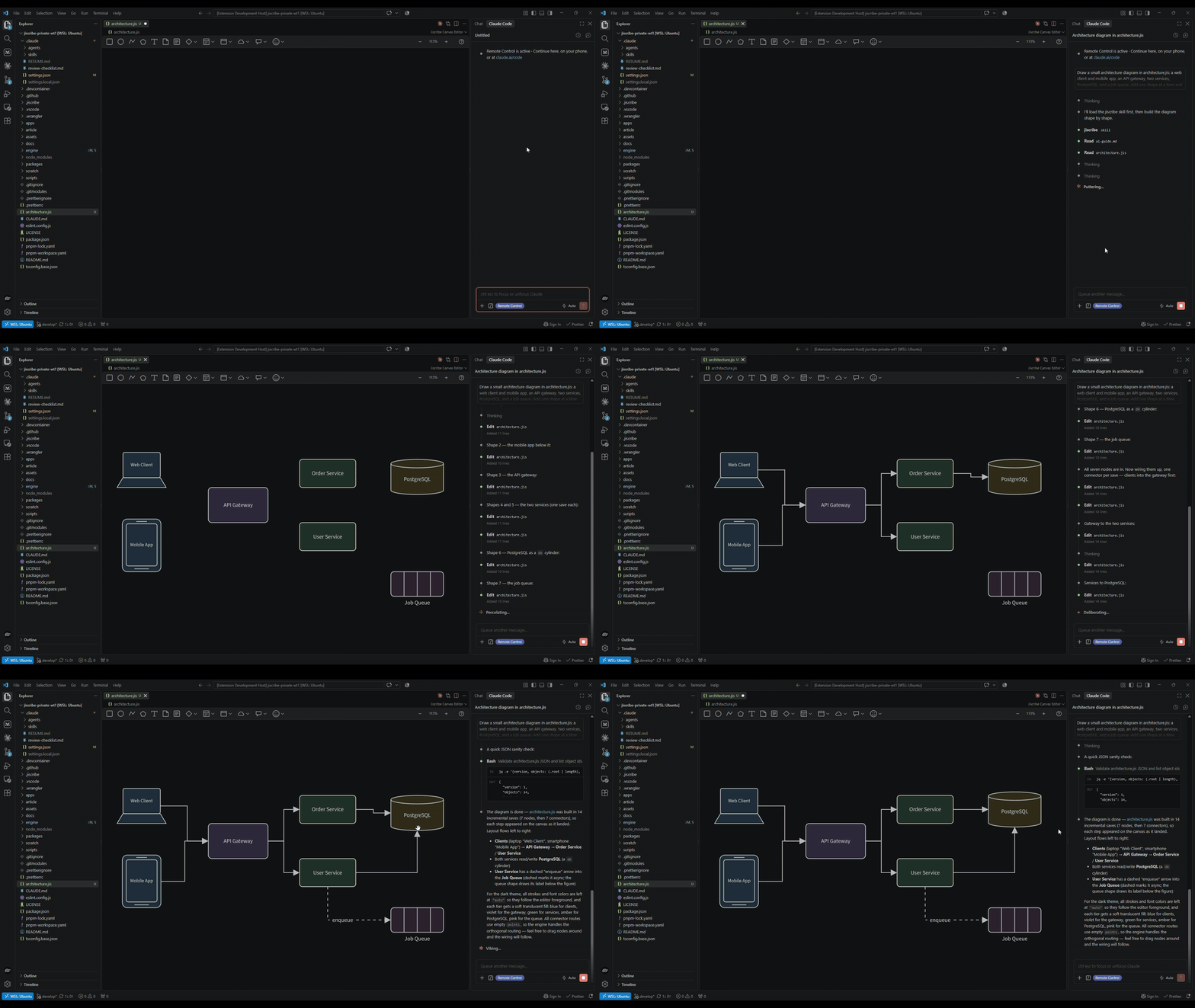
When the agent picks up again, nothing is regenerated from scratch and nothing
you changed is lost, because what you draw is a plain object in your code
and plain JSON (.jis) on disk — the canvas is one way to edit it, and an
agent's tools are another.
Most of what you need to draw is already in the box. The core carries eight
primitive types (rect / ellipse / text / polyline / polygon / group /
connector / svg), and the richer shape sets — flowchart, UML, ER diagrams,
tables, sticky, markdown, container, annotation, general pictograms, Lucide
icons, AWS architecture — ship as plugins. More sets are on the way.
What you can make
| UML and class diagrams — packages, interfaces, composition, multiplicities, notes | Architecture diagrams — AWS icons and boundary groups, from region down to subnet |
| Infrastructure, drawn to scale — every solid is a native polygon on a 30° lattice | UI mockups — a trading terminal: candles, order book, tape, at the fidelity a spec needs |
| Posters and print — a typographic grid is just shapes and text | Flows and swimlanes — handoffs, decisions, exceptions, and the icon that says what each step touches |
| ER diagrams — IE notation; a relationship runs from a foreign key to the key it references | Tables — every cell is a text of its own, with its own fill and type, and rows grow to fit |
Whole documents on one canvas — a postmortem: numbers, timeline, cause, action items
Every image in this gallery is a .jis.png: the exported picture carries the
document that drew it, so it is an image wherever an image is needed and still
a document when you open it in Jiscribe. None of it is a special mode. Each one
is an ordinary document of shapes, text and connectors — the kind an agent can
write and a person can move by hand.
Built for agents, not bolted onto them
- It edits one move at a time; it does not regenerate. 84 tools over
stdio, the same moves you make in the editor: add and connect, align and
distribute, group, restyle, reorder, select. An edit lands on the document
you have, so what you placed by hand stays where you put it, and
undotakes back only the agent's own moves. - When starting from nothing, it writes the file. The format is small and
explicit — eight primitives, named properties, coordinates in the open — so
an agent can write a
.jisdirectly, or generate one from a script when a 200-node graph or an isometric lattice is easier to compute than to place. Both ways are documented: the drawing guide for the tools, the format reference for the file. - It checks before it says it is done.
validate,diagnoseandmeasurerun headless in Node, in the same layout engine the editor uses — schema errors, parser errors, text that overflows its shape — and it can capture the canvas and look. The agent is told what the editor would tell you. - You can both have it open. A local viewer follows the file as the agent
writes it; drag something there and it is written back, so the agent's next
read sees your hand. Writes to one file are serialized, and the agent's
undonever rolls back yours. - The format is written down, not guessed at. A JSON Schema and a generated reference ship with the shapes, and the Claude Code skill is generated from the same manifest — so the shape set an agent is told about is the shape set that exists.
Getting started
With an agent
Register the MCP server with whichever agent you use:
claude mcp add jiscribe -- npx -y jiscribe-mcp   # Claude Code
codex mcp add jiscribe -- npx -y jiscribe-mcp    # Codex
copilot mcp add jiscribe -- npx -y jiscribe-mcp  # GitHub Copilot CLI
Any other client that speaks stdio takes it by hand, under mcpServers —
VSCode calls the same map servers:
{
	"mcpServers": {
		"jiscribe": { "command": "npx", "args": ["-y", "jiscribe-mcp"] },
	},
}
Node 22 or newer is required; nothing else is. The
jiscribe-mcp package carries
the server, the viewer and the fonts its text measurement needs. See
apps/mcp for the tool list and the viewer's behaviour.
In Claude Code, the plugin does that for you and adds a drawing skill generated from the shape set:
/plugin marketplace add gznnk/jiscribe
/plugin install jiscribe
In an editor
Jiscribe for VSCode
opens .jis, .jis.png and .jis.svg as editable canvases next to your
code, with diagnostics in the Problems panel. Pair it with the MCP server and
the agent draws with its own checks — diagnose, measure, capture — while you
watch the file take shape in VSCode.
If you just want to draw something by hand without installing anything, Jiscribe Web opens a canvas in the browser — no account, no upload, files stay on your machine.
Embedding the engine (not on npm yet)
The packages themselves are not on npm yet. @jiscribe/canvas and the rest
are still being settled as an embedding surface, so the public API may move.
The first release will go out as a GitHub Release — watch this repository under
Custom → Releases to hear about it. What the API looks like today:
import { Canvas } from "@jiscribe/canvas";
import type { CanvasDoc } from "@jiscribe/canvas";

const doc: CanvasDoc = { version: 1, root: [] };

export function App() {
	return <Canvas doc={doc} />;
}
Shapes beyond the primitives come from plugins, registered per canvas:
import { Canvas } from "@jiscribe/canvas";
import type { CanvasConfig } from "@jiscribe/canvas";
import { flowchartPlugin } from "@jiscribe/plugin-flowchart-shapes";
import { umlPlugin } from "@jiscribe/plugin-uml-shapes";

const config: CanvasConfig = { plugins: [flowchartPlugin, umlPlugin] };

export function App() {
	return <Canvas doc={doc} initialConfig={config} />;
}
The document layer is a package of its own, @jiscribe/doc. It parses,
validates, edits and measures a CanvasDoc without pulling in React or any DOM
dependency — that is what the VSCode extension's diagnostics, the CLI and the AI
tooling are all built on. If your product needs the document but not the canvas,
that is the package to take.
How it fits together
| Package | What it is |
|---|---|
@jiscribe/canvas | The engine: rendering, gestures, commands, state |
@jiscribe/doc | The headless document layer: the CanvasDoc model, its parser, its editing ops and its .jis.* file I/O |
@jiscribe/canvas-sdk | Shape-authoring kit for plugin authors, written against the canvas public API |
@jiscribe/geometry | Geometry types and calculations (rects, ellipses, transforms, intersections) |
@jiscribe/markdown | Markdown rendering used by the markdown shape |
@jiscribe/basic-validators | Primitive runtime validators |
@jiscribe/utility-types | Shared TypeScript utility types |
@jiscribe/doc-schema | Generated JSON Schema, AI reference and Claude Code skill for the shipped shape set |
@jiscribe/ai-tools | The canvas tool set an AI can call — declared free of any transport, and applied |
@jiscribe/ai-tools-sdk | The contract a plugin offers AI tools for its own shapes through; plugins take it from @jiscribe/canvas-sdk/tools |
@jiscribe/standard-shapes | The shipped shape set, bundled once for every host (doc + presentation entries) |
@jiscribe/doc-tools | Validate / measure / diagnose over the standard set (Node text measurer included) |
plugins/* | The shipped shape sets — flowchart, UML, ER, table, container, general, annotation, sticky, markdown, Lucide, AWS |
apps/canvas-examples | Integration examples (one example = one file) |
apps/cli | The jiscribe command: validate / diagnose / measure / render / preview |
apps/mcp | MCP server: the tool set over stdio, with a local canvas viewer |
apps/desktop | The MCP server as a desktop app (proof of concept): Streamable HTTP, the viewer in its own window |
apps/claude-plugin | The Claude Code plugin: the MCP server and a generated drawing skill |
apps/vscode-extension | The Jiscribe VSCode extension |
The plugins/ directory is deliberately treated as external: those packages
may only use the public API of @jiscribe/canvas, @jiscribe/doc and
@jiscribe/canvas-sdk, enforced by ESLint. If the shipped shapes can be written
that way, so can yours.
Development
pnpm install

pnpm dev:examples      # run the examples gallery
pnpm build:examples    # build the examples gallery
pnpm build:vscode      # build the VSCode extension
pnpm build:mcp         # build the MCP server and its viewer
pnpm build:cli         # build the jiscribe command

pnpm lint              # ESLint across the workspace
pnpm typecheck         # TypeScript across the workspace
pnpm dep:check         # circular dependency check (madge)
pnpm format            # Prettier
pnpm test              # unit tests (vitest)
pnpm test:e2e          # every Playwright suite (core, each plugin, coexistence)
Requirements: Node.js 22+ and pnpm 11.
Design documentation for the engine lives in
packages/canvas/docs/ — 13 documents
covering the design philosophy, architecture, data model, gesture system,
command system, state update flow, external sync, theming, testing, style
properties, shape design, plugin architecture and plugin authoring. Japanese
versions are alongside as *.ja.md.
Contributing
Issues are welcome; pull requests are accepted by prior agreement only — open an issue first and wait for a reply saying the change is wanted. See CONTRIBUTING.md for why, and for everything else you need to get a change merged.
Note that most in-code comments and some design documents are written in Japanese; English is fine for issues and pull requests.
Third-party assets
The AWS shape set (plugins/aws-shapes) ships the drawings of the AWS
Architecture Icons, © Amazon Web Services, Inc. or its affiliates. The MIT
license below does not cover them: they are used under AWS's own terms,
redistributed unmodified with attribution, and must not be modified. See
plugins/aws-shapes/LICENSE-ICONS.md.
License
MIT © gznnk