
mcp server
mcpki-server
mcpki-server is the backend infrastructure for https://www.mcpki.org, enabling secure public key management and autonomous certificate handling for large language models (LLMs).
Set up
Runs on your computer. Pick your agent and operating system.
This project does not publish an install method we can turn into a config. Follow the README instead.
README
synced Oct 23, 2026MCPKI server
MCPKI (Model Context Public Key Infrastructure) enables autonomous certificate management for Large Language Models (LLMs) and other automated systems. By leveraging the Model Context Protocol (MCP), MCPKI allows AI agents to programmatically handle the full lifecycle of digital certificates — including issuance, renewal, revocation, and validation — without manual intervention. This reduces human error, enhances security, and paves the way for AI-native PKI workflows in a more secure web ecosystem.
Table of Contents
- Introduction
- Features
- Prerequisites
- Getting Started
- Use with automation platforms
- Use with chat clients
- Access mcpki-server-programmatically
- API Endpoints
- Testing
- Deployment
- License
Introduction
This repository contains the implementation of the MCPKI server, built using:
- Spring Boot for a robust, modern Java-based web application framework.
- EJBCA Community Edition (CE) as the underlying PKI engine for managing Certificate Authorities (CAs), certificate profiles, CRLs, and OCSP services.
The server exposes a set of MCP-compatible API tools via Reactive Streams in sznchronous and asynchronous mode at endpoints like /mcp, enabling seamless integration with LLMs and other clients. It supports multiple cryptographic algorithms through dedicated CAs (e.g., ECDSA prime256v1, RSA, and post-quantum Dilithium2).
This implementation powers the public MCPKI service at https://mcpki.org:12121/mcp and is intended for educational, testing, and extension purposes.
For more details on MCPKI concepts, visit the official website: https://www.mcpki.org.
Features
MCPKI server provides a rich set of capabilities designed to enable seamless, autonomous PKI operations for LLMs and automated agents.
- Model Context Protocol (MCP) Compliance Fully implements the MCP specification, exposing PKI operations as LLM-friendly tools via Reactive Streams at /mcp. This allows AI agents to discover, invoke, and manage certificates entirely through natural-language-driven workflows.
- Automated Certificate Lifecycle Management
Programmatic support for:
- Certificate issuance (CSR submission and signed certificate delivery)
- Automatic renewal
- Revocation
- Status validation (OCSP/CRL checks)
- Multi-Algorithm Certificate Authorities
Dedicated EJBCA-managed CAs for a variety of cryptographic algorithms, including:
- ECDSA (prime256v1)
- RSA (2048/3072/4096-bit)
- Post-Quantum: Dilithium2 (CRYSTALS-Dilithium round-3 variant)
- Flexible Certificate Profiles
- Configurable profiles for different use cases (e.g., client authentication, server TLS, code signing) with customizable validity periods, key usage, and extensions.
- RESTful Management API (optional, for admin use) Secure endpoints for monitoring CA status, viewing issued certificates, managing end entities, and triggering CRL updates.
- Integration with EJBCA CC
Leverages EJBCA CE's battle-tested PKI features:
- Full CA hierarchy support
- CRL and OCSP responders
- Comprehensive audit logging
- Extensible validation modules
- Lightweight and Deployable Built on Spring Boot for easy containerization (Docker support included). Can be deployed alongside an EJBCA instance or configured to connect to a remote one.
- Non-Production Public Instance Powers the live demo service at https://www.mcpki.org, allowing immediate experimentation with LLM agents (rate-limited and monitored).
- Extensibility Modular design makes it straightforward to add new algorithms, custom validation logic, or additional MCP tools.
These features combine to make MCPKI a practical bridge between traditional PKI systems and the emerging world of autonomous AI agents.
Prerequisites
Before setting up and running the MCPKI server, ensure your system meets the following minimum requirements. The application is cross-platform and runs on Windows, macOS, and Linux.
System Requirements
- Operating System: Windows 10/11, macOS 10.15+, or a modern Linux distribution (e.g., Ubuntu 20.04+, Fedora, Debian)
- Java Development Kit (JDK): Version 17 or higher (OpenJDK or Oracle JDK recommended)
- Build Tool: Apache Maven 3.0.0 or newer
- Memory: At least 2 GB of free RAM (4 GB recommended for comfortable development and testing)
- Disk Space: Approximately 0.5 GB for the source code, dependencies, and build artifacts (additional space needed if running a local EJBCA instance)
- Network: Internet access for downloading Maven dependencies during the first build.
Getting Started
Installation
To install and run the latest version, follow these steps:
-
Clone the repository:
git clone https://github.com/MCPKI/mcpki-server.git -
Configure MCPKI server (see Configuration).
-
Build the project using Maven:
cd mcpki-server mvn clean install -
Replace x.x.x with the latest version and launch mcpki-server.
java -jar ./target/mcpki-server-x.x.x.jar [--debug | --trace]
Configuration
Copy src/main/resources/application.properties.sample to application.properties.:
# spring.main.web-application-type=none

# NOTE: You must disable the banner and the console logging
# to allow the STDIO transport to work !!!
spring.main.banner-mode=off
spring.ai.mcp.server.stdio=false

# Server settings
server.host=localhost
server.port=12121

# MCP server end point TLS settings
server.ssl.enabled=true
# server.ssl.client-auth=need
server.ssl.key-store-type=PKCS12
server.ssl.key-alias=<key-alias>
server.ssl.key-store=classpath:<file>.p12
server.ssl.key-store-password=<pwd>
server.ssl.trust-store=classpath:<file>.p12
server.ssl.trust-store-password=<pwd>
server.ssl.trust-store-type=PKCS

# Spring AI MCP settings
spring.ai.mcp.server.name=mcpki-server
spring.ai.mcp.server.version=1.3.2
spring.ai.mcp.server.enabled=true
spring.ai.mcp.server.transport=STREAMABLE_HTTP
spring.ai.mcp.server.type=${MCPKI_TYPE:SYNC}
spring.ai.mcp.server.request-timeout=240

# Parameters ranges.
com.mcpki.server.dn.length.min=3
com.mcpki.server.dn.length.max=120
com.mcpki.server.serialnumber.hex.length=40
com.mcpki.server.email.length.min=6
com.mcpki.server.email.length.max=64
com.mcpki.server.name.length.min=2
com.mcpki.server.name.length.max=30
com.mcpki.server.password.strength.min=12
com.mcpki.server.password.strength.max=32
com.mcpki.server.pem.length.min=100
com.mcpki.server.pem.length.max=40000
# Printable ASCII without `
com.mcpki.server.password.allowedCharacters=0123456789abcdefghijklmnopqrstuvwxyzABCDEFGHIJKLMNOPQRSTUVWXYZ!\"#$%&\'()*+,-./:;<=>?@[\\]^_

# MCPKI tools.
com.mcpki.server.tools.ejbca.GetAvailableCas=true
com.mcpki.server.tools.ejbca.GetCaCertificate=true
com.mcpki.server.tools.ejbca.GetLatestCrl=true
com.mcpki.server.tools.ejbca.CreateCrl=true
com.mcpki.server.tools.ejbca.GetCountCertificates=true
com.mcpki.server.tools.ejbca.GetCertificateProfile=true
com.mcpki.server.tools.ejbca.GetCertificatesAboutToExpire=true
com.mcpki.server.tools.ejbca.GetCertificatesAboutToExpire.max.items=100
com.mcpki.server.tools.ejbca.EnrollCertificateWithCsr=true
com.mcpki.server.tools.ejbca.RevokeCertificate=true
com.mcpki.server.tools.pki.ParseCertificate=true
com.mcpki.server.tools.tls.GetServerCertificate=true
com.mcpki.server.tools.tls.GetServerCertificate.tls.port=443
com.mcpki.server.tools.tls.GetServerCertificate.tls.version=TLSv1.3

# EJBCA REST API settings
com.mcpki.server.tools.ejbca.rest.url=https://<host>:<port>/ejbca/ejbca-rest-api
com.mcpki.server.tools.ejbca.rest.keystore=<file>.p12
com.mcpki.server.tools.ejbca.rest.keystorepwd=<pwd>
com.mcpki.server.tools.ejbca.rest.truststore=<file>.p12
com.mcpki.server.tools.ejbca.rest.truststorepwd=<pwd>

# Logging
logging.file.name=./mcpki-server.log
logging.level.root=INFO
logging.level.com.mcpki=INFO
logging.file.name=./mcpki-server.log
Add your individual configuration. Per default mcpki-server starts in synchronous mode. You can set the environment variable MCPKI_TYPE=ASNYC to launch mcpki-server in asynchronous mode.
Use with automation platforms
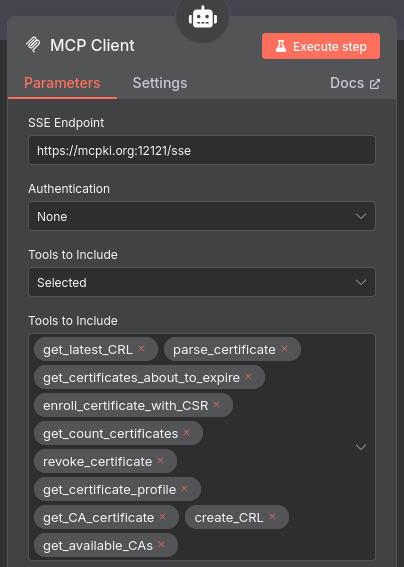
Configure n8n
Configure mcpki-server for at https://n8n.io or locally. How to run n8n locally follow the installtion guide at n8n.
Simply add an MCP client to your agentic workflow refer to your mcpki-server.
Use with chat clients
Configure LibreChat
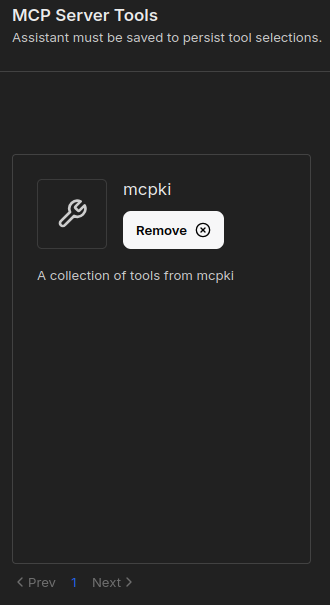
Add the MCPKI service to your 'librechat.yaml' MCP servers and restart LibreChat.
mcpServers:
  mcpki:
    type: streamable-http
    url: https://mcpki.org:12121/mcp
    timeout: 60000
You will find the MCPKI tools in the chat window's MCP tool menu

or in the Agent Builder Add MCP Server Tools dialog.
Access mcpki-server programmatically
Node.js and mcporter
Use Node.js, npx and mcporter to register mcpki-server.
npx mcporter config add mcpki-server https://mcpki.org:12121/mcp
Check that the registration as successful and the server is active.
npx mcporter list
Or list the MCP tools and its parameters.
npx mcporter list --http-url https://mcpki.org:12121/mcp
Call any MCP tool like this.
npx mcporter call mcpki-server.get_ca_certificate subject_dn="CN=mcpki-prime256-sub-ca,O=mcpki.org"
Or this.
npx mcporter call mcpki-server.get_available_cas external:false
API Endpoints
MCPKI server with Spring Webflux (Reactive Streams) at 'https://mcpki.org:12121/mcp' offers the following API enpoints:
- enroll_certificate_with_csr [Enrolls a certificate given a CSR.]
- csr: {type=string, description=Certificate Signing Request (CSR)}
- certificate_profile_name: {type=string, description=Name of the certificate profile.}
- end_entity_profile_name: {type=string, description=Name of the end entity profile.}
- name_of_ca: {type=string, description=Name of the issuing CA.}
- username: {type=string, description=Name of the end entity.}
- password: {type=string, description=Password of the end entity.}
- email: {type=string, description=Email of the end entity.}
- parse_certificate [Parses a certificate.]
- certificate: {type=string, description=The PEM formatted X.509 certificate.}
- get_certificates_about_to_expire [Get certificates about to expire.]
- days: {type=integer, format=int32, description=Number of days until expiration.}
- offset: {type=integer, format=int32, description=List offset (often 0).}
- max: {type=integer, format=int32, description=Maximum number of items returned (max 100).}
- get_latest_crl [Get latest CRL.]
- issuer_dn: {type=string, description=The subject DN of the issuing CA.}
- get_count_certificates [Counts the certificates.]
- active: {type=boolean, description=True for active certificates only.}
- revoke_certificate [Revoked a certificate.]
- issuer_dn: {type=string, description=The issuer of the certificate.}
- serial_number: {type=string, description=The certificate serial number in hex format.}
- password: {type=string, description=The certificate password.}
- revocation_reason: {type=string, description=The revocation reason.}
- get_certificate_profile [Get certificate profile.]
- name: {type=string, description=The name of the certificate profile.}
- create_crl [Create CRL.]
- issuer_dn: {type=string, description=The subject DN of the issuing CA.}
- get_ca_certificate [Get CA certificate.]
- subject_dn: {type=string, description=The subject DN of the CA certificate.}
- get_available_cas [Get the list of available CAs.]
- external: {type=boolean, description=True if external CAs a returned also.}
- get_server_certificate [Fetches an X.509 certificate in PEM format by a TLS connection.]
- host: {type=string, description=Hostname or IP.}
Testing
The 'mvn install' target automatically tests MCPKI server. Use the '-Dmaven.test.skip=false' option to skip the tests.
Deployment
After installation and configuration, create an application user and a start script (sample systemd). Do not run MCPKI server as root user.
Choose your port and weather you want to execute mcpki-server in synchronous and asynchronous mode.
useradd -m -r -s /bin/bash -U mcpki

cat <<EOT >> /etc/systemd/system/mcpki.service
[Unit]
Description=MCPKI
After=syslog.target

[Service]
User=mcpki
Group=mcpki
WorkingDirectory=/home/mcpki/
Environment="SERVER_PORT=12121"
Environment="MCPKI_TYPE=SYNC"
ExecStart=/usr/bin/java -jar <path-tothe-JAR-file>

[Install]
WantedBy=multi-user.target
EOT
Reload the daemon and start MCPKI server.
systemctl daemon-reload
systemctl enable mcpki.service
systemctl start mcpki.service
License
GNU General Public License as defined in http://www.gnu.org/licenses.