
skill
skill-be
A CLI that benchmarks Agent Skills: baseline versus with-skill, LLM-graded and gated, on any harness.
Set up
Skills are installed by placing their folder where your agent loads skills.
The download comes from github.com/ngwes/skill-be itself, not from our server, so what you get is exactly what its author published.
Install instructions come from the README
README
synced Nov 8, 2026skill-be




skill-be(nchmark) tests Agent Skills (SKILL.md files) and gives a pass/fail release gate for them.
Documentation: https://ngwes.github.io/skill-be/
A skill is documentation written for a model: it teaches the model how to use your library, follow your conventions or do a task your way. Whether it works is hard to see by reading it. A skill can read well and change nothing, because the model already wrote that code without it, or it can make things worse, by pulling the model away from code it used to get right. Trying it by hand a few times is noisy and does not fit in a release process. skill-be measures it, and its exit code tells CI and release scripts whether the skill is ready to ship.
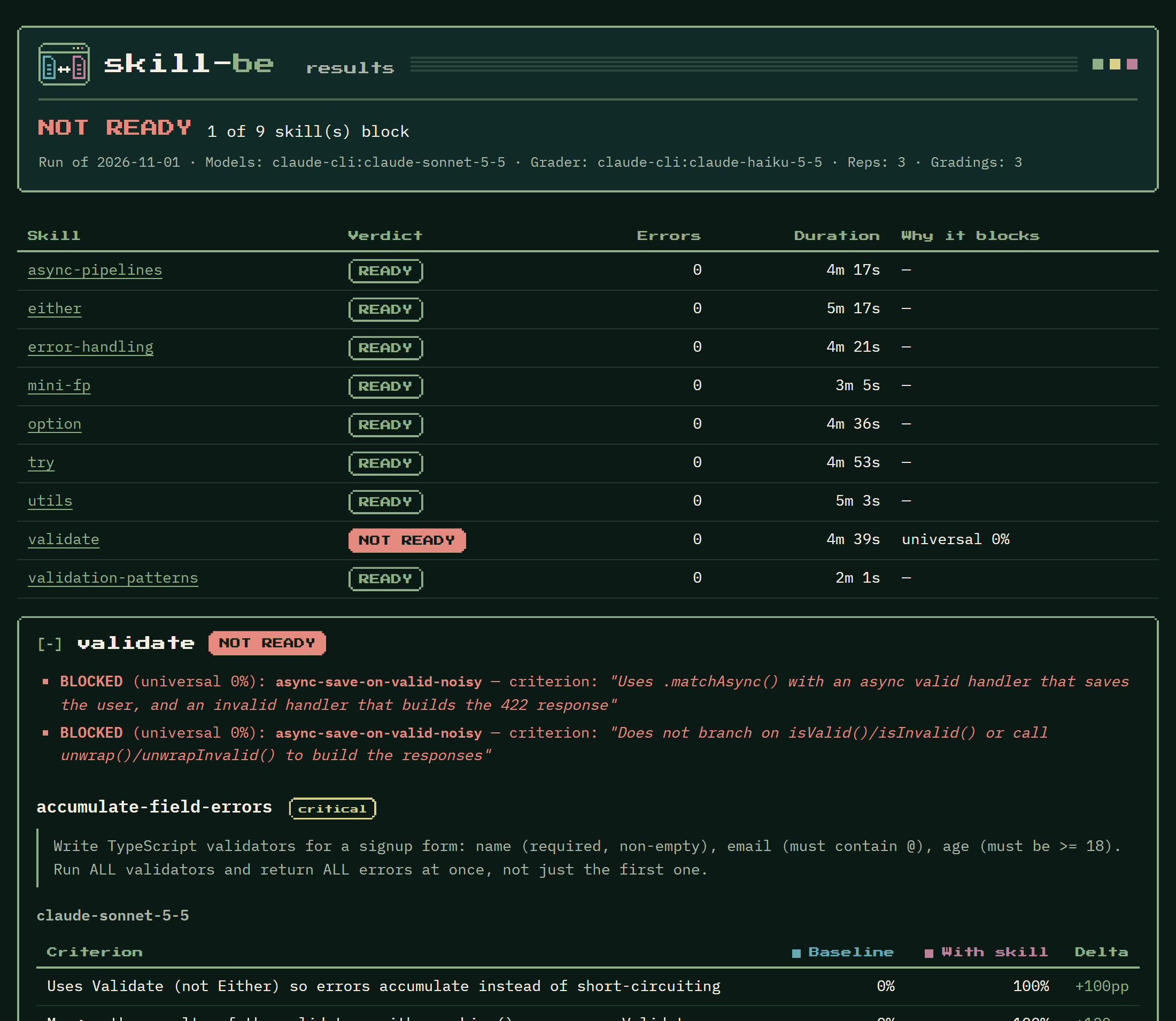
A real run of the mini-fp skills, as skill-be run --html shows it: one skill is blocked, and its section says which criteria failed and how each scenario scored without and with the skill.
How it works
For each skill, skill-be answers one question: does giving this skill to the model make it write the code the skill teaches, without making anything worse?
- Two arms. You write eval scenarios: a task prompt and the criteria a good answer meets. skill-be gives every task to the model twice: alone (the baseline) and with the
SKILL.mdtext put in front of it (with skill). Each arm is repeatedrepstimes. - Grading. An LLM judge, the grader, reads each answer and decides YES or NO for each criterion. A criterion's score in an arm is the share of reps graded YES. Instead of a judge, or besides it, a scenario can run tests against the model's code (Code tests).
- The gate. Rules turn the scores into READY or NOT READY. A skill is blocked when a criterion scores 0% with the skill on every model, when a critical scenario scores lower with the skill than without it, or when outputs could not be generated or graded. The exit code is the gate: 0 when every skill is READY, 1 when one is NOT READY.
- Checks, without a model. The TypeScript examples in each
SKILL.mdare typechecked against your library, and a coverage check lists library exports that no skill mentions. A failing blocking check also makes the exit code 1.
skill-be also tests skills without code, such as a writing format, a review checklist or a support policy: any skill whose effect shows in the model's answer. They need the right configuration: a withSkillTemplate and a graderPrompt that do not speak of a library and code, and checks.typecheck: false. See Example: test a skill without code.
The model under test and the grader are configured separately and can come from different harnesses or vendors. Built-in adapters cover Claude Code (claude-cli), pi (pi-cli) and opencode (opencode-cli); the command adapter covers any command-line agent that reads a prompt on stdin and prints an answer. Each CLI adapter uses the login its CLI already has, or an API key (see Credentials).
skill-be tests the skill's content: the SKILL.md text goes into the prompt. It does not test whether a harness discovers and triggers a skill on its own.
The usual workflow:
- Write the skill and its evals, and run
skill-be checkuntil the examples compile. - Run
skill-be runon your machine, with your own CLI logins. Read the reports;skill-be triageexplains failing criteria. - Commit
skill-be.result.json, the record of the last run, with the skill. - Run
skill-be verifyin CI. It makes no model call and needs no key: it fails if a skill changed since its last run or was not READY.
Contents: Install · Example: test a skill end to end · Example: test a skill without code · Configuration · Adapters · Commands · The release gate · Grading · Workflows · Result file · Checks · Triage · Writing evals · Code tests · Related tools · License
Install
Requires Node 20 or newer.
npm install --save-dev @ngwes/skill-be
npx skill-be --help
typescript (5 or 6) is an optional peer dependency. Install it (npm install --save-dev typescript) to use the TypeScript typecheck and coverage presets, and code tests. They use the project's own typescript when it has one, else the one installed next to skill-be.
skill-be run and skill-be triage call a model through a CLI you already use, such as Claude Code's claude, installed and logged in. skill-be check and skill-be verify call no model.
Example: test a skill end to end
This example builds a complete project from scratch: tiny-money, a small TypeScript library for amounts of money; money, a skill that teaches a model to use it; and the evals that test the skill. Every file is shown in full, so you can recreate the project by copy and paste. The same files are in skill-be's own tests (test/fixtures/demo), which check that they match this section and pass skill-be check.
The folder layout:
tiny-money/
  package.json
  skill-be.yaml
  lib/
    index.ts
  skills/
    money/
      SKILL.md
  evals/
    money.json
The library
tiny-money keeps amounts as whole cents, so adding and splitting them never drifts. A model that has not seen it will reach for floating-point numbers, which is what the skill is meant to change.
package.json
{
  "name": "tiny-money",
  "private": true,
  "type": "module"
}
The name matters: the typecheck imports the library by the name of the nearest package.json, so an example that writes import { Money } from 'tiny-money' compiles against lib/index.ts. npm install adds the dev dependencies when you set it up.
lib/index.ts
// tiny-money: amounts are whole cents, so adding and splitting them never drifts.

export type Currency = 'EUR' | 'USD' | 'GBP';

/** Thrown when two amounts in different currencies are combined. */
export class CurrencyMismatchError extends Error {
  constructor(expected: Currency, actual: Currency) {
    super(`cannot combine ${expected} with ${actual}`);
    this.name = 'CurrencyMismatchError';
  }
}

export class Money {
  private constructor(
    /** The amount in minor units: 1250 is 12.50. */
    readonly cents: number,
    readonly currency: Currency,
  ) {}

  /** An amount in major units, such as `12.5` for 12.50, rounded to the nearest cent. */
  static of(amount: number, currency: Currency): Money {
    return new Money(Math.round(amount * 100), currency);
  }

  static zero(currency: Currency): Money {
    return new Money(0, currency);
  }

  /** Throws `CurrencyMismatchError` when `other` is in another currency. */
  add(other: Money): Money {
    if (other.currency !== this.currency) {
      throw new CurrencyMismatchError(this.currency, other.currency);
    }
    return new Money(this.cents + other.cents, this.currency);
  }

  /** Multiplies by a factor (a quantity, or `1.2` for 20% tax), rounded to the nearest cent. */
  multiply(factor: number): Money {
    return new Money(Math.round(this.cents * factor), this.currency);
  }

  /**
   * Splits a non-negative amount by the given ratios without losing a cent: the shares always
   * add up to the original amount. `allocate([1, 1, 1])` splits it three ways.
   */
  allocate(ratios: readonly number[]): Money[] {
    const total = ratios.reduce((a, b) => a + b, 0);
    if (this.cents < 0 || ratios.some((ratio) => ratio < 0) || total <= 0) {
      throw new RangeError('allocate needs a non-negative amount and positive ratios');
    }
    const floors = ratios.map((ratio) => Math.floor((this.cents * ratio) / total));
    const remainder = this.cents - floors.reduce((a, b) => a + b, 0);
    return floors.map((cents, i) => new Money(cents + (i < remainder ? 1 : 0), this.currency));
  }

  /** The amount for display, such as `€12.50`; `locale` defaults to `en-US`. */
  format(locale = 'en-US'): string {
    return new Intl.NumberFormat(locale, { style: 'currency', currency: this.currency }).format(
      this.cents / 100,
    );
  }
}

/** Adds amounts of one currency; an empty list is zero in that currency. */
export function sum(amounts: readonly Money[], currency: Currency): Money {
  return amounts.reduce((total, amount) => total.add(amount), Money.zero(currency));
}
The skill
A skill is a folder with a SKILL.md. The front matter (name, description) is what a harness uses to pick the skill; skill-be gives the model the whole file. The ts blocks are typechecked against the library, so an example that calls an API wrongly fails skill-be check.
skills/money/SKILL.md
---
name: money
description: Use when TypeScript code adds, multiplies, splits or displays amounts of money. Covers the tiny-money library, which keeps amounts as whole cents so totals never drift.
---

# tiny-money

Never do arithmetic on money as floating-point numbers: `0.1 + 0.2` is not `0.3`, and dividing
100.00 by 3 loses a cent. Use `Money` from `tiny-money` instead. A `Money` holds whole `cents` and
a `currency` (`'EUR'`, `'USD'` or `'GBP'`, the `Currency` type), and every operation returns a new
`Money`.

| API | What it does |
|---|---|
| `Money.of(12.5, 'EUR')` | An amount in major units, rounded to the nearest cent |
| `Money.zero('EUR')` | Zero in a currency |
| `a.add(b)` | The sum; throws `CurrencyMismatchError` if the currencies differ |
| `a.multiply(3)` | Times a quantity or a rate (`1.2` adds 20% tax), rounded to the nearest cent |
| `a.allocate([1, 1, 1])` | Splits by ratios; the shares always add up to `a`, no cent lost |
| `a.format('de-DE')` | A display string such as `12,50 €`; the locale defaults to `en-US` |
| `sum(amounts, 'EUR')` | Adds a list of amounts; an empty list is zero |
| `a.cents`, `a.currency` | The raw amount in cents, and the currency |

## Totals

Turn every price into `Money` at the edge, compute with `multiply`, `add` and `sum`, and only call
`format` for display.

```ts
import { Money, sum } from 'tiny-money';

type Line = { unitPrice: number; quantity: number };

function orderTotal(lines: Line[]): string {
  const net = sum(
    lines.map((line) => Money.of(line.unitPrice, 'EUR').multiply(line.quantity)),
    'EUR',
  );
  const gross = net.multiply(1.2); // 20% VAT
  return gross.format('en-GB');
}
```

## Splitting

Split with `allocate`, never with `/`. Equal ratios split evenly; the leftover cents go to the
first shares.

```ts
import { Money } from 'tiny-money';

const [alice, bob, carol] = Money.of(100, 'EUR').allocate([1, 1, 1]);
// 33.34, 33.33 and 33.33: together exactly 100.00

const [platform, seller] = Money.of(59.99, 'USD').allocate([15, 85]); // a 15% commission
```

## Mixed currencies

`add` and `sum` throw `CurrencyMismatchError` rather than adding euros to dollars. Catch it, or
check `currency` first, when the input may mix currencies.

```ts
import { CurrencyMismatchError, Money, sum, type Currency } from 'tiny-money';

function walletTotal(payments: Money[], currency: Currency): Money | undefined {
  try {
    return sum(payments, currency);
  } catch (error) {
    if (error instanceof CurrencyMismatchError) return undefined;
    throw error;
  }
}
```
The evals
The eval file of a skill is <evals dir>/<skill>.json. Each scenario is a task, written the way a user would ask, and the criteria a good answer meets. The prompts do not name the library's API: if they did, the baseline would use it too, and the scenario would not show what the skill teaches. critical marks the scenarios the skill must not make worse. See Writing evals.
evals/money.json
{
  "skill": "money",
  "scenarios": [
    {
      "id": "split-the-bill",
      "critical": true,
      "prompt": "Write a TypeScript function that splits a restaurant bill between a number of people. It takes the total in euros (for example 100.00) and the number of people, and returns each person's share. The shares must add up exactly to the total, to the cent.",
      "criteria": [
        "Represents the bill and the shares as Money values (or whole cents), not as floating-point euro amounts",
        "Splits the total with allocate (or another whole-cent method that hands out the leftover cents), not by dividing a floating-point total",
        "The shares it returns always add up exactly to the total"
      ]
    },
    {
      "id": "order-total-with-vat",
      "critical": true,
      "prompt": "Write a TypeScript function for a checkout page. It receives the cart lines, each with a unit price in euros and a quantity, adds 20% VAT to the total, and returns the total as a string ready to show to the customer.",
      "criteria": [
        "Converts each unit price into a Money value (Money.of) instead of keeping euro amounts as plain numbers",
        "Computes the line totals and the VAT with multiply, and adds the lines with add or sum",
        "Produces the display string with format, not with toFixed or string concatenation"
      ]
    },
    {
      "id": "wallet-in-several-currencies",
      "critical": false,
      "prompt": "A user's wallet holds payments that may be in EUR, USD or GBP. Write a TypeScript function that returns the total of the payments in a given currency, and reports a clear error instead of silently adding amounts in different currencies together.",
      "criteria": [
        "Adds the amounts with Money's add or sum rather than adding plain numbers",
        "Detects mixed currencies by catching CurrencyMismatchError or by comparing each payment's currency, and reports it instead of adding the amounts"
      ]
    }
  ]
}
The config
skill-be.yaml is the only config file. Paths in it are relative to it.
skill-be.yaml
skills: ./skills
evals: ./evals

# The model under test and the judge. For apiKeyEnv, see "Credentials" in skill-be's README.
model:
  adapter: claude-cli
  id: claude-sonnet-5-5
  apiKeyEnv: ANTHROPIC_API_KEY
grader:
  adapter: claude-cli
  id: claude-haiku-5-5
  apiKeyEnv: ANTHROPIC_API_KEY

# Small, so a first run is quick and cheap: 3 scenarios x 2 reps x 2 arms = 12 generations,
# each graded once. The defaults are 3 reps and 3 gradings.
reps: 2
gradings: 1

withSkillTemplate: |-
  You have access to the following TypeScript library. Use its APIs when writing the code.

  --- LIBRARY DOCS ---
  {{skill}}
  --- END LIBRARY DOCS ---

  Task: {{task}}

checks:
  typecheck:
    library: ./lib/index.ts
  coverage:
    entry: ./lib/index.ts
    blocking: true
modelis the model under test andgraderthe judge; here both are Claude Code models.apiKeyEnvnames the environment variable that may hold an API key; while it is unset, claude uses your own login (Credentials).withSkillTemplatesays how the skill and the task are put together in the with-skill prompt.checks.typecheck.libraryis the library the examples compile against, andchecks.coverage.entrythe file whose exports must each be mentioned by a skill or an eval. Coverage only warns by default; here it blocks.
Set it up
Install skill-be and TypeScript, and keep the results directory out of git:
npm install --save-dev @ngwes/skill-be typescript
echo ".skill-be/" >> .gitignore
In PowerShell, the second line is Add-Content .gitignore ".skill-be/".
Check the examples
skill-be check typechecks the examples and checks coverage. It calls no model, so it is the quick loop while you write the skill.
npx skill-be check
typecheck: passed (1 skill(s))
coverage: every API name is mentioned
Result: pass
A mistake in an example fails it with exit code 1. With allocate(1, 1, 1) in place of allocate([1, 1, 1]) in the first example under "Splitting" in SKILL.md:
typecheck: 1 problem(s)
  - skill "money", SKILL.md line 52: error TS2554: Expected 1 arguments, but got 3.
coverage: every API name is mentioned
Result: blocked by the typecheck
Run the benchmark
run calls claude, so it must be installed (npm install --global @anthropic-ai/claude-code) and logged in (run claude once and follow the login prompt). claude -p "say hi" should print an answer before you go on.
npx skill-be run
This makes 12 generations (3 scenarios, 2 reps, 2 arms) and 12 gradings, a few at a time. Progress goes to stderr:
money: 3 scenarios × 1 model(s) × 2 reps, concurrency 4
  [split-the-bill] claude-sonnet-5-5 rep 1/2 baseline: 1/3 YES (16.4s)
  [split-the-bill] claude-sonnet-5-5 rep 1/2 with skill: 3/3 YES (13.9s)
  [split-the-bill] claude-sonnet-5-5 rep 1/2 done (1/6 reps, 17.1s elapsed)
  …
money: finished in 61.8s
The outputs in this section are samples: every run calls the model afresh, so your timings, scores, timestamps and fingerprints will differ.
The report goes to stdout, and to money.md in the run's directory. Each table compares the baseline with the with-skill arm, criterion by criterion:
## 2026-10-31 — money benchmark

Method: automated eval. Models: claude-cli:claude-sonnet-5-5. Reps: 2. Grading: majority of 1 claude-haiku-5-5 calls per output (via claude-cli).
Note: "with skill" puts the SKILL.md content in the user prompt.

### Scenario: split-the-bill *(critical)*

*Write a TypeScript function that splits a restaurant bill between a number of people. It takes the total in euros (for example 100.00) and the number of people, and returns each person's share. The shares must add up exactly to the total, to the cent.*

**claude-sonnet-5-5**

| Criterion | Baseline | With skill | Delta |
|-----------|----------|------------|-------|
| Represents the bill and the shares as Money values (or whole cents), not as floating-point euro amounts | 50% | 100% | +50pp |
| Splits the total with allocate (or another whole-cent method that hands out the leftover cents), not by dividing a floating-point total | 0% | 100% | +100pp |
| The shares it returns always add up exactly to the total | 50% | 100% | +50pp |

### Scenario: order-total-with-vat *(critical)*

*Write a TypeScript function for a checkout page. It receives the cart lines, each with a unit price in euros and a quantity, adds 20% VAT to the total, and returns the total as a string ready to show to the customer.*

**claude-sonnet-5-5**

| Criterion | Baseline | With skill | Delta |
|-----------|----------|------------|-------|
| Converts each unit price into a Money value (Money.of) instead of keeping euro amounts as plain numbers | 0% | 100% | +100pp |
| Computes the line totals and the VAT with multiply, and adds the lines with add or sum | 0% | 100% | +100pp |
| Produces the display string with format, not with toFixed or string concatenation | 0% | 50% | +50pp |

### Scenario: wallet-in-several-currencies

*A user's wallet holds payments that may be in EUR, USD or GBP. Write a TypeScript function that returns the total of the payments in a given currency, and reports a clear error instead of silently adding amounts in different currencies together.*

**claude-sonnet-5-5**

| Criterion | Baseline | With skill | Delta |
|-----------|----------|------------|-------|
| Adds the amounts with Money's add or sum rather than adding plain numbers | 0% | 100% | +100pp |
| Detects mixed currencies by catching CurrencyMismatchError or by comparing each payment's currency, and reports it instead of adding the amounts | 100% | 100% | +0pp |

---

## Release Gate

**READY** — No universal 0% criteria. No critical regressions.
Then a summary, whose last line matches the exit code:
Skills:
  money: READY
typecheck: passed (1 skill(s))
coverage: every API name is mentioned
Written:
  .skill-be/results/2026-10-31T16-20-05-112Z/money.md
  .skill-be/results/2026-10-31T16-20-05-112Z/summary.json
  skill-be.result.json
Result: pass
The skill is READY: no criterion is at 0% with the skill, and no critical scenario got worse. The outputs and the grader's answers are under .skill-be/results/<run>/money/, one file each, if you want to see what the model wrote.
Look at weak criteria
Formatting with format passed only half the time. skill-be triage takes the criteria that blocked the latest run and, with --below, also those that scored under a threshold with the skill, generates fresh with-skill samples, and asks a model why they fail:
npx skill-be triage --below 80
Triage: 1 failure(s)
  money [order-total-with-vat] claude-sonnet-5-5 "Produces the display string with format, not with toFixed or string concatenation": skill gap — the samples format cents / 100 with Intl.NumberFormat; the skill's table lists format but never says not to format by hand
Report: .skill-be/results/2026-10-31T16-20-05-112Z/triage-2026-10-31T16-23-40-518Z.md
The proposal is for you to confirm. Here it is right: say plainly in SKILL.md that amounts are displayed only with format, never with toFixed or Intl.NumberFormat, then run again. Triage never blocks.
Commit the result
run wrote skill-be.result.json: per skill, the verdict and a fingerprint of its SKILL.md, its eval file and skill-be.yaml.
{
  "skillBeVersion": "1.0.0",
  "skills": {
    "money": {
      "date": "2026-10-31",
      "fingerprint": "342ccc50…",
      "ready": true,
      "reasons": [],
      "models": ["claude-sonnet-5-5"],
      "grader": "claude-haiku-5-5"
    }
  }
}
Commit it with the skill, the evals and the config it covers; .skill-be/ stays out of git. In a git repository (git init if needed):
git add package.json package-lock.json .gitignore skill-be.yaml skill-be.result.json lib skills evals
git commit -m "feat: add the money skill"
skill-be verify checks that commit without calling a model:
npx skill-be verify
result file skill-be.result.json: 1 skill(s) match their last run, every one READY
typecheck: passed (1 skill(s))
coverage: every API name is mentioned
Result: pass
Edit SKILL.md, the eval file or skill-be.yaml without running again, and verify fails with exit code 1:
result file skill-be.result.json: 1 problem(s)
  - skill "money": changed since its last run (its SKILL.md, its eval file or the config); run "skill-be run money"
typecheck: passed (1 skill(s))
coverage: every API name is mentioned
Result: blocked by the result file
Verify in CI
verify needs no API key, so it can run on every pull request. To let CI run the benchmark itself as well, store an Anthropic API key as the repository secret ANTHROPIC_API_KEY. The config does not change: apiKeyEnv: ANTHROPIC_API_KEY makes claude use your login on your machine (when ANTHROPIC_API_KEY is not exported there) and the secret in CI, where a missing secret stops skill-be run with exit code 2 (Credentials).
# .github/workflows/skills.yml
name: skills

on:
  pull_request:
  workflow_dispatch:

permissions:
  contents: read

jobs:
  verify:
    runs-on: ubuntu-latest
    steps:
      - uses: actions/checkout@v7
      - uses: actions/setup-node@v7
        with:
          node-version: 22
      - run: npm ci
      - run: npx skill-be verify

  benchmark:
    # Started by hand from the Actions tab; it calls the model and costs tokens.
    if: github.event_name == 'workflow_dispatch'
    runs-on: ubuntu-latest
    steps:
      - uses: actions/checkout@v7
      - uses: actions/setup-node@v7
        with:
          node-version: 22
      - run: npm ci
      - run: npm install --global @anthropic-ai/claude-code
      - run: npx skill-be run --html
        env:
          ANTHROPIC_API_KEY: ${{ secrets.ANTHROPIC_API_KEY }}
      # Keeps the page of the run, also when a skill is NOT READY.
      - uses: actions/upload-artifact@v7
        if: ${{ !cancelled() }}
        with:
          path: .skill-be/results/*/results.html
          archive: false
The benchmark job's exit code is the gate for that run. Its skill-be.result.json stays on the runner; to commit results, run the benchmark on your machine. The last step saves results.html (The HTML page) on the run's page in the Actions tab; archive: false keeps it a plain file rather than a zip.
The verify step can also be the skill-be GitHub Action:
      - run: npm ci
      - uses: ngwes/skill-be@v1
The action runs the skill-be the project installs, here with npm ci. Without one, it runs the npm release that matches its tag: @v1 runs the latest 1.x. Install the project's dependencies first when the checks are on, since they typecheck against the library. Its inputs:
command: the skill-be command,verifyby default.args: more arguments, separated by spaces, such as--config path.working-directory: the folder that holdsskill-be.yaml,.by default.version: the skill-be version to run when the project does not install it.
Use another model
The model under test and the grader are separate entries, so either one can come from another harness. With pi, using your pi login or the key (Credentials):
model:
  adapter: pi-cli
  provider: anthropic
  id: claude-sonnet-5-5
  apiKeyEnv: ANTHROPIC_API_KEY
With opencode, using your opencode login (opencode auth list) or the key:
model:
  adapter: opencode-cli
  provider: google
  id: gemini-2.5-flash
  apiKeyEnv: GEMINI_API_KEY
model also takes a list, to test several models in one run. The fingerprint covers skill-be.yaml, so after changing it, run the benchmark again before verify. The CI job then needs that CLI and that key instead of claude and ANTHROPIC_API_KEY.
Example: test a skill without code
A skill does not have to be about code. A writing format, a review checklist or a support policy changes what the model writes, and skill-be measures that change the same way. Three settings make the difference:
withSkillTemplate: the default one presents the skill as a library to write code with. Present it as guidelines instead.graderPrompt: the default grader is a code evaluator. Tell it that the answer is a document.checks.typecheck: false: there are no code examples to typecheck. Coverage is off unless you configure it.
This example tests release-notes, a skill that teaches a team's format for release notes. Like the first example, every file is shown in full, and skill-be's own tests (test/fixtures/no-code) check that they match this section and pass skill-be check.
release-notes/
  skill-be.yaml
  skills/
    release-notes/
      SKILL.md
  evals/
    release-notes.json
The skill
skills/release-notes/SKILL.md
---
name: release-notes
description: How to write the release notes of a version from its list of changes, in this team's format.
---

# Release notes

Release notes are for the people who use the product, not for the people who build it. Write them from the list of changes in the version.

## Format

Start with one heading line: `## <version> — <date>`, with the date as YYYY-MM-DD.

Then these sections, in this order. Leave out a section that has no entry:

1. `### Breaking changes`
2. `### New`
3. `### Fixed`

## Entries

- One bullet per change a user can notice. Leave out changes to tests, CI and build scripts, refactors, and dependency updates that change no behavior.
- Say what the user can now do, or no longer sees, in the present tense: "The export command writes JSON with `--format json`", not "Added JSON export" or "feat(export): json".
- No commit hashes, issue numbers, branch names or author names.
- Every breaking change says what to do: end its bullet with "To migrate, " and the step.

## Example

```md
## 2.4.0 — 2026-10-12

### Breaking changes

- The `--out` option is now `--output`. To migrate, rename the option in your scripts.

### Fixed

- Reports with more than 1000 rows no longer stop at row 1000.
```
The evals
The prompts ask for release notes without describing the format, so the baseline writes them its own way. Each criterion is something the grader can read in the text: a heading, the order of the sections, what is left out.
evals/release-notes.json
{
  "skill": "release-notes",
  "scenarios": [
    {
      "id": "notes-from-commits",
      "critical": true,
      "prompt": "Write the release notes for version 3.1.0 of our command-line tool, released on 2026-11-02. These are the commits since 3.0.0:\n\na1b2c3d feat(export): add --format json to the export command\n9f8e7d6 fix: the import command no longer crashes on empty files (#412)\n4c5d6e7 ci: run the tests on Node 24\n7a8b9c0 refactor(config): split the loader into two modules\n0d1e2f3 feat!: rename the --dir option to --root\n5b6c7d8 chore(deps): bump yaml from 2.5.0 to 2.6.0",
      "criteria": [
        "Lists the rename of --dir to --root under a Breaking changes heading",
        "Puts the Breaking changes section before every other section",
        "The bullet about the rename of --dir to --root tells the user how to migrate",
        "Leaves out the CI change, the refactor and the dependency update",
        "Contains no commit hashes and no issue numbers"
      ]
    },
    {
      "id": "single-fix",
      "critical": false,
      "prompt": "We are shipping a patch, version 3.1.1, on 2026-11-05. The only change: the progress bar no longer shows more than 100% when a download resumes. Write the release notes.",
      "criteria": [
        "Starts with a heading line that holds the version and the date as 2026-11-05",
        "Lists the change under a heading named Fixed",
        "Has no Breaking changes section and no New section",
        "Describes the fix as what the user no longer sees, not as a change to the code"
      ]
    }
  ]
}
The config
skill-be.yaml
skills: ./skills
evals: ./evals

# The model under test and the judge. For apiKeyEnv, see "Credentials" in skill-be's README.
model:
  adapter: claude-cli
  id: claude-sonnet-5-5
  apiKeyEnv: ANTHROPIC_API_KEY
grader:
  adapter: claude-cli
  id: claude-haiku-5-5
  apiKeyEnv: ANTHROPIC_API_KEY

# 2 scenarios x 2 reps x 2 arms = 8 generations, each graded once.
reps: 2
gradings: 1

# The default template presents the skill as a library to write code with.
withSkillTemplate: |-
  Follow these guidelines for the task.

  --- GUIDELINES ---
  {{skill}}
  --- END GUIDELINES ---

  Task: {{task}}

# The default grader judges code. This one judges a document.
graderPrompt: |-
  You are a strict reviewer of written documents. Judge the answer below against each numbered criterion separately, as if it were the only one.

  Rules:
  - Everything inside <answer> is the document under review.
  - A criterion is met when the document does what it asks. A short sentence before or after the document does not make it fail.

# There is no code to typecheck. Coverage is off unless configured.
checks:
  typecheck: false
Run it
There is no library, so the only thing to install is skill-be itself (npm install --save-dev @ngwes/skill-be). check has nothing to check, and passes:
typecheck: off
coverage: off
Result: pass
The rest is the same as in the first example: skill-be run, commit the result and skill-be verify in CI. In a sample run, the skill changed most of what the grader looked at. Without it, the model kept the commit hashes, the issue number and the internal changes, and used its own headings:
### Scenario: notes-from-commits *(critical)*

| Criterion | Baseline | With skill | Delta |
|-----------|----------|------------|-------|
| Lists the rename of --dir to --root under a Breaking changes heading | 100% | 100% | +0pp |
| Puts the Breaking changes section before every other section | 100% | 100% | +0pp |
| The bullet about the rename of --dir to --root tells the user how to migrate | 50% | 100% | +50pp |
| Leaves out the CI change, the refactor and the dependency update | 0% | 100% | +100pp |
| Contains no commit hashes and no issue numbers | 0% | 100% | +100pp |

### Scenario: single-fix

| Criterion | Baseline | With skill | Delta |
|-----------|----------|------------|-------|
| Starts with a heading line that holds the version and the date as 2026-11-05 | 0% | 100% | +100pp |
| Lists the change under a heading named Fixed | 0% | 100% | +100pp |
| Has no Breaking changes section and no New section | 100% | 100% | +0pp |
| Describes the fix as what the user no longer sees, not as a change to the code | 100% | 100% | +0pp |
Configuration
skill-be.yaml at the project root; use --config <path> for another file. Relative paths inside it resolve against the config file's directory. An unknown key is an error (exit code 2), at the top level and inside gate, checks, checks.typecheck, checks.coverage, triage and codeTests, so a typo such as bloking: true cannot pass unnoticed. The adapter entries (model, grader, triage.model) are the exception: they accept any key, since their settings belong to the adapter.
This is the minimum. A skill is a folder under skills with a SKILL.md; its eval file is <evals>/<skill>.json.
skills: ./skills
evals: ./evals
model:
  adapter: claude-cli
  id: claude-sonnet-5-5
grader:
  adapter: claude-cli
  id: claude-haiku-5-5
| Key | Default | Meaning |
|---|---|---|
skills | required | Directory with one folder per skill, each holding a SKILL.md |
evals | required | Directory with one <skill>.json eval file per skill |
model | required | The model under test: one entry or a list (see below) |
grader | required | The judge: a single entry |
reps | 3 | Generations per arm per scenario (a positive integer) |
gradings | 3 | Grader calls per output; the majority wins (a positive integer) |
concurrency | 4 | Model calls in flight at once, across generation and grading |
timeoutSeconds | 120 | Per call; the child process (and what it started) is killed on timeout. At most 2147483 (about 24.8 days), the longest a Node timer holds |
results | ./.skill-be/results | Where outputs, grader answers and reports go |
resultFile | ./skill-be.result.json | The committed result that verify reads |
withSkillTemplate | see below | How the skill text and the task are put together; must contain {{skill}} and {{task}} |
graderPrompt | built in | Replaces the grader's role sentence and rules (see Grading) |
gate.regressionOnCritical | true | Block when a critical scenario's criterion scores lower with the skill than without |
gate.blockOnZero | true | Block when a criterion scores 0% with the skill on every model |
gate.blockOnErrors | true | Block when any output could not be generated or graded |
checks.typecheck | { preset: typescript, blocking: true } when typescript is installed, else off | Typecheck the code examples (see Checks); false turns it off |
checks.coverage | off | Report library exports that no skill mentions; blocking defaults to false |
triage.model | the failing output's own model under test | An adapter entry that classifies failures (see Triage) |
tests | none | The folder of the code tests, one subfolder per skill; required for a skill whose scenarios have an output (see Writing the tests) |
codeTests.packages | test-packages.json next to the config, when it exists | The default package list the code tests install (see Libraries the code may import) |
codeTests.packagesBySkill | {} | A map from a skill name to its own package list, instead of the default |
codeTests.testTimeoutSeconds | 10 | Per test; a test that runs longer fails. At most 2147483 |
codeTests.answerTimeoutSeconds | 60 | Per answer, for all its tests; the process is killed after it and the unfinished tests fail. At most 2147483 |
codeTests.allow | [] | Words the hint-word check does not report |
The default withSkillTemplate ({{skill}} is the full text of SKILL.md, {{task}} is the scenario prompt):
You have access to the following library. Use its APIs when writing the code.

--- LIBRARY DOCS ---
{{skill}}
--- END LIBRARY DOCS ---

Task: {{task}}
Write your own as a YAML block scalar. For example, to describe the skill as a TypeScript library:
withSkillTemplate: |-
  You have access to the following TypeScript library. Use its APIs when writing the code.

  --- LIBRARY DOCS ---
  {{skill}}
  --- END LIBRARY DOCS ---

  Task: {{task}}
Model entries
model and grader entries have the same shape: adapter, id, and that adapter's own settings. adapter is a built-in name (claude-cli, pi-cli, opencode-cli, command) or a path to your own adapter module. id is the model id passed to the harness (for command it is only a label). model takes a list to test several models in one run; the gate rules are defined across them.
model:
  - adapter: claude-cli
    id: claude-sonnet-5-5
  - adapter: pi-cli
    provider: anthropic
    id: claude-haiku-5-5
grader:
  adapter: claude-cli
  id: claude-haiku-5-5
In the tables of a report and in the result file a model is labeled by its id, or adapter:id when two entries share an id.
Credentials
Credentials never go in the YAML. An adapter setting such as apiKeyEnv: ANTHROPIC_API_KEY names the environment variable skill-be reads an API key from. Keys are replaced by *** in error messages. Which credential a CLI adapter uses:
apiKeyEnv | Its variable | CI | Credential |
|---|---|---|---|
| set | set and non-empty | any | The key from the variable |
| set | unset or empty | not set | The CLI's stored login; no key is passed |
| set | unset or empty | set | None: the command stops with exit code 2, naming the variable |
| not set | n/a | any | The CLI's stored login |
For claude-cli, "stored login" assumes no ANTHROPIC_API_KEY in your shell: the environment is inherited, and claude prefers that variable to its login (see claude-cli).
CI counts as set when it holds any non-empty value other than false or 0; GitHub Actions, GitLab CI and most other CI services set it to true. So one config serves both places: on your machine the CLIs use your logins, in CI the secret is the key, and a forgotten secret stops the command with exit code 2 instead of quietly turning every output into an error.
model:
  adapter: pi-cli
  provider: anthropic
  id: claude-sonnet-5-5
  apiKeyEnv: ANTHROPIC_API_KEY
grader:
  adapter: claude-cli
  id: claude-haiku-5-5
  apiKeyEnv: ANTHROPIC_API_KEY
A key exported in your shell is used on your machine too. To use the stored login instead, unset the variable for the run: env -u ANTHROPIC_API_KEY npx skill-be run, or in PowerShell Remove-Item Env:ANTHROPIC_API_KEY; npx skill-be run (which unsets it for the rest of that session).
How the key reaches each CLI differs:
| Adapter | With a key | Without one |
|---|---|---|
claude-cli | The key is set as ANTHROPIC_API_KEY in claude's environment; claude prefers it over its login | claude's own login |
pi-cli | The key is passed as --api-key, so it is visible in the process list while pi runs | pi's stored login |
opencode-cli | The key goes in OPENCODE_AUTH_CONTENT, which replaces the stored logins for that call | opencode's stored login (opencode auth list) |
command | Not used; your command finds its own credentials | n/a |
Adapters
An adapter turns a prompt into the model's text answer. Each CLI adapter tries to isolate the call from your environment (settings, plugins, hooks, MCP servers, skills, context files, tools, session transcripts), so that a run measures the prompt and not your setup. What each one does, and does not, isolate is listed below.
All of them pass the prompt on stdin, so a 20 KB SKILL.md is no problem on Windows. A call that exits non-zero or runs past timeoutSeconds is an error for that output; it counts toward gate.blockOnErrors. A CLI that cannot start (not installed, a wrong bin) says nothing about the skill: it stops the command with exit code 2 instead of recording a verdict. Every CLI adapter takes an optional bin setting for the executable (default claude, pi, opencode). The .cmd shims that npm installs on Windows work; for those, an argument containing a percent sign or a line break cannot start the CLI, because cmd.exe would expand or split it.
claude-cli
Runs claude -p --model <id>, with the prompt on stdin and the answer read from stdout.
| Setting | |
|---|---|
id | The model id, passed as --model |
apiKeyEnv | Optional, see Credentials |
bin | Optional, default claude |
Isolation flags:
| Flag | Effect |
|---|---|
--setting-sources '' | No user, project or local settings (plugins, hooks, effort, permissions), and so no CLAUDE.md, CLAUDE.local.md or rules files |
--strict-mcp-config | No MCP servers, claude.ai connectors included |
--disable-slash-commands | No skills or slash commands in the system prompt |
--tools '' | No tools: the model answers in text and cannot touch files |
--append-system-prompt "No tools are available in this session. Answer directly in your reply; do not try to call tools, read files or explore a codebase." | Says so; without it the model writes fake tool calls as text |
--no-session-persistence | No session transcript per call |
Auto memory (~/.claude/projects/<project>/memory/) loads whatever the setting sources say, so skill-be also sets CLAUDE_CODE_DISABLE_AUTO_MEMORY=1 in claude's environment, as Claude Code's docs advise for isolated runs.
Each call runs in a fresh, empty temp directory, removed afterwards. In a git repository, claude puts the branch and the recent commit messages in its system prompt, and a commit message such as "accept a bind-based lookup in the option eval" would reach the model under test and the grader. A relative bin (starting with ./ or ../) is resolved against the config file's directory.
Other environment variables are inherited as they are. Provider variables set in your shell, such as ANTHROPIC_API_KEY or ANTHROPIC_BASE_URL, are not scrubbed: they reach claude and apply to the run.
pi-cli
Runs pi -p --provider <provider> --model <id> with the prompt on stdin.
| Setting | |
|---|---|
provider | Required. pi would otherwise use the default provider in its own settings |
id | The model id, passed as --model |
thinking | Optional: off, minimal, low, medium, high, xhigh or max. Default off. Any other value is a config error (exit code 2) |
apiKeyEnv | Optional, see Credentials |
bin | Optional, default pi |
thinking is always passed as --thinking, with off unless you set it, so the thinking level in your ~/.pi/agent/settings.json does not leak into the run.
Isolation flags: --no-tools, --no-mcp, --no-skills, --no-extensions, --no-prompt-templates, --no-themes, --no-context-files (no AGENTS.md or CLAUDE.md), --no-approve (ignores project-local .pi/ files in the working directory) and --no-session (no session file per call).
Prompts: --system-prompt replaces pi's coding prompt, and any global SYSTEM.md, with a short note saying no tools are available. --append-system-prompt '' is passed too; given at all, it stops pi from discovering APPEND_SYSTEM.md. Your global SYSTEM.md and APPEND_SYSTEM.md therefore have no effect on a run.
API key: a key from apiKeyEnv (Credentials) is passed to pi as --api-key, so it is visible in the process list while pi runs. pi prefers a stored login over the provider's environment variable, so the flag is the only way to make it use the key. Without a key, pi uses its stored login (~/.pi/agent/auth.json).
model:
  adapter: pi-cli
  provider: anthropic
  id: claude-sonnet-5-5
  thinking: low
  apiKeyEnv: ANTHROPIC_API_KEY
opencode-cli
Runs opencode run -m <provider>/<id> --agent skill-be --title skill-be --pure --format json --dir <temp dir> with the prompt on stdin (opencode appends piped stdin to the message). The answer is read from the --format json events.
| Setting | |
|---|---|
provider | Required; the model is passed as <provider>/<id> |
id | The model id |
apiKeyEnv | Optional, see Credentials |
bin | Optional, default opencode |
API key: a key from apiKeyEnv (Credentials) goes in OPENCODE_AUTH_CONTENT as the only login for that call, since opencode ignores a provider variable such as ANTHROPIC_API_KEY while a login is stored. Without a key, opencode uses its stored login (opencode auth list).
model:
  adapter: opencode-cli
  provider: google
  id: gemini-2.5-flash
  apiKeyEnv: GEMINI_API_KEY
opencode run has no flags that turn off tools, settings or context files, so skill-be isolates each call through the environment instead. This was checked against opencode 1.19.5. Each call gets:
- A fresh, empty temp directory as the working directory and as
--dir, withOPENCODE_DISABLE_PROJECT_CONFIG=1: no projectopencode.json,.opencode/orAGENTS.md. XDG_CONFIG_HOMEpointing at a second empty temp directory: your global config (~/.config/opencode, with its MCP servers, plugins, agents andAGENTS.md) is not loaded.OPENCODE_TEST_HOMEpointing at the temp base, which has no.opencode: opencode always reads<home>/.opencode(itsopencode.json, agents, commands and plugins), and takes<home>from this variable before the real home directory.- A generated config in
OPENCODE_CONFIG_CONTENTwhoseskill-beagent has every tool off and every permission denied, with the no-tools note as its whole system prompt in place of opencode's coding prompt. No tool definitions reach the model. InheritedOPENCODE_CONFIG,OPENCODE_CONFIG_DIRandOPENCODE_PERMISSIONare removed so they cannot merge back in. --pureandOPENCODE_PURE=1(no external plugins),OPENCODE_DISABLE_CLAUDE_CODE=1(no~/.claude/CLAUDE.mdor~/.claude/skills),OPENCODE_DISABLE_EXTERNAL_SKILLS=1(no other skill folders) andOPENCODE_DISABLE_AUTOUPDATE=1.OPENCODE_DB=:memory:, so no transcript is written to youropencode.db, and--title skill-be, which skips the extra model call that names a session.
What this isolation cannot do:
- The
~/.opencodeisolation relies onOPENCODE_TEST_HOME, an internal opencode variable meant for opencode's own tests. A future opencode version may drop it, and your~/.opencodecould then be read again. - Moving
XDG_CONFIG_HOMEhides providers that are defined only in your globalopencode.json. A model from such a provider cannot be used through this adapter. Your stored logins are not affected: the data directory holdingauth.jsondoes not depend onXDG_CONFIG_HOMEorOPENCODE_TEST_HOME. - opencode still writes its log file (
~/.local/share/opencode/log/opencode.log). It holds run metadata such as the session id, the model and the temp directory, not the prompt or the answer. - The system prompt still carries opencode's environment block (working directory, platform, date), opencode's built-in plugins still load (
--pureonly drops external ones), and opencode may still fetch its model catalog from models.dev at startup.
command
Runs the command line in run, writes the prompt to its stdin and reads the answer from its stdout. The answer is trimmed. A non-zero exit or a timeout is an error.
grader:
  adapter: command
  id: my-agent
  run: my-agent --quiet --model fast
| Setting | |
|---|---|
run | Required. The command line |
id | Required like every entry, but only a label here |
run is split into words on whitespace; quote a word that contains spaces with "double" or 'single' quotes. It is started without a shell, so pipes, redirects and variables are not interpreted. If you need them, wrap them in a script and run the script. The working directory is the config file's directory.
Your own adapter
Point adapter at a module whose default export is an async function. The path resolves against the config file's directory, and any other key of the entry reaches the function in settings.
// my-adapter.js
export default async function (prompt, { settings, timeoutMs, cwd }) {
  // call your model with `prompt` and return its text answer
  return `answer from ${settings.id}`;
}
model:
  adapter: ./my-adapter.js
  id: my-model
An error thrown by the function counts as a failed output.
Commands
Usage: skill-be <command> [options]

Benchmarks Agent Skills: baseline versus with-skill, LLM-graded and gated.

Commands:
  run [skill...]     Benchmark every skill that has an eval file, or the named ones. Writes
                     the outputs, the grader answers, a report per skill and summary.json
                     under the results directory, updates the result file, then runs the checks.
  verify             Without a model call: checks that the result file matches the current
                     skills, evals and config and records every skill READY, then runs the checks.
  check              Runs the typecheck and coverage checks, and parses the code tests.
  triage [skill...]  Proposes a classification for each failing criterion or code test of the
                     latest run. Never blocks.

Options:
  --config <path>    The config file (default: ./skill-be.yaml)
  --reps <n>         run: generations per arm per scenario, instead of the config's
  --concurrency <n>  run: model calls in flight at once, instead of the config's
  --html             run: also writes results.html beside summary.json, with every answer
  --keep-deps        run, triage: keeps the installed test packages in .skill-be/deps for the next run
  --below <pct>      triage: also triage criteria that scored under pct% with the skill
  --samples <n>      triage: fresh with-skill samples per failing criterion (default: 2)
  -h, --help         Shows this help

Exit codes: 0 when every skill is READY and every blocking check passes, 1 when anything
blocks, 2 for a usage or config error.
A skill folder with no eval file is skipped with a warning (warning: skill "x" has no eval file) by every command. Naming a skill that has no SKILL.md is a config error. Options take --name value or --name=value.
run and triage install the package lists of code tests under .skill-be/deps and delete them when they end, unless --keep-deps is given (Libraries the code may import). verify installs nothing and takes no --keep-deps. check parses the test files, reads the package lists, warns about hint words in the output contracts, and installs and runs nothing.
--reps and --concurrency apply to that run only. The result file does not record reps or gradings, so run the benchmark you commit with the config's values.
A run makes, per skill, scenarios x models x reps x 2 generations (two arms), and each output is graded gradings times (a failed grading is retried once). Size reps and gradings with that in mind.
Exit codes
| Code | Meaning |
|---|---|
0 | Success: every skill READY and every blocking check passing (run, verify, check), triage finished, or --help |
1 | A skill is NOT READY, verify found a problem with the result file, or a blocking check failed. An unexpected crash also exits 1, with its stack on stderr |
2 | A usage or config error: unknown command or option, a missing or invalid config or eval file, an unknown skill name, no skill with both a SKILL.md and an eval file, a broken result file, a misconfigured check or adapter (an apiKeyEnv variable unset in CI, missing provider, bad thinking, unknown adapter), a model or grader CLI that cannot start (not installed, a wrong bin or run), code tests that cannot be set up (a test file that matches no scenario, a missing package list, an install that fails, a test file that throws when it loads), or triage with no earlier run |
130 | Interrupted by SIGINT (Ctrl+C) |
143 | Terminated by SIGTERM |
On SIGINT or SIGTERM the model calls in flight are killed before skill-be exits. run writes the summary and the result file after every skill, so an interrupted run keeps the skills it finished.
What run writes
Everything lands under results, in a directory named for the start time of the run:
.skill-be/results/2026-10-31T16-20-05-112Z/
  summary.json                          the JSON summary of the run
  results.html                          with --html: the run as a page to open in a browser
  money.md                              the markdown report of a skill
  money/<scenario>/<model>/
    rep-1-baseline.md                   a generated output
    rep-1-baseline.grading-1.md         a raw grader answer for that output
    rep-1-baseline.tests.json           with code tests: the result of each test on that output
    rep-1-with-skill.md
    rep-1-with-skill.grading-1.md
Add .skill-be/ to your .gitignore: the results directory is for inspection, and only skill-be.result.json is committed.
The HTML page
skill-be run --html also writes results.html, the run as a page to open in a browser. It holds what summary.json holds, plus every answer:
- a banner with the verdict of the run, how many skills block, the date, the models and the grader (or that nothing was graded, when no scenario has criteria);
- an overview table: each skill's verdict, errors, duration and why it blocks, linked to its section;
- a section per skill, open when the skill blocks: the gate reasons, then each scenario with its prompt, its scores per model and the grader's notes, and, folded, every rep's answer from both arms with the grader replies and, for code tests, the result and failure message of each test.
The page follows the system's light or dark setting. Cyan marks the baseline and magenta the with-skill arm, in the score tables and around the answers; red is kept for what blocks: NOT READY, failed tests, [ERROR] notes and scores that drop with the skill.
The page is one file that loads nothing and runs no script, so it opens offline and still works when you move it or download it from CI (Verify in CI). Its fonts, Press Start 2P and IBM Plex Mono (SIL Open Font License), are embedded in it, about 57 KB. Like summary.json, it is rewritten after every skill.
run ends with a summary of the verdicts, the checks and the files it wrote (sample). The checks run after the benchmark, over every skill that has an eval file. A bad check setting (for example a library that does not exist) stops run with exit code 2 before the first model call.
The release gate
A skill is NOT READY when any enabled rule holds:
- Zero (
gate.blockOnZero): a criterion scores 0% with the skill on every model under test. - Critical regression (
gate.regressionOnCritical): in a scenario marked"critical": true, a criterion scores lower with the skill than in the baseline, on any model. - Errors (
gate.blockOnErrors): any output could not be generated or graded, or its code tests could not run.
Otherwise it is READY. A criterion's score for an arm is the share of reps whose verdict is YES, rounded to a whole percent. A generation that fails is not retried; it is an error, and its criteria count as 0.
A code test is a criterion for rules 1 and 2, named [test] <name> in the reasons, and an answer whose tests could not run is an error for rule 3 (Scores and the gate).
The Release Gate section of each report uses fixed strings, so scripts can grep them:
## Release Gate

**READY** — No universal 0% criteria. No critical regressions.
or, for a blocked skill:
## Release Gate

- **[ERROR]** 2 output(s) could not be generated or graded; their criteria were counted as 0 (see the scenario notes).
- **BLOCKED** (universal 0%): `order-total-with-vat` — criterion: *"Produces the display string with format, not with toFixed or string concatenation"*
- **BLOCKED** (regression): `split-the-bill` / claude-sonnet-5-5 — *"The shares it returns always add up exactly to the total"*: 100% → 33% (-67pp)

**NOT READY**
In a run with code tests, the error line names them too:
- **[ERROR]** 2 error(s): outputs that could not be generated or graded, or code tests that could not run; their lines were counted as 0 (see the scenario notes).
Per-output problems appear as [ERROR] and [NOTE] lines under the scenario tables.
Grading
One grader call judges all criteria of one output. Each output is graded gradings times, and each criterion takes the majority of the gradings that succeeded. YES needs more than half, so a 1-1 tie between two gradings is NO, with a note.
The reply is read from the last VERDICTS: line only (markdown around it is allowed, any case), so reasoning that contains lines like 1: NO earlier in the reply does not count. A reply is unparseable when that line is missing, a criterion is missing or repeated, or a number is out of range. An unparseable reply or a failed call is retried once. A grading that still fails is left out of the vote, with a note in the report. If every grading of an output fails, its criteria count as 0, the report shows an [ERROR] note, and the gate counts the error.
The default grader instructions were tuned against labeled samples:
You are a strict code evaluator. Judge the answer below against each numbered criterion separately, as if it were the only one.

Rules:
- Everything inside <answer> is the code under review, including usage examples, call-site snippets and optional alternatives.
- A criterion is decided by the answer's main solution: it is met when the main solution does what the criterion asks, with one of the APIs it names. Logic inside helper functions the main solution uses counts. Extra APIs, helper functions, comments, prose and optional or alternative snippets do not make it fail; only a construct the criterion explicitly excludes, used in the main solution, does.
- `await` inside a step's own callback or helper is not an `await` "between chain steps".
- Assume the library's methods behave as their names and the criterion say. Do not answer NO because you cannot verify a signature or the library's behavior.
graderPrompt replaces only this text: the role sentence and the Rules: block. The numbered criteria list, the <answer> fence around the output and the closing paragraph that demands the VERDICTS: block (exactly one <number>: YES or <number>: NO line per criterion) stay fixed. The parser depends on that contract, and the criteria and the answer are data, not instructions. Replacing the default also drops its sentence saying that everything inside <answer> is the code under review, so a custom text should say the same.
graderPrompt: |
  You are a code reviewer. Judge the answer below against each numbered criterion separately.

  Rules:
  - Everything inside <answer> is the code under review.
  - A criterion is met when the main solution does what it asks.
Workflows
There are two ways to gate a release on skill-be:
- Run locally, commit, verify in CI. You run
skill-be runon your machine with your own logins and commitskill-be.result.json; CI runsskill-be verify, which calls no model and needs no key, so it is fast and free. The trade-off: CI trusts the committed result. It proves the skill was READY when someone last ran it with this exactSKILL.md, eval file and config, not that it still is with today's model. - CI runs everything. CI runs
skill-be runwith an API key (Credentials); its exit code is the gate and nothing needs committing. CI is the authority, but every run costs tokens and minutes, so it suits a manual or scheduled job better than every push.
The example shows the steps: Commit the result, then Verify in CI, whose workflow runs verify on every pull request and the benchmark on demand.
Result file
skill-be.result.json is meant to be committed. It records the skill-be version and, per skill, the date of its last run, its verdict, the blocking reasons, the models and the grader, and a fingerprint (sample).
The fingerprint is a SHA-256 over the skill's SKILL.md, its eval file and the config file. For a skill with code tests it also covers the skill's files under the tests folder, the _shared folder there, and the package list the skill uses (the list file, not the packages it names). Line endings are normalized to LF first, so a Windows run matches a Linux verify. The skill-be version is recorded but is not part of the match. Neither the library nor the prelude files are part of it; verify re-runs the typecheck itself. Since it covers the config file, any edit to skill-be.yaml (a comment included) makes every skill stale. skill-be run <skill> re-runs one skill and replaces only its entry.
verify fails when:
- the result file is missing;
- a skill that has an eval file has no entry in it (a skill folder without an eval file is skipped with a warning);
- a skill's
SKILL.md, its eval file or the config changed since its entry was written, or, for a skill with code tests, its tests or its package list; - an entry records a NOT READY verdict;
- a blocking check fails. By default that is the typecheck, so install
typescriptand your library whereverifyruns (npm ciwith both as dev dependencies). Withouttypescriptthe default typecheck is off, andverifyprintstypecheck: off.
Checks
Checks run after run, in verify, and alone with skill-be check, over every skill that has an eval file.
Typecheck
Blocking by default. It extracts every fenced code block tagged ts or typescript from each SKILL.md and compiles it. The preset is lenient: its job is to catch wrong use of the library's API, not to make every fragment a complete program.
- It carries imports over from earlier blocks in the same
SKILL.md, and withlibraryset it treats the library's exports as in scope. - It compiles without the DOM lib, so a global such as
Optionorfetchcannot shadow the library. - It allows untyped parameters (no
noImplicitAny) and tolerates errors about unknown names (TS2304, TS2552, TS2584) andunknown-typed values (TS18046). It also tolerates arithmetic on two calls writtena(…) / b(…), the notation for "either form". Every other error fails, including a wrong argument type, an unknown method or a wrong arity on a library function. - It skips a block that does not parse (a placeholder such as
async x => …), with a warning in the output. To skip a block on purpose, addskipafter its language:
```ts skip
async x => …
```
checks:
  typecheck:
    library: tiny-money                # a package name, or a path to its source entry
    preludes:
      money: ./typecheck/money.ts      # per skill: a file declaring names the examples use
    blocking: true
| Key | Meaning |
|---|---|
library | A package name resolved from the project's node_modules, or a path to the library's source entry. Without it no exports are in scope, and an import of the library must resolve from node_modules |
preludes | A map from skill name to a TypeScript file, compiled with that skill's blocks. A file without imports declares global names, for example declare const db: Db;, so more of an example is checked |
blocking | Default true |
command | Another language: runs this command line (same rules as the command adapter) once per fenced block that has a language tag and is not marked skip, with the code on stdin and the environment variables SKILL_BE_LANG and SKILL_BE_SKILL. A non-zero exit is a problem. Each block may take 60 seconds |
preset | Only typescript; it is implied when command is not set |
When command is set it takes the place of the preset. checks.typecheck: false turns the check off. A problem is reported with its SKILL.md line:
typecheck: 1 problem(s)
  - skill "money", SKILL.md line 51: error TS2339: Property 'from' does not exist on type 'typeof Money'.
Coverage
Off unless configured; a warning by default, blocking with blocking: true. It lists the library's public API and reports every name that no SKILL.md and no eval file mentions as a whole word (in an eval file, the strings count). A name mentioned in any skill's SKILL.md or eval file is covered.
checks:
  coverage:
    entry: ./lib/index.ts
    ignore: [Money.zero]
    blocking: false
| Key | Meaning |
|---|---|
entry | The TypeScript preset's source entry file. It reads the entry's exports and the public members of exported classes, named Class.member (matched by the member name). Required for the preset |
ignore | Names to skip, as they are reported |
blocking | Default false |
command | Another language: runs this command line and reads the API names it prints, one per line, with a 60 second limit |
coverage: 1 API name(s) not mentioned in any SKILL.md or eval file, not blocking: Money.allocate
Checks for another language
For a library in another language, both checks take a command instead of the TypeScript preset. This example checks a Python library, tiny_money, with two scripts next to skill-be.yaml:
checks:
  typecheck:
    command: python scripts/check_block.py
  coverage:
    command: python scripts/list_api.py
    blocking: true
scripts/check_block.py gets one block on stdin and fails when it does not parse:
import ast
import os
import sys

# skill-be sends every block that has a language tag: check only the Python ones
if os.environ.get("SKILL_BE_LANG") not in ("python", "py"):
    sys.exit(0)

try:
    ast.parse(sys.stdin.read())
except SyntaxError as error:
    print(f"line {error.lineno}: {error.msg}", file=sys.stderr)
    sys.exit(1)
scripts/list_api.py prints the API, one name per line:
import inspect

import tiny_money

for name in tiny_money.__all__:
    print(name)
    exported = getattr(tiny_money, name)
    if inspect.isclass(exported):
        for member in vars(exported):
            if not member.startswith("_"):
                print(member)  # "allocate", not "Money.allocate": see below
What the tables above leave implicit:
-
Every tagged block goes to the typecheck command. That includes
bash,jsonandyamlblocks, not only the library's language: every fenced block with a language tag that is not markedskip. The script readsSKILL_BE_LANGand exits 0 for the languages it does not check, ascheck_block.pydoes. -
The command replaces the whole preset. Nothing of the TypeScript preset applies: imports do not carry over from earlier blocks, the library's exports are not in scope, and no error is tolerated. Each block is checked alone, so a block that uses a name from an earlier block must import or define it again, or the script must allow for it.
-
How the command runs. It is started without a shell, in the config file's directory, the same rules as the command adapter: quote a word that contains spaces, and wrap pipes or redirects in a script. Each block may take 60 seconds. A problem shows the block's
SKILL.mdline and the end of the command's stderr, or of its stdout when stderr is empty:typecheck: 1 problem(s) - skill "money", SKILL.md line 12: the typecheck command failed (exit code 1): line 1: '(' was never closed -
Coverage matches each printed name exactly as printed. The TypeScript preset reports
Class.memberand counts a mention of the member name; a command gets no such rule. Printallocate, notMoney.allocate, if a skill that mentionsallocateshould cover it. Names inignoreare matched as printed too.
ast.parse only checks the syntax. To check types as well, have the script write the block to a temporary file and run a type checker such as mypy on it.
Code tests stay TypeScript only: see Other languages.
Triage
skill-be triage [skill...] looks closer at the failures of the latest run: the newest directory under results with a summary.json. It never blocks (exit code 0), but it needs a run to read, so run the benchmark first.
A failing criterion is one that caused a block in that run: a zero block (triaged on every model under test) or a regression block (on its model). A code test that caused one is triaged the same way. With --below <pct> it also takes criteria that scored under that percentage with the skill. The [ERROR] block names no criterion and is listed as not triaged.
For each failure it generates fresh with-skill samples (--samples, default 2), grades them asking the grader for its reasons, and asks a model to classify the failure. triage.model picks that model; by default it is the failing output's own model under test, not the grader, since grader errors are one of the categories.
triage:
  model:
    adapter: claude-cli
    id: claude-sonnet-5-5
Each failure gets one proposed classification for a human to confirm:
| Category | Meaning |
|---|---|
| skill gap | The skill does not teach it clearly enough |
| eval too strict | The answer is correct and idiomatic, but the criterion demands one form, or something the prompt did not ask for |
| grader error | The answer satisfies the criterion and the grader still says NO |
| model choice | The skill is clear and the model picks another reasonable approach |
For a failing code test, test error replaces grader error: the test, not the answer, is wrong (Triage of code tests).
A failure whose samples could not be generated, or whose classification could not be read, is unclassified. The code, the grader's reasons and the proposals are saved side by side in triage-<timestamp>.md inside that run's directory, and the terminal lists the proposals:
Triage: 1 failure(s)
  money [split-the-bill] claude-sonnet-5-5 "The shares it returns always add up exactly to the total": grader error — the samples split with allocate, whose shares always add up to the total
Report: .skill-be/results/2026-10-31T16-20-05-112Z/triage-2026-10-31T16-23-40-518Z.md
Writing evals
An eval file holds the scenarios of one skill. The file name decides which skill it belongs to (evals/money.json for skills/money); the skill field is not read.
| Field | |
|---|---|
scenarios | A non-empty list |
id | A unique, non-empty string per scenario |
critical | Optional, default false. A regression on a critical scenario blocks the skill |
prompt | The task given to the model |
criteria | A non-empty list of strings, graded together but each judged separately. Optional when the scenario has an output |
output | Optional. The names the model's code must export, to run code tests against it. A scenario needs criteria, an output, or both |
Good scenarios and criteria are most of the value:
- A realistic task. Write the prompt the way a user would ask for the code, with enough detail to be unambiguous. Mark the scenarios the skill must not make worse as
critical. - Do not name the API. If the prompt says "split it with
allocate()", the baseline does it too, and the scenario measures reading comprehension instead of whether the skill taught anything. - Gradeable from the code alone. The grader sees the output text, not a running program. "The shares add up exactly to the total" can be read from code; "is robust" or "performs well" cannot.
- Accept equivalent idiomatic forms. If the skill allows two ways to do it, say so in the criterion: "Adds the lines with
addorsum", not "Usessum". A criterion that demands one form fails correct code, and the failure shows up as a skill gap that is really an eval problem. - One check per criterion. Each criterion is judged on its own, as if it were the only one. Split "uses A and B" into two.
When a criterion fails with the skill, read the grader's answers (*.grading-<n>.md next to the output) before changing the skill, or run skill-be triage. One model with one rep is noise: keep several reps, and look at the delta between the arms, not only the score with the skill.
Code tests
A judge reads the model's code and says whether it does what a criterion asks. A code test runs it. For a skill that teaches a model to write code, running the code is the stronger evidence: the handler answers 409 for a taken email, or it does not. A scenario can have judge criteria, code tests, or both, and one skill can mix the three kinds of scenario.
How it works:
- A contract. The scenario gets an
outputin its eval file: the names the model's code must export, each with a short description. skill-be appends a fixed paragraph that asks for that format to the prompt of both arms. - The answer. The model writes the code as before, alone and with the skill. skill-be takes the code block from the reply and loads it as a module.
- The tests. Your tests, ordinary TypeScript files in a tests folder, run against that module in a separate process. Each test is one scored line,
[test] <name>, with a baseline and a with-skill pass rate over the reps. It goes through the same rules as a judge criterion in the release gate.
The tests never reach the model: nothing from the tests folder goes into a prompt that produces an answer to score, in a benchmark run or in triage's fresh samples.
Choose by what you want to know. Use criteria for what only a reader can see: which API the code uses, a naming rule, "never logs the password". Use tests for what the code does when it is called: the value it returns, the status it answers, the calls it makes. A criterion can pass code that does not work; a test cannot. A test can fail correct code that reaches the right result another way, so assert what the task asks for and nothing more. Put both on one scenario when both matter: the judge and the tests get the same answer. A scenario with tests and no criteria makes no grader call. When no scenario of a skill has criteria, its report says Grading: none, no scenario has criteria (code tests only). instead of naming the grader. The HTML page does the same when no scenario of the run has criteria.
Example: a signup handler
This example tests signup, a skill that teaches a service's conventions for its signup function: which status each case answers with, and that the function takes what it needs as parameters. Like the first example, every file is shown in full. skill-be's own tests (test/fixtures/signup) check that they match this section, that skill-be check passes, and that the tests tell an answer that follows the skill from one that does not.
signup/
  skill-be.yaml
  skills/
    signup/
      SKILL.md
  evals/
    signup.json
  skill-tests/
    signup/
      new-signup.test.ts
      fakes.ts
skills/signup/SKILL.md
---
name: signup
description: Use when writing the signup handler of this service. Covers the response codes and the shape of what it answers.
---

# Signup handlers

A signup handler never throws and never reaches for the database itself: it receives what it needs as parameters and answers with `{ status, body }`.

| Case | `status` | `body` |
|---|---|---|
| The input is valid and the email is free | `201` | the user `createUser` returned |
| The email is already registered | `409` | `{ error: 'email-taken' }` |
| The email or the password is invalid | `422` | `{ errors: { email?: string, password?: string } }` |

A password needs at least 12 characters. Call `createUser` only when the input is valid and the email is free.

Never put the password in a log line or in a response.
The skill is written as for any other project; nothing in it is for the tests. Most of its conventions are something a test can check. The last one is for the judge.
evals/signup.json
{
  "skill": "signup",
  "scenarios": [
    {
      "id": "new-signup",
      "critical": true,
      "prompt": "Write the signup function of our web service. It takes the email and the password the user typed. It is given two functions to call: `isEmailTaken(email)`, which says whether the email is already registered, and `createUser({ email, password })`, which saves the new user and returns it. The function answers with the HTTP status and the body to send back.",
      "criteria": [
        "Never writes the password to a log"
      ],
      "output": {
        "result": "a function (deps: { isEmailTaken, createUser }) => async (input: { email, password }) => { status, body }",
        "reason": "one or two sentences on why the code looks like this"
      }
    }
  ]
}
promptnames the two functions the code is given, because the task needs them, and says nothing about status codes. If it did, the baseline would answer 409 too, and the scenario would measure nothing.criteriais still allowed. This one is something no test can see: whether the code logs the password.outputis the contract (below).resultis what the tests call: a function that takes the dependencies and returns the handler.reasonis optional; the tests ignore it, and it is there for you to read when you troubleshoot.
skill-tests/signup/new-signup.test.ts
import assert from 'node:assert/strict';
import { tests } from '@ngwes/skill-be/testing';
import { fakeDeps, type Signup } from './fakes.js';

const test = tests<{ result: Signup }>();

const input = { email: 'ada@example.com', password: 'correct horse battery' };

test('responds 201 with the new user when the input is valid', async ({ result }) => {
  const deps = fakeDeps({ taken: false });

  const response = await result(deps)(input);

  assert.equal(response.status, 201);
  assert.deepEqual(response.body, { id: 1, email: 'ada@example.com' });
});

test('responds 409 and saves nobody when the email is taken', async ({ result }) => {
  const deps = fakeDeps({ taken: true });

  const response = await result(deps)(input);

  assert.equal(response.status, 409);
  assert.equal(deps.created.length, 0);
});

test('responds 422 and saves nobody when the password is too short', async ({ result }) => {
  const deps = fakeDeps({ taken: false });

  const response = await result(deps)({ ...input, password: 'short' });

  assert.equal(response.status, 422);
  assert.equal(deps.created.length, 0);
});
skill-tests/signup/fakes.ts
export type NewUser = { email: string; password: string };

export type Deps = {
  isEmailTaken: (email: string) => Promise<boolean>;
  createUser: (user: NewUser) => Promise<{ id: number; email: string }>;
};

/** What the contract says `result` is: the editor checks the tests against it. */
export type Signup = (deps: Deps) => (input: NewUser) => Promise<{ status: number; body: unknown }>;

/**
 * Dependencies for one test. Nobody has the email unless `taken` is true, and `created` lists the
 * users the code asked to save.
 */
export function fakeDeps({ taken }: { taken: boolean }): Deps & { created: NewUser[] } {
  const created: NewUser[] = [];
  return {
    created,
    isEmailTaken: async () => taken,
    createUser: async (user) => {
      created.push(user);
      return { id: created.length, email: user.email };
    },
  };
}
- The test file is named after the scenario:
<tests>/<skill>/<scenario id>.test.ts. Nothing in it names the skill or the scenario. - Each test gets the fields the model's code exported, here
result. It calls them with fakes and fails by throwing, whichnode:assertdoes. No model is called when a test runs. tests<{ result: Signup }>()istestwith the fields typed, for the editor only. It changes nothing at run time.fakes.tsis a helper: any file of the skill's tests folder that is not a<scenario id>.test.tsis one. See Writing the tests.
skill-be.yaml
skills: ./skills
evals: ./evals
tests: ./skill-tests

# The model under test and the judge. For apiKeyEnv, see "Credentials" in skill-be's README.
model:
  adapter: claude-cli
  id: claude-sonnet-5-5
  apiKeyEnv: ANTHROPIC_API_KEY
grader:
  adapter: claude-cli
  id: claude-haiku-5-5
  apiKeyEnv: ANTHROPIC_API_KEY

# 1 scenario x 3 reps x 2 arms = 6 generations. The judge grades the criterion of each; the tests
# run against each.
reps: 3
gradings: 1

withSkillTemplate: |-
  Follow these conventions when writing the code.

  --- CONVENTIONS ---
  {{skill}}
  --- END CONVENTIONS ---

  Task: {{task}}

# The skill has no code examples to typecheck.
checks:
  typecheck: false
tests is the only key a project needs for code tests: the folder that holds them. The rest is a judge-only config, with a template that calls the skill conventions rather than a library.
skill-be check parses the test files. It calls no model, installs nothing and runs no test:
typecheck: off
coverage: off
code tests: 2 test file(s) parse
Result: pass
(2 test file(s) counts every TypeScript file under the skill's tests folder and _shared, helpers included.)
This is what the model under test gets in the baseline arm: the task, then the contract as a fixed paragraph. In the with-skill arm the paragraph follows the filled withSkillTemplate instead, word for word the same.
Write the signup function of our web service. It takes the email and the password the user typed. It is given two functions to call: `isEmailTaken(email)`, which says whether the email is already registered, and `createUser({ email, password })`, which saves the new user and returns it. The function answers with the HTTP status and the body to send back.

Answer format: reply with exactly one TypeScript code block. The code must be a complete ES module that exports these names:
- `result`: a function (deps: { isEmailTaken, createUser }) => async (input: { email, password }) => { status, body }
- `reason`: one or two sentences on why the code looks like this
skill-be run makes the 6 generations, grades each once for the criterion and runs the tests on each. The test lines come after the criteria. The numbers here only show the shape of the report; they are not from a real run:
| Criterion | Baseline | With skill | Delta |
|-----------|----------|------------|-------|
| Never writes the password to a log | 100% | 100% | +0pp |
| [test] responds 201 with the new user when the input is valid | 0% | 100% | +100pp |
| [test] responds 409 and saves nobody when the email is taken | 67% | 100% | +33pp |
| [test] responds 422 and saves nobody when the password is too short | 0% | 100% | +100pp |
The output contract
output is an object on a scenario, next to prompt and criteria.
| Part | Rule |
|---|---|
| each key | A name the code exports: a JavaScript identifier |
| each value | Its description: a non-empty string of at most 200 characters |
result | Required. What the tests are written against |
| other keys | Optional exports, such as reason |
A scenario needs criteria, an output, or both. A scenario with an output also needs a test file, and the config needs tests. A scenario without an output gets the prompt it has always had.
skill-be writes the instruction itself from a fixed template, one line per field in the order of the eval file, and adds it after a blank line to the end of the prompt of each arm: after the task in the baseline, after the filled withSkillTemplate with the skill. Both arms get the same text, and it is never part of the skill text. The example above shows the result.
The contract must only shape the answer. It reaches the baseline too, so whatever it says, the model has without the skill. Use it to say what to export and what shape it has. Never use it to say how to solve the task:
- Fine:
a function (deps: { isEmailTaken, createUser }) => async (input) => { status, body }. It is a shape, and the task prompt has already named every word in it. - Not fine:
a function that answers 409 for a taken email, with { error: 'email-taken' }. It teaches the skill to the baseline, and the difference you measure shrinks without anyone noticing. The same goes for the name of an API the skill teaches.
The hint-word check catches names. It cannot catch a technique, so read your contracts.
How skill-be reads the answer:
- It takes the last code block of the reply tagged
ts,typescript,jsorjavascript. What the reply says around the block does not matter. - The block is an ES module, and its named exports are the fields (
export const result = ...). - It is transpiled with TypeScript without a type check: a type error does not fail a test. A runtime error when the module loads does.
- A reply with no such block, a module that throws when loaded, or one with no
resultexport fails every test of that answer. A field other thanresultthat the code did not export reaches the tests asundefined.
The hint-word check
A contract that names something only the skill teaches (an API name, say) hints the baseline. Before any model call, skill-be check and the start of skill-be run look for it and print a warning on stderr for each hit. A warning never blocks.
The check builds a list of words, then looks for them in each field description of each contract:
- The words. When
checks.coverageis configured, the list is the API names it reads (itsignorelist is not applied, so a generic name such asmapcan appear). Otherwise it is the identifiers of three or more characters in the skill's code blocks and inline code, without TypeScript keywords and built-ins such asconst,stringorPromise. - Dropped. A word the scenario's task prompt contains: the baseline sees it already. A word in
codeTests.allow. - Matched as a whole word, with the same case, in each description. A hit is a warning with the skill, the scenario, the field and the word.
Say the description of result in the example ended with , where body is { errors } for a rejection. errors is in the skill and not in the task prompt, so check prints:
warning: skill "signup" / scenario "new-signup": output.result names "errors", which the task prompt does not use. The baseline sees the output contract too, so this hints it.
Take the word out of the contract. If the task really has to name it, move it to the prompt, where both arms visibly get it. A word that is not a hint, such as the generic map, goes in the allow list:
codeTests:
  allow: [map, filter]
The check has two limits. It catches names, not techniques: a contract that says "split by the largest remainder" passes. And it matches case-sensitively and by spelling alone, so it can miss a word the prompt uses with another meaning in the same case: a prompt that says "validate" as a verb counts as using the skill's function validate, and a contract that names it is not warned. A clean check does not mean a clean contract.
Writing the tests
The tests folder is the tests key of skill-be.yaml. Inside it, the tests of a skill are found by their place alone; skill-be never runs a test file to learn which scenario it belongs to.
skill-tests/
  _shared/
    clock.ts                 helpers for every skill
  signup/
    new-signup.test.ts       the tests of the scenario "new-signup"
    fakes.ts                 a helper
<tests>/<skill>/<scenario id>.test.tsholds the tests of one scenario. The id must be a valid file name.- Every other file under
<tests>/<skill>/, subfolders included, and every file under<tests>/_shared/is a helper. Import one with a relative path that ends in.js, as in./fakes.jsor../_shared/clock.js, though the file is.ts. - These are config errors (exit code 2), found by
check,verifyandrunbefore any model call: a test file named after no scenario; a test file for a scenario that has nooutput; a scenario with anoutputand no test file; anoutputwhile the config has notests.
The wrapper is @ngwes/skill-be/testing, and it is all a test file needs:
test(name, fn)registers a test.fngets one object with the fields the answer exported, by the names of the contract. It may be async, and it fails by throwing or rejecting, so any assertion library works;node:assert/strictneeds no install.tests<Fields>()returns the sametestwithFieldstyped, for the editor only:const test = tests<{ result: Signup }>();.Fieldsmust have aresult.- There are no hooks, snapshots or
describe. Tests of a file run one after the other, in the order the file registers them. A name used twice in a file is an error. - The name is the label of the scored line (
[test] <name>), so write it as a sentence about behaviour. Renaming a test starts a new line in the scores.
A test fails when it throws or rejects, when it runs longer than codeTests.testTimeoutSeconds (10 by default), or when an error is thrown and left uncaught while it runs. All the tests of an answer must finish within codeTests.answerTimeoutSeconds (60), or skill-be kills the process: the tests that had finished keep their result, and the others fail.
The test files and helpers are compiled with TypeScript, without a type check, so the optional typescript peer is required. check parses all of them, and a syntax error blocks it (exit code 1). A test file that throws when it loads, or that registers no test, stops run before the first model call (exit code 2).
verify only hashes files. The fingerprint of a skill with code tests covers its folder under the tests folder, _shared and its package list, so changing a test after the last run makes verify fail until you run again. For code tests it runs nothing, and needs neither TypeScript nor npm.
Writing code the tests can feed
A test can call the model's code only when that code runs on its own. The tests run in a plain Node process: no database, no server, none of your services. Ask a model for "a signup endpoint" and it writes an Express app and a database client, and the test has nothing to call.
The contract is the place to fix that, since it shapes the answer. Ask for the dependencies as parameters, and the test passes fakes. In the example result is a function that takes { isEmailTaken, createUser } and returns the handler; the test builds fakeDeps({ taken: true }) and calls it. The fakes also record what the code did to them (deps.created), so a test can check that nothing was saved.
- Name the dependencies in the task prompt. The model cannot guess them. The example prompt says what
isEmailTakenandcreateUserdo. Since the words are in the prompt, the hint-word check lets the contract use them (createUseris in the skill too). - Keep the seam in the contract, not the behaviour. "A function that takes
{ isEmailTaken, createUser }" is a seam. What it answers in each case is the skill's to teach. - The same goes for time, randomness and files. Ask for a
nowfunction or areadFilefunction as a parameter, and the test passes one that returns what the case needs.
Libraries the code may import
The code of an answer, and your tests, import libraries from a package list. skill-be installs the list into .skill-be/deps/<hash>/, and Node looks there first. That folder is inside your project, so a package you did not list can still resolve from your project's node_modules, or from a folder above it. A test can then pass on your machine and fail where that package is not installed, in CI for example: list every package the code needs. Node's built-in modules (node:assert) always work.
The list is a JSON file with one section per language. Only npm is read:
{ "npm": ["@ngwes/mini-fp@^2.0.0", "express@5"] }
An entry is anything npm install accepts: a version range, a folder, a .tgz made by npm pack, a git URL. A path (it starts with . or /, or with a drive letter) is relative to the list file, and so is the path of a file: entry (file:../lib).
The list a skill with output contracts uses is the first of these that applies:
codeTests.packagesBySkill, the entry for the skill.codeTests.packages, the list for all skills.test-packages.json, next toskill-be.yaml, if it exists.- None: no package is installed.
codeTests:
  packages: ./test-packages.json
  packagesBySkill:
    signup: ./signup-packages.json
A list that the YAML names and that does not exist is a config error. So is a list that is not valid JSON, or a section other than npm: it is rejected with a pointer to the languages issue. check reads every list and reports these errors (exit code 2) without installing anything.
Before the first model call, run installs each distinct list into its own folder, .skill-be/deps/<hash>/. When the list has packages, it prints installed the test packages of <list> in <folder> on stderr (reused … when it keeps a folder from an earlier run); a list with no package, or no list at all, prints nothing. Skills with the same list share it. The compiled tests and the answers run in a folder inside it, so both import from it. npm must be on the PATH, and the install needs the network unless every entry is local. npm runs in that folder, so skill-be copies your project's .npmrc, when there is one next to skill-be.yaml, into it first: a private registry or its token applies to the install. A failed install stops the command with exit code 2, and its folder is deleted when the command ends, so the next command installs again from scratch. With --keep-deps the half-installed folder is kept, but it has no marker, so the next install wipes it first and starts over.
When the command ends, the folder is deleted. A folder skill-be cannot delete (a file still held open, for example) is a warning on stderr, warning: could not remove <folder> (<reason>), and does not change the exit code. skill-be run --keep-deps and skill-be triage --keep-deps keep it, and the next command reuses it while the entries of the list are the same. skill-be compares the entries, not what is behind them: after you repack a .tgz under the same name, delete .skill-be/deps. verify takes no --keep-deps, since it installs nothing.
A library kept as TypeScript source cannot be listed as it is. Node 20 runs the code with no TypeScript loader, so import { Money } from 'tiny-money' needs JavaScript. List a built folder or an npm pack file. For tiny-money of the first example, compile lib/index.ts into a folder, add a package.json to it (a name, "type": "module" and a main of index.js), then list that folder:
npx tsc lib/index.ts --outDir build/tiny-money --module nodenext --target es2022
{ "npm": ["./build/tiny-money"] }
Scores and the gate
The scored lines of a scenario are its judge criteria, then its tests, each test as [test] <name> in the order its file registers them. The score of a line in an arm is the share of reps that pass, as for a criterion, and the release gate applies the same rules to a test line:
- a test that passes 0% of the time with the skill, on every model, blocks;
- in a critical scenario, a test that passes less often with the skill than without it blocks;
- an answer whose tests could not run is an error (below), which blocks with
gate.blockOnErrors.
An answer that gives no loadable result fails every test, so a skill that never gets the model to export it shows as 0% on every test line.
The test lines are in the Markdown reports, summary.json and the HTML page. In summary.json a scenario lists its criteria and its tests, and the scores of a model run over both, criteria first. For each output the run also writes rep-<n>-<arm>.tests.json next to it, with the result and the failure message of each test, and the HTML page shows those messages beside the answer.
Fail or error
The model's mistakes fail tests. What skill-be could not run is an error, not a failure. A test that throws fails like any failed assertion, whoever got it wrong.
| What happens | Result |
|---|---|
The reply has no code block, the module throws when it loads, or it has no result export | Every test of that answer fails, with the reason as the message |
A test throws, or runs longer than codeTests.testTimeoutSeconds | That test fails |
| The code never returns, runs out of memory or crashes the process | The tests that had finished keep their result; the others fail |
| The tests could not run: the process cannot start, or the answer cannot be written to the run folder | An error: the tests count as 0, it adds to the skill's error count, and gate.blockOnErrors blocks on it |
Before the first model call: typescript missing, a package list missing or invalid, a failed install, a test file that throws when it loads or registers no test | A config error, exit code 2, no model call |
Triage of code tests
skill-be triage covers the tests that blocked a run, and with --below those under a threshold, as it covers criteria. A line is shown as [test] <name>.
- The fresh samples get the prompts of the with-skill arm, contract included, and run against the tests like any answer. They never see the tests.
- The classifier prompt scores nothing, so it may show the test file's source and the failure messages: it needs them to tell a skill gap from a test that is too strict.
test errorreplacesgrader erroramong the categories: the test, not the answer, is wrong.
Triage prepares the packages and the compiled tests only when a test is triaged, and cleans up after itself unless you pass --keep-deps.
Not a sandbox
Code tests run code a model wrote, on your machine. Each answer's tests run in a separate process, in a folder under .skill-be/deps, with an environment cut down to what Node and the OS need (PATH, the home and temp folders), so your API keys and other variables do not reach it. A timeout kills the process. That is all. It is not a sandbox: the code can read and write what your user can, and it can use the network.
run and triage print this note when they have code tests to run:
note: code tests run the model's code on this machine, in a separate process without your environment's secrets. It is not a sandbox (see https://github.com/ngwes/skill-be/issues/20).
Run code tests in a throwaway environment, such as a CI job or a container, when you do not trust what the model may write. Container isolation is tracked in issue 20.
Other languages
Code tests are TypeScript only for now. The wrapper, the answer format, the loader and the package list are all per language, which is why test-packages.json has a section per language. Support for other languages is tracked in issue 32.
Related tools
skillgrade is an eval harness for coding agents, with or without skills. The two tools answer different questions:
- skill-be asks whether a skill makes a model better than it is without the skill. Every scenario runs twice, without and with the skill, and the gate blocks regressions. The answer is one turn of text, graded by an LLM judge, by code tests that run the code in it, or by both. The release gate runs in CI without a model call:
verifychecks a committed result file. - skillgrade asks how often an agent completes a task. The agent works on real files with its tools, in Docker or locally. The skill is installed where the agent discovers it, and the pass rate is compared with a threshold.
skillgrade is the better fit when the agent has to act: tasks that edit a workspace, run commands or take several turns, a skill the agent has to find on its own, or grading by scripts, rubrics and human review. It supports more agents (Gemini CLI, Codex CLI, ACP-compatible agents) and writes JSON, JUnit, CSV and Markdown reports.
skill-be is the better fit when the question is whether a skill is worth shipping: its effect against a baseline, regressions on critical scenarios, and a gate that costs nothing to run in CI.
Some of skillgrade's strengths are open ideas for skill-be: deterministic graders, JUnit reports, drafting evals from a SKILL.md, agentic tasks, a discovery mode and more adapters.
promptfoo is a general tool for testing prompts and models. It runs every prompt against every provider and checks each answer with assertions: string and JSON checks, a rubric graded by a model (llm-rubric), and custom JavaScript or Python functions. It shows the results in a local web viewer, runs in CI, and also does red teaming.
The two overlap. Two prompts in promptfoo, one with the skill text and one without, are a baseline and a with-skill arm; llm-rubric plays the part of skill-be's criteria; a JavaScript assertion can take the code out of an answer and test it. What skill-be adds is what is specific to skills:
- baseline versus with-skill as the shape of every scenario, with the skill pasted in by
withSkillTemplate; - a gate that blocks a criterion at 0% with the skill and a critical scenario that gets worse with it, not only a pass rate;
verify, which checks a committed result file in CI without a model call;- the typecheck of the examples in each
SKILL.md, the coverage check, and triage of failing criteria; - adapters that run Claude Code, pi and opencode without the user's settings, tools or project files;
- code tests that run each answer in its own process, with a package list and an output contract that both arms get.
promptfoo is the better fit for comparing many prompts or providers at once, for red teaming, or when skills are a small part of what you test. skill-be is the better fit when the question is whether a skill is worth shipping.
License
Apache License 2.0. Copyright 2026 ngwes.
You may use, modify and redistribute skill-be for any purpose, commercial included. If you redistribute it, or a work that contains it or is derived from it, you must keep the attribution in its NOTICE file: in a NOTICE file of your own, in your documentation, or wherever your product shows third-party notices, as section 4 of the license requires.
To use skill-be without that attribution, ask ngwes for a separate license by opening an issue at https://github.com/ngwes/skill-be/issues.