
skill
no-fi
Agent skill that draws UI wireframes as plain text, with a linter that catches boxes that don't line up.
Set up
Skills are installed by placing their folder where your agent loads skills.
The download comes from github.com/p-a-u-l-i-e/no-fi itself, not from our server, so what you get is exactly what its author published.
Install instructions come from the README
README
synced Oct 30, 2026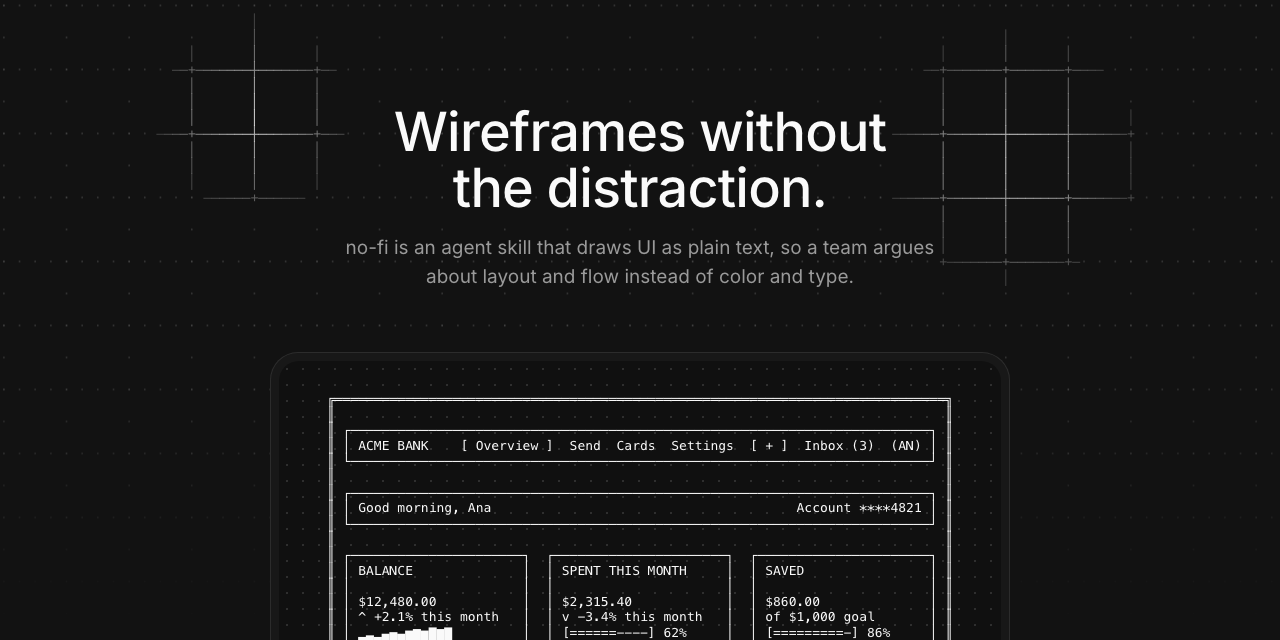
no-fi
Wireframes without the distraction. no-fi is an agent skill that draws UI as plain text, so a team argues about layout, content, and flow instead of color and type.
Ask for a screen and Claude answers with a monospaced drawing: boxes, fields, buttons, tables, and bar charts made from plain characters. There are no colors, fonts, or icons to react to, so the only thing left to discuss is structure.
Contents
- What it looks like
- Install
- Use it
- The rules
- The vocabulary
- Examples
- Check your work
- Repository layout
What it looks like
╔══════════════════════════════════════╗
║ SIGN IN                              ║
║                                      ║
║ ┌──────────────────────────────────┐ ║
║ │ Email                            │ ║
║ │ [ ana@acme.com_______________ ]  │ ║
║ │                                  │ ║
║ │ Password                         │ ║
║ │ [ ************_______________ ]  │ ║
║ │                                  │ ║
║ │ [[ Sign in ]]   [ Forgot? ]      │ ║
║ └──────────────────────────────────┘ ║
╚══════════════════════════════════════╝
The outer frame is double-lined, every box inside it is single-lined, and the primary button gets double brackets. Larger screens are in Examples.
Install
Pick one. Each puts the no-fi skill folder where your agent loads skills from.
With a prompt
Copy the install prompt from no-fi.dev and paste it into Claude Code or any agent. It runs the npx command below, or downloads the files one by one if it can't run npx.
With npx
npx no-fi-skill
This copies the skill into ~/.claude/skills/no-fi. Add --project to install it into ./.claude/skills/no-fi instead, and --force to replace an existing install.
With the skills CLI
npx skills add p-a-u-l-i-e/no-fi --skill no-fi
By hand
git clone https://github.com/p-a-u-l-i-e/no-fi.git
cp -R no-fi/plugin/skills/no-fi ~/.claude/skills/
On claude.ai
Download no-fi.zip and upload it under Settings, Capabilities, Skills. It holds only the skill folder. GitHub's Download ZIP holds the whole repository, which claude.ai won't take as a skill.
The skill is plain text plus one small checker script, in Node and Python, so you can read every file before you install it.
Use it
Ask for a screen the way you would ask a designer for a sketch. Saying wireframe or sketch is enough to load the skill, or type /no-fi in Claude Code.
Wireframe a send-money form with three steps.
Draw the settings page for notification preferences.
Let's talk through the transactions table before we design it.
Claude replies with a fenced code block, runs the checker on it, and adds a note below the drawing for anything that needs a visual described in words.
The rules
Seven rules keep every wireframe readable. The full text is in SKILL.md.
- Plain characters, plus box-drawing. Printable ASCII, box-drawing borders, and block characters for bars and charts. No emoji, no tabs.
- Double outside, single inside. The outermost container uses double lines. Every box inside it uses single lines.
- Fixed width. No line is longer than 80 characters, and every box is the same width on every row.
- Code block. Output is always a fenced block, so alignment holds.
- Describe, don't decorate. No colors, fonts, or icons. Name anything visual in a note below the drawing.
- Use the vocabulary. Draw each element as the tables show. Don't invent symbols.
- Validate. Run the checker and fix every failure before showing the result.
The vocabulary
44 elements in 7 groups: Structure, Fields, Buttons, Feedback, Navigation, Data, and Charts. Each element looks like the component it stands for:
- An input is one line. A textarea is a taller card with a
//grip. - A badge is a pill,
( Paid ). A tag is removable,<Food x>. - A button has brackets, and the primary one has double brackets.
- Open states are drawn open: a select with its menu below, an accordion with its content under it.
- Modals, toasts, and tooltips are cards drawn inside the screen they sit on.
The complete table, with a drawing and a note for each element, is in SKILL.md. The same data is in vocabulary.json.
Examples
Seven finished screens in examples/, built to use the whole vocabulary:
| Screen | File |
|---|---|
| Fintech dashboard | fintech-dashboard.txt |
| Send money form | send-money-form.txt |
| Transactions table | transactions-table.txt |
| Spending report | spending-report.txt |
| Card details | card-details.txt |
| Notification settings | settings-notifications.txt |
| Activity patterns | activity-patterns.txt |
Check your work
Your agent checks every wireframe before it shows you one. To check one yourself, from anywhere:
npx no-fi-skill check wireframe.txt
The checker also ships with the skill, in Node and Python with the same output. From an install, or from this repository:
node ~/.claude/skills/no-fi/scripts/check_wireframe.mjs wireframe.txt
python3 plugin/skills/no-fi/scripts/check_wireframe.py wireframe.txt
It fails on unsupported characters, tabs, ASCII box borders, boxes that don't close or line up, mixed double and single lines in one box, a double-line box nested inside another box, table dividers that don't land in the same column, progress bars whose fill disagrees with their percentage, bar chart rows whose length disagrees with their value, heatmaps and stacked columns without a legend, and column charts that don't say what a row is worth.
Maintaining the vocabulary
plugin/skills/no-fi/vocabulary.json is the source of truth. These scripts live in scripts/, outside the skill, so they don't ship to users. After editing the vocabulary, run:
python3 scripts/sync_vocabulary.py                 # rewrite the tables in SKILL.md
node scripts/check_coverage.mjs                    # every element appears in an example
node plugin/skills/no-fi/scripts/check_wireframe.mjs plugin/skills/no-fi/examples/*.txt
python3 scripts/check_coverage.py gives the same coverage output without Node.
Repository layout
plugin/                    the Claude plugin
  .claude-plugin/          plugin.json
  skills/no-fi/            the skill
    SKILL.md               rules and vocabulary tables
    vocabulary.json        the element vocabulary as data
    examples/              finished example screens
    scripts/               the wireframe checker
scripts/                   maintainer scripts: vocabulary sync and coverage
bin/no-fi-skill.mjs        the npx no-fi-skill command
assets/                    README images
site/                      the no-fi.dev site