
mcp server
orchescope
A local test harness for AI agent systems. Compare the same work before and after a change.
Set up
Runs on your computer. Pick your agent and operating system.
This project does not publish an install method we can turn into a config. Follow the README instead.
README
synced Oct 22, 2026Orchescope
A local, deterministic test harness for AI agent systems.
An AI agent system is software in which one or more language-model-driven agents choose steps, call tools, or hand work
to other agents. Orchescope records or scans the same work before and after a change, then reports an evidence-backed
verdict: improved, unchanged, regressed, mixed, or insufficient_evidence.
It is built for developers, CI, and coding agents. It runs on your machine and does not call a model, upload your code, or send telemetry.
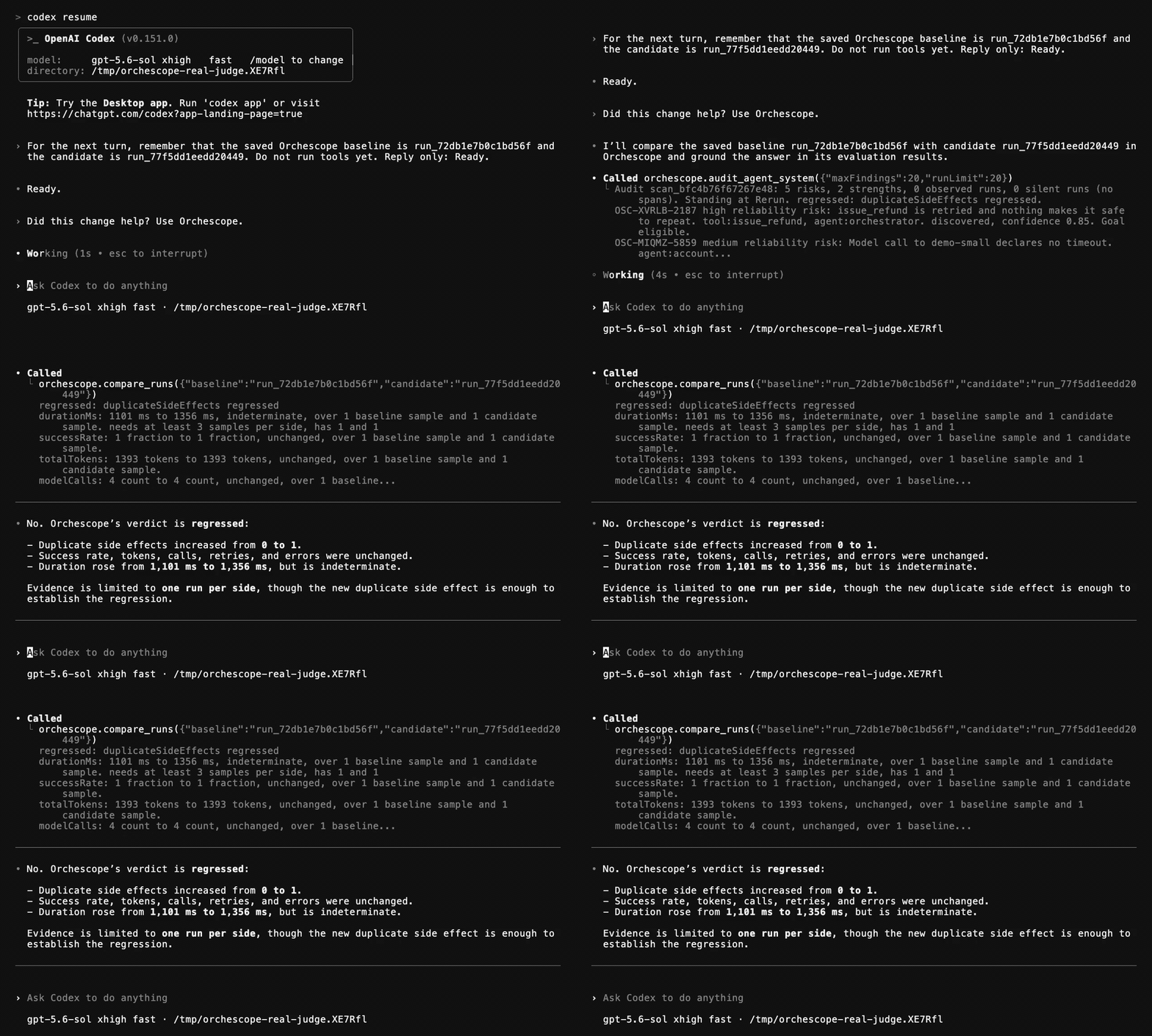
In this real Codex session, Codex calls Orchescope and gets a regressed verdict because duplicate side effects
increased from 0 to 1.
Install
Node.js 24 or newer is required. Installation has no compiler step or native build.
npm install -g orchescope
orchescope doctor
Or run one command without a global install:
npx orchescope@latest doctor
Compare a change
A scenario is a checked-in recipe for running one piece of work. The first result is the baseline, the result before your change. Run the same scenario after the change and compare the two run IDs:
orchescope test --scenario support-desk       # baseline
# make one change
orchescope test --scenario support-desk       # candidate
orchescope compare <baseline-run-id> <candidate-run-id>
The comparison keeps sample sizes and the direction of each metric. A faster run is not called an improvement if task success fell. If the evidence does not support a decision, Orchescope says so.
Use orchescope init --scenario to create a scenario template. See
scenario testing for the file
format and evaluators.
The loop
Every audit reports where the repository stands in the same five-step loop and prints the next command.
| Step | What it establishes | Command |
|---|---|---|
| 1 Audit | what is declared, what ran, and what evidence is missing | orchescope audit |
| 2 Goal | one finding as a bounded task with acceptance criteria | orchescope goal create <finding-id> |
| 3 Rerun | the same scenario and seed after the change | orchescope test --scenario <id> |
| 4 Measure | completion, duration, cost, retries, and repeated effects | recorded by the rerun |
| 5 Did it help | the baseline against the candidate | orchescope goal validate <goal-id> |
For a source-only finding, the goal compares the scan before the change with the scan after it. For a runtime finding, it compares the same scenario twice. The verdict is separate from whether every acceptance criterion passed, so a partial improvement can still be distinguished from no change or a regression.
When to use it
Use Orchescope when you need to:
- compare one change against a repeatable baseline
- check behaviour, cost, retries, repeated side effects, or completion in CI
- join supported source declarations to evidence from real runs
- give a coding agent a bounded goal and a command that verifies the outcome
When not to use it
Do not use Orchescope as:
- a replacement for a coding agent's broad source review
- a comprehensive static auditor for every framework or application pattern
- a judge of model answer quality
- an automatic code fixer
- proof that an agent system is safe
In a measured head-to-head test, a coding agent found more checkable static issues. Orchescope's narrower role is to make the same test repeatable and judge the before-and-after evidence. Read Orchescope against an agent and the judge measurement for the recorded results.
Evidence and limits
Orchescope can use two kinds of evidence:
- A source scan reads only tested code and configuration patterns. Unsupported files and adapters are reported in the coverage block. See ecosystem support.
- A runtime record ingests OpenTelemetry spans. OpenTelemetry is a standard format for traces that describe what a program did while it ran. See runtime tracing.
The analysis rules are deterministic. Raw audit JSON still contains volatile timings and generated display IDs, so it is not byte-for-byte identical across runs. Comparisons use stable semantic identity and exclude those volatile fields from reproducibility claims.
Coding agents and CI
Every command accepts --json. orchescope mcp serve exposes the same operations through the Model Context Protocol
(MCP), a standard way for a coding agent to call tools. The CLI and MCP surface return the same evidence and verdicts.
See coding agent integration and the CLI reference.
Privacy and safety
Orchescope keeps state under .orchescope/ in the repository. Its trace receiver listens on loopback only. Exports are
redacted, but redaction cannot prove that every secret was removed.
trace, test, benchmark, and chaos run your system with your account's privileges. Orchescope is not a sandbox.
Your system can write files, use credentials, reach networks, and cause real side effects. Only run it where those effects
are acceptable. Nothing here makes agent execution, prompt injection, or chaos testing safe.
Read data handling, the permission model, and the security policy before running systems with real side effects.
Try the offline demonstration
This repository includes a small agent system with deliberate weaknesses. It needs no credentials or paid model.
git clone https://github.com/twinkling-reality/orchescope
cd orchescope
pnpm install
pnpm orchescope --cwd apps/demo test --scenario support-desk
pnpm orchescope --cwd apps/demo audit
Documentation
Start with the quickstart. The documentation index links the full command, ecosystem, architecture, security, and research references.
Contributing
Read CONTRIBUTING.md and
AGENTS.md. Changes must pass pnpm verify.
License
Apache License 2.0. See LICENSE.