
skill
playthrou
Scripted product demos on your real UI. A cursor that glides, clicks and types, and a camera that zooms in on what matters. Zero dependencies.
Set up
Skills are installed by placing their folder where your agent loads skills.
The download comes from github.com/diip3sh/playthrou itself, not from our server, so what you get is exactly what its author published.
Install instructions come from the README
README
synced Oct 25, 2026playthru
Your hero demo is a 6 MB MP4. It should be your actual UI.
playthru glides a cursor across your real interface. It clicks, types, and zooms the camera in on what matters, then loops. It stays sharp at any size, works in light or dark, and is never out of date with your product. Zero dependencies, ~5 KB gzipped, no stylesheet to import.
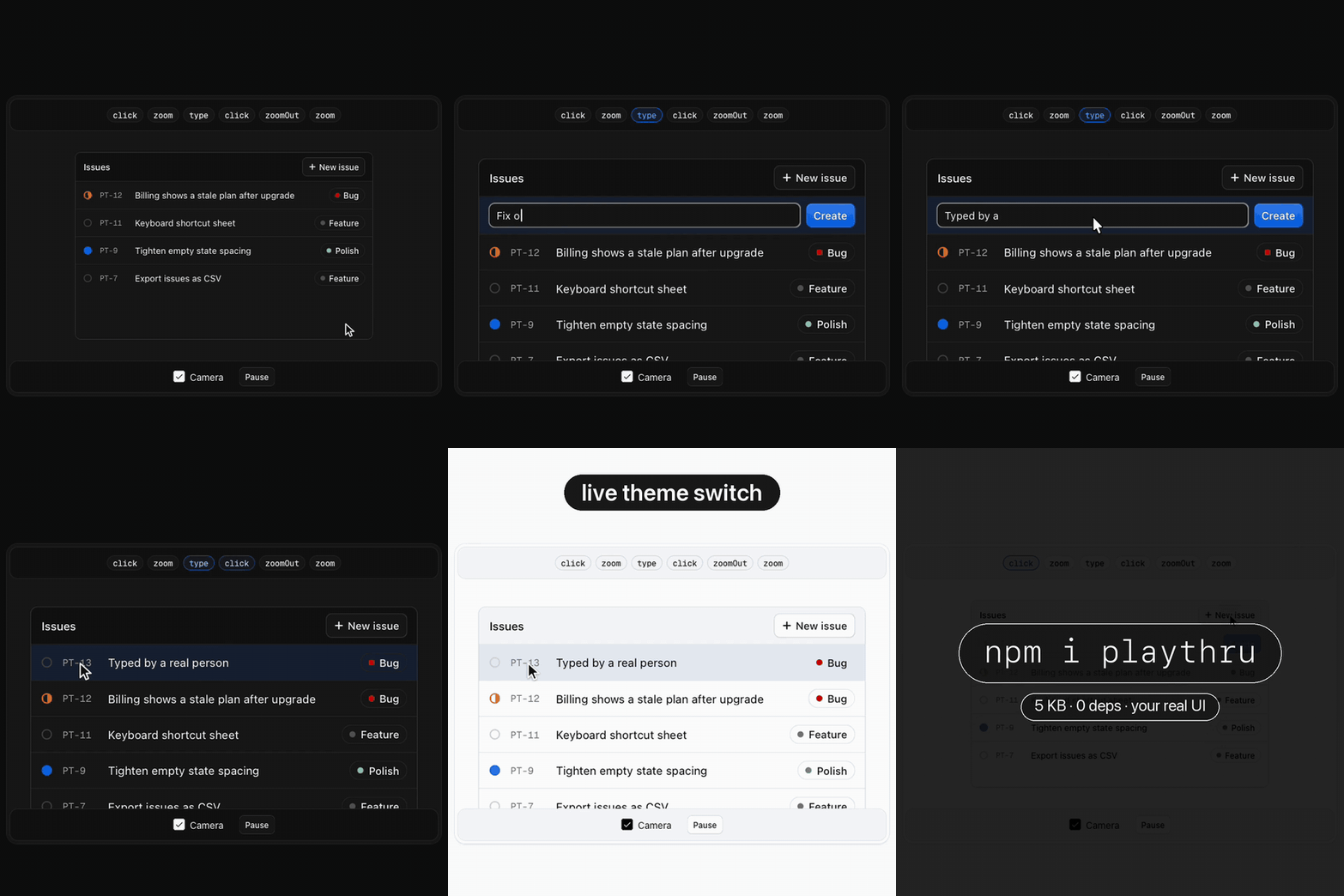
npm i playthru
Quick start
<div id="hero">
  <!-- your real app UI -->
</div>
import { playthru } from "playthru";

playthru("#hero")
  .click("#new-issue")
  .zoom("#composer")
  .type("#title", "Fix onboarding flicker on Safari")
  .click('[data-label="Bug"]')
  .click("#create")
  .zoomOut()
  .zoom(".row.is-new")
  .reset(() => app.reset());
That's the whole demo. It starts the first time the stage scrolls into view and loops forever.
React
import { Playthru } from "playthru/react";

<Playthru
  className="hero"
  script={(d) => d.type("#todo", "Record the launch video").click("#add").zoom("li:first-child")}
>
  <TodoApp />
</Playthru>
Or attach to something you already render: usePlaythru(ref, script, options).
Let your agent do it
There's an agent skill in skills/playthru. Add it, then ask for "a playthru demo of my app". The agent will set it up, with npm or with a plain <script> tag.
npx skills add diip3sh/playthrou
Or copy skills/playthru into your project's .claude/skills/.
API
| Step | Does |
|---|---|
move(target) | Glides the cursor to an element. |
click(target?) | Glides there, presses, ripples and fires real pointerdown → mousedown → pointerup → mouseup → click. Without a target it clicks the last one. |
type(target?, text) | Clicks the field, then types into it with human timing. Works with React and Vue controlled inputs. |
key(key) | Fires keydown and keyup on the last target, e.g. key("Enter"). |
zoom(target?) | Pushes the camera in on an element (or the last target). |
zoomOut() | Pulls the camera back. |
wait(ms) | Holds. |
run(fn) | Runs your own code as a step, with no pause after it. |
reset(fn) | Runs before every pass, to restore app state. Typed fields restore themselves. |
Targets are a selector (scoped to the stage) or an element. They resolve when the step runs, so you can target things earlier steps created.
Controls: play(), pause(), destroy(), playing.
Options say whether, never how:
| Option | Default | |
|---|---|---|
loop | true | Replay forever. |
autoplay | true | Start the first time the stage is 30% in view. |
pauseOnHover | true | A real pointer over the stage pauses the demo and hides the fake cursor, so visitors can poke around. |
There is no speed, easing, or duration option, and there won't be one.
The numbers
The numbers are the product. Each one is a decision you no longer have to make.
| Job | Number | Why |
|---|---|---|
| Glide | 420 ms + 0.34 ms/px, max 980 ms | Short hops shouldn't feel sluggish and long ones shouldn't teleport. A full-width move across a 900 px hero lands just under a second. |
| Arc | 10% of distance | Hands move from the wrist, in a slight curve. A straight line reads as a robot; much more than 10% reads as drunk. |
| Ease | cubic in-out | Starts and lands softly, like a camera operator. The same curve drives the cursor and the camera so they never disagree. |
| Settle | 180 ms | The beat between arriving and clicking. Without it, eyes can't catch up to what got clicked. |
| Press | 90 ms down, cursor at 84% | A real click is 60 to 120 ms. The squeeze makes it readable at video frame rates. |
| Ripple | 560 ms | Long enough to see in a 30 fps recording, gone before the next action. |
| Typing | 48 ms + up to 42 ms jitter, +150 ms after punctuation | Around 120 to 140 wpm: fast enough to not bore you, uneven enough to look human. It's seeded, so every loop types identically. |
| Zoom | 1050 ms; target fills 50% of the stage; scale clamped to 1.3 to 2.2× | Below 1.3× a zoom looks like a mistake. Above 2.2× you lose where you are. If the target can't fit in 95% of the stage at 1.3×, as on a phone, the camera stays out. |
| Follow | pan only when the target is within 8% of an edge, and only enough to bring it 22% in | While zoomed in, the camera keeps the action in frame without chasing every move or recentering on it. |
| Gap | 240 ms between steps | Sequential actions should read as separate. |
| Hold | 1.9 s on the final state | The payoff needs to land before the loop. |
| Loop | glide home and zoom out, 240 ms fade, reset, 380 ms fade in | It reads as a cut, not a glitch. |
How it behaves
- Real events. Your app's own handlers run. Hovered elements get
[data-playthru-hover]and the field being typed in gets[data-playthru-focus], so you can mirror:hoverand:focusstyles:.btn:hover, .btn[data-playthru-hover] { … }. - It never steals focus. The page keeps real keyboard focus. playthru draws its own caret instead.
- It never navigates. Clicks on links and submit buttons have their default action prevented. Your click handlers still run.
- It never closes your menus. playthru's events reach the whole page, so a menu's "click outside to close" handler would see them. While a menu, listbox or popover outside the stage is open, the demo pauses and picks up again once it closes. It detects popups by
aria-expanded="true"on a trigger witharia-haspopup(or a combobox) and by the native:popover-openstate, which Radix, Base UI, Headless UI, React Aria and MUI all set. A hand-rolled popup without either should ignore events whereevent.isTrustedisfalse. - Pausable clock. Everything runs on one frame clock, so hover, scrolling it off screen, or a background tab freezes it mid-motion, and it resumes exactly where it was.
- Reduced motion. With
prefers-reduced-motion, the cursor jumps instead of gliding, the camera never moves, and loops cut without fades. - The stage. Your stage gets
overflow: hidden. Its single child becomes the "scene" that the camera moves. If there are several children, they're wrapped (and unwrapped ondestroy()).
Develop
npm install
npm run dev     # builds, serves examples at http://localhost:5178
npm run size
Release
Run npm run changeset to describe a change. On main, the Release workflow opens a "Version packages" pull request; merging it publishes to npm with provenance through npm trusted publishing.
MIT