
mcp server
promoteops
An MCP server that compares AWS CloudFormation stacks across separate environment accounts, for example Development, Test, and Production, and promotes changes between them only after a plan has been
Set up
Runs on your computer. Pick your agent and operating system.
Before you start
- Node.js 20 or newer
{
  "mcpServers": {
    "promoteops": {
      "command": "npx",
      "args": [
        "-y",
        "promoteops"
      ]
    }
  }
}
same format Cursor, GitHub Copilot CLI, Junie, JetBrains AI Assistant, Augment (Auggie CLI), Factory Droid, Kiro, Devin CLI +12
Values in angle brackets are placeholders. Restart Claude Desktop after editing its config.Claude Desktop docs
README
synced Oct 21, 2026PromoteOps


An MCP server that compares AWS CloudFormation stacks across separate environment accounts, for example Development, Test, and Production, and promotes changes between them only after a plan has been reviewed and approved.
The problem this solves
Teams that run the same CloudFormation stack in more than one AWS account or environment, one for Development, one for Test, one for Production, run into a management problem: once there's more than a handful of stacks, it becomes hard to tell which ones are still in sync and which have drifted apart. Answering "is Production actually running what Test is running?" usually means opening the AWS console for each account and comparing templates by hand, one stack at a time.
PromoteOps is a Model Context Protocol (MCP) server that runs locally and connects to an AI coding agent. Once connected, the agent can use PromoteOps' tools to generate a drift report across every tracked stack, show the exact template diff for one stack, and promote a stack from one environment to the next, using real data read from the AWS accounts, not a guess.
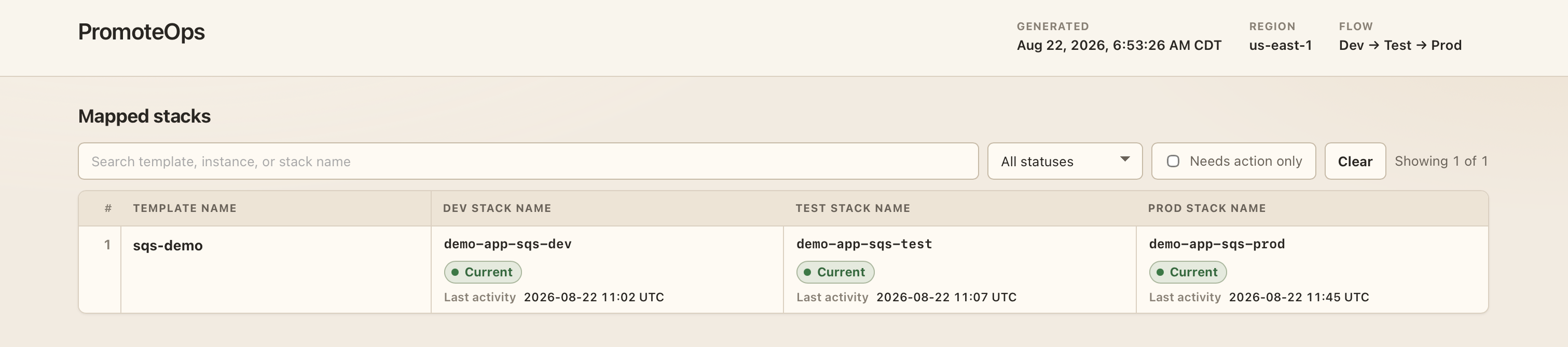
PromoteOps reads a small configuration file that maps each CloudFormation template to its stack name in each environment, then uses that mapping to generate a report like the one below, where every stack is currently in sync:
What PromoteOps actually does
- Compares the live template running in each mapped stack across environments and reports which ones have drifted.
- Shows the exact diff for one stack, line by line, before any decision is made to promote it.
- Builds a promotion plan: reads the local template file intended for deployment, records the target stack's current state, and saves the plan to disk. This step does not change anything in AWS.
- Executes a promotion plan, but only when given the exact plan ID and an explicit confirmation to proceed. Before applying anything, it re-checks that the target stack has not changed since the plan was created. If it has, the plan is rejected, and a new plan has to be made.
What PromoteOps is not
- Not a CI/CD pipeline. It does not run on a schedule or in response to a git push; every action is triggered explicitly, through the agent.
- Will not create or update a stack that isn't already listed in the mapping file. If an environment is marked as not deployed or excluded, PromoteOps stops and requires the mapping file to be updated instead of guessing what to do.
- Does not store or transmit AWS credentials. It uses the AWS profiles already configured on the machine it runs on.
- Built around a fixed environment chain (for example Development to Test, Test to Production), not a general multi-account orchestration tool.
Core features
| Feature | MCP tool | Can it change AWS? |
|---|---|---|
| Check that the server is running | ping | No |
| Compare every mapped stack across environments and generate a drift report | report_stacks | No |
| Show the full template diff for one stack between two environments | diff_stack | No |
| Build a promotion plan from a local template, without applying it | plan_stack_promotion | No |
| Apply a previously approved plan | execute_stack_promotion | Yes |
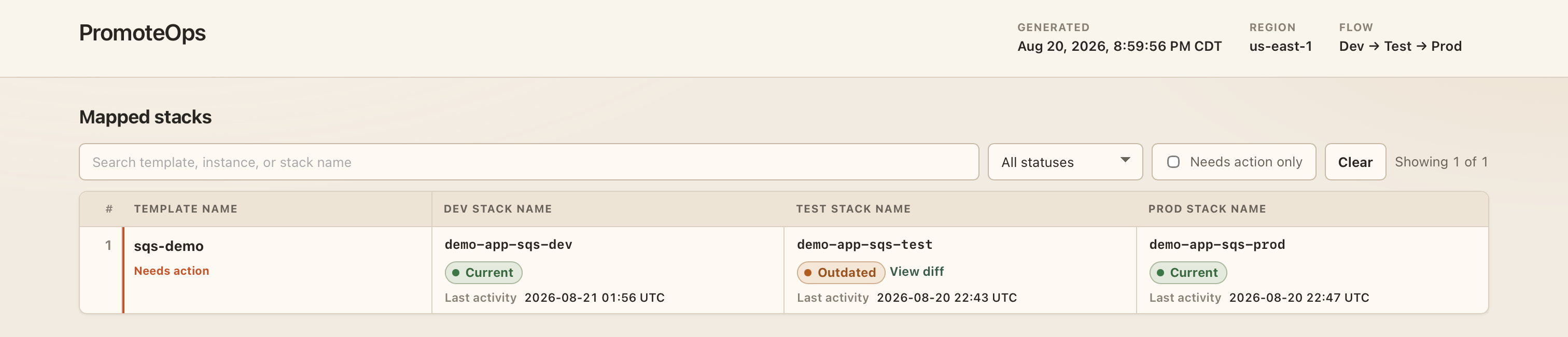
Each row in the report is flagged when it needs attention:
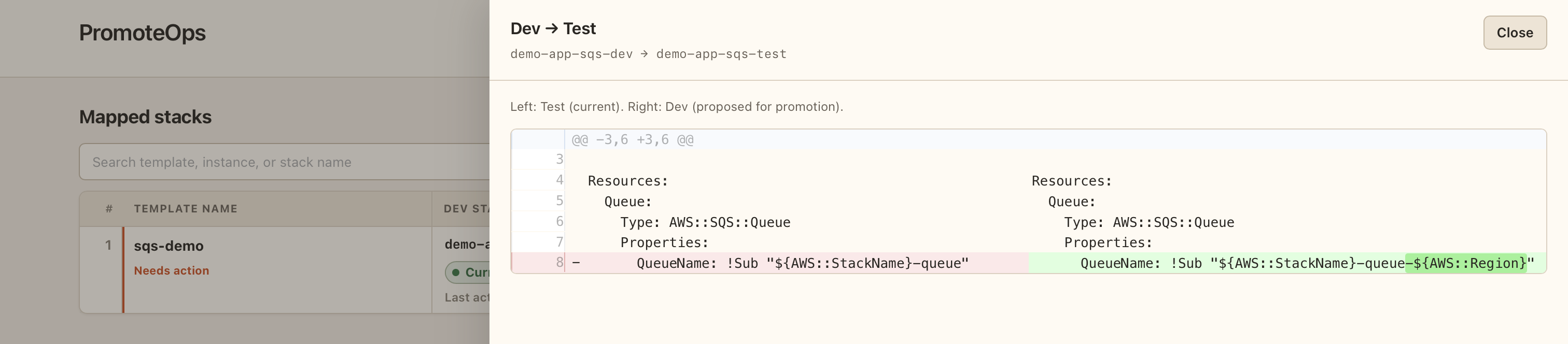
Opening a flagged row shows the exact diff between what's deployed and what would be promoted:
How the two flows work
PromoteOps separates reading from writing. Generating a report or a diff never changes anything in AWS. Promoting a stack always goes through a plan first, so nothing is applied without a record of what was proposed and a check that the record is still accurate.
Reading drift: report_stacks and diff_stack

report_stacks reads the live template for every mapped stack in each environment and produces an HTML report plus a summary of what has drifted. diff_stack uses the same comparison data to show the exact diff for one stack.
Promoting a stack: plan_stack_promotion then execute_stack_promotion
The check against the target stack's hash, right before applying anything, is what makes the plan trustworthy. If another deployment changed the target stack after the plan was created, the plan is discarded instead of being applied against infrastructure that no longer matches what was reviewed.
Safety boundaries
ping,report_stacks,diff_stack, andplan_stack_promotionnever call an AWS API that changes infrastructure. The only tool that can mutate anything isexecute_stack_promotion.execute_stack_promotiononly accepts a plan ID, not a stack name or template. A plan ID only exists after a realplan_stack_promotioncall, and the agent is expected to have that plan reviewed and confirmed before calling execute with it.- Each plan can be executed once. A repeated attempt to execute the same plan ID is rejected.
- If the mapping file marks an environment as
EXCLUDEDorNOT_DEPLOYED, PromoteOps will not create a stack there or choose a name for it. It stops and requires the mapping file to be edited. - Promotion plans require every CloudFormation parameter to be specified explicitly. There is no option to silently reuse whatever value is already set on the stack.
- Every plan created, every confirmation accepted or declined, every rejected stale or repeated plan, and every executed change is written to a plain text audit log on the local machine, at
~/.promoteops/audit.log. - PromoteOps uses the AWS credentials and profiles already configured on the local machine. Nothing is sent anywhere except to AWS and to the local filesystem; there is no server component beyond the process running locally.
Setup
Requires Node.js 20 or newer, an AWS account with CloudFormation stacks in up to three environments, and AWS credentials already configured locally (for example through aws configure sso).
Option A: Install from npm (recommended)
mkdir promoteops-config
cd promoteops-config
npm install promoteops
cp node_modules/promoteops/config.example.yaml ./config.yaml
cp node_modules/promoteops/mapper.example.json ./mapper.json
This installs promoteops and copies the two config files into the current folder. Edit those files next.
Option B: Run from source
git clone https://github.com/Hitesh1326/promoteops.git
cd promoteops
npm install
npm run build
cp config.example.yaml config.yaml
cp mapper.example.json mapper.json
Fill in the configuration
Either option produces the same two files to edit. Edit config.yaml with the AWS region, the AWS profile name for each environment, and absolute paths for the templates, mapper, and report:
aws:
  region: us-east-1
  profiles:
    dev: my-dev-sso-profile
    test: my-test-sso-profile
    prod: my-prod-sso-profile

templates:
  localPath: /absolute/path/to/cloudformation-templates

paths:
  mapper: /absolute/path/to/promoteops-config/mapper.json
  reportOutput: /absolute/path/to/promoteops-config/tmp/report.html
For Option A, promoteops-config is the folder created above. For Option B, use the cloned repo path instead.
Edit mapper.json to list each template PromoteOps should track, along with its stack name in each environment. If a template doesn't have a stack in an environment yet, or shouldn't be promoted there at all, use the sentinel values NOT_DEPLOYED or EXCLUDED instead of a stack name:
{
  "mappings": {
    "name_of_the_template": [
      { "dev": "name_of_the_stack_in_dev", "test": "name_of_the_stack_in_test", "prod": "name_of_the_stack_in_prod" }
    ],
    "new-service": [
      { "dev": "new-service-dev", "test": "NOT_DEPLOYED", "prod": "EXCLUDED" }
    ]
  }
}
Connecting PromoteOps to an agent
Add PromoteOps to the MCP configuration of any MCP-compatible AI coding agent. Replace the --root placeholder with the absolute path to the folder that holds config.yaml and mapper.json (the folder created in Option A):
{
  "mcpServers": {
    "promoteops": {
      "command": "npx",
      "args": ["-y", "promoteops", "--root", "/absolute/path/to/promoteops-config"]
    }
  }
}
For Option B, point the agent at the built entry file directly instead of using npx, and pass --root as the cloned repo folder (where config.yaml and mapper.json live):
{
  "mcpServers": {
    "promoteops": {
      "command": "node",
      "args": [
        "/absolute/path/to/promoteops/dist/index.js",
        "--root",
        "/absolute/path/to/promoteops"
      ]
    }
  }
}
After a code or config change and rebuild, restart the MCP connection. Most agent hosts cache the tool list from a running server and won't pick up new tools until reconnected.
What a session looks like
- Call
report_stacks. It generates the drift report and returns a summary of which stacks are in sync and which have drifted. - For a stack flagged as drifted, call
diff_stackwith its template name and the environment pair to review, for example dev to test. It returns the exact lines that differ. - To promote that stack, call
plan_stack_promotionwith the template name, the environment pair, and the CloudFormation parameters to use. This does not change anything in AWS; it returns a plan ID and a summary of what the plan would do. - Review the plan summary, then pass that exact plan ID to
execute_stack_promotionto run it. Without the plan ID from step 3,execute_stack_promotionhas nothing to execute and will not run. - PromoteOps checks that the target stack has not changed since the plan was created, then creates and runs the CloudFormation change set, waits for it to finish, and reports whether it succeeded.
Where plans and logs are stored
- Each plan is saved as a JSON file under
~/.promoteops/plans/, named by its plan ID. It records the template name, the source and target environment, the resolved stack name, the target stack's template hash at the time of planning, the local template contents, and the parameters specified. ~/.promoteops/audit.logis a plain text file where each line is a JSON record of one event: a plan being created, a confirmation being accepted or declined, a plan being rejected as stale or already executed, or a promotion succeeding or failing.
Development
npm install
npm test          # unit test suite, no AWS calls are made
npm run build     # compiles TypeScript and copies report assets
npm start         # runs the built server over stdio
| Path | Role |
|---|---|
src/index.ts, src/server.ts | Entry point; parses --root and registers the five MCP tools and their input schemas |
src/tools/ | One folder per tool: reportStacks, diffStack, planStackPromotion, executeStackPromotion |
src/stacks/ | Stack comparison, template diffing, and mapper-to-stack resolution logic |
src/aws/ | AWS client construction, stack inspection, and CloudFormation change set handling |
src/planStore/ | Plan persistence and staleness checks |
src/audit/ | The local audit log writer |
src/mapper/, src/config/ | Parsing and validation for mapper.json and config.yaml |
src/report/ | HTML report rendering |
Anything that calls AWS, touches the filesystem, or reads the system clock is passed in as a dependency rather than called directly. This is what makes it possible to unit test the promotion logic, mapping resolution, staleness checks, and plan lifecycle, without needing real AWS credentials.
License
MIT © Hitesh Shinde