
mcp server
Tavotto
AI drew your research figure. Tavotto makes it publication-ready: edit matplotlib and AI-generated figures on a canvas, lay out multi-panel pages in mm, check journal rules before export. Scripts stay
Set up
Runs on your computer. Pick your agent and operating system.
Before you start
- uv (`curl -LsSf https://astral.sh/uv/install.sh | sh`)
{
  "mcpServers": {
    "tavotto": {
      "command": "uvx",
      "args": [
        "tavotto"
      ]
    }
  }
}
same format Cursor, GitHub Copilot CLI, Junie, JetBrains AI Assistant, Augment (Auggie CLI), Factory Droid, Kiro, Devin CLI +12
Values in angle brackets are placeholders. Restart Claude Desktop after editing its config.Claude Desktop docs
README
synced Nov 1, 2026Tavotto: make AI-drawn research figures publication-ready
AI drew your research figure. Tavotto™ makes it publication-ready. Tavotto is a free, open-source tool for finishing scientific figures: it opens the figure that an AI assistant or your own Python script already drew (matplotlib today), and you change titles, legends, curves and the page layout on a canvas. The script stays untouched, every edit is saved separately, and before export the figure is checked against a publication profile (font floor, column width, dpi).
Download
Get started
Desktop app in three steps
- Install it. Open the
.dmgor run the.exefrom the buttons above. The installer carries its own Python with numpy, matplotlib, pandas, scipy, seaborn and Pillow, so you do not install Python. The download is about 195 MB on macOS and 89 MB on Windows. - Open your figures. Drag a matplotlib script (
.py) onto the window, or open the folder that holds your figure scripts. The home page also offers a guided example. - Edit and export. Double-click a panel to edit inside it, arrange panels on the page, then press Export. The preflight runs before anything is written.
On Windows, an unsigned installer makes SmartScreen show a prompt on first run: choose More info → Run anyway, or check the file against SHA256SUMS.txt on the release page first. More: installation details.
Use it from an AI coding assistant
With the desktop app installed, open Settings → Figure assistants → Connect AI editors and press Connect on your editor's row; the first time, it asks which project folder the editor may work in.
| Assistant | With the desktop app | Without it |
|---|---|---|
| Codex | Connect | Codex plugin |
| Claude Code, WorkBuddy | Connect | Plugin (Beta) |
| Cursor, VS Code, Trae, ZCode, Claude Desktop | Connect | Config generator (experimental) |
| DeepSeek Harness, MiniMax Code | Not yet | Bundle (Beta) or config generator |
pip, Linux and servers
pipx install "tavotto[worker]"
tavotto
Your browser opens at http://127.0.0.1:5089. It needs Python 3.10 or later; on an older Python, uv tool install --python 3.12 "tavotto[worker]" fetches one. tavotto --figures <dir> opens a figure folder directly. More (uv, SSH to a remote server, your own Python environment): installation details.
What it does
Edit inside the figure
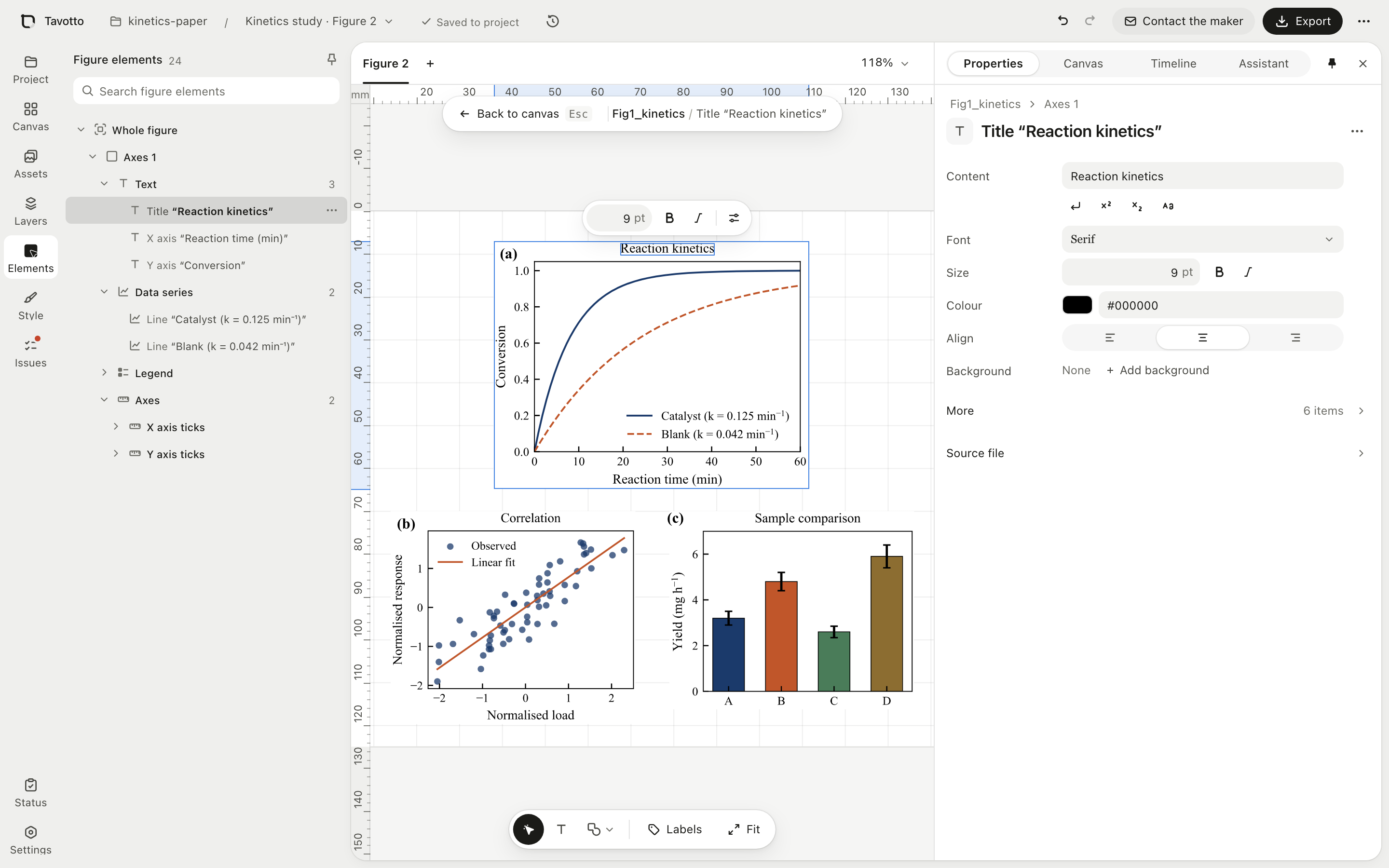
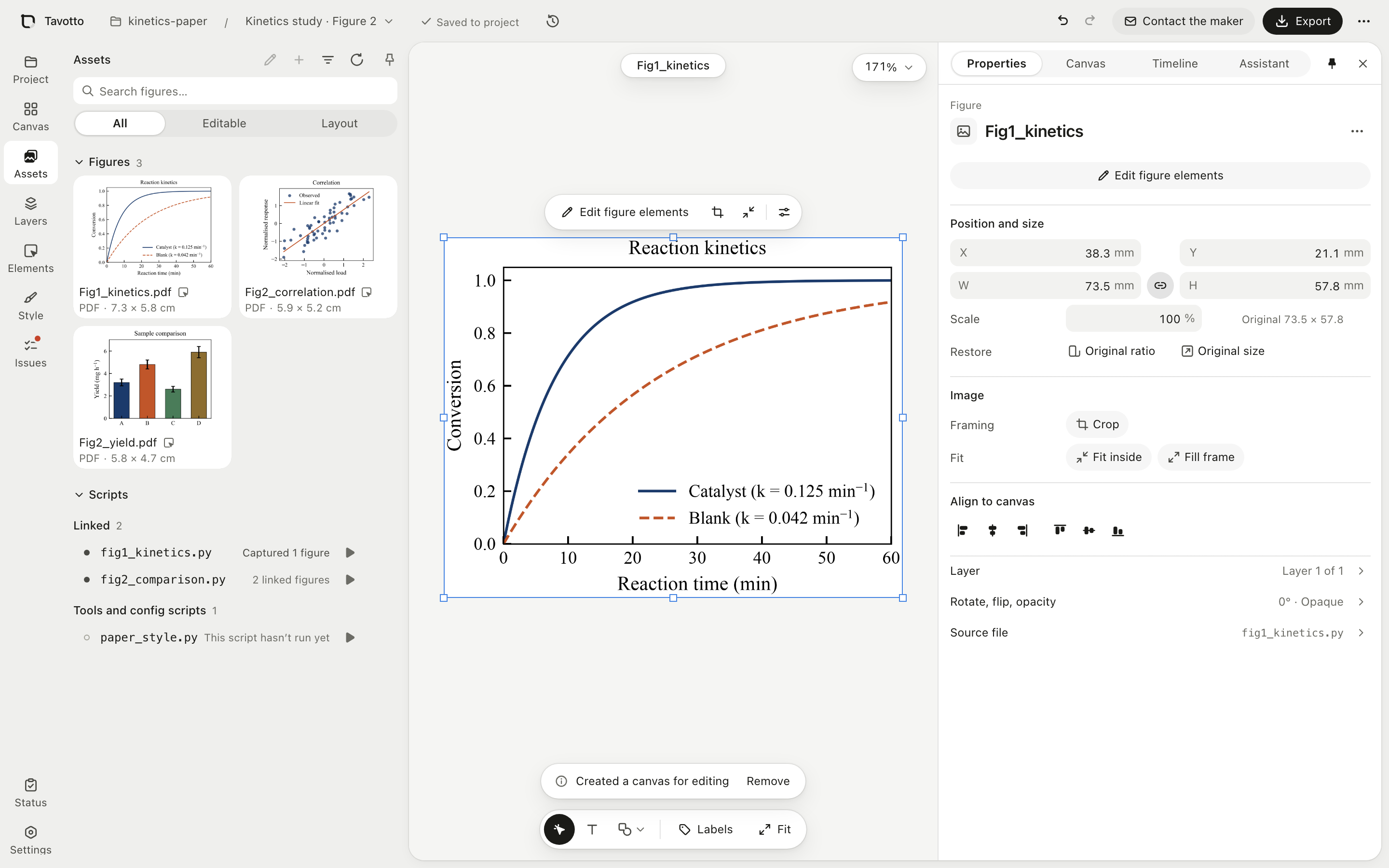
Double-click a panel and Tavotto runs your script once and keeps the matplotlib Figure in memory. Pick the title, a tick, a curve, the legend or an arrow from the tree or on the canvas, then change its size, colour, dash pattern or position; dragging follows the cursor, and matplotlib runs once when you let go. What can be edited.
Lay out several figures on one page
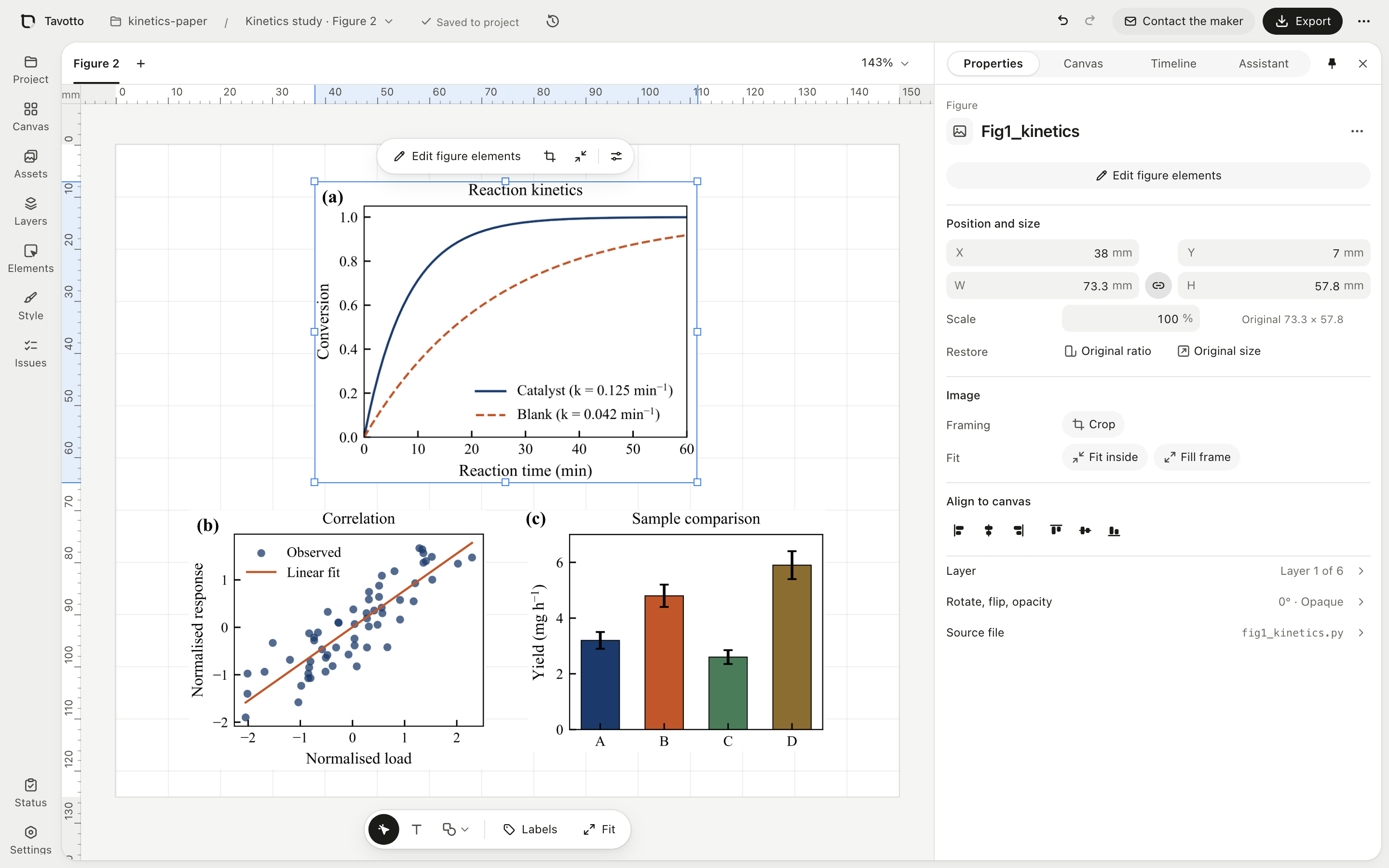
Place panels on a page measured in millimetres at the size their script drew them, snap and align them, bind them into rows and grids, add (a)(b)(c) labels, and draw arrows, scale bars and zoom boxes on top.
Check and export for submission
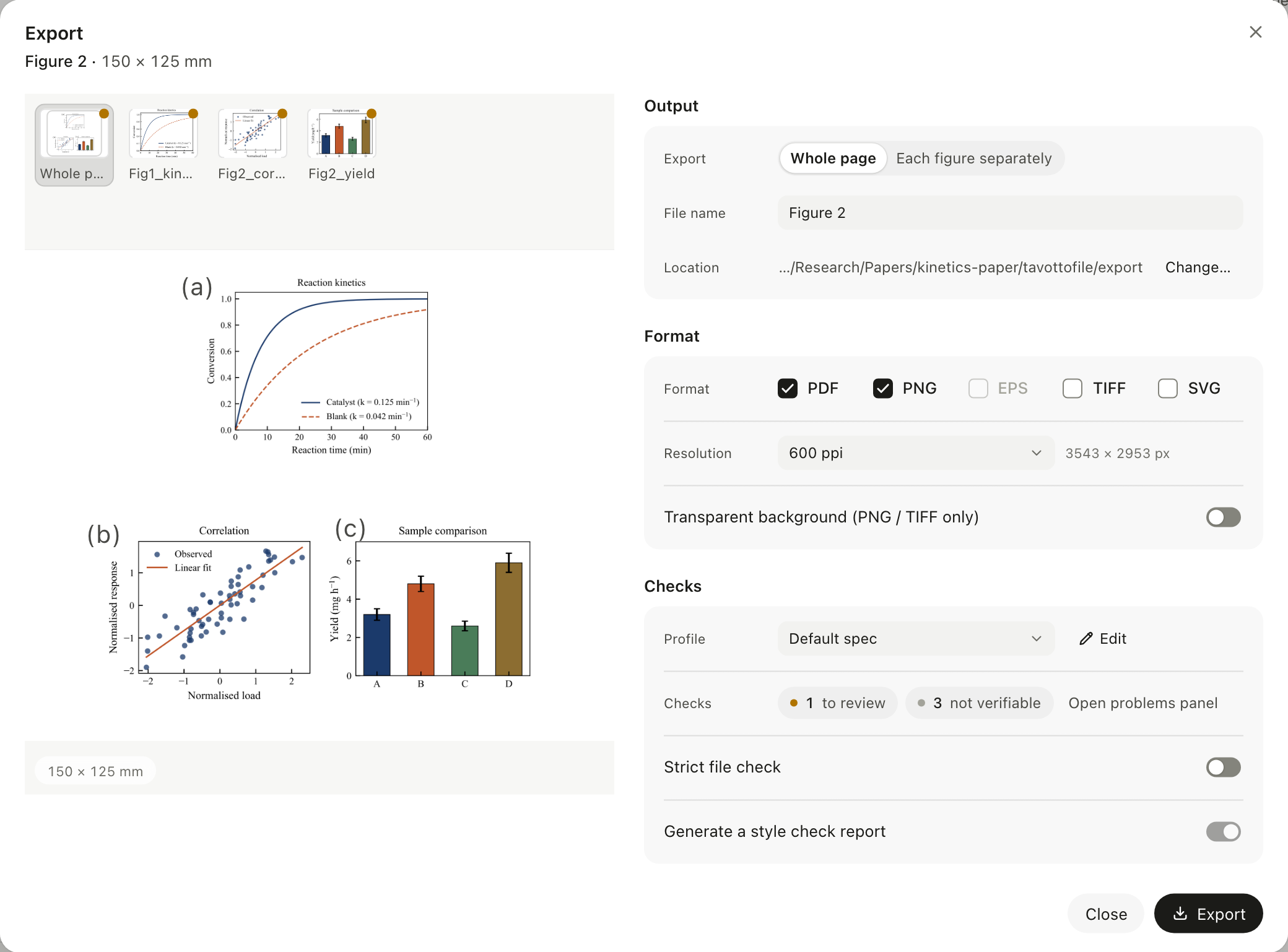
Export writes PDF with real vector text, plus PNG, TIFF and SVG (PNG and TIFF at 300 to 1200 ppi; EPS too when you export a single figure that has a script). Alongside, the figure is checked against a publication profile at its final physical size: text under the font floor, the wrong column width, low-dpi rasters. Findings are sorted into to fix, to review, not verifiable and suggestions. They never lock the Export button; anything still unresolved is recorded in a style-check report written with the files. Formats, levels and profile.
Connect your own AI to change the figure
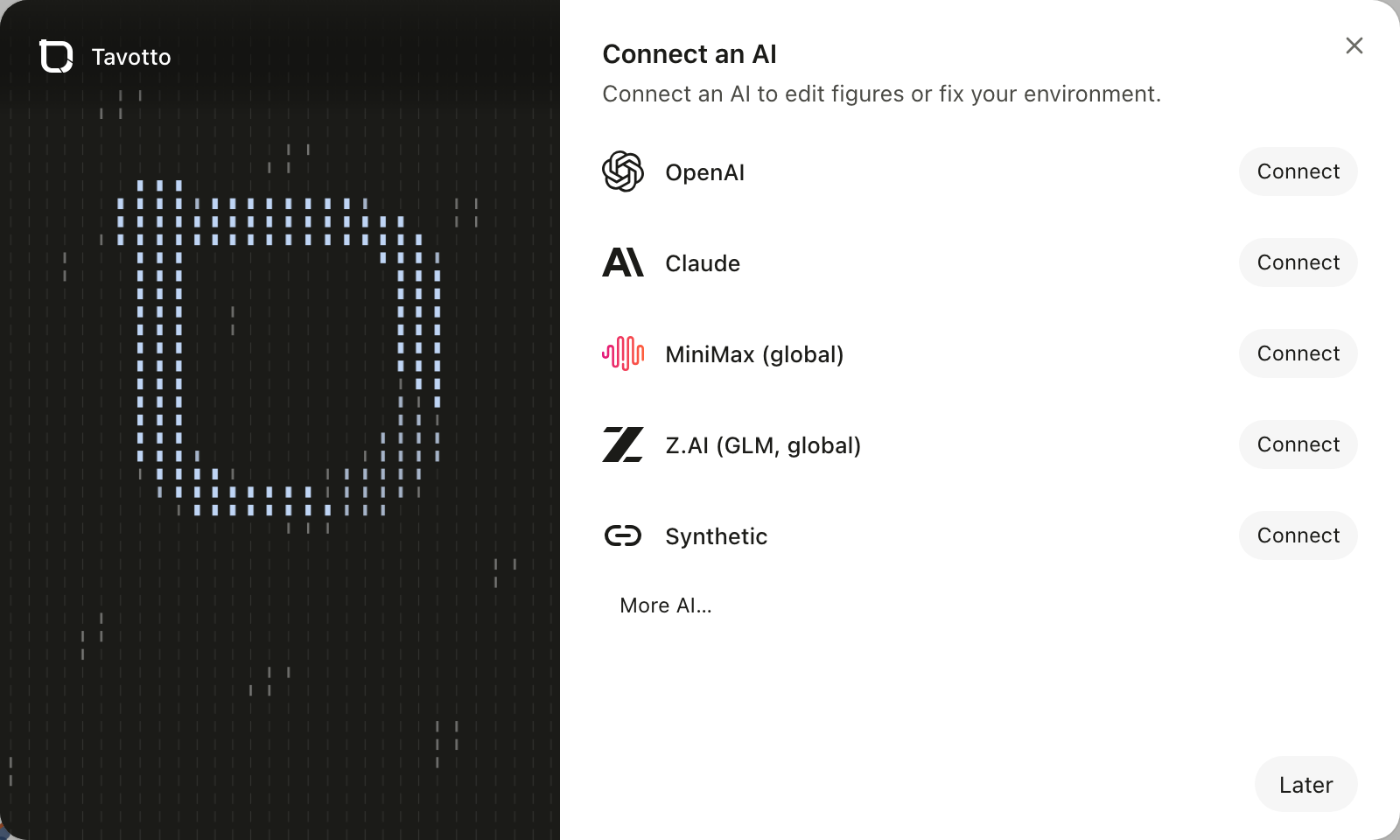
The assistant panel edits the script for you ("move the legend to the top left, 7 pt"). Connect a ChatGPT (Codex) or Claude subscription, an API key from DeepSeek, Kimi, Zhipu GLM, MiniMax, Alibaba Bailian, OpenAI or Anthropic and others, or any compatible custom endpoint. Your script is snapshotted first, you see the diff, and one click reverts it. This is the only path that touches your script, and you have to start it.
Open a script in the environment it already runs in
Tavotto looks for the conda, venv or system Python your script was written for and runs it there. A package it cannot find is named, and your own environments are never modified. From a terminal, tavotto run -- python figure.py attaches to figures made by the command you already use (Beta).
Go back to any earlier layout
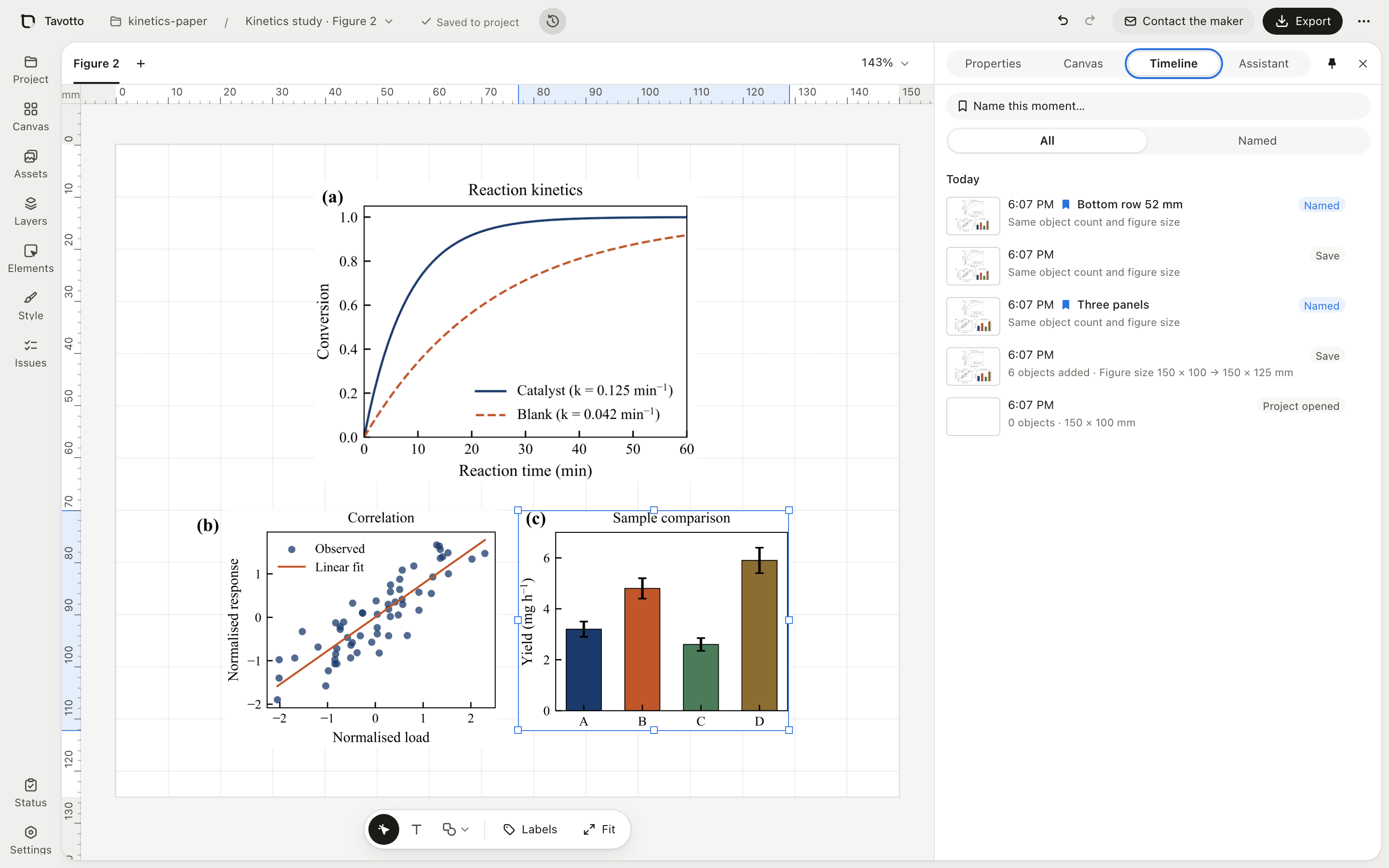
The layout timeline keeps a node automatically after you pause editing (at most one every two minutes) and on export, write-back, save, and project open or close. Name the ones you want to keep, compare a node with the current canvas, and restore it; the state before the restore is saved too.
Why use it
| Edit the script and re-run | Finish in a vector editor | Tavotto | |
|---|---|---|---|
| Move a legend by 3 mm | Change a number, run, look, repeat | Drag it | Drag it |
| Knows it is a legend, not paths | In code | No | Yes: title, legend, ticks, series, colourbar |
| Edits survive the next data update | Yes | No, the hand-made layout is lost | Yes, replayed onto a fresh run |
| Several panels on a page in mm | By hand in code | Yes | Yes |
| Journal rules checked before export | No | No | Yes |
A vector editor is the more powerful drawing tool. It does not know that the thing you clicked is a legend, and it cuts the figure off from the code that drew it.
Common questions
Can I edit a PDF that matplotlib generated? Yes, when the script that produced it is next to it: tavotto open figures/Fig1.pdf matches it to the script in the same project, re-runs it and lets you edit the figure itself, not a flattened picture. A PDF with no script in its project folder can still be placed on a page, arranged, annotated and exported, but not edited inside.
Does Tavotto change my script? No. Edits are stored as overrides in the layout and replayed onto a fresh run. "Write back to the original file" is an explicit action, and it can be locked off per project. The optional AI assistant is the other way your script can change, and only when you ask.
Is my data uploaded? No. Rendering, layout and export run on your machine. Tavotto makes two requests on its own: a daily update check, and anonymous usage statistics that are off until you opt in. If you connect an AI, your request goes to that AI, through its command-line tool or straight to its API, and nowhere else. See Privacy.
Does it work with figures written by Claude, Codex or ChatGPT? Yes. Any matplotlib script works, including seaborn and pandas plots. For agents, keep the script and its output in one folder and save the output as vector PDF; the plugin teaches the agent this shape.
Do I need to install Python? Not for the desktop app, which carries its own. The PyPI install needs Python 3.10 to 3.14.
What about plotly or Pillow figures? They are not matplotlib objects, so they cannot be edited inside. Tavotto says so and can ask your connected AI for an editable matplotlib version as a new script, leaving the original alone.
Install in an AI coding assistant
The Codex install without the desktop app's Connect button. Every other assistant, and everything beyond the commands, is in the full reference.
Using Tavotto in Codex (plugin)
Just want AI inside Tavotto? You don't need this section: click "Connect AI" in the app.
Regular users: do not clone or build this repository. Installing from source is only for people working on Tavotto itself.
| What you want to do | What to install |
|---|---|
| Codex draws the figure; you keep dragging and tweaking it in the Tavotto desktop window | The Tavotto desktop app + the Codex plugin (no Python engine needed) |
| Use Tavotto's canvas, preflight, editing and export tools directly inside Codex | The Codex plugin + the Tavotto Python engine |
| Change Tavotto itself | See "Contributors: developing from source" below |
The full Codex integration
Run these in a terminal, one at a time:
codex plugin marketplace add Tavotto/Tavotto --sparse .agents/plugins
codex plugin add tavotto@tavotto
pipx install "tavotto[worker]"
Then close your current Codex session and start a new one. The plugin's skill and MCP tools do not hot-reload into a session that is already open. If you installed the engine with pip/pipx, tavotto codex install does the two codex plugin steps for you and skips what is already healthy; tavotto codex doctor only diagnoses.
If the plugin shows up enabled but with no tools, run tavotto codex install. If you only have Codex Desktop, skip the two codex plugin lines and let Tavotto do them. It finds the CLI bundled in %LOCALAPPDATA%\OpenAI\Codex\bin\<hash>\codex.exe, and when Codex cannot run git it downloads the plugin's release branch as a zip and checks every file against the build manifest:
pipx install "tavotto[worker]"
tavotto codex install
Without the Python engine, do the same by hand in PowerShell:
$codex = (Get-ChildItem "$env:LOCALAPPDATA\OpenAI\Codex\bin\*\codex.exe" | Sort-Object LastWriteTime -Descending | Select-Object -First 1).FullName
$dir = "$env:LOCALAPPDATA\Tavotto\codex-marketplace"
Invoke-WebRequest https://github.com/Tavotto/Tavotto/archive/refs/heads/plugin-stable.zip -OutFile "$env:TEMP\tavotto-plugin-stable.zip"
Expand-Archive "$env:TEMP\tavotto-plugin-stable.zip" $dir -Force
& $codex plugin marketplace add "$dir\Tavotto-plugin-stable"
& $codex plugin add tavotto@tavotto
A local marketplace has no codex plugin marketplace upgrade: upgrade with tavotto codex upgrade, or delete $dir\Tavotto-plugin-stable and repeat the download. Background and symptoms: the full reference and codex-plugin/README.md.
In the new session you can say:
Draw this figure with Tavotto. Run the Tavotto health check first; only draw once it is healthy, and open the result in Tavotto at the end. Do not install or upgrade any component that is already working.
The plugin installs into your local ~/.codex configuration, so it loads only in Codex surfaces that read local plugins: the Codex CLI and the Codex desktop app. A surface that does not load local plugins (a cloud-hosted session, an IDE integration that ignores ~/.codex/plugins) will never show the Tavotto tools; check in a terminal codex session first.
Handing off to the desktop app only
Install the desktop app plus the plugin (the two codex plugin commands above; the pipx line is not needed). When you ask Codex to "open it in Tavotto", the plugin's skill hands the figure over with its own script, which finds the CLI inside the desktop app:
python3 <plugin-dir>/skills/tavotto-figure/scripts/handoff.py path/to/figure.py
Do not tell Codex to run a bare tavotto open on this route: the desktop installers deliberately leave your PATH untouched, so that command only exists after a PyPI install. Keep the script and its output in the same directory, and prefer vector PDF.
Let Codex do the install
Send Codex this message, in full:
Follow the "Using Tavotto in Codex (plugin)" section of the README exactly, as a regular-user install. Do not clone or build the source; do not run pnpm, npm, cargo, Tauri, tests, or an editable install. Install only the Codex plugin and the Tavotto engine it needs, then run the health check; when a new session is required, tell me so explicitly and stop.
Privacy
Rendering, composition and export are local; Tavotto does not upload your figures, scripts, projects or data. It makes two requests on its own: a once-a-day check of GitHub Releases for a new version (or the project's China mirror, dl.tavotto.cn, depending on your time zone; switch it off under Settings → Check for updates), and anonymous usage statistics that stay off until you say yes and can never contain figures, scripts, paths or text. Diagnostics bundles are saved locally, redacted, and sent only if you confirm. Details: docs/privacy.md and the event contract. Where Tavotto keeps its files: docs/guide/files-and-data.md.
Free code signing is provided by SignPath.io, certificate by SignPath Foundation; see the code signing policy. Report security issues through private reporting, not a public issue.
Contributing
Issues and pull requests are welcome. CONTRIBUTING.md covers how to verify a change and which boundaries the codebase keeps. When reporting a bug, Settings → Privacy, diagnostics and About → Download diagnostics bundle collects what is usually needed, with keys and personal paths redacted.
Contributors: developing from source. This is for changing Tavotto itself, never a fallback for a failed regular install (needs node and pnpm to build the interface):
git clone https://github.com/Tavotto/Tavotto.git && cd Tavotto
python -m venv .venv && .venv/bin/pip install -e ".[worker,dev]"
.venv/bin/python scripts/fetch_fonts.py   # approved fonts (not in git)
python scripts/build_frontend.py
.venv/bin/tavotto
Support the project
Tavotto is free and open source, and maintained by one person. If it saves you time, you can support its development: one-off or monthly on Ko-fi, or with Alipay / WeChat Pay on 爱发电 (afdian). Support is voluntary and unlocks no features; what it pays for, and the supporters wall, are on tavotto.com/support.
Sponsors
Supporters on the $50/month Sponsor tier on Ko-fi (or the 赞助人 plan on 爱发电) appear here with their avatar, for as long as they sponsor. The image updates on its own.
License
Using Tavotto, modifying it and running it inside your lab are all unrestricted, and the figures and PDFs you produce with it are entirely yours — the licence does not reach your work. The obligations apply to distribution: if you give a modified Tavotto to others, or run it as a network service for them, the corresponding source has to be available to those users.
Contributing
Contributions are accepted under the Tavotto Contributor License Agreement, which lets you keep the copyright in your contribution while allowing the project to distribute it under the community licence and, where applicable, under separate commercial terms. The Tavotto copyright holder(s) may offer separately licensed editions.
See CONTRIBUTING.md and docs/legal/.
Trademark
Tavotto™ is an unregistered trademark of the Tavotto project. An open-source copyright licence is not a trademark licence: forks are welcome and may say they are based on Tavotto, but shouldn't present themselves as the official release. See TRADEMARKS.md.
If Tavotto saves you an afternoon on your next figure, consider starring the repository.