
mcp server
vaultic
🔐 Local-first, hardware-secured password manager with FIDO2/YubiKey support, AI-powered analysis, and beautiful CLI/TUI
Set up
Runs on your computer. Pick your agent and operating system.
This project does not publish an install method we can turn into a config. Follow the README instead.
README
synced Oct 26, 2026Vaultic
A local-first, encrypted password manager in Rust. No cloud, no account, no telemetry. Your vault is a directory of encrypted files on your machine — CLI, TUI, daemon, GUI, and MCP server all sharing one on-disk format.
 ██╗   ██╗ █████╗ ██╗   ██╗██╗  ████████╗██╗ ██████╗
 ██║   ██║██╔══██╗██║   ██║██║  ╚══██╔══╝██║██╔════╝
 ██║   ██║███████║██║   ██║██║     ██║   ██║██║
 ╚██╗ ██╔╝██╔══██║██║   ██║██║     ██║   ██║██║
  ╚████╔╝ ██║  ██║╚██████╔╝███████╗██║   ██║╚██████╗
   ╚═══╝  ╚═╝  ╚═╝ ╚═════╝ ╚══════╝╚═╝   ╚═╝ ╚═════╝

   Local-first  ·  Hardware-backed  ·  Yours, on disk
Quick Install
# From source (works today)
cargo install --git https://github.com/punitmishra/vaultic

# Then:
vaultic init -n "My Vault"
vaultic unlock
Homebrew (
brew install vaultic),cargo install vaulticfrom crates.io, and pre-built release binaries all land with the v2.3.0 release. Until then, build from source (above) or from a checkout. SeeROADMAP.md§ Release chores.
Security
Argon2id key derivation (64 MB default), XChaCha20-Poly1305 authenticated encryption,
X25519 key exchange for sharing. All crypto from vetted Rust crates (argon2, chacha20poly1305,
x25519-dalek) — no home-rolled cryptography.
- Threat model:
SECURITY.md— what we defend against and what's out of scope - Report vulnerabilities: GitHub Security Advisories
- License: MIT
Four binaries
Vaultic ships four programs that share one library and one on-disk
vault format. The newest, vaultic-mcp, landed after the 2.2.0
release and ships in v2.3.0 (it's already in the source tree):
| Binary | What it does |
|---|---|
vaultic | The CLI + TUI. Original surface — init, unlock, add, list, search, import/export, recovery key, sharing, TOTP, and a full-screen ratatui mode (vaultic tui). When vaultic-agent is running and unlocked for the active vault, list/get/search/totp automatically route through it instead of opening the on-disk vault directly. |
vaultic-agent | A long-running Unix-socket daemon, like ssh-agent. Holds an unlocked vault key in memory; serves the CLI, GUI, and MCP server over a typed JSON-over-Unix-socket protocol. Peer-credential auth, 15-minute inactivity lock, graceful shutdown. |
vaultic-gui | An eframe/egui desktop app. Talks to vaultic-agent. Unlock screen, entry list with fuzzy search, detail view, live TOTP codes, four built-in themes, vim-style keyboard nav, 30-second clipboard auto-clear. Runs Argon2id locally so the password never leaves the GUI process. |
vaultic-mcp | Model Context Protocol server for AI tool integration. Lets Claude Code and other MCP-compatible assistants securely access vault credentials without pasting secrets in chat. User consent prompts, rate limiting, all credentials stay local. See docs/MCP_SERVER.md. |
Wire format and threat model for the agent ↔ client conversation are
documented in docs/AGENT_PROTOCOL.md. The
overall component layout lives in docs/ARCHITECTURE.md.
What it looks like
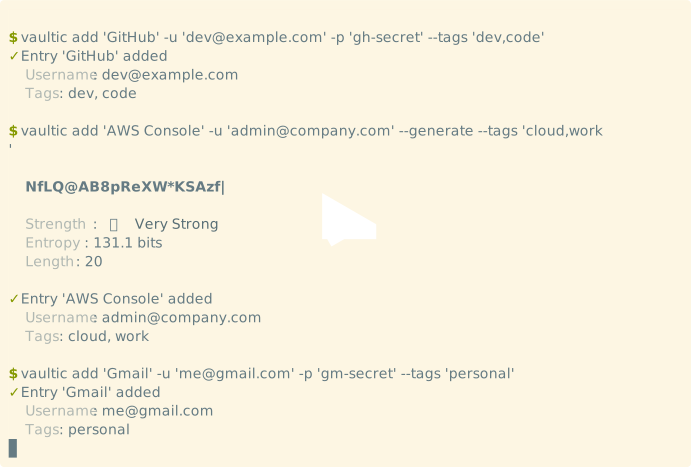
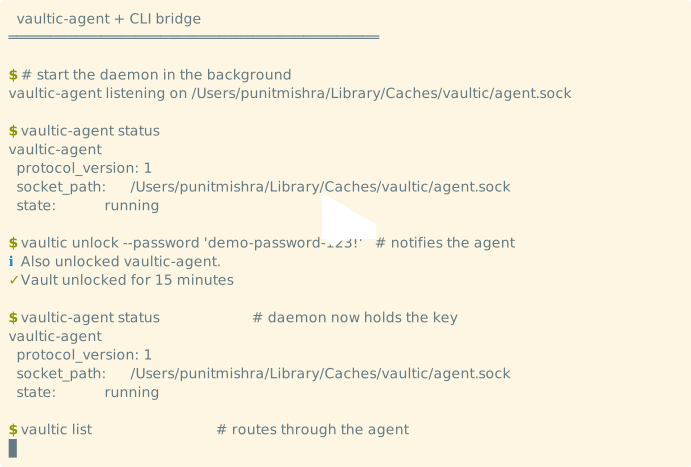
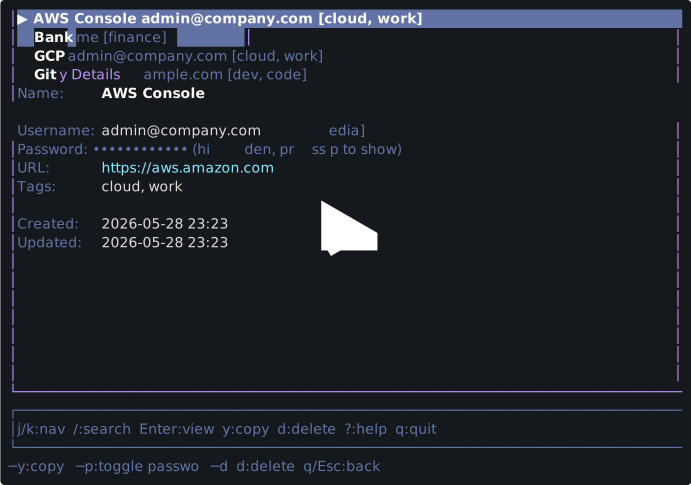
Three short asciinema casts — click any to play.
CLI quick-start — init, unlock, add, list, search, lock:
vaultic-agent + CLI bridge — agent holds the key, CLI routes through it:
Full-screen TUI — vim-keys, fuzzy search, detail view, themes:
To play locally without the asciinema.org embeds:
asciinema play demos/quickstart.cast
asciinema play demos/daemon.cast
asciinema play demos/tui.cast
To re-record after a CLI change, see demos/quickstart.sh,
demos/daemon.sh, and demos/tui.sh.
The TUI cast is recorded interactively (the TUI takes keystrokes); the other
two run unattended via --command.
Features
Security
- XChaCha20-Poly1305 - Authenticated encryption with 256-bit keys
- Argon2id KDF - Memory-hard key derivation (64MB default)
- Multi-Method Unlock - Password, BIP39 recovery keys, or hardware keys
- X25519 Key Exchange - Secure sharing with perfect forward secrecy
- Compressed Sessions - DEFLATE-compressed, encrypted session files
- Zero Memory Leaks - Sensitive data auto-zeroed with
zeroize - Local-Only - No cloud, no servers, your data stays with you
What's Working
Vault & crypto
- Vault init/unlock/lock with XChaCha20-Poly1305 + Argon2id
- Multi-method unlock (password, BIP39 recovery keys)
- BIP39 recovery keys with QR display
- Session management (15-min auto-expiry)
- Identity management & secure sharing (X25519 key exchange)
CLI / TUI (vaultic)
- Add / list / get / edit / delete / search entries (fuzzy search)
- Password generation with entropy analysis
- Tag / folder filtering, favorites, password history
- Import: Bitwarden, LastPass, 1Password
- Export: JSON, CSV, encrypted backup
- Full-screen TUI mode (
vaultic tui) with vim-style keys + 4 themes - Shell completions: bash / zsh / fish / powershell
- Shell integration (
exec,shell-init) - TOTP/2FA: scan QR codes (PNG/JPEG), display codes with countdown
- AI analysis (Ollama) + auto-tagging
- HIBP breach checking
- Health audit with scoring
- Batch operations (tag, delete, move, favorite)
- Git credential helper
Daemon (vaultic-agent)
- Unix-socket server with peer-credential auth (same UID only)
- 10 protocol methods: ping, status, unlock, lock, list_summary, list_filtered, get_entry, get_totp, search, shutdown
- Holds unlocked vault key in memory until 15-min inactivity timeout or explicit lock / shutdown
- Caches the master key only — opens sled per request so the CLI, TUI, GUI, and agent can share the same vault directory without fighting sled's process-wide lock
- Detects stale sockets from crashed daemons and recreates them
- Graceful SIGINT shutdown unlinks the socket
CLI ↔ daemon bridge
When vaultic-agent is running and unlocked for the active vault:
vaultic unlockwrites the CLI session AND notifies the agent;vaultic lockclears both.vaultic statusshows agent state alongside vault/session.vaultic list,search,get, andtotp show(including--watch) route through the agent's protocol methods. Same filters and same output as the local-sled path; falls back to local sled cleanly if the agent isn't routable.- See
docs/AGENT_PROTOCOL.mdfor the wire format andCHANGELOG.mdfor the rollout.
GUI (vaultic-gui)
- Connects to
vaultic-agentover its Unix socket - Unlock dialog runs Argon2id KDF locally; daemon never sees the password
- Entry list with type-ahead fuzzy search
- Detail pane with name, username, password (masked + reveal), URL, tags, folder, notes
- Live TOTP code with 1-second refresh + countdown progress bar
- Copy-to-clipboard with 30-second auto-clear (sentinel-matched so your later clipboard contents aren't trampled)
- Four themes shared by name with the TUI:
default,dracula,solarized-dark,monochrome. Hot-swappable. - Vim-style keyboard nav:
j/k/ arrows ///Esc
AI tool integration (vaultic-mcp)
- Model Context Protocol server so Claude Code and other MCP clients can read credentials without you pasting secrets into a chat
- Talks to
vaultic-agentover its Unix socket — the vault must be unlocked viavaultic unlockfirst; no password ever crosses MCP - Secret-returning tools (
get_password,get_credential,get_totp) prompt for explicit consent on stderr; read-only tools (vault_status,list_entries,search_entries) don't - Rate-limited to 10 credential requests/minute; all secrets stay local
- See
docs/MCP_SERVER.mdfor setup
Pending / experimental
- FIDO2 / YubiKey — code structure in place (
--features fido2), needs real hardware to test the unlock flow - GPG support — code structure in place (
--features gpg), onsequoia-openpgp 2.x(the 1.x advisory RUSTSEC-2025-0136 was cleared by the 2.3 bump in #42). Off by default; opt in with--features gpg.
Installation
Until the v2.3.0 release pipeline runs, From Source (below) is the supported path.
Homebrew (macOS/Linux) — with v2.3.0
⏳ Pending the v2.3.0 release. The formula in
Formula/still carries placeholder checksums and points at release artifacts that don't exist yet (the pipeline is blocked on the CI billing lock, #8). Build from source below until then.
brew tap punitmishra/vaultic
brew install vaultic
From Source (works today)
# Clone repository
git clone https://github.com/punitmishra/vaultic.git
cd vaultic

# Build release binary
cargo build --release

# Install to PATH (optional)
cp target/release/vaultic /usr/local/bin/

# Verify installation
vaultic --version
Direct Download — with v2.3.0
⏳ Pending the v2.3.0 release (blocked on the CI billing lock, #8). The latest tagged release is v2.1.0; the artifact names below are what the release workflow will publish. Each tarball ships
vaultic,vaultic-agent, andvaultic-mcp; the x86_64 macOS/Linux builds also includevaultic-gui.
Once published, download pre-built binaries from the releases page:
- macOS (Intel):
vaultic-macos-x86_64.tar.gz - macOS (Apple Silicon):
vaultic-macos-aarch64.tar.gz - Linux (x86_64):
vaultic-linux-x86_64.tar.gz - Linux (ARM64):
vaultic-linux-aarch64.tar.gz - Linux (musl):
vaultic-linux-x86_64-musl.tar.gz
Shell Completions
# Bash
vaultic completions bash > ~/.local/share/bash-completion/completions/vaultic

# Zsh
vaultic completions zsh > ~/.zfunc/_vaultic

# Fish
vaultic completions fish > ~/.config/fish/completions/vaultic.fish
Quick Start
# Initialize vault
vaultic init --name "My Vault"

# Unlock (creates 15-min session)
vaultic unlock

# Add entries
vaultic add "GitHub" -u "user@example.com" -p "secret" --tags "dev"
vaultic add "AWS" -u "admin" --generate --url "https://aws.amazon.com"

# List entries
vaultic list

# Search entries
vaultic search "git"

# Generate password
vaultic generate --length 24

# Check vault health
vaultic health

# Lock when done
vaultic lock
Run the daemon + GUI
# Build everything (four binaries)
cargo build --release

# Start the agent in one terminal (foreground; SIGINT to stop)
./target/release/vaultic-agent start

# Launch the GUI from another terminal — pick a theme
./target/release/vaultic-gui --theme dracula

# Inside the GUI:
#  1. Vault path defaults to ~/.vaultic; adjust if needed
#  2. Type your master password, hit Enter
#  3. Browse + fuzzy-search entries
#  4. Live TOTP codes appear in the detail pane for entries that have them
#  5. Copy auto-clears the clipboard after 30 seconds

# In a third terminal you can probe the daemon
./target/release/vaultic-agent status

# Stop the daemon when done
./target/release/vaultic-agent stop
The agent, GUI, and CLI use the same on-disk vault. Unlock/lock state
is bridged (shipped in 2.2.0): vaultic unlock notifies a running
agent, vaultic lock clears it, and the CLI's list/get/search/
totp show commands route through the agent when one is available.
See CHANGELOG.md for the exact rollout (PRs
#29/#30/#31).
Let an AI assistant use your vault (MCP)
vaultic-mcp exposes the vault to MCP
clients like Claude Code, so the assistant can pull a credential
instead of you pasting it into chat. The vault must already be
unlocked, and every secret access asks for your consent.
# 1. Unlock the vault and start the agent (see above)
vaultic unlock
./target/release/vaultic-agent start &

# 2. Register the MCP server with your client. For Claude Code,
#    add this to ~/.claude/settings.json:
#
#      { "mcpServers": { "vaultic": { "command": "vaultic-mcp" } } }
#
#    Then ask: "What's my vault status?" or "Get my GitHub password."
#    Secret requests prompt for y/N consent on the terminal.
Read-only tools (vault_status, list_entries, search_entries)
need no consent; get_password, get_credential, and get_totp
prompt every time and are rate-limited. Full setup and the security
model are in docs/MCP_SERVER.md.
Usage
Vault Management
# Create a new vault
vaultic init --name "Personal"

# Create with high-security KDF (256MB memory)
vaultic init --name "Work" --high-security

# Unlock vault (default: 15 minute session)
vaultic unlock

# Unlock with custom timeout
vaultic unlock --timeout 60

# Check status
vaultic status

# Lock vault
vaultic lock
Multi-Method Unlock (v2.0)
# Migrate existing vault to v2 format
vaultic migrate

# Generate BIP39 recovery key
vaultic recovery generate --qr

# Unlock with recovery phrase
vaultic recovery unlock

# List configured unlock methods
vaultic unlock-method list
Password Entries
# Add entry interactively
vaultic add "Service Name"

# Add with all options
vaultic add "GitHub" \
  --username "user@example.com" \
  --password "your-password" \
  --url "https://github.com" \
  --tags "dev,work" \
  --folder "Development"

# Add with generated password
vaultic add "New Service" -u "user" --generate --length 24

# Get entry details
vaultic get "GitHub"

# Edit an entry
vaultic edit "GitHub"

# Delete an entry
vaultic delete "GitHub"

# Search entries
vaultic search "git"

# List all entries
vaultic list

# Filter by tags
vaultic list --tags "work"
Identity & Sharing
# View/create your identity
vaultic identity show

# Export your identity (share with others)
vaultic identity export

# Add someone's identity
vaultic identity add "Alice" "<exported_identity_string>"

# List trusted identities
vaultic identity list

# Share an entry securely
vaultic share "GitHub" --to "Alice"

# Share with expiration (24 hours)
vaultic share "AWS" --to "Bob" --expires 24 --one-time
Shell Integration
# Run command with vault secrets as environment variables
vaultic exec "AWS" -- aws s3 ls

# Generate shell aliases
eval "$(vaultic shell-init bash)"
eval "$(vaultic shell-init zsh)"
vaultic shell-init fish | source

# Use convenient aliases (after shell-init)
vg GitHub          # Get entry
vcp GitHub         # Copy password
vrun GitHub aws    # Run with secrets
AI Features
# Get AI-powered tag suggestions
vaultic suggest --auto-tag

# Apply suggested tags
vaultic suggest --auto-tag --apply

# Analyze password strength
vaultic suggest --analyze

# Check for breaches
vaultic suggest --check-breaches
TOTP / Two-Factor Authentication
# Scan a QR code image to add TOTP
vaultic totp scan ~/Downloads/github-2fa-qr.png

# Scan and attach to existing entry
vaultic totp scan ~/Downloads/qr.png --entry "GitHub"

# Scan and preview without saving
vaultic totp scan ~/Downloads/qr.png --dry-run

# Add entry with TOTP secret directly
vaultic add "GitHub" -u "user@example.com" --totp-secret "JBSWY3DPEHPK3PXP"

# Add entry with otpauth:// URI
vaultic add "GitHub" --totp-uri "otpauth://totp/GitHub:user?secret=JBSWY3DPEHPK3PXP&issuer=GitHub"

# Show current TOTP code
vaultic totp show "GitHub"

# Watch TOTP code with live countdown
vaultic totp show "GitHub" --watch

# Copy TOTP code to clipboard
vaultic totp show "GitHub" --copy
Password Generation
# Generate secure password (20 chars)
vaultic generate

# Custom length
vaultic generate --length 32

# Without symbols
vaultic generate --no-symbols

# Digits only (PIN)
vaultic generate --length 6 --no-uppercase --no-lowercase --no-symbols
Import/Export
# Import from Bitwarden
vaultic import bitwarden_export.json --format bitwarden

# Import from LastPass
vaultic import lastpass_export.csv --format lastpass

# Import from 1Password
vaultic import 1password_export.csv --format onepassword

# Export to JSON (plaintext - handle carefully!)
vaultic export backup.json --format json

# Export encrypted backup
vaultic export backup.vaultic --format encrypted
Security Health Check
# Run security audit
vaultic health

# Verbose output with recommendations
vaultic health --verbose
Password History
# View password history for an entry
vaultic history GitHub

# Restore a previous password
vaultic history GitHub --restore 2
Batch Operations
# Add tags to multiple entries
vaultic batch tag --add "work" GitHub AWS GitLab

# Move entries to a folder
vaultic batch move --folder "Cloud" AWS GCP Azure

# Delete multiple entries (with confirmation)
vaultic batch delete OldService1 OldService2
Git Credential Helper
# Configure git to use vaultic
git config --global credential.helper vaultic

# Or for a specific repository
git config credential.helper vaultic

# Vaultic will now provide credentials for git operations
Interactive TUI
Launch a full-screen terminal interface for managing your passwords:
# Make sure vault is unlocked first
vaultic unlock

# Launch terminal UI
vaultic tui
┌──────────────────────────────────────────────────────────────┐
│  Vaultic - Password Manager                                  │
├──────────────────────────────────────────────────────────────┤
│ Entries (3)                                                  │
│                                                              │
│ ▶ AWS Console  admin@company.com  [cloud, work]             │
│   GitHub       dev@example.com    [dev, code]               │
│   Gmail        user@gmail.com     [personal]                │
│                                                              │
├──────────────────────────────────────────────────────────────┤
│ j/k:nav  /:search  Enter:view  y:copy  d:delete  ?:help     │
└──────────────────────────────────────────────────────────────┘
Keybindings:
| Key | Action |
|---|---|
j / ↓ | Move down |
k / ↑ | Move up |
g | Go to first entry |
G | Go to last entry |
/ | Search entries |
Enter | View entry details |
y | Copy password to clipboard |
p | Toggle password visibility |
d | Delete entry (with confirmation) |
r | Refresh entries |
? | Show help screen |
Esc | Cancel / go back |
q | Quit |
Architecture
Vaultic ships four binaries — vaultic (CLI/TUI), vaultic-agent
(Unix-socket daemon), vaultic-gui (eframe app), and vaultic-mcp
(MCP server for AI clients) — that all share one library and one
on-disk vault format.
For a contributor-oriented overview of how the pieces fit together
(component diagram, threading model, where to find each module,
known seams), see docs/ARCHITECTURE.md.
For the daemon's wire format and threat model, see
docs/AGENT_PROTOCOL.md.
File Structure
~/.vaultic/
├── db/                 # sled database (encrypted entries)
├── kdf_params.json     # Argon2id parameters + salt
├── keyring.json        # v2 multi-method unlock (encrypted wrappings)
└── session/            # CLI-only: encrypted session files
The agent keeps its unlocked state purely in memory; it doesn't
read or write session/.
Security Model
Encryption Stack
- Key Derivation: Password → Argon2id (64MB memory, 3 iterations) → 32-byte master key
- Key Expansion: Master key → HKDF → encryption key + auth key
- Data Encryption: XChaCha20-Poly1305 with random nonces
- Session Storage: DEFLATE compression → XChaCha20-Poly1305 → file
- Sharing: X25519 ephemeral key exchange → XChaCha20-Poly1305
Multi-Method Unlock (v2)
- VaultKey: Random 256-bit key that encrypts all vault data
- KEK (Key Encryption Key): Derived from unlock method (password, recovery key, hardware key)
- Wrapped Keys: VaultKey encrypted with each KEK, stored in keyring.json
- Recovery Keys: BIP39 24-word mnemonic for emergency recovery
Development
# Run tests
cargo test

# Build debug
cargo build

# Build release
cargo build --release

# Run with debug logging
VAULTIC_DEBUG=1 cargo run -- <command>

# Format code
cargo fmt

# Lint
cargo clippy
Documentation
SECURITY.md— vulnerability reporting (private GitHub Security Advisories), threat model, supported versionsCONTRIBUTING.md— DCO sign-off, dev setup, test/lint commands, code style, crypto-PR barGOVERNANCE.md— single-maintainer-with-trusted-reviewers model, decision-making, release processVIBE_CODING.md— honest essay on how Vaultic is built with heavy AI assistance: what works, what fails, where the maintainer overrode the assistantCHANGELOG.md— what shipped in each releaseROADMAP.md— what's planned, what's in flightdocs/ARCHITECTURE.md— component layoutdocs/AGENT_PROTOCOL.md— daemon wire protocol + threat modeldocs/MCP_SERVER.md— MCP server setup, tools, and consent model
Sponsor the project
Vaultic is maintained by one person and funded by GitHub Sponsors. The work that gets paid for: dependency bumps, security advisory follow-up, real-hardware FIDO2 testing, the mlock follow-through in #24, and keeping the GUI alive across egui releases.
Sponsoring does not unlock features that aren't already free — Vaultic is MIT-licensed and the open-source build has every feature. It funds the maintenance work that lives behind those features.
Contributing
PRs welcome. The short version:
- For anything beyond a typo or small fix, open an issue first so we can align on shape.
- Every commit needs a
Signed-off-by:line — Vaultic uses the Developer Certificate of Origin, the same sign-off as the Linux kernel.git commit -sdoes it for you. cargo test,cargo clippy --all-targets --all-features -- -D warnings, andcargo fmt --all -- --checkmust be clean before merge.
See CONTRIBUTING.md for the full guide.
License
MIT License - see LICENSE for details.
Acknowledgments
- RustCrypto - Cryptographic primitives
- Sequoia PGP - OpenPGP implementation
- Sled - Embedded database
- ratatui - Terminal UI framework
Security Notice: Vaultic stores secrets. Review the code before
trusting it with real credentials. Don't open a public GitHub issue
for security problems — use the private channel documented in
SECURITY.md or
GitHub Security Advisories.