
mcp server
yaww
YAWW (Yet Another Windows WebView) - WebView for Windows, with WebView2, EdgeHTML, MSHTML, and ChakraCore.
Set up
Runs on your computer. Pick your agent and operating system.
This project does not publish an install method we can turn into a config. Follow the README instead.
README
synced Oct 25, 2026YAWW (Yet Another Windows WebView)

YAWW (Yet Another Windows WebView) is a small C++ library focused on embedding web content in Windows applications. It provides backends for Microsoft Edge WebView2 (Chromium), EdgeHTML (legacy Edge), and MSHTML (Trident). The existing C++ API, header, and build identifiers retain their webview names.
YAWW draws inspiration from these projects and tools:
- MichaelKim's webview (MIT license) as the project's starting point and API foundation.
- zerge's webview for its cross-platform WebView approach.
- litehtml and the Gumbo parser for HTML parsing ideas.
- Microsoft's mshta HTML Application host for the HTA hosting model.
- Quark for the idea of using ChakraCore as a host-side layer separate from the HTML rendering engine.
Recent development and testing have focused on Windows. macOS and Linux backends remain in the source, but have not been tested since the versions noted below and are not part of the current support matrix.
Support
| Platform | Backend | Engine | Notes |
|---|---|---|---|
| Windows | WebView2 (WEBVIEW_EDGE) | Microsoft Edge (Chromium) | Recommended; requires the WebView2 Runtime. |
| Windows | EdgeHTML (WEBVIEW_WIN) | Microsoft Edge Legacy | Requires Windows 10 version 1809 or later; deprecated. |
| Windows | MSHTML (WEBVIEW_MSHTML) | Trident | Industrial and legacy application compatibility; requires ATL. |
The macOS WebKit backend was last listed as tested on macOS Mojave and Catalina. The Linux WebKitGTK backend was last listed as tested on Ubuntu 18.04.02 LTS. Neither has been tested against newer releases as part of recent Windows-focused work.
Shared local-file-only mode
setLocalFileOnly(true) is a common feature available in all three Windows backends: MSHTML, EdgeHTML, and WebView2. It is intended for applications that should display local pages rather than external websites, while still allowing those pages to reference external resources such as scripts and stylesheets. Attempts to navigate the main document or a frame to an external site are blocked and show a built-in Forbidden page. This controls page navigation; it is not a network sandbox and does not filter subresource requests.
WelsonJS and MSHTML
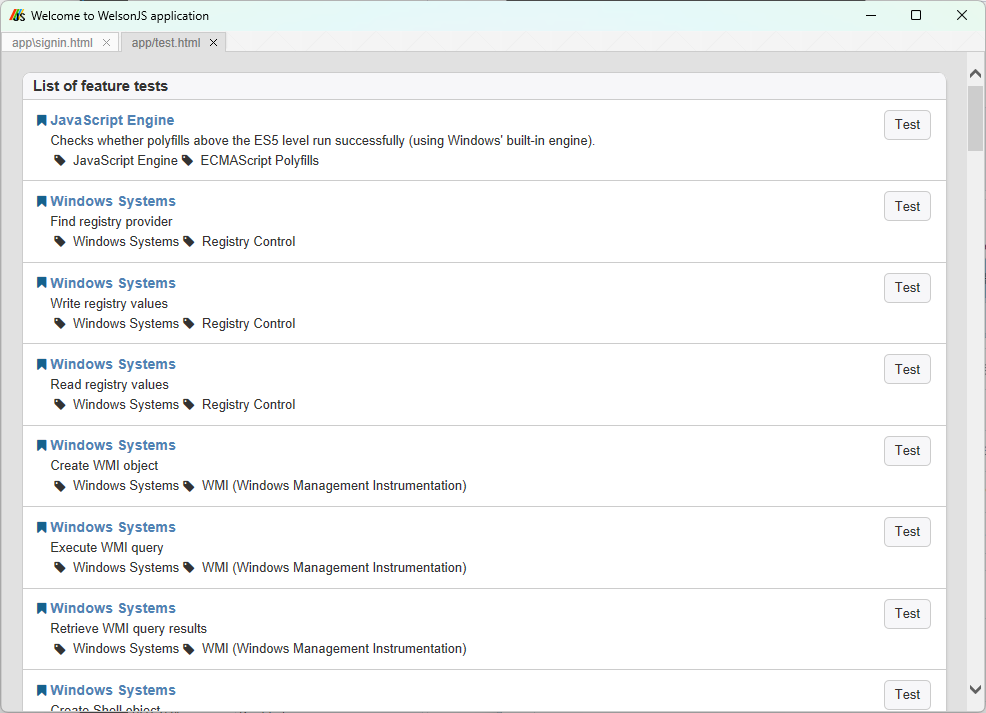
MSHTML support was added to help WelsonJS, a lightweight Windows JavaScript framework for application development and industrial-system automation, maintain compatibility with existing industrial systems and their web-based interfaces. WelsonJS applications combine JavaScript (including transpiled languages) with HTML and CSS. The MSHTML backend provides access to the system's Trident engine for environments where compatibility with existing applications and workflows is important.
The MSHTML implementation includes balanced COM/OLE initialization and cleanup, navigation and new-window event handling, defensive initialization and teardown, and JavaScript/native callback support.
See MSHTML build instructions and the mshtml example.
Build and examples
See Build Steps for backend requirements and configuration. For a Visual Studio x64 WebView2 build, configure with -A x64; use -A Win32 for 32-bit. The CMake configuration selects the WebView2 loader for the chosen architecture.
Windows example executables embed YAWW file and product descriptions and
version metadata. Set the release version in cmake/Version.cmake.
The MCP stdio API uses nlohmann/json for JSON-RPC parsing and serialization. CMake uses an installed 3.12.0+ package or fetches that release during configuration.
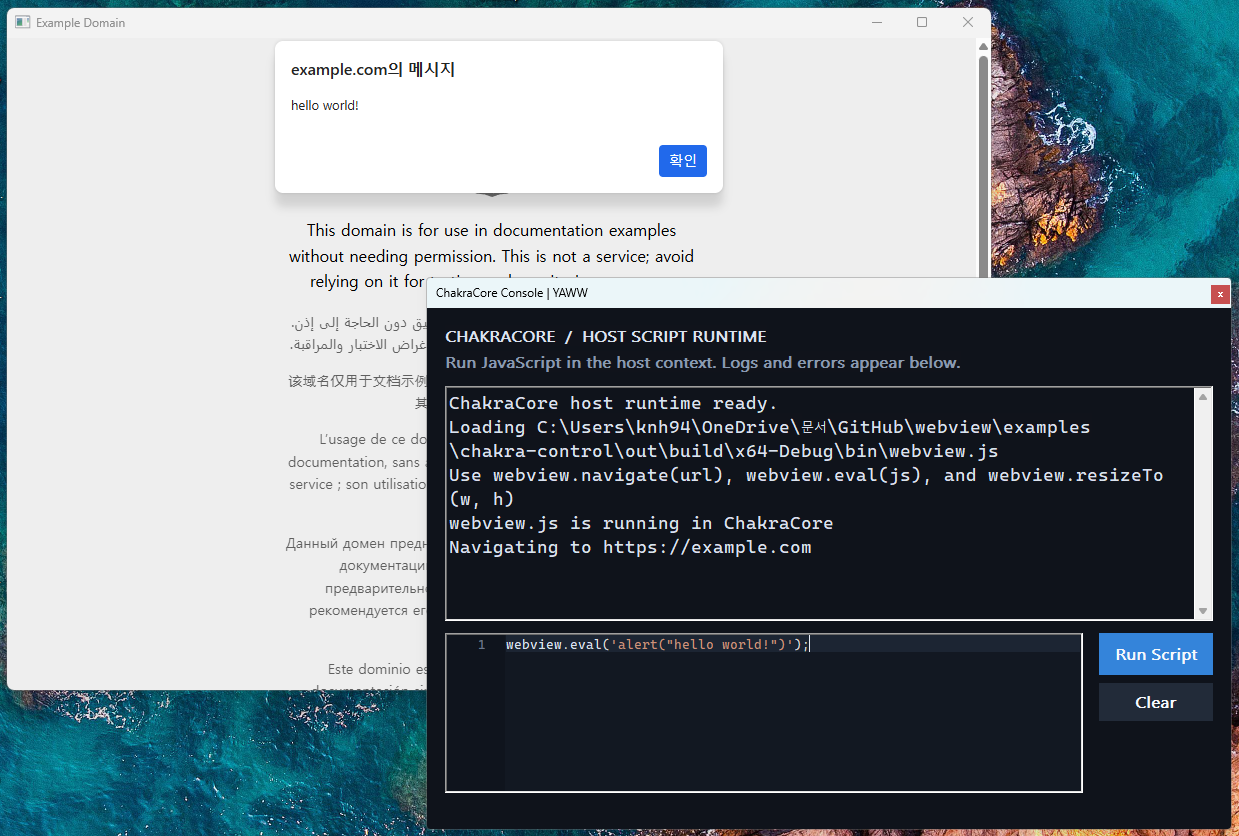
ChakraCore can be enabled as an optional host-side script runtime shared by the
Windows WebView2, EdgeHTML, and MSHTML backends. Configure with
-DWEBVIEW_ENABLE_CHAKRACORE=ON to use prebuilt ChakraCore binaries, downloaded
automatically from the matching x86_release.zip or x64_release.zip, and expose
wv::ChakraCore through webview.hpp. To use binaries already on disk, set
WEBVIEW_CHAKRACORE_PREBUILT_DIR to the directory containing
ChakraCore.lib and ChakraCore.dll. Set
-DWEBVIEW_CHAKRACORE_USE_PREBUILT=OFF to build ChakraCore from source instead.
Prebuilt ZIP archives are SHA-256 verified during download.
Choose whether to start it, the script path, and whether to show its debug
console with
wv::ChakraCore::Options; an empty script path uses webview.js beside the
executable, while a specified path takes precedence. showDebugConsole() or
the window title bar's system menu can open the console later.
Applications using CMake should call webview_deploy_chakracore(target) to
copy the runtime DLL beside their executable. See the ChakraCore example
instructions.
The debug console uses Scintilla and
Lexilla for JavaScript syntax
highlighting by default; set WEBVIEW_ENABLE_SCINTILLA_CONSOLE=OFF to use a
plain text input editor.
Examples are in examples/:
basicopenshttps://google.com.chakra-control,chakra-control-edgehtml, andchakra-control-mshtmldemonstrate the shared ChakraCore host API with WebView2, EdgeHTML, and MSHTML.local-onlyloadsindex.htmlfrom the current directory and displays Not Found if it is missing. External page navigation is blocked with a Forbidden page.mshtmldemonstrates the legacy MSHTML backend, local content, and a JavaScript-to-native callback.ipcdemonstrates callback-basedwindow.mcp.tools.call('evaluate_js', params, callback)over stdio JSON-RPC; the same example works with Promise-based engines.ipc-mshtmlandipc-edgehtmlrun MCP IPC on the legacy Windows engines; MSHTML uses a callback because it has no native Promise support.open-fileis a Windows example that routes.htafiles to MSHTML and.htmlfiles to WebView2, EdgeHTML, or MSHTML according to runtime availability.
YAWW handles HTML <title> and <link rel="icon"> elements as common
features. It parses the document head with
Gumbo and updates the native
window title and icon across backends;
Windows local files are also parsed before navigation, including the temporary
HTML copy used for HTA files.
The local-only setting applies to document navigation, not to resources referenced by the page. Do not treat it as a network sandbox for untrusted HTML.
TODO
- Complete HTA (
.hta) compatibility semantics. Theopen-fileexample routes.htafiles to MSHTML, but does not reproduce standalonemshta.exewindow and privilege behavior. HTA content has different security assumptions from normal browser content, so document that behavior before treating it as a full HTA host. See Microsoft's documentation for theHTA:APPLICATIONelement and HTA security model.
Usage
Include webview.hpp and configure the dependencies for your backend (see
Build Steps). By default, Windows uses WebView2.
#include "webview.hpp"

void callback(wv::WebView& webview, wv::String& arg) {
  if (arg == Str("hello"))
    webview.eval(Str("alert('Hello from C++!')"));
}

WEBVIEW_MAIN {
  wv::WebView webview{800, 600, true, true, Str("Local files only")};
  webview.setLocalFileOnly(true);
  webview.setCallback(callback);

  // To load a website instead, disable local-only mode and set a URL:
  // webview.setLocalFileOnly(false);
  // webview.navigate(Str("https://google.com"));

  if (webview.init() == -1) {
    return 1;
  }

  while (webview.run() == 0)
    ;

  return 0;
}
With local-file-only mode enabled, the app loads index.html from its current
working directory and blocks external document navigation. Place this file in
that directory before running the app:
<!doctype html>
<html>
<head><meta charset="utf-8"><title>Local WebView</title></head>
<body>
  <button onclick="window.external.invoke('hello')">
    Call native code
  </button>
</body>
</html>
On Windows, strings use std::wstring; wrap string literals with Str("...").
WEBVIEW_MAIN selects the appropriate Win32 or standard C++ entry point.
The library supports HTTP(S), local file:/// URLs, and inline data: URLs. EdgeHTML does not support local file URLs; see Limitations.
Documentation
License
YAWW is licensed under GNU GPL version 3. The original MichaelKim/webview project is identified as MIT-licensed in the inspiration list above. The verbatim GPLv3 text is in LICENSE, from the Free Software Foundation.
Screenshots
MSHTML compatibility tested in an mshta-style industrial application scenario.
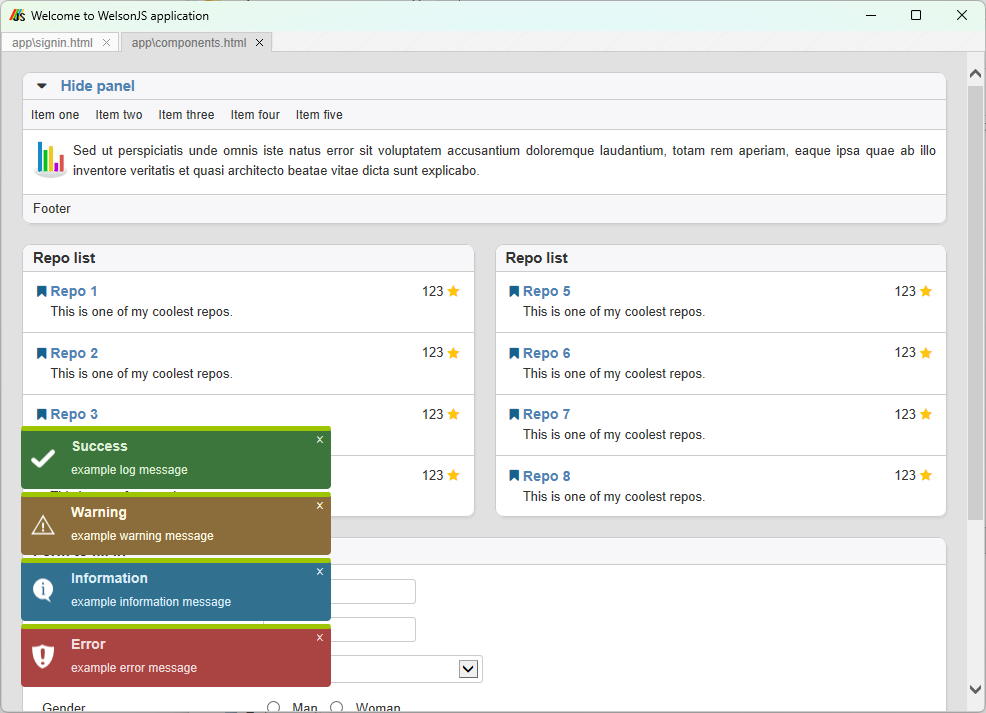
MSHTML compatibility test confirming that the UI Components page renders correctly in an mshta-style industrial application scenario.
ChakraCore Console example showing host-side JavaScript control of the webview.
Contact
For questions and project inquiries, contact oss@catswords.re.kr.